Building a website used to feel like a big task. You needed design skills, technical knowledge, and a lot of time just to get something basic online. That is no longer the case today.
AI website builders have changed how people create websites. Now you can type in your business name, pick a few preferences, and get a full website built for you in minutes. It is faster, simpler, and more beginner friendly. You do not need coding skills or design experience to get started.
In this guide, we will look at some of the best AI website builders you can use. Each one has its own strengths depending on what you need, whether it is speed, design, or flexibility.
Best Website Builders To Consider
Here are our top picks for the easiest and most useful website builders you can use right now.
TL;DR:
Best website builder overall: Design.com – it lets you create a full professional website in minutes using AI, with thousands of templates, easy customization, and a simple setup that removes the need for coding or design skills.
| Website Builder | Best For | Ease of Use | Starting Price |
| Design.com | Fast AI websites | Very easy | Free; premium plan starts at $6/month |
| BrandCrowd | Branding consistency | Very easy | Free; premium plan starts at $6/month |
| Wix | Flexibility | Easy | Free plan available |
| Squarespace | Clean design | Easy | $16/month |
| WordPress | Full control | Medium | Varies |
1. Design.com
Rating: 10/10
Best for: Fast AI website creation
Let’s start with our top pick.
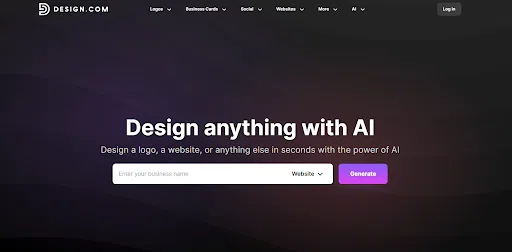
Design.com is built for speed, but what really makes it stand out is its AI system. It does not just drop you into a basic template. It actually builds a full website layout for you based on your business name, industry, and style preferences.
The AI website generator looks at thousands of design references and combines them into a ready-made website that already feels structured and balanced. So instead of spending time moving sections around or guessing what looks good, you already get a strong starting point that makes sense for your business.
You just enter your business name and a few details, and the AI builds a full website for you in minutes. It pulls from thousands of design references so your site already looks clean and structured from the start.
Once you pick a design, everything is still fully editable. You can adjust text, colors, fonts, images, and layout without needing any technical skills.
Or you can browse from the AI-generated templates section and see which one best fits your needs.
Check out some of the samples of customizable website templates from Design.com:
and more:
Key Features
- AI website generation
- Smart template finder
- Full customization control
- Responsive design
- One click publishing
- Built in business tools
Pros
- Super fast setup
- All-in-one system
- AI handles layout and structure
- Full control over branding
Cons
- Web-based only
- Suits small businesses best
Pricing
- Free plan available
- Premium plan starts at $6 per month
2. BrandCrowd
Rating: 9.5/10
Best for: Branding consistency
Next up is BrandCrowd!
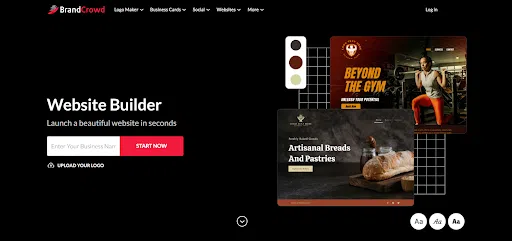
BrandCrowd is built around one main idea: your brand should look consistent everywhere, not just on your logo but also on our website. It combines branding tools and a website builder in one platform, so you do not need to jump between different tools to build your online presence.
It is also very beginner friendly, but still gives you plenty of control over your design. You can start by entering your business name or adding keywords, and the platform will instantly generate a website that already matches your brand style.
You can upload your own logo or even generate one using the BrandCrowd logo maker, then instantly apply it across your website. From there, you can adjust fonts, colors, layouts, and sections until everything feels right for your brand.
Sample website templates from BrandCrowd include:
Key Features
- Website builder
- Drag and drop editor
- Brand integration
- Template library
- All in one branding system
Pros
- Easy to use
- Fast setup and publishing
- All-in-one branding system
- Highly customizable
- Built-in logo creation
- Mobile-ready designs
- Beginner-friendly editing
Cons
- Limited collaboration features
- No native app yet
Pricing
- Free plan available
- Premium plan starts at $6 per month billed annually or $9 per month monthly
3. Wix
Rating: 9.2/10
Best for: Beginners and small businesses
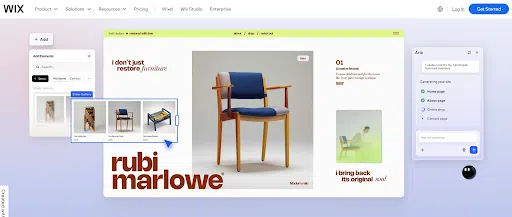
Wix is one of the most popular website builders because it gives you full creative freedom without needing coding skills. It uses a simple drag-and-drop editor, so you can place elements exactly where you want them on the page.
Here are some of the sample website templates from Wix:
From there, you can fully customize everything. Wix is flexible enough for portfolios, business sites, blogs, and even small online stores.
Key Features
- Drag-and-drop website editor
- AI website generator (Wix ADI)
- Large template library
Pros
- Very easy for beginners
- Highly customizable design freedom
- Large feature ecosystem (apps, tools, integrations)
Cons
- Can feel cluttered with too many options
- Once you choose a template, switching is difficult
- Performance can slow down with heavy customization
Pricing
- Free plan available (with Wix branding)
- Paid plans
4. Squarespace

Rating: 9/10
Best for: Polished, modern designs
Squarespace is known for its clean, modern, and professional-looking website designs. It is popular among creatives, photographers, designers, and small businesses that want a polished aesthetic without doing heavy customization. Everything is structured, so you build within a guided system rather than free-form editing.
Here are some website templates from Squarespace:
Key Features
- Professionally designed templates
- Built-in website editor
- Blogging tools
Pros
- high-quality design templates
- Easy to maintain and manage
- Strong all-in-one platform (hosting included)
Cons
- Less flexible than drag-and-drop builders
- Fewer third-party integrations
- Can feel restrictive for advanced users
Pricing
- No free plan (trial available)
- Paid plans start at entry-level and increase for commerce and advanced features
5. WordPress
Rating: 9.4/10
Best for: Content-heavy sites
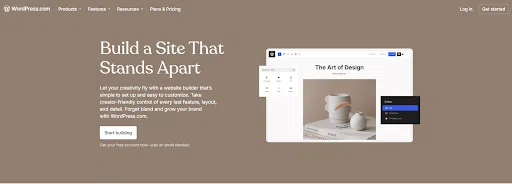
WordPress is the most widely used website platform in the world. It is powerful, flexible, and capable of building almost any type of website, from simple blogs to large enterprise sites. Unlike drag-and-drop builders, WordPress gives you deep control over structure and functionality.
However, it has a steeper learning curve. You often need plugins, themes, and some technical setup depending on how advanced your site is.
These are some of the website templates from WordPress:
Key Features
- Open-source platform
- Thousands of themes and plugins
- Full customization control
Pros
- Extremely flexible and scalable
- Huge community and support resources
- Great for SEO and content-heavy sites
- Works for almost any type of website
Cons
- Requires more setup and maintenance
- Can feel technical for beginners
- Plugin management can get complex
Pricing
- Software is free (self-hosted)
- Costs come from hosting, themes, and plugins
Final Thoughts
AI website templates are making it faster and easier than ever to build professional websites by generating ready-made designs based on simple inputs like business names and keywords. Design.com stands out as the top choice because its AI doesn’t just give you templates, it builds complete, structured websites in minutes that you can instantly customize and publish.