
Your chat application feels slow. Users complain that messages take forever to arrive. You refresh the page, and suddenly you see ten notifications at once. This frustrating delay happens because traditional web connections work like a one-way street. Your browser asks the server for updates, waits for an answer, and then asks again. This back-and-forth takes time, and your real-time features suffer.
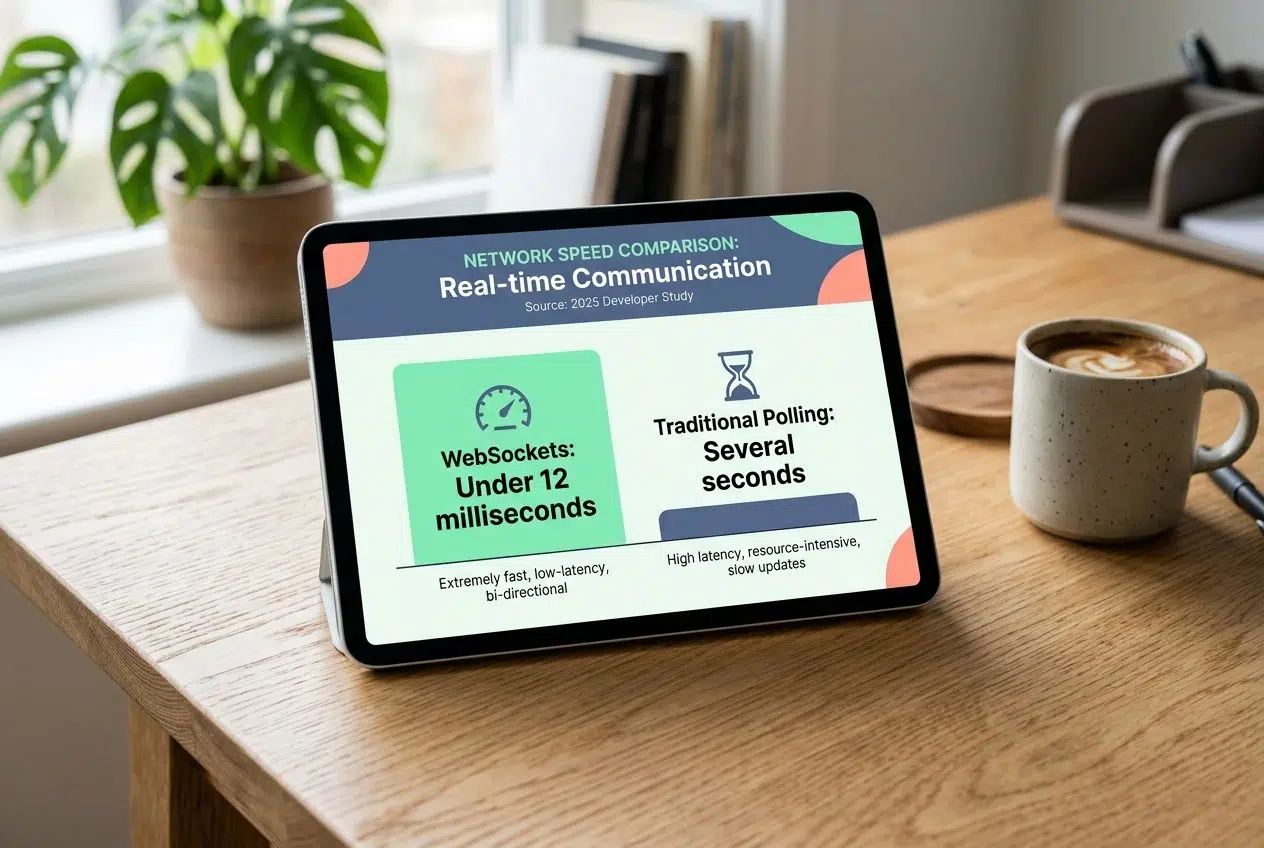
A developer study found that traditional polling methods take several seconds to update, while WebSockets deliver messages in under 12 milliseconds. That is the kind of speed we want to achieve.
I am going to show you How To Build Real-Time Features With WebSockets. Grab a cup of coffee, and let’s go through this setup together. I will share the exact steps to keep your server fast and your users happy.
Exploring How To Build Real-Time Features With WebSockets
WebSockets open a direct line between your client and server. They let both sides swap messages back and forth instantly without the usual request-response delays. This two-way street transforms how applications handle live data. It makes chat apps, live notifications, and real-time dashboards feel snappy.
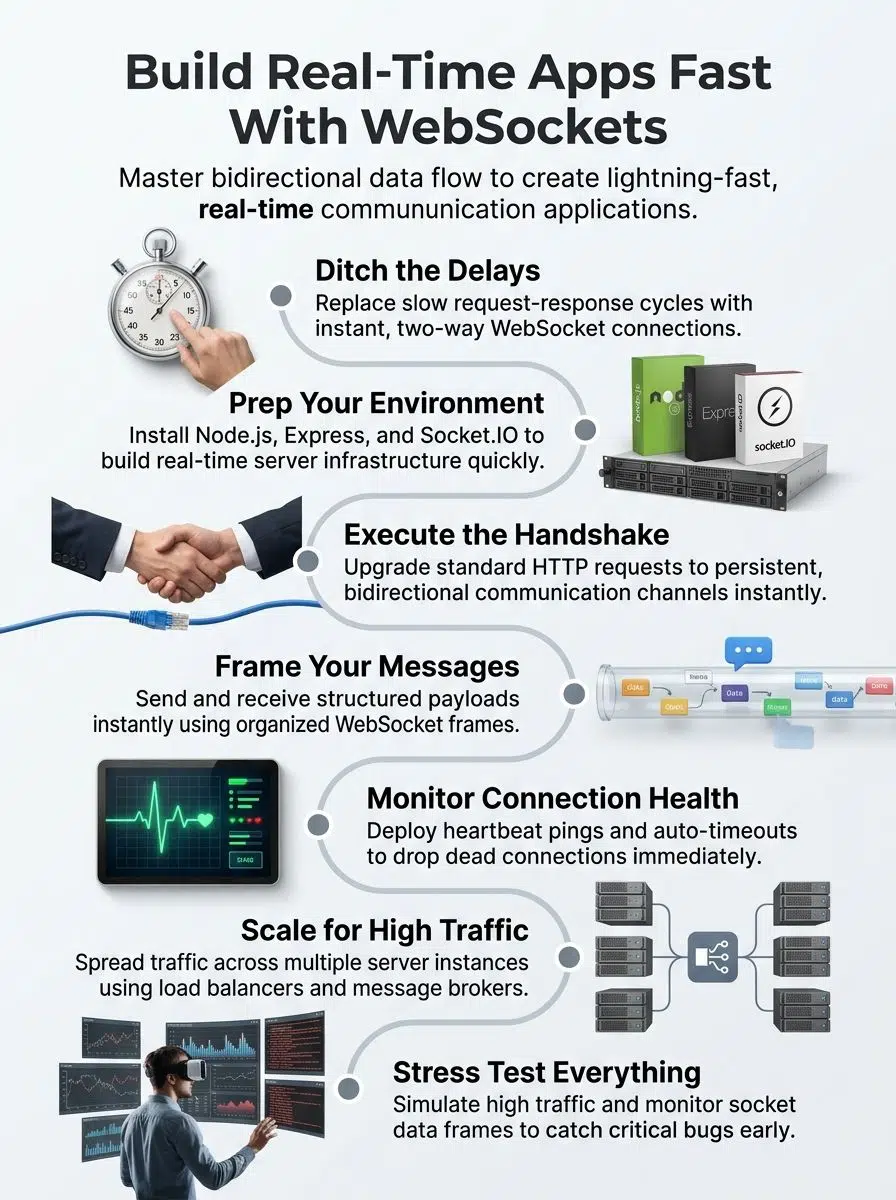
Functionality of WebSocket Connections
A WebSocket connection opens a two-way street between your client and server. Unlike traditional HTTP requests that follow a question-and-answer pattern, this protocol keeps the line open. Your browser and server talk back and forth without closing the connection after each message.
This means data flows in both directions at the same time. We call this full-duplex communication. The server pushes information to your client whenever it wants, and your client sends data back just as fast. You spend no time waiting around for requests to finish.
Think of it like a phone call instead of sending letters back and forth. Once you pick up, both people speak and listen simultaneously. The handshake process starts everything off. Your client asks the server to upgrade from HTTP to the WebSocket protocol.
The server agrees, and you have a persistent connection ready for action. This bidirectional data flow makes real-time communication applications possible. Message handling becomes straightforward because both sides stay connected and ready to exchange data instantly.
Advantages of WebSockets for Live Features
Now that you understand how WebSocket connections work, we can look at why they matter so much for live features. WebSockets shine because they keep a single connection open. This bidirectional data flow cuts down on overhead dramatically.
A 2026 InfoQ software architecture study found that WebSockets reduce client-sent data payloads by 80% to 86% compared to HTTP. Because you do not send bulky HTTP headers with every single message, your bandwidth usage plummets.
“By eliminating the need to retransmit conversation history and headers on every request, WebSocket connections deliver a 15% to 29% faster end-to-end execution time.” – InfoQ, 2026
This asynchronous programming approach lets you handle thousands of simultaneous connections. Socket programming becomes cleaner. For example, a 2025 case study on US brokerage apps like Robinhood showed their WebSocket clusters handling 1.2 million market ticks per second with sub-65 millisecond latency. Live data streaming becomes smooth and efficient.
Setting Up a WebSocket Server
You need to set up your environment and install the right tools before you start building. Getting your server ready takes just a few steps.
Prerequisites and environment setup
Getting your machine ready for WebSocket development requires the right tools. This section walks through what you need to install before writing your first line of code.
- Install Node.js on your computer. It provides the JavaScript runtime environment for building real-time communication applications.
- Set up npm, which comes bundled with Node.js and manages your project dependencies.
- Create a new project folder on your machine where all your WebSocket protocol code will live.
- Initialize your project with npm by running “npm init” to generate a package.json file.
- Install Express.js to simplify server setup for your API development.
- Choose a code editor like Visual Studio Code to write and edit your files.
Comparing Technology Stacks: ws vs. Socket.IO
Before writing code, you have a major decision to make. In the Node.js ecosystem, developers usually choose between two main packages: the native `ws` library or the feature-rich `socket.io` library. A 2025 benchmark from Dev.to revealed clear performance differences between the two.
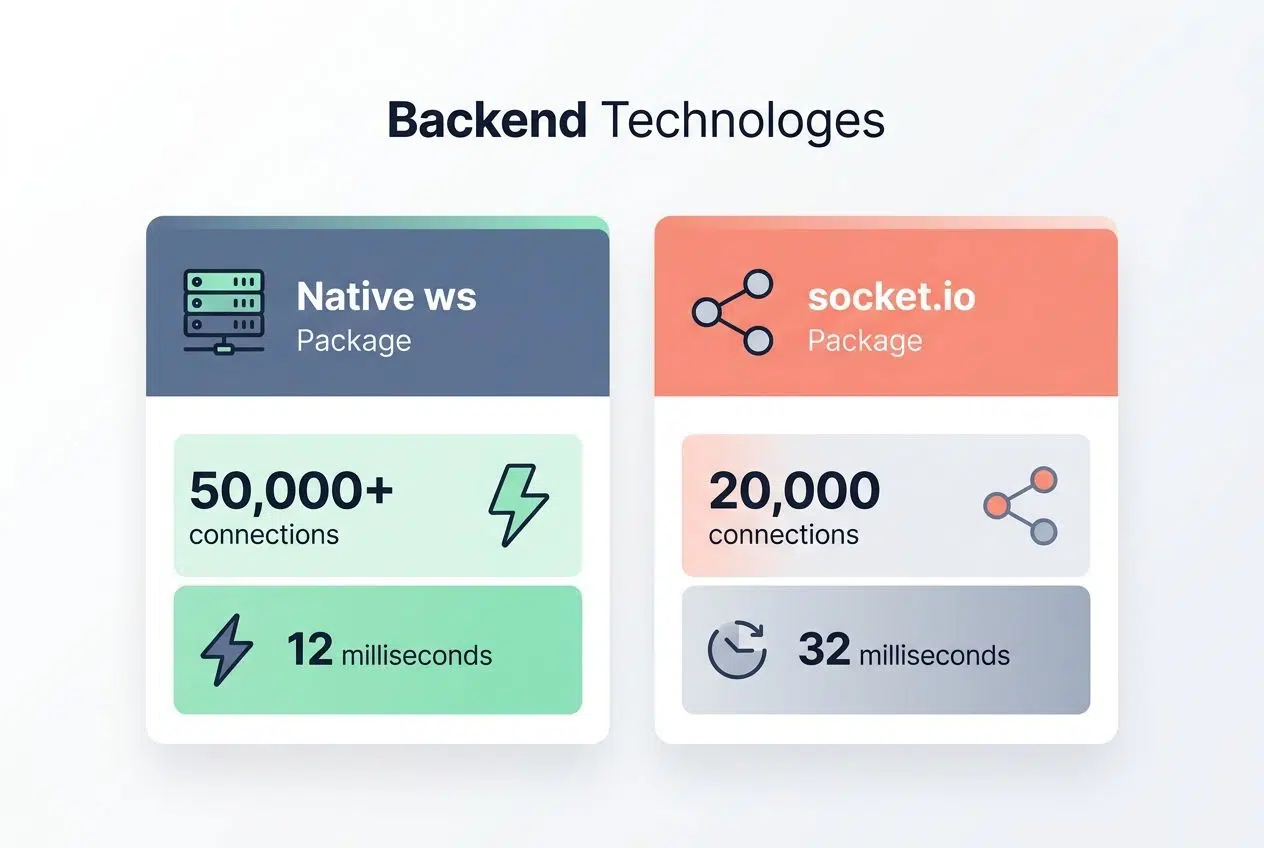
| Feature | Native `ws` Package | `socket.io` Package |
|---|---|---|
| Performance | Handles 50,000+ connections per server | Handles about 20,000 connections per server |
| Latency (p99) | 12 milliseconds | 32 milliseconds |
| Built-in Features | Requires manual coding for rooms and reconnects | Auto-reconnects, channels, and fallbacks included |
Many developers on the US-based r/node subreddit advise starting with `socket.io` for chat apps because the auto-reconnect feature saves hours of work. For high-volume live data streaming, like sports scores or trading ticks, the lighter `ws` package is the better choice.
Basic server configuration
You have your tools, so now it is time to configure your server. This shapes how your WebSocket protocol will operate.
- Create a basic server file that initializes your framework and listens on port 3000 or 8080.
- Configure CORS settings to allow requests from your frontend domain. This prevents security issues while enabling asynchronous programming across different origins.
- Set up event listeners that trigger when clients connect, disconnect, or send messages.
- Define your message structure and data format. You must decide if you will use JSON objects or plain text.
- Implement error handling callbacks that catch connection failures early.
- Set timeout values for idle connections. This cleans up dead WebSocket connections automatically and saves server memory.
Establishing a WebSocket Connection
Getting a WebSocket connection off the ground requires you to complete a handshake between your client and server. This opens the door to two-way communication. Once that handshake succeeds, data flows back and forth instantly.
The Initial Handshake Process
The handshake process kicks off the entire WebSocket connection. Your client sends an HTTP upgrade request to the server. It asks to switch from regular HTTP to the WebSocket protocol.
The server receives this request, checks that everything looks good, and sends back a response agreeing to the upgrade. This back-and-forth usually happens in just a few milliseconds. Here is a helpful tip: you can use Postman to test this. As of 2025, Postman offers native WebSocket testing tools that let you inspect these upgrade headers visually.
This handshake uses standard HTTP headers, so firewalls and proxies handle it perfectly. Your client includes a special key in its request, and the server performs a quick calculation to create a response key. After the handshake completes successfully, the HTTP connection closes, and the WebSocket connection takes over.
Full-duplex communication setup
Once the handshake completes successfully, your server and client can talk without waiting. Full-duplex communication powers real-time applications like chat platforms and live notifications.
- Initialize event listeners on the client side that wait for incoming messages from the server.
- Set up server-side event handlers that capture messages from connected clients.
- Create a message queue system that stores outgoing messages temporarily to guarantee delivery.
- Establish a heartbeat mechanism that sends periodic ping messages between client and server.
- Design your API integration layer to handle incoming client messages and outgoing server responses through separate channels.
Handling Messages in Real-Time
Messages flow back and forth between your client and server in structured packages. Your application reads and acts on these instantly.
Message framing and structure
WebSocket messages follow a specific frame structure that keeps data organized. Each frame contains a header, payload data, and control bits. These tell your server what to do with the information.
The header holds details like the opcode. This signals whether you are sending text, binary data, or a control command. Your payload carries the actual content, whether that is chat text or sensor readings.
The frame structure includes a mask key for security. This ensures data traveling from client to server stays protected from interference. A typical WebSocket frame might be just a few bytes for a simple chat message, or several kilobytes for complex live data streaming.
Your server reads the opcode first to know if the content is text or binary data. Control frames serve special purposes, like ping-pong exchanges that keep your connection healthy. The payload length field tells your application how many bytes to expect, which helps you avoid memory crashes.
Sending and receiving data
Your application needs to send and receive data smoothly to keep users connected. Fast message handling delivers live updates without delays.
- Your server sends data by encoding messages into frames that follow the protocol structure.
- Clients receive incoming messages through event listeners that trigger automatically.
- Craft message payloads as JSON objects or binary data. Binary data is highly recommended for massive streams to save memory.
- Implement asynchronous programming patterns to prevent your app from freezing while waiting for messages.
- Store incoming data temporarily in buffers, then process each item in order.
- Limit message size to keep bandwidth usage reasonable and prevent network congestion.
Error Management and Connection Health
WebSocket connections fail sometimes, and you must catch those failures before they break your app. Your server needs to monitor connection health actively.
Detecting and handling errors
Things go wrong in real-time communication applications. Error detection keeps your event-driven architecture running smoothly. Set up try-catch blocks around all asynchronous programming code that handles socket connections.
A common mistake is ignoring the “1006 Abnormal Closure” status code. A 2025 Velt developer guide points out that mobile networks in the US frequently drop WebSocket connections without warning. If you do not handle this code, your client will just stare at a frozen screen.
Implement an exponential backoff strategy for reconnection attempts. Start by waiting one second, then two, then four, and so on. This prevents your clients from accidentally overwhelming your server with thousands of connection requests the moment it comes back online.
Log all errors to a monitoring system. This helps you track patterns and spot which parts of your message handling code fail most often. Create custom error messages that include the exact timestamp and context.
Managing dead WebSocket connections
Dead WebSocket connections happen when clients disconnect without proper closure. Your application will slow down and drain memory if you let these zombie connections pile up.
- Implement heartbeat mechanisms that send ping frames from your server to connected clients at regular intervals (typically every 30 seconds).
- Configure timeout settings on your server. A 2026 MassiveGRID server guide warns that Nginx uses a default 60-second idle timeout, which can prematurely kill healthy but quiet WebSockets if you do not adjust it.
- Track the connection state actively by maintaining a registry of all active connections.
- Listen for close events on each connection so your server removes dead sockets from memory immediately.
- Measure connection health metrics like response times and error rates to identify poorly behaving sockets.
Scaling WebSockets for High Traffic
Your application grows fast, and thousands of users will hit your server at once. You need a plan to handle that traffic without crashing.
Load Balancing and Sticky Sessions
Load balancing spreads traffic across multiple server instances, so no single server gets overwhelmed. A load balancer sits in front of your servers and routes incoming requests intelligently. This handles high traffic situations effectively.
Standard round-robin load balancing breaks WebSocket applications. Because WebSocket connections are stateful, the initial HTTP upgrade request might reach Server A, while subsequent message frames accidentally route to Server B. This immediately breaks the connection. To fix this, you must configure your load balancer correctly:
- Use “sticky sessions” or IP hashing in your configuration settings.
- Configure tools like HAProxy or Nginx to remember the client’s original server.
- Ensure a specific client stays tied to the same server for the entire duration of their session.
- Keep your bidirectional data flow stable and continuous.
Scaling across multiple server instances
One server cannot handle everything alone. You need to spread the load across multiple instances to keep your real-time communication running smoothly. Each instance handles its own connections, yet they must talk to each other.
This is where things get interesting. According to a 2025 Leapcell engineering report, the industry standard for scaling WebSockets horizontally is using a central message broker through a Publish/Subscribe (Pub/Sub) pattern. Redis is the most popular tool for this job in the US tech market.
When one server receives a message from a client, it publishes that message to a specific Redis channel. All other WebSocket server instances subscribe to that same channel. They instantly receive the message and broadcast it to their local clients. Every connected user gets the update they need, no matter which Node.js instance holds their connection.
This approach keeps your live data streaming consistent across your entire system. If one server crashes, the load balancer sends new connections to healthy servers. Your clients reconnect automatically and continue receiving updates.
Testing and Debugging WebSocket Implementations
Testing separates successful real-time communication applications from those that fail. You need solid testing strategies to catch problems before your users experience them.

- Use browser developer tools to inspect frames. The Chrome DevTools Network Tab has a specific “WS” filter that lets you see exact payloads flowing between client and server.
- Load test your server with tools like Artillery or Apache JMeter. Artillery specifically supports WebSocket protocols and can push 10,000+ concurrent connections to stress-test your system.
- Write unit tests for message handling logic to ensure your application processes incoming data correctly.
- Test connection failures deliberately by pulling network cables or simulating timeouts.
- Simulate network latency using throttling tools to understand how your app behaves on weak cellular connections.
The Closing Thoughts
WebSocket technology transforms how applications handle real-time communication. You now understand How To Build Real-Time Features With WebSockets, including full-duplex channels that send and receive data instantly.
Your applications can power live data streaming, chat features, and event-driven architecture that keeps users engaged. The protocol remains simple yet powerful, making it accessible for developers at all skill levels. Your next steps matter.
Start small with a basic server setup, test your message handling thoroughly, and scale gradually with Redis Pub/Sub as traffic increases. The real-time communication landscape rewards those who experiment and iterate quickly. Take what you have learned about the WebSocket protocol and build something that solves actual problems for your users.
Frequently Asked Questions (FAQs) on WebSockets
1. What are WebSockets, and why use them for real-time features?
WebSockets create a persistent two-way connection between your browser and server, so data flows instantly without the delay of traditional HTTP requests. You can use them to build chat apps, live sports scores, or stock tickers that update in real time.
2. How do I start building with WebSockets?
Start by installing a WebSocket library like Socket.IO, which works great with Node.js and makes setup super simple. Then write a few lines of code to create a server connection and listen for messages from your client.
3. Can WebSockets handle lots of users at once?
Yes, WebSockets can handle thousands of concurrent connections on a single server if you manage resources well. A properly configured server can support around 10,000 to 65,000 simultaneous connections depending on your hardware. Just monitor your memory and CPU usage to keep things running smoothly.
4. What problems should I watch out for when using WebSockets?
Connection drops are common, so always build in automatic reconnection logic to get users back online fast. Also, validate all incoming messages on the server side since WebSocket channels stay open and could receive malicious data.