Running a WooCommerce store is exciting, but if your website is slow, it can drive customers away and impact sales. A sluggish website not only affects user experience but also lowers search engine rankings. That’s why you need the best tips to improve WooCommerce website performance & speed.
When a website takes more than three seconds to load, nearly 40% of visitors abandon it. For eCommerce stores, slow speed means lost revenue, higher bounce rates, and frustrated customers.
Moreover, studies suggest that a one-second delay in page load time can result in a 7% drop in conversions. This means a WooCommerce store generating $10,000 per day could lose $700 per day due to slow loading times.
This guide will walk you through 10 actionable tips to improve WooCommerce website performance & speed and ensure a seamless shopping experience.
Each section will include detailed insights, data-backed recommendations, and practical solutions.
Why WooCommerce Website Performance & Speed Matter
Before diving into the tips to improve WooCommerce website performance & speed, let’s understand why it’s crucial:
- Better User Experience: Fast-loading sites improve engagement and reduce bounce rates.
- Higher Conversion Rates: Studies show a one-second delay can reduce conversions by 7%.
- Improved SEO Rankings: Google prioritizes fast-loading websites in search results.
- Lower Cart Abandonment: Faster checkout processes lead to fewer abandoned carts.
- Competitive Advantage: Faster sites provide a better shopping experience than slow competitors.
- Increased Mobile Traffic: Mobile shoppers expect faster load times, and delays impact purchases.
Now, let’s explore the best tips to improve WooCommerce website performance & speed.
10 Proven Tips to Improve WooCommerce Website Performance & Speed
Optimizing WooCommerce performance is essential for a seamless shopping experience. Slow loading times can frustrate users, increase bounce rates, and hurt sales.
By implementing these key strategies, you can ensure faster site speed, improved customer satisfaction, and higher conversion rates.
1. Choose a Fast & Reliable Hosting Provider
Your hosting provider plays a crucial role in your WooCommerce website’s performance. Cheap shared hosting often results in slow speeds, downtimes, and poor scalability.
Instead, opt for high-performance hosting solutions that cater to WooCommerce-specific needs, ensuring stability, security, and reliability.
| Hosting Type | Pros | Cons |
| Shared Hosting | Affordable, easy to set up | Slow speeds, limited resources |
| VPS Hosting | Better performance, scalable | Slightly higher cost |
| Managed WooCommerce Hosting | Optimized for WooCommerce, high speed | More expensive but worth it |
Recommended Hosting Providers:
- SiteGround: Optimized for WooCommerce, excellent uptime.
- Kinsta: Premium managed hosting with great speed.
- Cloudways: Flexible, high-performance cloud hosting.
- WP Engine: Specifically tailored for WordPress and WooCommerce stores.
2. Optimize Images for Faster Loading Times

Images are one of the biggest culprits of slow websites. Large, uncompressed images can drastically affect your site’s speed.
Since product pages often contain multiple high-resolution images, proper optimization is essential.
How to Optimize Images:
- Use next-gen formats: WebP provides better compression than JPEG/PNG.
- Compress images: Tools like TinyPNG, Smush, or ShortPixel reduce file sizes.
- Enable lazy loading: Ensures images load only when needed.
- Use responsive images: Automatically serve appropriate sizes based on device.
| Optimization Method | Benefits |
| WebP Format | 30-50% smaller than PNG/JPEG |
| Compression Tools | Reduces file size without quality loss |
| Lazy Loading | Improves first contentful paint (FCP) |
| CDN for Images | Ensures fast global delivery |
3. Use a Lightweight & Optimized WooCommerce Theme
A WooCommerce theme significantly impacts loading speed. A bloated theme packed with unnecessary features can slow down your site.
Opt for lightweight, fast-loading themes that are designed for WooCommerce.
Best Lightweight WooCommerce Themes:
- Astra: Lightweight and WooCommerce-ready.
- GeneratePress: Clean code, super-fast.
- OceanWP: Fully customizable and mobile-friendly.
| Theme | Performance Rating | Key Features |
| Astra | ⭐⭐⭐⭐⭐ | Ultra-fast, optimized for SEO |
| GeneratePress | ⭐⭐⭐⭐⭐ | Minimalistic, great for speed |
| OceanWP | ⭐⭐⭐⭐ | Highly customizable, lightweight |
4. Implement Caching for Faster Page Loads
Caching reduces server load and speeds up page delivery. Here’s how:
- Browser Caching: Stores static assets in users’ browsers for faster repeat visits.
- Server-Side Caching: Optimizes server requests with plugins like WP Rocket or W3 Total Cache.
- Object Caching: Uses Redis or Memcached for database query optimization.
| Caching Type | Description | Recommended Tools |
| Browser Caching | Stores website data in browser | WP Rocket, LiteSpeed Cache |
| Server Caching | Reduces processing load | W3 Total Cache, WP Super Cache |
| Object Caching | Optimizes database queries | Redis, Memcached |
5. Minify & Optimize CSS, JavaScript, and HTML
Excessive CSS and JavaScript files can slow down your WooCommerce store, leading to longer load times and poor user experience.
Large and unnecessary scripts increase HTTP requests, putting additional strain on server resources.
Minify and combine these files to improve performance, reduce bandwidth consumption, and ensure a smoother browsing experience for your customers.
Best Plugins for Minification:
- Autoptimize: Simplifies minification.
- WP Fastest Cache: Speeds up file processing.
- Asset CleanUp: Reduces unnecessary scripts.
| File Type | Impact on Speed | Optimization Methods |
| CSS | Affects styling load | Minification, combining files |
| JavaScript | Impacts functionality | Defer parsing, remove unused scripts |
| HTML | Impacts rendering | Compress whitespace, remove comments |
6. Utilize a Content Delivery Network (CDN)
A CDN distributes your website content across multiple servers worldwide, ensuring fast loading times globally.
By caching copies of your website’s static content on different data centers, CDNs reduce latency and server response time.
This means users from various locations experience quicker page loads, resulting in a better browsing experience.
Additionally, using a CDN helps reduce bandwidth consumption, prevents downtime during traffic spikes, and improves security by mitigating DDoS attacks.
Popular CDN Services:
- Cloudflare (Free & Paid options)
- BunnyCDN (Affordable and fast)
- StackPath (Enterprise-grade security and speed)
| CDN Provider | Best For | Pricing |
| Cloudflare | Free plan, security features | Free & Paid |
| BunnyCDN | Budget-friendly, high performance | Affordable |
| StackPath | Enterprise solutions | Premium |
7. Optimize WooCommerce Database for Better Performance
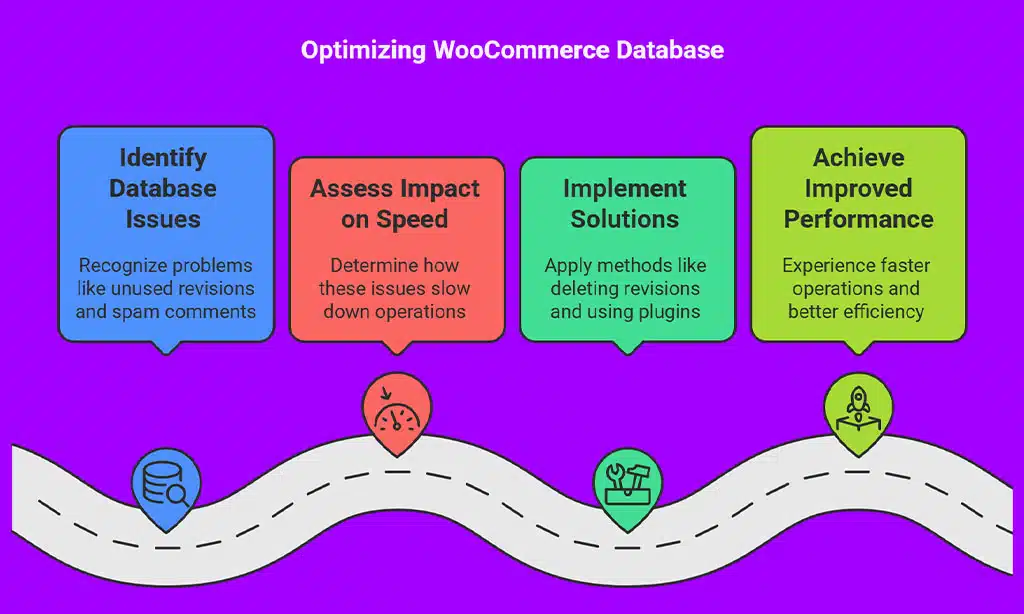
Over time, your database accumulates unnecessary data that slows down your store. This includes outdated product revisions, expired transients, abandoned cart data, and unnecessary log files.
Cleaning and optimizing your database ensures smoother operations, faster response times, and reduced server load.
Regular maintenance prevents data bloat, leading to better efficiency and improved customer experience.
How to Optimize Your Database:
- Delete old revisions, transients, and spam comments to free up space.
- Use WP-Optimize or Advanced Database Cleaner to automate cleanup.
- Limit post revisions to avoid excessive database bloat.
- Regularly run database maintenance through phpMyAdmin or plugins.
| Database Issue | Impact on Speed | Solution |
| Unused Revisions | Slows down queries | Limit revisions or delete them |
| Expired Transients | Creates unnecessary load | Regular cleanup with plugins |
| Spam Comments | Increases database size | Bulk delete spam comments |
| Overloaded Tables | Slows queries | Optimize tables using phpMyAdmin |
8. Disable Unused Plugins & Remove Bloatware
Too many active plugins can negatively impact site performance. Each plugin adds scripts, styles, and database queries that can slow down your WooCommerce store.
Even inactive plugins add unnecessary code and affect database performance, as they can still run background processes or leave residual data.
Regularly auditing and removing unused plugins helps improve website speed, security, and overall efficiency.
Steps to Optimize Plugins:
- Audit installed plugins and remove unnecessary ones.
- Use multifunctional plugins instead of multiple single-feature ones.
- Disable WooCommerce features you don’t use with plugins like Perfmatters.
| Plugin Issue | Impact on Speed | Fix |
| Too Many Plugins | Slows down site | Remove unused ones |
| Bloated Plugins | Increases load time | Use lightweight alternatives |
| Unused WooCommerce Features | Adds excess scripts | Disable with code or plugins |
9. Enable Lazy Loading for Images & Videos
Lazy loading defers the loading of offscreen images and videos until they’re needed, significantly improving page speed.
This technique ensures that only the images visible on a user’s screen load immediately, while others load dynamically as the user scrolls down.
By reducing the number of initial requests, lazy loading helps decrease bandwidth usage, speeds up page load times, and enhances mobile browsing experiences.
How to Enable Lazy Loading:
- Use a3 Lazy Load or WP Rocket for automatic implementation.
- Manually add loading=”lazy” attribute to images in HTML.
- Enable lazy loading in WordPress settings (available since WP 5.5).
| Lazy Loading Feature | Benefit |
| Images Load on Scroll | Reduces initial page load time |
| Video Placeholder | Improves above-the-fold speed |
| Defers Offscreen Elements | Improves performance metrics |
10. Regularly Monitor & Test Performance
Continuously testing your site’s performance helps identify speed issues and ensures your WooCommerce store remains optimized.
Regular monitoring allows you to detect inefficiencies, troubleshoot bottlenecks, and implement necessary optimizations before they impact user experience.
Performance testing should be a recurring practice, as factors such as traffic surges, plugin updates, and content additions can affect site speed over time.
Best Tools for Performance Testing:
- Google PageSpeed Insights: Provides detailed reports and improvement suggestions.
- GTmetrix: Offers waterfall charts and speed optimization insights.
- Pingdom: Helps monitor real-time performance globally.
| Performance Tool | Features | Best For |
| Google PageSpeed | Mobile & desktop insights | SEO and Core Web Vitals |
| GTmetrix | Detailed performance reports | Identifying bottlenecks |
| Pingdom | Real-time monitoring | Uptime tracking |
Takeaways
By implementing these 10 tips to improve WooCommerce website performance & speed, you can enhance user experience, boost SEO rankings, and increase conversions.
From choosing a reliable host to optimizing your database and enabling caching, every step contributes to a faster WooCommerce store.
Now, it’s your turn! Try these tips to improve WooCommerce website performance & speed, and share your results in the comments!