Are you tired of spending more time fixing broken servers than actually building your product? Managing servers takes time, money, and headaches. Your team spends hours updating software and worrying about whether your app can handle traffic spikes. I am going to show you a different path forward. This guide on serverless architecture will help you skip the server management game entirely.
Companies across the US are making the switch fast. A 2026 Datadog report showed that 65% of AWS customers now use AWS Lambda in some form. Your competitors are already moving in this direction. So grab a cup of coffee, and let us go through it together. I will show you exactly how it works.
What is Serverless Architecture?
Serverless architecture changes how you build and run applications in the cloud. You write code, deploy it, and the cloud provider handles all the difficult tasks. Servers, scaling, and maintenance disappear from your plate completely.
Definition and key principles
Serverless architecture lets developers build and run applications without managing servers directly. Cloud computing providers handle all the infrastructure work for you, so you focus only on writing code. This approach flips the traditional model upside down. Instead of renting or buying servers, you pay only for the computing power your code actually uses.
Function as a Service FaaS powers this model by letting you upload small pieces of code that run in response to specific events. Your functions execute automatically when triggered and then shut down when finished. Cost efficiency becomes your best friend here because you stop paying for idle server time.
- Automation: Your applications respond to triggers like API calls or database changes automatically.
- Scalability: The system grows or shrinks instantly based on user demand.
- Event-driven execution: Code only runs when a specific action wakes it up.
Cloud providers like AWS Lambda, Google Cloud Functions, and Microsoft Azure Functions manage resource management and deployment. This setup means your team can ship code faster and spend less time troubleshooting server problems.
How it differs from traditional architecture
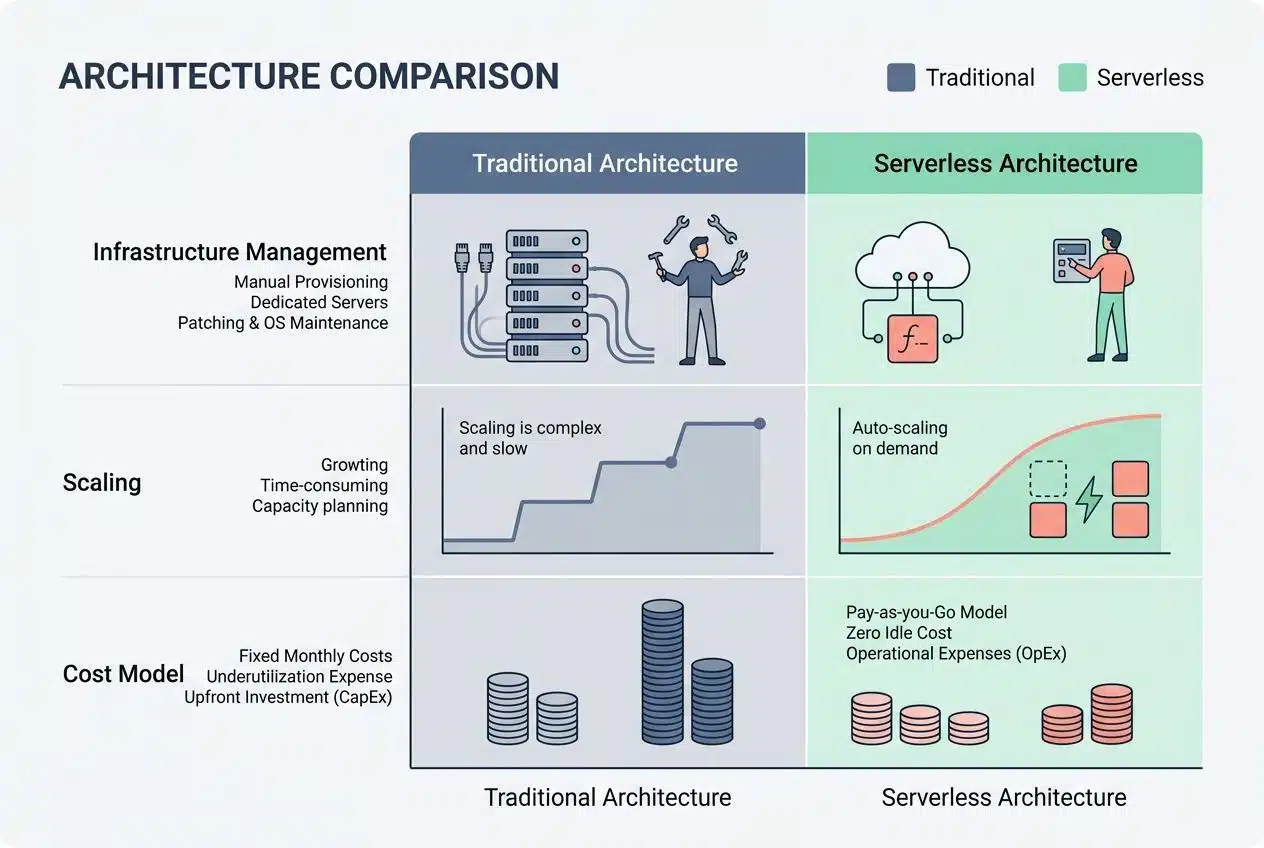
Traditional and serverless architectures operate on fundamentally different models. Understanding these differences shapes how you build modern applications.
| Aspect | Traditional Architecture | Serverless Architecture |
|---|---|---|
| Infrastructure Management | You manage servers, databases, and networking components yourself. Your team handles provisioning, patching, and maintenance around the clock. | Cloud providers handle all infrastructure. You write code and deploy functions without touching servers or managing patches. |
| Scaling | Manual scaling requires planning ahead. You predict traffic spikes and add capacity before demand hits. Over-provisioning wastes money. | Automatic scaling happens instantly. Functions spin up or down based on actual demand. You pay only for what you use. |
| Cost Model | Fixed costs apply whether servers run at full capacity or sit idle. Monthly bills remain consistent regardless of actual usage. | Pay-per-execution pricing ties costs directly to function invocations. Idle time costs nothing. |
| Deployment Complexity | Deployment involves coordinating multiple layers. You manage containers, orchestration, load balancing, and service discovery. | Deploy individual functions instantly. Versioning and routing happen automatically through the cloud platform. |
| Execution Model | Applications run continuously on allocated servers. Code executes within persistent runtime environments you control. | Functions execute only when triggered by events. Execution environments spin up, run code, then shut down completely. |
| Team Responsibilities | DevOps teams spend significant time on infrastructure concerns. On-call rotations handle system failures and performance issues. | Teams focus on business logic and code quality. Infrastructure concerns shift entirely to the cloud provider. |
| Cold Start Impact | Applications maintain warm runtime states. Initial requests are processed quickly with minimal latency. | First invocation after idle periods experiences latency as the function environment initializes. Subsequent calls execute faster. |
| Long-Running Processes | Ideal for batch jobs and continuous background tasks. Your application maintains state across multiple executions. | Timeout limits restrict execution duration. Most functions complete in seconds or minutes, not hours. |
Think of traditional architecture like owning a restaurant where you staff employees even during slow hours. Serverless resembles hiring gig workers who arrive exactly when customer orders spike and leave immediately after. Both approaches work, but they serve different business needs and operational realities.
How Serverless Architecture Works
Cloud providers handle all the backend tasks behind the scenes. You get to focus on writing code instead of managing servers.
Role of cloud providers
Cloud providers serve as the backbone of serverless architecture. They handle all the difficult tasks behind the scenes. Amazon Web Services, Microsoft Azure, and Google Cloud Platform run your code without you managing servers. These companies maintain the infrastructure, apply security patches, and keep everything running smoothly. You focus on writing your functions, and they focus on everything else.
“A 2026 Datadog report highlighted that 70% of Google Cloud customers now use Cloud Run, proving how heavily developers rely on providers to manage their containers and functions.”
Your cloud provider manages resource allocation automatically. They scale up when traffic spikes and scale down when things quiet down. They handle deployment, monitoring, and infrastructure management so you can concentrate on application development.
Think of them as your personal IT department. They work 24/7 and never take a vacation. This hands-off approach lets development teams move faster and ship features more quickly.
Function-as-a-Service (FaaS) explained
Function as a Service FaaS strips away the heavy lifting from your shoulders. You write your code, upload it to a cloud provider, and that provider handles everything else. Your functions run only when they are needed and then disappear into the background. No servers sit idle, burning through your budget. No infrastructure teams waste time managing machines that might not even be used.
- AWS Lambda: The most popular choice for AWS users.
- Google Cloud Functions: Great for connecting Google services.
- Azure Functions: Integrates seamlessly for Microsoft-heavy teams.
These platforms let developers focus purely on writing business logic. The cloud provider automatically scales your functions up or down based on demand. If ten thousand requests hit your system at once, FaaS scales to meet that spike. If traffic drops to nothing, your costs drop too. This pay-as-you-go model transforms how teams think about application deployment and cost efficiency.
FaaS works through event-driven architecture. This means your functions spring to life when specific events occur. A file upload triggers one function, and a database change activates another.
Pros of Serverless Architecture
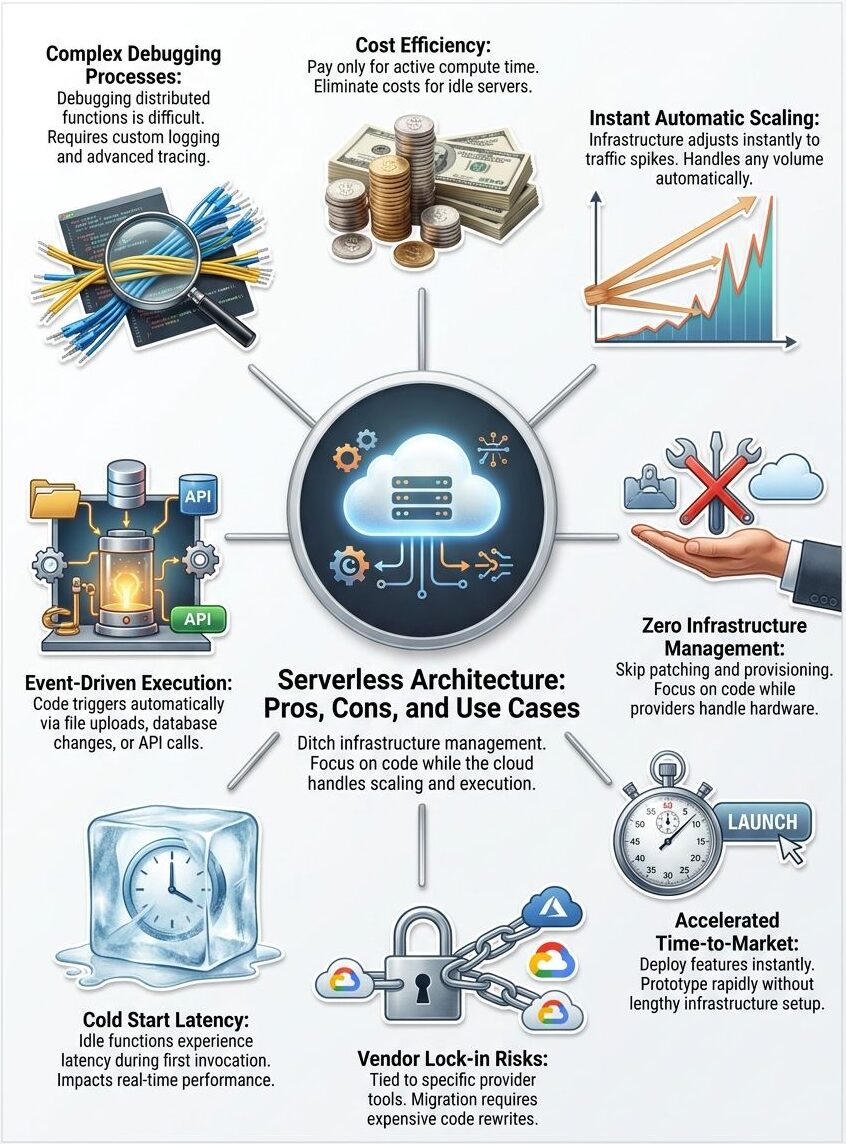
Serverless architecture cuts your operational costs dramatically. You only pay for the computing power you actually use, not for idle servers sitting around.
Cost efficiency
You pay only for what you use with serverless architecture. This approach cuts costs dramatically compared to traditional cloud computing.
Your team stops paying for idle servers that sit around doing nothing. Functions execute on demand, so you avoid wasting money on infrastructure that nobody needs at that moment.
“A 2026 report from TekRecruiter found that shifting to a pay-per-execution serverless model can reduce costs by over 70% for the right workloads.”
Companies see their bills shrink because cloud providers handle all the resource management behind the scenes. No more renting expensive servers for peak traffic that happens just a few hours each week. Scaling up costs you nothing extra with this model. Traditional setups force you to buy more hardware before you need it, which drains your budget fast. Serverless architecture scales automatically without charging you for unused capacity.
Automatic scaling
Serverless architecture handles traffic spikes without you lifting a finger. Your functions scale up automatically when demand increases and then scale back down when things quiet down. This means your application stays responsive during peak hours, whether you get ten requests or ten thousand.
- Zero capacity planning: Stop guessing how many servers you will need for peak shopping days.
- Instant response: The system adapts in milliseconds.
- Cost-aligned growth: Your infrastructure adapts to real demand, not predictions.
Cloud providers manage all the scaling logic behind the scenes, so you do not waste time writing code to handle it. The scalability feature saves you from the nightmare of guessing how many servers you will need months in advance. During slow periods, your costs drop significantly since idle functions do not consume resources.
Faster time-to-market
Beyond automatic scaling, serverless architecture accelerates your application development cycle in ways that traditional infrastructure simply cannot match. Developers skip the lengthy setup phases that eat up weeks or months. They write code, deploy it instantly, and watch it run without managing servers or infrastructure.
This speed transforms prototyping from a slow, painful process into something agile and responsive. Your team launches features faster, tests ideas quicker, and responds to market demands before competitors even notice the shift.
“By eliminating server management, engineers can focus entirely on writing business logic and delivering value, accelerating time-to-market dramatically.”
The cloud computing platform handles all the heavy tasks, so your developers focus purely on writing business logic instead of wrestling with deployment headaches. Cost efficiency pairs beautifully with this acceleration, creating a powerful combination for startups and enterprises alike. Teams can experiment boldly, fail cheaply, and iterate quickly without draining budgets.
Simplified infrastructure management
Serverless architecture removes the headache of managing servers. That is a massive win for development teams. You stop worrying about hardware provisioning, system updates, and infrastructure scaling because the cloud provider handles all of it.
- No more late-night patches: The cloud provider applies OS updates automatically.
- Fewer system failures: Built-in redundancy keeps your apps online.
- Leaner teams: DevOps professionals spend less time on routine maintenance.
Your team spends less time fixing broken servers and more time building features that matter. This shift in responsibility means developers can focus on writing code instead of babysitting infrastructure. This speeds up application development and cuts down on operational overhead. The cloud computing platform automatically manages resource allocation.

Cons of Serverless Architecture
While serverless architecture offers real benefits, it comes with trade-offs. These issues can trip up teams who do not plan ahead.
Vendor lock-in risks
Switching cloud providers becomes difficult once you commit to serverless architecture. Your functions, databases, and services tie themselves to one vendor’s specific tools and APIs. Moving to a different cloud platform means rewriting significant portions of your code, which costs time and money.
“If you build entirely around AWS specific tools like DynamoDB and EventBridge, moving that same logic to Google Cloud requires a complete rewrite.”
You lose flexibility when you depend too heavily on one provider’s ecosystem. This dependency can limit your negotiating power on pricing and features. Companies that build large applications on serverless infrastructure often find themselves stuck and unable to migrate without major disruption.
Vendor lock-in also affects your long-term strategy and resource management. To reduce this risk, developers should design applications with abstraction layers that separate business logic from cloud-specific code.
Performance limitations
Serverless functions face real speed bumps that developers must navigate carefully. Cold starts happen when a function sits idle and then suddenly needs to wake up and respond to a request. This delay can stretch from milliseconds to several seconds, depending on your cloud provider and function size.
- The INIT Phase Delay: AWS must provision a new execution environment, download your code, and start a container.
- Cost Implications: In late 2025, AWS began billing for the Lambda INIT phase, making cold starts a direct budget concern.
- Size Matters: A 2026 guide from AgileSoftLabs noted that reducing a deployment package from 50MB to 10MB can improve cold start times by 40-60%.
Applications that demand instant responses, like online gaming or real-time trading platforms, struggle with this latency issue. Your microservices architecture might feel sluggish if you stack too many serverless functions together. Heavy computational tasks also hit performance walls since these functions run on shared resources with strict memory limits.
A function processing massive datasets will time out before finishing its work, leaving you frustrated and your users waiting.
Debugging and monitoring challenges
Debugging serverless functions feels like finding a needle in a haystack. Your code runs in isolated environments controlled by cloud providers, which makes traditional debugging tools nearly useless. You cannot simply attach a debugger to your function and step through the code line by line. Distributed systems spread your application across multiple functions, multiple regions, and multiple cloud services.
“Tracking down where a problem actually lives takes real effort because logs scatter across different services.”
To solve this, many US companies now use specialized observability tools like Datadog, Lumigo, or AWS X-Ray. These tools help trace requests as they jump from one microservice to another. Your infrastructure management becomes invisible, so you lose visibility into the underlying systems that run your code. The latency issues that pop up might stem from cold starts, network delays, or resource constraints.
Pinpointing the exact culprit demands serious investigation skills. Monitoring your serverless application requires a completely different mindset than traditional Backend as a Service BaaS or standard cloud computing approaches.
Use Cases of Serverless Architecture
Serverless architecture shines when you need to respond to events in real time. Companies deploy serverless solutions for everything from handling sudden traffic spikes to powering machine learning pipelines.
Real-time data processing
Real-time data processing stands as one of the most powerful use cases for serverless architecture. Your applications can process streams of data instantly without waiting for batch jobs to complete. Cloud computing platforms handle the heavy lifting and spin up functions the moment data arrives.
- Stock Market Feeds: Analyzing financial data the millisecond it hits the wire.
- Log Analysis: Scanning application logs for errors as they happen.
- ETL Pipelines: A 2026 case study showed a company reduced data processing costs by 80% when migrating to a serverless AWS Glue architecture.
You pay only for the processing time you actually use, making cost efficiency a major win. This approach works great for sensor data from IoT devices and website clickstreams that demand immediate action. Microservices built on Function as a Service FaaS excel at handling event-driven workflows that fire up automatically.
Building APIs and microservices
Serverless architecture shines when you build APIs and microservices. Cloud providers handle all the backend tasks, so you focus on writing code. Each function runs independently, which means you can update one service without breaking others. This separation creates flexibility that traditional systems struggle to match.
“You can write a function, connect it to an API gateway like Amazon API Gateway, and your endpoint goes live instantly.”
Your team ships features faster because you skip the infrastructure setup. Microservices built on serverless platforms scale automatically when traffic spikes and then shrink back down when demand drops. You pay only for what you use, making cost efficiency a real win for startups and enterprises alike. Teams can deploy multiple microservices simultaneously without coordination headaches.
Event-driven applications
Event-driven applications thrive on serverless architecture because they respond to triggers instantly. our code springs to life only when something happens, like a user uploading a file, a database changing, or a message arriving in a queue. This reactive approach means you pay only for the actual work performed, making cost efficiency a major win.
- Image Resizing: A user uploads a profile picture, and a function automatically generates a thumbnail.
- Database Triggers: A new customer signs up, and a function automatically sends a welcome email.
- Payment Processing: A checkout event triggers inventory updates and receipt generation.
Cloud providers handle all the heavy tasks, so you skip the infrastructure management headaches entirely. Your functions execute automatically when events occur, eliminating the need to keep servers running around the clock.
IoT applications
IoT devices generate massive amounts of data every second, and serverless architecture handles this flow beautifully. Sensors on machines, wearables, and smart home gadgets send information constantly to the cloud. Serverless functions process these data streams instantly without you needing to manage servers or worry about scaling. Your application automatically handles ten devices or ten million devices with the same ease.
“A temperature sensor detects heat in a warehouse, and a serverless function fires immediately to alert the US maintenance team.”
This cost efficiency matters because you pay only for the computation time you actually use, not for idle server capacity sitting around doing nothing. Serverless architecture shines in IoT scenarios where events trigger actions in real time. Cloud computing providers handle all the infrastructure management, so your team focuses on building features that matter.
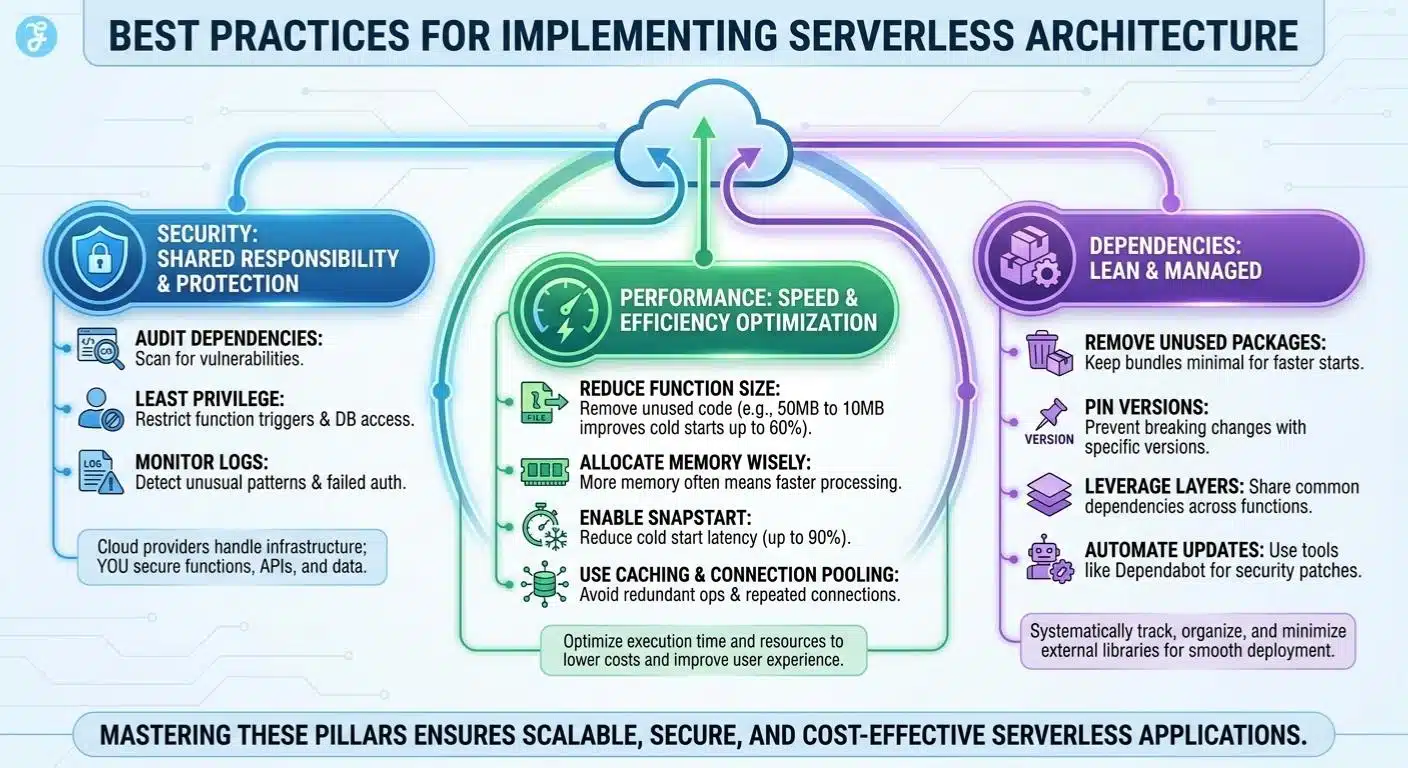
Best Practices for Implementing Serverless Architecture
You will want to master security, performance, and dependency management. This is how you get the most from your serverless setup.
Security considerations
Serverless architecture shifts security responsibilities, but it does not eliminate them. Cloud providers handle infrastructure security, patching servers, and managing firewalls. You still need to protect your functions, though. Developers must secure API endpoints, validate all incoming data, and encrypt sensitive information before storing it.
- Audit Dependencies: Third-party libraries in your code can introduce vulnerabilities.
- Least Privilege: Limit exactly who can trigger your functions and what databases they can reach.
- Monitor Logs: Set up alerts for unusual patterns or failed authentication attempts.
Cost efficiency gains from serverless can disappear fast if security gets overlooked. Misconfigured permissions might expose your data to unauthorized access, creating expensive breaches. Automation tools can scan your code for common vulnerabilities and flag risky patterns automatically. These practices protect your applications while maintaining the scalability and deployment speed that make serverless attractive.
Optimizing function performance
After locking down your security measures, you need to shift focus to making your functions run faster and more smoothly. Performance optimization helps keep your cloud computing costs down while delivering better results to your users.
- Reduce function size by removing unnecessary code and dependencies. A 2026 AgileSoftLabs study showed that reducing package size from 50MB to 10MB improves cold starts by up to 60%.
- Monitor execution time closely using cloud provider tools, so you catch slow functions before they affect real users and drain your budget.
- Allocate appropriate memory to each function based on actual needs. More memory often means faster processing and better performance.
- Enable tools like AWS Lambda SnapStart. Recent updates show this feature can reduce cold start latency by up to 90% for certain runtimes.
- Use caching strategies to avoid repeating the same calculations or data retrieval operations multiple times within your application.
- Implement connection pooling for database access, which prevents your functions from wasting time opening new connections repeatedly.
- Optimize your code logic to eliminate loops and redundant operations that add extra milliseconds to execution time.
- Choose runtimes that match your application requirements, since some languages perform faster than others for specific workloads.
- Set appropriate timeout values for your functions so they fail quickly rather than consuming resources on failing requests.
- Use asynchronous processing patterns to handle multiple tasks without blocking other operations from completing.
- Profile your functions regularly to identify bottlenecks and areas where resource management improvements will have the greatest impact.
- Use content delivery networks for static assets, which reduces the work your functions must perform on each request.
- Batch operations together when possible, so your functions process multiple items in one execution instead of triggering separately.
Managing dependencies effectively
Managing your function dependencies can make or break your serverless application’s performance. You need to keep your code lean, your packages minimal, and your deployment smooth.
- Identify all external libraries and packages your functions require before you deploy them to production environments.
- Use package managers like npm for Node.js or pip for Python to track and organize your dependencies systematically.
- Remove unused packages from your project, as they add unnecessary weight to your function bundles and slow down cold starts.
- Pin specific versions of your dependencies to prevent unexpected breaking changes when updates roll out.
- Separate your core application logic from third-party libraries so you can update them independently without affecting your entire codebase.
- Leverage layer functionality in AWS Lambda and similar services to share common dependencies across multiple functions, reducing duplication.
- Containerize your functions with Docker when you need complex dependencies that do not fit well into standard serverless environments.
- Test your dependency combinations locally before pushing code to your cloud provider to catch conflicts early.
- Monitor your function sizes regularly, as bloated packages directly impact cold start latency and resource management costs.
- Create a dependency inventory spreadsheet that documents which packages each function uses, making troubleshooting faster when issues arise.
- Automate your dependency updates using tools like Dependabot that scan for security vulnerabilities and suggest patches automatically.
- Implement version control strategies that allow you to roll back to previous dependency versions if new releases cause problems.
- Document all external service connections and API keys your functions need so team members understand the complete infrastructure management picture.
- Use lightweight alternatives to heavy frameworks whenever possible. Smaller packages mean faster deployment and better application development cycles.
Wrapping Up
Serverless Architecture comes down to matching your project with the right tool. You get real cost savings because you pay only for what you use. Automatic scaling handles traffic spikes seamlessly, giving your team less infrastructure headache in general.
Cloud computing platforms handle the heavy lifting, letting you focus on writing code. The trade-offs matter too. Vendor lock-in can trap you with one cloud provider, and cold starts create latency issues if you are not careful. Your next move depends on what your application needs. Start small with a single function, measure performance, and scale from there.
Frequently Asked Questions (FAQs) on Serverless Architecture
1. What is serverless architecture, and how does it work?
Serverless architecture lets you run code without managing servers, and platforms like AWS Lambda and Azure Functions handle all the infrastructure for you. The cloud provider automatically scales your app and maintains the hardware while you just write your code and deploy it. You only pay for the actual compute time your functions use, which can really cut costs compared to keeping servers running around the clock.
2. What are the main pros of using serverless architecture?
You only pay when your code actually runs, which can cut infrastructure costs by 40% or more compared to traditional hosting. The platform handles all the scaling automatically, so your app can handle traffic spikes without you lifting a finger or worrying about capacity planning.
3. Are there any cons with serverless setups?
Cold starts can add anywhere from 100 milliseconds to a few seconds of delay when a function hasn’t run recently. You also give up some control since you can’t access the underlying servers or customize the environment as deeply as you could with traditional hosting.
4. When should I use serverless architecture for my project?
It’s perfect for apps with unpredictable traffic patterns, like chatbots, image processors, or APIs that see random bursts of activity. Companies like Netflix use serverless for tasks like video encoding and real-time file processing because it scales instantly without paying for idle time.