


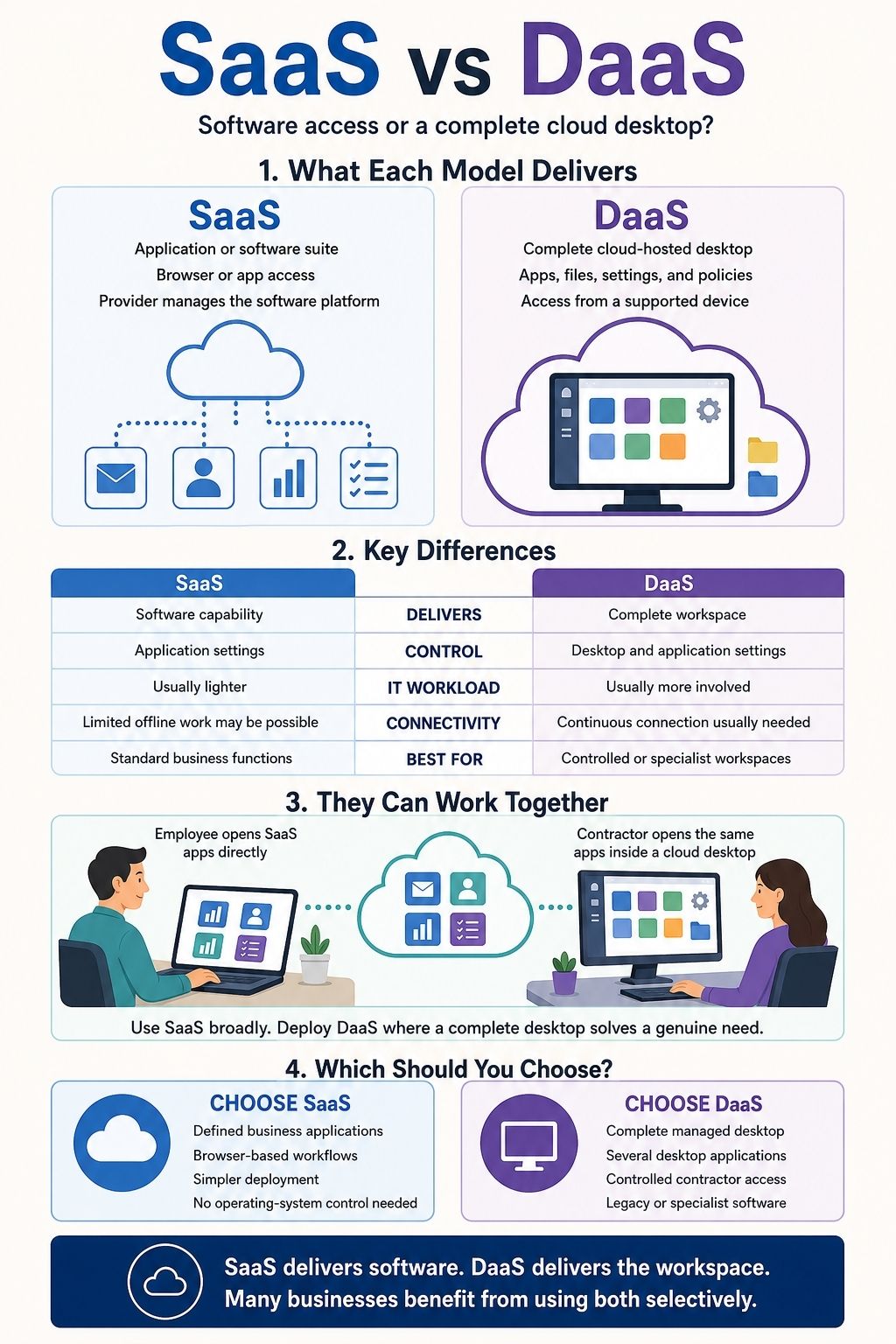
SaaS and DaaS share the same cloud vocabulary, but they solve different problems. Software as a Service gives users access to an application or software suite. Desktop as a Service provides a complete virtual desktop that may include applications, files, settings, security policies, and access to company systems.
The distinction sounds simple. The business decision is more complicated. The two services give customers different levels of control, create different responsibilities for IT teams, and respond differently to poor network conditions. Their cost structures also involve far more than the advertised subscription price.
When I compare SaaS vs DaaS, I start with one practical question: do users need a particular software capability, or do they need an entire managed workspace?
For many organizations, the answer varies by role. A company might use SaaS throughout the business while reserving DaaS for contractors, remote employees, developers, or teams that require controlled access to specialist applications.
A Quick Note About What DaaS Means
In this article, DaaS means Desktop as a Service. The same acronym can also refer to Data as a Service or Device as a Service. Anyone evaluating a product described as DaaS should confirm which meaning the vendor intends.
There is another technical distinction worth understanding. NIST’s widely used cloud framework identifies Software as a Service, Platform as a Service, and Infrastructure as a Service as its three service models. Desktop as a Service is not presented as a fourth equivalent category in that framework.
DaaS is an industry term describing what the user receives: a cloud-hosted desktop. The product delivering that desktop can itself follow a SaaS business and delivery model. Microsoft, for example, describes Windows 365 as a cloud-based SaaS product that provides users with virtual Cloud PCs.
That may sound circular, but it explains why SaaS and DaaS do not fit into a neat either-or comparison.
What Is SaaS?
Software as a Service allows people to use provider-hosted applications over a network. Access usually happens through a browser, mobile app, desktop client, or application programming interface.
Email services, customer relationship management systems, accounting platforms, project-management tools, and collaboration suites are common examples.
The provider generally manages the application, servers, storage, platform maintenance, availability, and most software updates. Customers continue to manage their own users, permissions, data, configurations, integrations, and decisions about how the application is used.
According to NIST, SaaS customers use applications running on a provider’s cloud infrastructure without managing the underlying servers, operating systems, storage, or most application capabilities.
SaaS does not necessarily mean one small browser tool. A provider may offer a narrowly focused product or a large suite covering several business functions. The defining feature is access to the software capability rather than control over the environment beneath it.
What Is Desktop as a Service?
Desktop as a Service delivers a virtual desktop from cloud-hosted infrastructure. Users connect through a physical endpoint such as a laptop, desktop computer, thin client, tablet, or supported browser.
After signing in, a user may see an operating system, installed software, SaaS applications, company files, personal settings, security policies, and access to internal resources. Different employees can receive different applications and computing capacity based on their roles.
Most processing takes place in the cloud-hosted virtual machine. The service streams the visual desktop to the local device while keyboard, mouse, touchscreen, microphone, and other supported inputs travel back to the remote session.
DaaS can reduce the infrastructure a company must build and maintain internally. It still requires physical endpoints, secure identities, application administration, access policies, network connectivity, and technical support.
The exact division of responsibility depends heavily on the provider and product.
SaaS vs DaaS: The Fundamental Differences
SaaS delivers access to a specific application or software suite, while DaaS provides an entire cloud-hosted desktop environment. This difference affects application flexibility, customer control, IT responsibilities, security, network requirements, performance, and total cost.
The Deliverable Changes the User Experience
With SaaS, users open an application to perform a particular type of work. An accounting platform provides accounting functions. A customer relationship management system organizes leads, contacts, communications, and sales activity.
DaaS provides the wider environment in which that work takes place. Once connected, the user may have access to several applications, shared files, company security controls, browser bookmarks, internal networks, and personalized desktop settings.
Consider a new sales employee who only needs a browser-based CRM, email, and a communication platform. Giving that person a complete virtual desktop may add cost and administration without solving a real problem.
A contractor who needs three installed Windows applications, controlled access to internal files, and a workspace that can be disabled immediately at the end of the contract presents a different case. DaaS may provide meaningful value there.
DaaS Supports a Broader Application Mix
SaaS customers use the features and integrations made available by the provider. Configuration can be extensive, but customers generally cannot install unrelated software inside the service.
A DaaS desktop can bring several application types into one managed environment. It may contain browser-based SaaS products, traditional desktop software, internal applications, and compatible legacy tools. This flexibility comes with compatibility work.
Older software may depend on a particular operating system, licence arrangement, driver, hardware component, or internal network connection. Graphics tools, engineering applications, video software, smart-card readers, USB devices, printers, webcams, multiple monitors, and accessibility equipment may behave differently in a remote session.
Claims that DaaS “works on any device” deserve careful scrutiny. The service may technically open on many devices while still delivering a poor experience for a particular application or peripheral.
A proper pilot should test the exact software, endpoints, accessories, network conditions, and user workflows involved.
More Control Brings More Administration
SaaS customers control what happens within the boundaries of the application. Administrators may configure roles, workflows, retention rules, integrations, security settings, and user access. They usually cannot modify the provider’s operating system or underlying infrastructure.
DaaS can give an organization much more control over the user’s workspace. Depending on the service, IT teams may manage desktop images, installed applications, user profiles, access policies, resource capacity, storage, and network connections.
That control supports standardization. It also creates work. DaaS providers manage different portions of the platform, so organizations may remain responsible for operating-system updates, application patches, antivirus policies, identities, licences, desktop images, network settings, monitoring, compliance, and user support.
Microsoft’s Windows 365 guidance assigns customers responsibilities that include operating-system and application lifecycles, compliance settings, endpoint-security policies, and access configuration.
Citrix documentation similarly identifies customer responsibilities involving operating-system patches, antivirus protection, installed software, firewall rules, and other configuration areas in certain DaaS environments.
DaaS can substantially reduce infrastructure administration. Desktop and application management do not disappear with it.
Security Depends on the Entire Setup
DaaS can keep applications and files inside a centrally managed environment instead of storing them permanently on a contractor’s or employee’s personal device. Administrators can apply consistent policies, control redirection features, and remove access without recovering the physical endpoint.
Those are genuine advantages for distributed teams, temporary workers, and bring-your-own-device programs.
The security outcome still depends on configuration and daily management. Stolen credentials, excessive permissions, unpatched images, insecure endpoints, uncontrolled downloads, drive redirection, clipboard access, and poorly designed networks can undermine the environment.
SaaS has its own version of the same problem. A reputable provider cannot prevent every weak password, careless sharing decision, excessive administrator permission, or unsafe third-party integration.
Both services use shared-responsibility models. A useful evaluation should identify exactly what the provider protects, what the customer controls, and whether the internal team has the resources to manage its responsibilities.
Network Quality Has a Greater Effect on DaaS
Both models depend on internet access and provider availability. A live DaaS session is especially sensitive to connection quality because the entire interactive desktop is being streamed.
Latency, bandwidth, packet loss, provider region, display resolution, the number of monitors, webcam use, graphics workloads, virtual-machine capacity, and peripheral redirection can all affect the experience.
AWS notes that graphics-intensive desktop workloads require more bandwidth and lower latency than routine document work.
A weak connection might make a SaaS page slow to load. The same connection can make a DaaS session feel persistently delayed, especially during video calls, rapid typing, design work, or multi-monitor use.
Some SaaS products also provide offline functions or local synchronization. An active cloud desktop generally requires continuous connectivity.
For teams working across areas with uneven internet service, performance testing under ordinary conditions matters more than a polished vendor demonstration.
Cost Includes More Than the Subscription
SaaS pricing commonly depends on the number of users, feature tier, storage, transactions, API usage, or optional add-ons.
DaaS bills may include the virtual desktop subscription, compute capacity, memory, storage, operating-system licensing, business software licences, network usage, backup, monitoring, identity products, endpoint management, technical support, and administration.
Pricing structures also vary. Some products charge a fixed monthly rate for each desktop. Others combine a base fee with hourly usage or resource-based charges. Amazon WorkSpaces, for example, offers monthly subscriptions and hourly metering.
DaaS may reduce spending on internally operated desktop infrastructure, particularly when demand changes frequently or temporary users need to be provisioned quickly. Savings are not guaranteed. Oversized virtual machines, unused desktops, duplicated licences, growing storage, and specialist support can make a deployment expensive.
I would compare the expected total cost over the full deployment period. The advertised monthly rate rarely tells the whole story.
What SaaS and DaaS Have in Common
Both services give users network-based access to centrally hosted resources. The provider manages a meaningful portion of the underlying platform, and customers can often expand access without purchasing the same amount of traditional on-site infrastructure.
They also share several limitations. Each creates some dependence on the provider and the network connection. Identity management, permissions, data governance, endpoint security, integrations, and contract terms remain important. Customers also need a realistic plan for outages, subscription changes, data export, migration, and service termination.
Moving a capability into the cloud changes who manages each layer. It does not remove operational risk.
Can SaaS and DaaS Work Together?
Yes. In many businesses, they already do.
A permanent employee may open a SaaS project-management platform directly from a company laptop. A contractor could access the same platform from inside a restricted DaaS desktop. The finance team might use a browser-based accounting service alongside an installed application that has no suitable SaaS replacement.
A mixed environment can also assign different tools to different groups:
- SaaS for employees using standard business applications
- DaaS for contractors and temporary teams
- DaaS for sensitive or tightly controlled workflows
- SaaS combined with local workstations for intensive creative or engineering work
- DaaS for compatible legacy applications that still serve a business purpose
- Different virtual desktop configurations for developers, analysts, designers, and general office users
This is usually a better way to frame the decision. The question is often which users need DaaS, rather than whether the entire company should adopt it.
Providing a cloud desktop to everyone can create unnecessary expense when most employees only require a few well-chosen SaaS tools.
DaaS and VDI Are Related, but Not Identical
Virtual Desktop Infrastructure, or VDI, is an approach for delivering virtual desktops from centralized infrastructure. In a traditional VDI deployment, the organization may build, host, secure, update, and operate much of that infrastructure itself.
DaaS applies a cloud-service model to desktop delivery. A third-party provider operates the cloud platform and manages defined parts of the supporting infrastructure. The customer subscribes to the service instead of building the entire environment internally.
The boundary varies by provider. Some DaaS products manage far more than others, so the label alone says little about the customer’s workload. Responsibility documentation and contract terms provide a more reliable picture.
Final Thoughts
The core difference is clear: SaaS delivers a software capability, while DaaS delivers a virtual desktop environment.
My practical conclusion is equally direct. Start with SaaS when users only need a business application. Introduce DaaS where a specific group genuinely needs a controlled workspace, centrally delivered desktop software, rapid provisioning, or access to compatible legacy systems.
Neither option guarantees lower costs, stronger security, or simpler management. The outcome depends on the workload, provider responsibilities, internal expertise, network conditions, and quality of implementation.
For most organizations, the strongest SaaS vs DaaS strategy will be selective rather than company-wide. SaaS can support everyday business functions across the workforce. DaaS earns its place where the complete desktop solves a problem that individual cloud applications cannot.
Frequently Asked Questions About SaaS vs DaaS
1. What is the main difference between SaaS and DaaS?
SaaS provides access to a specific application or software suite, while DaaS delivers a complete cloud-hosted desktop environment. A DaaS desktop can include installed software, company files, security policies, and SaaS applications.
2. Can SaaS and DaaS be used together?
Yes. A business can use SaaS for everyday functions such as email, accounting, and project management while providing DaaS to contractors, remote teams, or employees who need controlled access to specialist applications.
3. Is DaaS more secure than SaaS?
DaaS is not automatically more secure. It can reduce local data storage and centralize access controls, but its security still depends on strong authentication, updated desktop images, appropriate permissions, secure endpoints, and proper configuration.
4. Is DaaS more expensive than SaaS?
DaaS often has more cost components because it provides an entire virtual desktop rather than one software capability. Businesses should compare the total cost of subscriptions, computing resources, storage, licences, administration, support, endpoints, and network usage.
5. When should a business choose DaaS instead of SaaS?
DaaS is usually the better fit when users need a complete managed workspace, several desktop applications, access to compatible legacy software, or tightly controlled environments for contractors and remote employees. If users only need a particular business application, SaaS is generally simpler.

























