


A task list shows what is waiting, not what deserves the next hour. When a client message, tomorrow’s deadline, and a long-term project sit together, the noisiest item often wins. Learning how to prioritize tasks with the Eisenhower Matrix tests each one by consequence, timing, and who needs to do the work.
The method sorts tasks by urgency and importance, then assigns an action: do, schedule, delegate, or remove. It cannot repair an unreasonable workload. It becomes useful when the decision changes your calendar, the task’s owner, or the list.
How the Matrix Works
The Eisenhower Matrix has four quadrants. Urgency concerns timing: delay would miss a deadline, block someone, or worsen a problem. Importance concerns consequence and responsibility: the task advances a meaningful goal, manages risk, or requires your judgment.
Those qualities can overlap, but they are not interchangeable. A message may feel urgent because someone wants a quick reply. Planning a future budget can matter even when nobody is asking for it today. Understanding how to prioritize tasks with the Eisenhower Matrix starts with separating pressure from consequence.
The name comes from a distinction Dwight D. Eisenhower discussed in an August 19, 1954 address. He quoted a former college president; he did not present the four-box tool now carrying his name. The modern model is also associated with Stephen Covey’s time-management framework.
A 2018 Journal of Consumer Research paper described a “mere urgency effect.” Across five experiments, participants sometimes favored lower-payoff tasks when they appeared urgent. This helps explain the value of pausing before acting.
The Four Quadrants
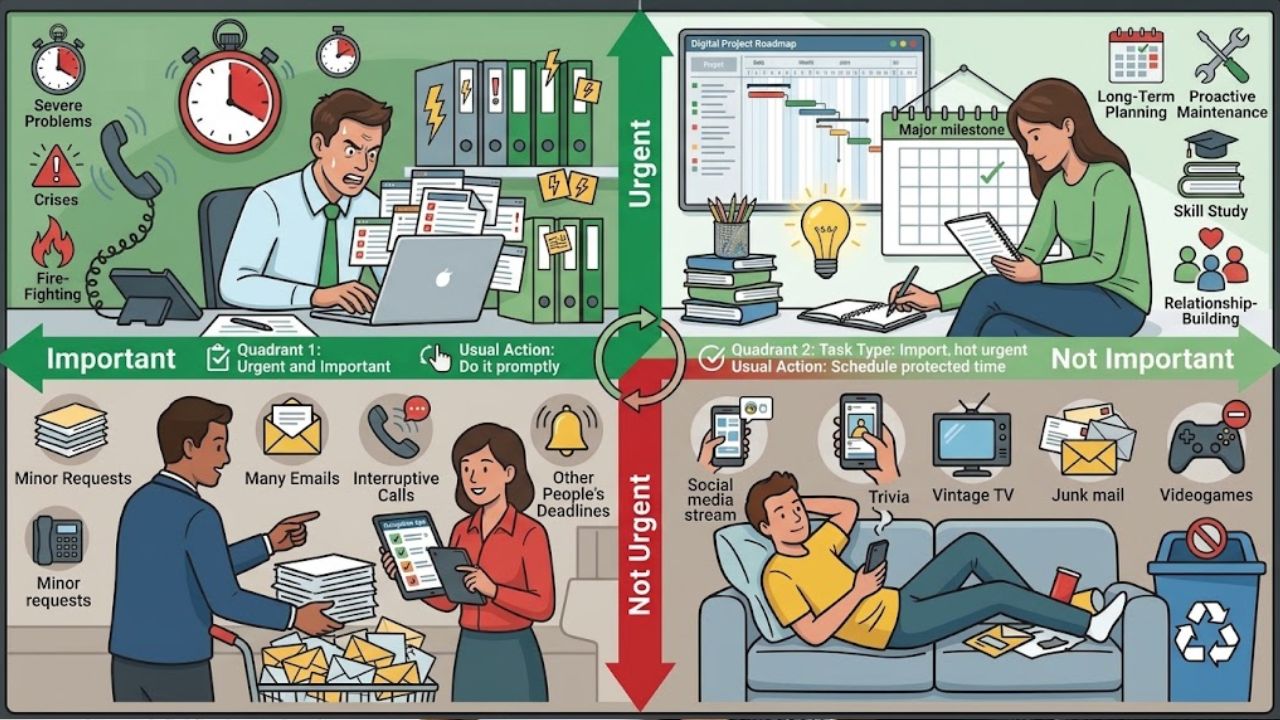
| Quadrant | Task Type | Usual Action |
| 1 | Urgent and important | Do it promptly |
| 2 | Important but not urgent | Schedule protected time |
| 3 | Urgent but not important | Delegate, batch, automate, or limit |
| 4 | Neither urgent nor important | Remove or decline |
Quadrant 2 is often the most valuable part. Planning, maintenance, study, and relationship-building are easy to postpone because they demand no immediate response. Leave them unattended and some return as Quadrant 1 problems.
How to Sort Your Tasks
A reliable way to learn how to prioritize tasks with the Eisenhower Matrix is to judge importance before urgency. Starting with deadlines and notifications gives the loudest work too much influence.
1. Define What Matters Now
Choose a planning window: today, this week, or the current project stage. Identify the responsibilities that matter within it. A manager may need to resolve a delivery risk; a student may need to submit an assignment.
A task is probably important when it supports a current goal, prevents meaningful loss, fulfills a responsibility, or requires your authority. A short approval may matter more than an hour of cosmetic edits.
2. Turn Projects Into Actions
Do not compare “launch the website” with “approve the homepage copy.” One is a project; the other is an action. Break broad commitments into the next visible step.
Replace “prepare for exams” with “complete one practice paper.” Specific actions are easier to judge and schedule.
3. Judge Importance Before Urgency
Three questions usually reveal whether a task matters:
- What useful result will this produce?
- What meaningful consequence follows if it waits?
- Does it require my decision, authority, or skill?
This is often the hardest part of how to prioritize tasks with the Eisenhower Matrix. Urgency arrives with notifications, red labels, and reminders, while important work may sit quietly for weeks. Consider the consequence before the clock.
4. Test the Deadline
“Please handle this soon” is not a usable deadline. Clarify whether the task is needed within an hour, today, or later in the week. Look for a fixed date, a blocked person, or damage that becomes harder to reverse.
Tasks can move. Renewal documents may start in Quadrant 2 and enter Quadrant 1 if ignored. The matrix is a current view, not a permanent classification.
5. Decide What Happens Next
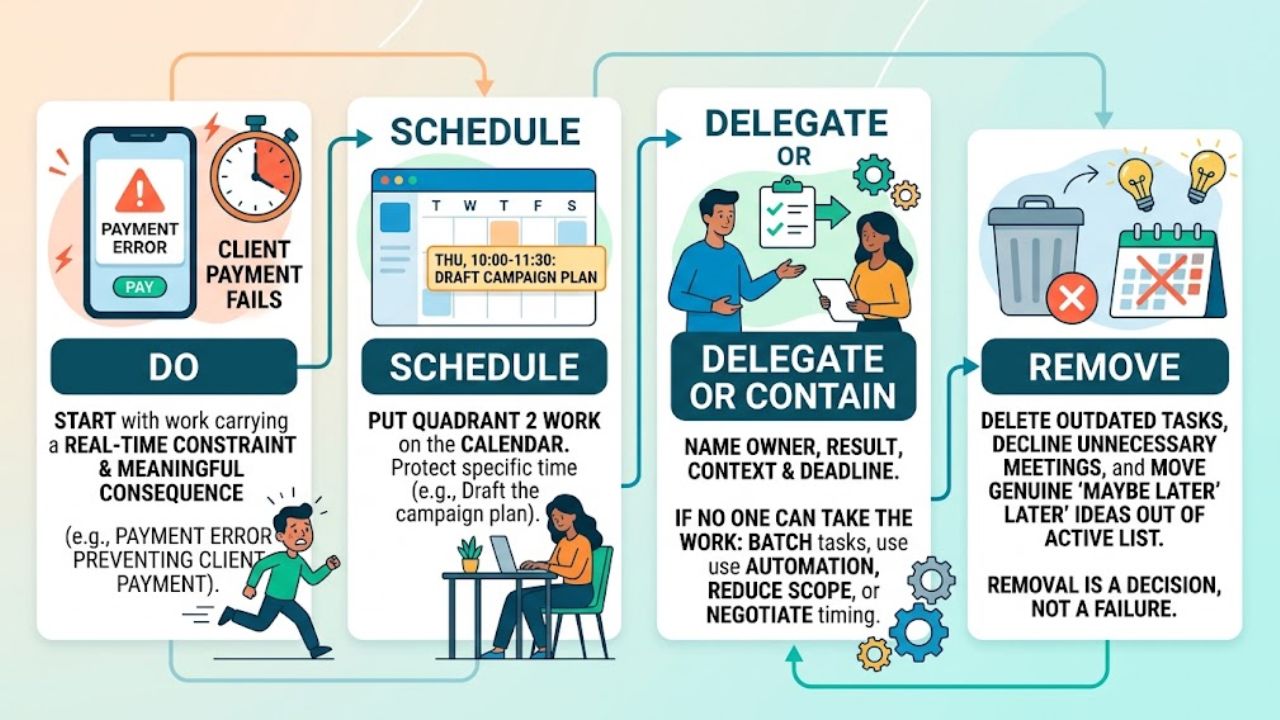
- Do: Start with work carrying a real-time constraint and meaningful consequence, such as a payment error preventing a client from paying. Keep this group short.
- Schedule: Put Quadrant 2 work on the calendar. “Work on strategy later” is vague. “Draft the campaign plan from 10:00 to 11:30 on Thursday” protects the time.
- Delegate or contain: Name the owner, result, context, and deadline. If nobody else can take the work, batch similar tasks, use suitable automation, reduce the scope, or negotiate the timing.
- Remove: Delete outdated tasks, decline unnecessary meetings, and move genuine “maybe later” ideas out of the active list. Removal is a decision, not a failure.
A Practical Example
Consider a small-business owner facing four tasks: correct an invoicing error, review next quarter’s pricing, arrange a routine delivery, and redesign an internal document nobody uses.
The invoicing error belongs in Quadrant 1. The pricing review needs calendar time in Quadrant 2. Delivery scheduling may fit Quadrant 3 if another person or booking tool can handle it. The unused redesign belongs in Quadrant 4. This is how to prioritize tasks with the Eisenhower Matrix in practice: every label produces a decision.
Common Mistakes
The matrix stops helping when every obligation is marked important. If the grid is crowded, ask which delay affects a major goal, creates serious risk, blocks other work, or breaks a commitment.
People learning how to prioritize tasks with the Eisenhower Matrix often turn Quadrant 2 into a waiting room. Important work without a date stays unfinished until it becomes urgent. Schedule it while there is room.
The label “not important” needs care. A Quadrant 3 task may matter to the team without requiring a manager or specialist. Delegating an unclear request simply transfers the confusion.
If the same problem keeps returning to Quadrant 1, look for an earlier checkpoint, clearer ownership, preventive maintenance, or a realistic internal deadline.
When the Matrix Falls Short
The method cannot solve a workload containing more critical work than available capacity. That requires a trade-off: move a deadline, reduce scope, add help, or escalate the conflict.
Knowing how to prioritize tasks with the Eisenhower Matrix helps with ordinary workload decisions; it does not replace emergency protocols, clinical triage, safety procedures, or incident-response rules. Established instructions come first.
For a large backlog, use the matrix as an initial filter. Teams may still need dependency tracking, effort estimates, owners, and dates.
A Simple Review Routine
Check the matrix briefly each day and update it when timing, consequences, or ownership change. Each week, schedule one important task, inspect one recurring emergency, and remove one stale commitment.
Most people do not need a dedicated app. Paper, a four-column note, a spreadsheet, or an existing task board is enough. Software helps when several people need to see owners and deadlines.
Final Thoughts
Learning how to prioritize tasks with the Eisenhower Matrix should change what happens next, not merely produce a tidy diagram. Start with one day or week of work. Choose the few tasks that genuinely need action now, place important future work on the calendar, and be willing to remove low-value commitments.
If the grid remains crowded after that, the problem may be capacity rather than prioritization. Recognizing that early is more useful than rearranging the same impossible list.
Frequently Asked Questions (FAQs)
What if Everything Feels Urgent and Important?
When deciding how to prioritize tasks with the Eisenhower Matrix under pressure, compare the consequence of delay rather than the discomfort of unfinished work. Consider deadlines, dependencies, financial or safety impact, and reversibility. If several tasks remain critical, raise the capacity conflict instead of accepting impossible expectations.
Can the Matrix Work if I Cannot Delegate?
Yes. A student, freelancer, caregiver, or solo business owner may have nobody to take a Quadrant 3 task. Batch similar work, automate an appropriate step, shorten the output, request another deadline, or decline low-value work. Delegation is not the only response.
They can, but separate grids are clearer when responsibilities are hard to compare. A combined weekly view can still help when work, study, caregiving, and appointments compete.























