


SaaS onboarding reduces early churn by helping new customers reach a result quickly and showing them how to repeat it. The process should focus on one clear activation event, remove unnecessary setup decisions, and respond when a user stalls. A product tour alone is not enough.
Customers need useful defaults, clear error recovery, relevant guidance, and human help when the setup becomes complex. Teams should then compare activation behavior with later retention instead of treating sign-ups or completed checklists as success. Done well, onboarding turns the promise made before signup into practical value customers have a reason to return for.
Define What Activation Means in SaaS Onboarding
Calling signup “activation” is convenient but misleading. Email verification, sign-in, and tour completion show that someone entered the product, not that the product helped.
A useful activation event reflects real progress. For example:
- A project-management customer creates a live project and adds real work.
- A reporting customer connects data and produces a usable report.
- An invoicing customer creates and sends an invoice rather than editing a sample.
Within SaaS onboarding, these events should begin as hypotheses. Compare customers who complete the event with similar customers who do not. If both groups return at roughly the same rate, it probably measures setup rather than meaningful activation and should not become the headline metric.
B2B products need separate user- and account-level views. One employee building a dashboard does not mean the company has adopted the software. A business account may need connected data or a shared workflow. Forcing a solo customer to invite colleagues, however, is artificial progress.
Shorten the Path to Value
Fewer screens do not guarantee a better first run. One form packed with settings, integrations, and permissions can be harder than a short, clear sequence.
Progressive disclosure is a sound default: show common options first and reveal specialist controls when relevant. Required settings, however, should not be hidden simply because they look advanced.
A focused opening path usually benefits from a few practical choices:
- Start inside the task the customer came to complete, not on a feature directory.
- Reuse information collected during signup or sales.
- Offer editable defaults instead of demanding every decision upfront.
- Request permissions when their purpose is visible.
- Save partial work so an interruption does not force a restart.
Templates can make a blank product easier to understand, but exploring sample content is not the same as completing real work. Label it clearly and make the switch to the customer’s own data obvious.
Feature tours are often overrated. A short tour may introduce an unfamiliar interface, but contextual guidance beside a real task is usually more useful.
Match SaaS Onboarding to the Customer
A solo founder, a manager moving a team, and an administrator reviewing access controls need different opening sequences. Personalization does not require a long survey. Ask only what changes the route: outcome, role, team setup, and the first necessary integration. Do not request information already captured elsewhere.
Human help should match the setup burden. A self-serve tool should not force every trial user to book a call. Migration, technical integration, or departmental coordination may justify implementation support. For sales-led accounts, pass the promised use case, risks, and stakeholders forward instead of repeating discovery.
Fix Empty States and Setup Errors
An empty dashboard transfers the design problem to the customer. Replace a vague “Get started” button with a specific action: import a file, create a record, or choose a template.
During SaaS onboarding, failure paths matter as much as the ideal journey. A CSV may use the wrong column format, an integration may lack permission, or an invitation may arrive without context. A generic error leaves each person guessing.
Good error handling identifies what failed, explains the next step, and preserves entered information. If a setting must change in another service, name it and say where to find it. If support must intervene, carry the error details into the request rather than asking the customer to reproduce the failure.
Trigger Help From Behavior
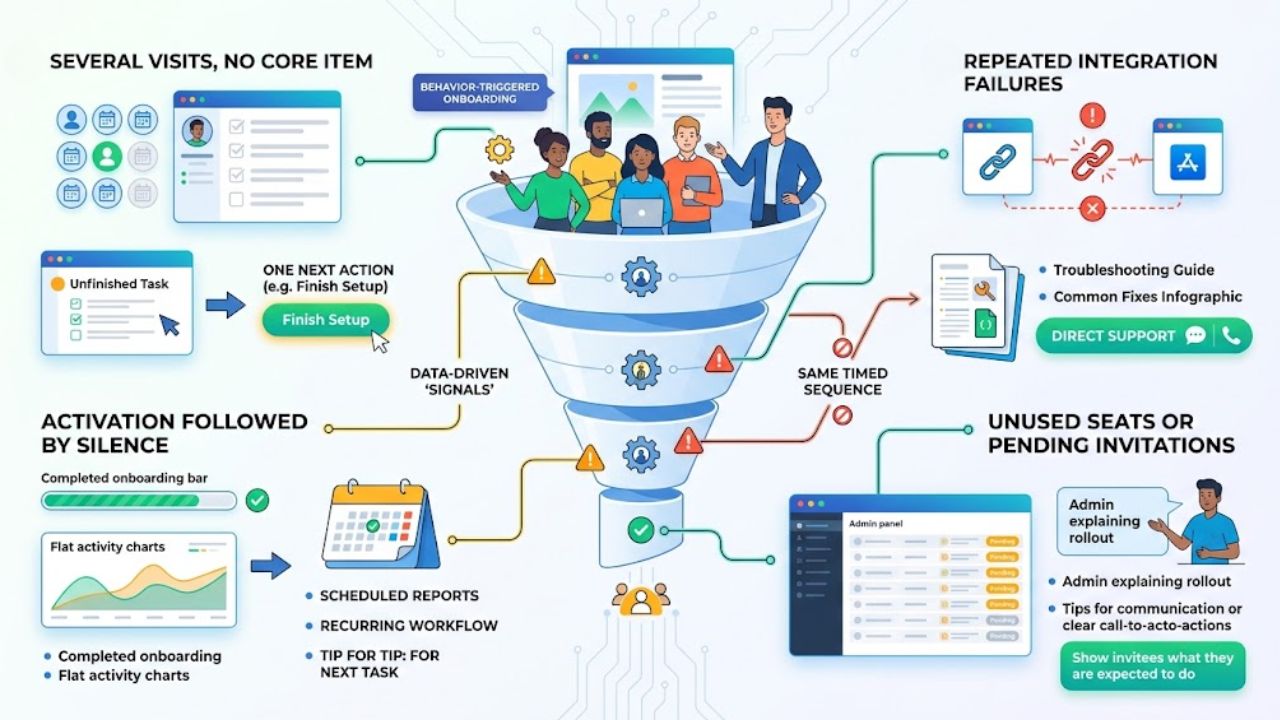
Behavior-triggered SaaS onboarding is more useful than sending every account the same timed sequence. Timing alone does not reveal the obstacle.
Watch for signals that point to a specific intervention:
- Several visits but no core item: Return the customer to the unfinished task with one next action.
- Repeated integration failures: Show troubleshooting for the relevant connection and provide a direct support route.
- Activation followed by silence: Prompt the next task, scheduled report, or recurring workflow—not another welcome message.
- Unused seats or pending invitations: Help the administrator explain the rollout and show invitees what they are expected to do.
These signals invite investigation; they do not prove intent. A quiet account may be stuck or may use the product monthly. Match triggers to the expected rhythm, stop reminders after completion, and avoid contacting someone through several channels about the same issue.
Use human help for complex obstacles, not as a permanent patch for a confusing interface.
Measure Activation Against Retention
There is no universal period for early churn. Daily collaboration, monthly reporting, and annual compliance products run on different schedules. Measure within the period when customers should receive value and return.
To judge SaaS onboarding, track more than one completion rate:
- Activation rate by use case, account type, and plan
- Time from signup to the first meaningful outcome
- Drop-off and error rates at critical setup points
- Return behavior after activation
- Repeated setup questions in support conversations
- Early cancellation, downgrade, and non-renewal reasons
For multi-user products, analyze people and accounts separately. Compare behavioral cohorts instead of one blended average. Customers who connect real data may behave differently from those who only explore samples, even when both finish the checklist.
Do not optimize checklist completion alone. If completion rises but repeat use stays flat, the flow may be easier without being more valuable. Check the data first; duplicate events, missing account identifiers, or renamed features can distort the result.
Analytics shows where progress stops. Support requests, cancellation comments, usability sessions, and customer conversations help explain why.
Keep Improving the Process
SaaS onboarding ages as navigation, permissions, integrations, and expectations change. Review it at a pace suited to signup volume and usage frequency.
Start with the largest avoidable drop-off for one segment. Review product data beside support evidence, fix the underlying obstacle, and compare later cohorts. Watch for new setup errors or support demand. A higher activation number is not progress if it creates trouble later.
One person should own the journey, even though several teams contribute. Without clear ownership, teams improve their own steps while the gaps remain.
Final Thoughts
Good SaaS onboarding gives customers a credible route to a result they can repeat. Choose one important segment and one candidate activation event. Follow recent accounts through the path and fix the obstacle that repeatedly slows them down before adding another tour.
The strongest work is often unglamorous: clearer defaults, better error recovery, a cleaner handoff, or one unnecessary decision removed. Those changes address the stalled progress behind preventable early churn.
Frequently Asked Questions (FAQs)
How long should SaaS onboarding last?
It should continue until the customer can achieve and repeat the core result with reasonable independence. That may take minutes for a simple tool or a full working cycle for software involving migration, permissions, or several departments. Use a success state, not an arbitrary number of days.
What if activation improves but early churn does not?
Recheck the activation event. It may be easy to complete without producing lasting value. Customers may then struggle with the second workflow, team adoption, recurring data updates, or a gap between the product sold and delivered. Better onboarding cannot repair poor product fit or a misleading acquisition promise.
What if there are too few customers for a reliable cohort comparison?
Do not treat small percentage changes as firm evidence. Review individual journeys, setup calls, error logs, support requests, and cancellation reasons. Repeated friction can justify a focused fix, but not a claimed retention win.























