


As the world advances further into the digital age, information has proven to be among the most valuable and sensitive assets an organization owns. Documents which previously stayed on filing cabinets nowadays move through e-mails, cloud storage, joint workspaces, and third-party websites. And within those documents—contracts, reports, memoranda, and transcripts—is a minefield of personal data to be protected gingerly.
For decades, redaction has been a key part of that safeguarding. To maintain client confidentiality, comply with the law, or safeguard trade secrets, organizations often need to disseminate documents containing confidential information. But the traditional redaction technique—manual, error-prone, and time-consuming—is no longer sufficient in a high-speed, information-driven world.
Enter AI and automation.
All of these technologies are changing the way companies approach document redaction, making it faster, smarter, and much, much more secure. They are not just helping experts catch what otherwise would pass through—they’re eliminating the info for good. And as laws about privacy continue to evolve and electronic documentation gets increasingly complex, the role of AI-powered redaction is needed more than ever before.
The Risks of Traditional Redaction
To understand why AI and automation are so game-changing, it is useful to start by considering the limitations of traditional redaction.
In most businesses, redaction is still manually done by tediously reading each document and using basic editing software to blackout sensitive information. Sometimes it’s done in Word, sometimes in PDF editors, and sometimes with little more than a digital pen on a screenshot.
The problem with this method isn’t so much the time involved. It’s the error potential. Hand redactions have a tendency to leave behind metadata, hidden layers, or revision histories that anyone with even rudimentary technical expertise can easily find. There have been a few instances of documents released by government agencies, law offices, or corporations being presumed to be redacted—only to later be found fully recoverable with a couple of simple maneuvers.
These are not uncommon glitches. They’re the result of antiquated tools trying to fix a problem that has only grown more complex. Redaction in the modern era is not just hiding text that can be seen. It’s about removing information entirely—throughout all corners of a digital document, even what isn’t visible on the screen.
That’s where automation and AI step in.
How AI Improves Redaction Accuracy?
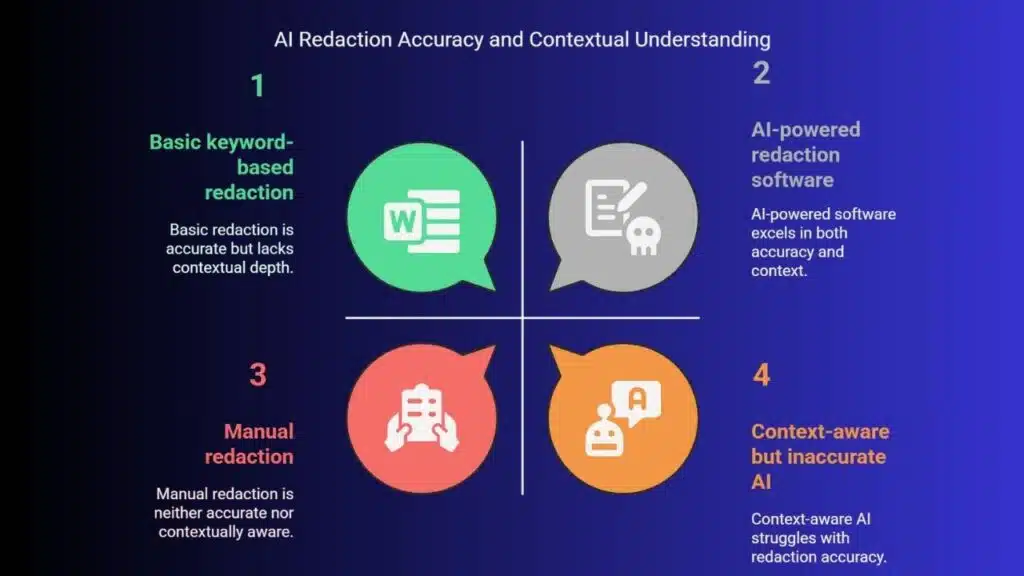
Redaction software powered by AI doesn’t simply read documents line by line. They comprehend them.
Modern AI models are trained to recognize sensitive content in context. That is, they can recognize not just certain keywords or data types—like phone numbers, Social Security numbers, or email addresses—but contextual clues as well. They can recognize a name that appears in a given paragraph, identify confidential language in legal contracts, or highlight medical terms in medical reports.
This is the kind of intelligence that sets AI apart. Instead of relying on users to laboriously locate each instance of personal data, AI helps to bring it to the forefront automatically. It also reduces the risk of inconsistency. If several people censor the same document, mistakes are unavoidable. AI sets a quality and accuracy standard that human check alone often cannot provide.
AI learns in the long term as well. When it processes more documents and is exposed to more input, the precision improves and the system becomes more attuned to the specific needs of an industry or a business. If you are legal, financial, healthcare, or public service, AI models can learn to sort and deal with the types of sensitive information that matter most to you.
Automation Means Speed—and Security
What took hours previously can now be achieved in minutes. Automated redaction allows processing a whole folder or batch of documents at one time. It is especially handy for companies that deal with regulatory audits, public records requests, or legal discovery procedures involving thousands of pages.
But speed has another benefit. Consistency and traceability are also obtained through automation. All redactions are logged and audited so that it is easy to see what was redacted, when, and why. This is important for data privacy laws like GDPR, HIPAA, and CCPA.
Combined, AI and automation not only reduce time and human error—both offer a redaction system that can expand with the requirements of today’s businesses.
Mid-sized companies that once struggled to manually manage confidentiality can now use a software like Redactable to integrate secure redaction directly into their daily operations. Whether it’s preparing documents for public release or wiping sensitive documents before being shared internally, these programs make sure that what is intended to be kept confidential remains confidential.
And most importantly, possibly, computerized redaction software doesn’t merely “hide” information. It deletes it completely from all layers of the document. There are no recoverable traces, no concealed content, and no leaked metadata. That’s a level of security manual processes simply can’t offer.
Building Privacy Into the Workflow
One of the greatest advantages of AI-powered redaction software is that it naturally fits into your current workflows. Instead of adding additional steps to your workflow, it streamlines them. Teams of individuals can upload documents, set up redaction parameters, and track output—all within a single dashboard. In many situations, the software can be set up to automatically identify certain types of data or follow industry guidelines.
This convergence reduces friction and raises adoption. Workers will be more likely to use redaction tools consistently when they are simple and streamlined. And that’s a key element of building a privacy-first culture in an organization.
After all, redaction isn’t the law—it’s a mark of respect for the businesses and individuals you’re working with. It’s a promise that their information will be handled carefully, even after it’s no longer needed.
Looking Ahead: The Future of Redaction
As AI evolves further, its document protection and analysis functionalities will only become more intense. We can expect redaction tools to become more predictive, adaptive, and integrated into real-time collaboration platforms. Eventually, AI may even detect sensitive data in spoken transcripts, scanned handwriting, or multimedia files.
Yet wherever the technology leads, this is certain: the risks of poor redaction aren’t going away. If anything, they’re increasing as more information is generated, transmitted, and stored electronically.
Organizations that invest in smart, secure redaction solutions now are preparing for that future. Not only are they reducing risk—they’re building trust.
For in an age where information comes in non-stop, being capable of protecting what must remain private is one of the highest forms of professionalism any business can offer.

























