Google has made a surprising and strategic move by transforming its iconic homepage Doodle — usually reserved for celebrating historical events, cultural milestones, or notable personalities — into a promotional banner for its new artificial intelligence-powered tool called “AI Mode.” This shift marks a significant moment in the tech giant’s evolution as it seeks to position itself as a front-runner in the race for AI supremacy.
On Tuesday, visitors to the Google homepage were greeted with an animated, glowing “G” icon in place of the traditional logo. Clicking on the Doodle didn’t take users to a commemoration or biography, but rather to a landing page showcasing AI Mode — Google’s latest addition to its growing suite of AI-powered search capabilities. The Doodle also included a dedicated share button, encouraging users to spread the word about the new feature.
Why Google Is Promoting AI Mode Now
Responding to competition and reshaping the future of search
The decision to promote AI Mode in such a high-visibility way comes as Google faces mounting competition from newer AI-focused companies. These include OpenAI, creator of ChatGPT; Anthropic, the developer of Claude; and Perplexity AI, a search startup branding itself as an “AI-powered answer engine.” All of these platforms offer advanced generative AI features that are drawing attention away from traditional search engines.
Faced with this growing pressure, Google is intensifying its efforts to promote its own AI solutions. By placing AI Mode on its most valuable digital space — the homepage — the company is actively pushing more users to try its latest tools and stay within the Google ecosystem.
What Is AI Mode?
An advanced search experience powered by Gemini
AI Mode is designed to enhance the traditional search experience by offering more conversational, insightful, and contextual answers to complex questions. Rather than receiving a list of blue links, users get AI-generated responses that summarize key information, compare data, and offer direct answers — all in one interaction.
The engine behind AI Mode is Google’s Gemini, a powerful AI model developed to understand and respond to multifaceted queries. Users can engage with AI Mode through typed questions, voice inputs, or even image-based queries, allowing for a more flexible and intuitive way of gathering information.
This tool aims to address queries that would typically require multiple searches or deep browsing. For instance, instead of searching “best DSLR cameras 2025,” “Canon vs Nikon comparison,” and “Amazon reviews,” users can simply ask AI Mode to recommend a camera based on their needs — and receive a concise, tailored answer.
Key Features of AI Mode
Enhancing user experience through intelligent interaction
AI Mode includes several features that make it a standout addition to the search platform:
-
Multi-step reasoning: AI Mode can handle questions that require layered thinking and context. It keeps track of the conversation and allows follow-up questions for deeper exploration.
-
Visual aids and data organization: Users receive not only text-based answers but also tables, charts, lists, and images embedded within responses, making it easier to digest complex information.
-
Multimodal input support: Users can interact using not just text, but also images and voice, making the tool accessible and dynamic for various user needs.
-
Personalized suggestions (opt-in): If users choose to share data with Google, AI Mode can offer personalized recommendations based on past search behavior, location, or interests.
-
Integration with other services: Google is gradually integrating AI Mode across its products, including Gmail, Maps, Shopping, and Google Workspace, turning it into a seamless assistant across platforms.
From Experiment to Rollout
Gradual expansion to reach more users globally
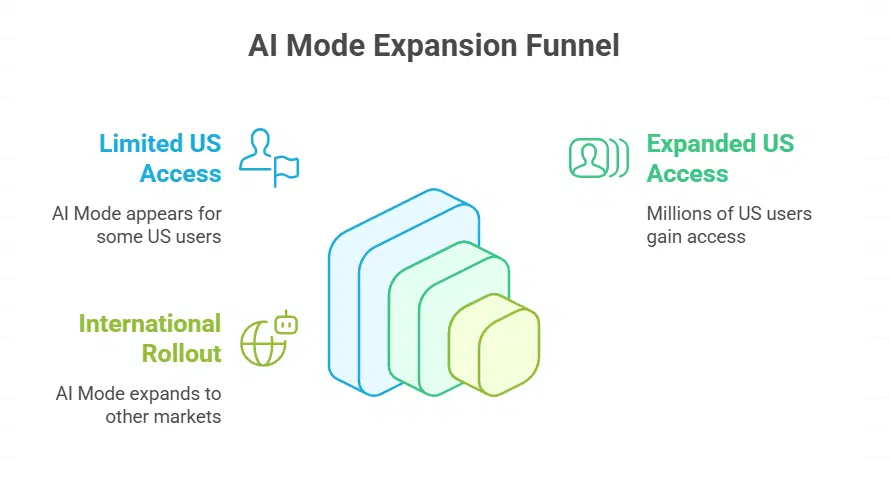
AI Mode began as an experimental feature available only through Search Labs, a program that allows early adopters to test new Google features. In March 2025, it started appearing alongside regular search results for some users in the United States.
By May, Google had expanded access to millions of U.S. users, removing the waitlist and placing the AI Mode button directly below the search bar — even replacing the long-standing “I’m Feeling Lucky” button, a change rarely made by the company. This rollout signifies a broader transition, signaling Google’s confidence in the tool’s readiness and importance.
While currently available to a majority of users in the United States, AI Mode is expected to be released in other major markets in phases. The early positive reception in test regions like India has accelerated the company’s international expansion plans.
How AI Mode Differs from Traditional Search
A conversational shift designed for deeper discovery
Traditional search engines work by matching keywords in a user’s query with content from web pages and returning a list of relevant links. AI Mode, on the other hand, processes the intent behind the question, pulls data from multiple sources, and delivers a synthesized answer in real-time.
For instance, if someone asks, “How can I prepare for a marathon in three months?” the traditional search engine would offer articles, blogs, and videos. AI Mode would provide a complete three-month training plan, nutritional advice, gear recommendations, and even weekly progress tracking tips — all in one scrollable response.
This chatbot-style interaction bridges the gap between search engine and assistant, aiming to reduce user effort and increase satisfaction.
The Role of the Homepage Doodle
Google’s most powerful marketing tool in the spotlight
The use of the Doodle — usually reserved for honoring scientists, writers, athletes, or significant global events — for a product promotion reflects a clear shift in Google’s communication strategy. It shows the company’s intent to push AI Mode as a critical evolution in how people interact with information online.
While a Google spokesperson emphasized that this Doodle was a fun promotion rather than a permanent change in Doodle policy, the move underlines how important AI Mode has become to the company’s roadmap.
The Future of AI Search at Google
Competing for leadership in the AI era
As generative AI continues to redefine how we use the internet, Google is positioning itself not just as a gatekeeper to information, but as a real-time solution provider. With AI Mode powered by Gemini, Google wants to remain the first choice for users looking for intelligent, interactive, and efficient search experiences.
The promotional push through the homepage Doodle is just the beginning. In the coming months, Google is expected to introduce more capabilities to AI Mode, integrate it further into its ecosystem, and possibly roll it out globally to ensure that it remains a dominant player in the rapidly evolving AI landscape.
Google’s bold move to feature AI Mode on its homepage through an animated Doodle shows how seriously the company is investing in its AI-driven future. The tool, backed by the advanced Gemini model, is part of a larger push to redefine how users interact with search and information. With features that allow complex, multimodal, and personalized interactions, AI Mode is not just a feature—it’s Google’s bet on the future of the internet.