

Google has temporarily paused the rollout of its much-anticipated AI feature “Ask Photos” inside the Google Photos app. The decision was made following critical user feedback that raised concerns about the feature’s speed, response accuracy, and overall usability.
What Is “Ask Photos”?
Launched as a test feature in late 2024, “Ask Photos” is designed to let users search their personal photo libraries using natural, conversational language rather than specific keywords or filters.
Powered by Google’s Gemini AI model, the feature aims to transform how users interact with their visual memories. For instance, you could ask:
-
“Show me photos of my dog at the beach”
-
“Find receipts from last September”
-
“Where did I park my car last weekend?”
Instead of scanning manually or relying on date-based filters, “Ask Photos” uses AI to understand the context of images—including visual elements, text within images, locations, and even emotions or events.
Why Google Paused the Feature
Although the initial response was positive during early previews, the broader rollout was halted after users started reporting performance issues.
In a public statement on X (formerly Twitter), Jamie Aspinall, Product Manager at Google Photos, acknowledged the growing concerns. He said:
Ask Photos isn’t where it needs to be — in terms of latency, quality, and user experience.”
According to Aspinall, Google received complaints about the slowness of the responses, incorrect search results, and unexpected behavior of the AI assistant when interpreting user queries.
To address these concerns, Google has decided to pause the rollout for a small group of users who had early access to the feature. The company emphasized that this is a temporary pullback, and a more refined version will be released soon.
This pause is intended to allow the engineering team to improve backend systems, fine-tune the Gemini AI’s photo interpretation models, and refine the overall response engine.
What Powers “Ask Photos”?
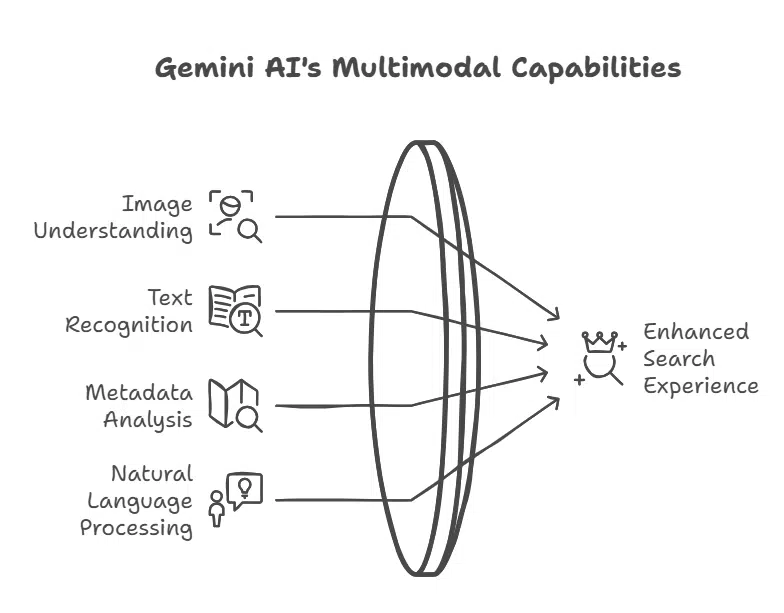
The “Ask Photos” tool is based on the Gemini AI model, which is a multimodal model developed by Google DeepMind. It can understand and combine data from images, text, and metadata to deliver richer, context-aware search experiences.
Gemini AI was specifically trained for this feature to:
-
Detect objects, people, locations, and actions within photos
-
Recognize and extract text within images (OCR)
-
Understand conversational prompts in natural language
-
Match queries to photo content with contextual reasoning
For example, if you ask, “Show me the photo of the cake from Mom’s birthday,” it tries to understand what event is referenced, look for objects like cakes and people tagged as “Mom,” and retrieve the most likely photo(s).
New Search Upgrades in Google Photos
While “Ask Photos” is paused, Google has rolled out other powerful improvements to the standard Google Photos search function. These include:
1. Exact Match with Quotation Marks
Users can now use quotes (“”) in searches to find exact matches for:
-
Filenames
-
Camera model identifiers
-
Captions
-
Text within the photos (like screenshots, signs, or scanned documents)
For instance, searching for "invoice 2024" will retrieve only images with that exact phrase.
2. Improved Visual Search Without Quotes
If users search without using quotes, Google Photos will now also return visual matches based on content, such as landmarks, faces, objects, and scenes. This adds a multimodal layer to the search, combining text, image recognition, and location data.
These upgrades come as part of Google’s broader vision of making Photos smarter and more intuitive, aligning with AI developments discussed during Google I/O 2024.
Past Setbacks with AI Features at Google
This is not the first time Google has faced backlash or quality issues with its AI rollouts. Notably:
-
Google Search’s “AI Overviews” feature, launched in May 2024, was paused after social media backlash when the tool suggested absurd or false answers—like adding glue to pizza cheese. The company admitted to the inaccuracies and temporarily pulled the feature to make adjustments.
-
Earlier this year, Google’s Gemini image-generation tool was suspended after producing historically inaccurate images, including depictions of U.S. Founding Fathers as people of color—a factual error that sparked significant controversy.
Google acknowledged these flaws and halted each feature to retrain the AI models, add safety layers, and improve contextual understanding.
These recurring pauses reflect Google’s “safety-first” AI rollout strategy, in which public feedback and ethical accuracy are treated as top priorities—especially after repeated pressure from regulators and watchdogs globally.
What’s Next for “Ask Photos”?
While there’s no firm date for when the feature will be fully relaunched, Aspinall said users should expect an updated version within weeks, with enhanced speed and reliability.
The company’s long-term goal is still clear: to make photo searching more human-like and personalized.
Instead of users adapting to software, Google wants its AI tools to adapt to users’ natural way of thinking and speaking. This includes:
-
Contextual awareness of events, locations, and people
-
Emotional and visual interpretation of images
-
Seamless integration across Google’s AI ecosystem
Google’s decision to pause “Ask Photos” demonstrates both the potential and the challenges of integrating large language models into everyday tools. As AI becomes more central to Google’s products, the tech giant is also facing higher expectations for accuracy, speed, and cultural sensitivity.
While users may be disappointed by the delay, this strategic pause shows that Google is taking user trust and product maturity seriously.
For now, users can still enjoy improved search tools inside Google Photos and expect to see “Ask Photos” reappear in a better form soon.
























