
5 Tips For Creating An Effective Online Survey

Tips For Creating An Effective Online Survey

Online surveys remain one of the most practical ways to gather opinions, measure satisfaction, and understand customer behavior. When designed well, they deliver actionable insights that can guide product improvements, service upgrades, and strategic planning. Using a survey builder can make the process easier by helping you structure questions logically, customize layouts, and collect data in an organized format.

1. Define Your Goal Before Writing Questions

Every effective survey starts with a clear purpose. Identify exactly what you want to achieve before drafting questions. For instance, are you gathering feedback on a recent purchase, testing interest in a new product, or evaluating customer support?

Without a specific goal, it’s easy to create a survey that drifts into unrelated topics, which can frustrate participants. Defining your objective ensures each question serves a purpose and leads to meaningful results. This focus also helps in later stages when you analyze responses, making it easier to spot patterns and trends that matter.

2. Keep It Short and Simple

In the fast-paced digital environment, people have limited time and attention. Long surveys can cause drop-offs, reducing completion rates. Aim for a length that can be finished in five minutes or less, ideally with no more than 10 well-chosen questions.

Clarity is equally important. Use simple, direct language that avoids jargon or complex phrasing. Respondents should understand each question immediately without rereading. This approach improves accuracy and prevents misunderstandings that could distort your data.

3. Ask the Right Type of Questions

Variety in question format keeps the survey engaging while providing richer data. Multiple-choice questions are excellent for gathering measurable statistics, while open-ended questions give respondents space to share unique insights in their own words.

Rating scales, such as those from 1 to 5 or 1 to 10, help quantify satisfaction levels or likelihood to recommend. Yes-or-no questions can be useful for quick, decisive answers. The key is to balance these formats so you collect both quantitative and qualitative insights without overwhelming the participant.

4. Use a Logical Flow
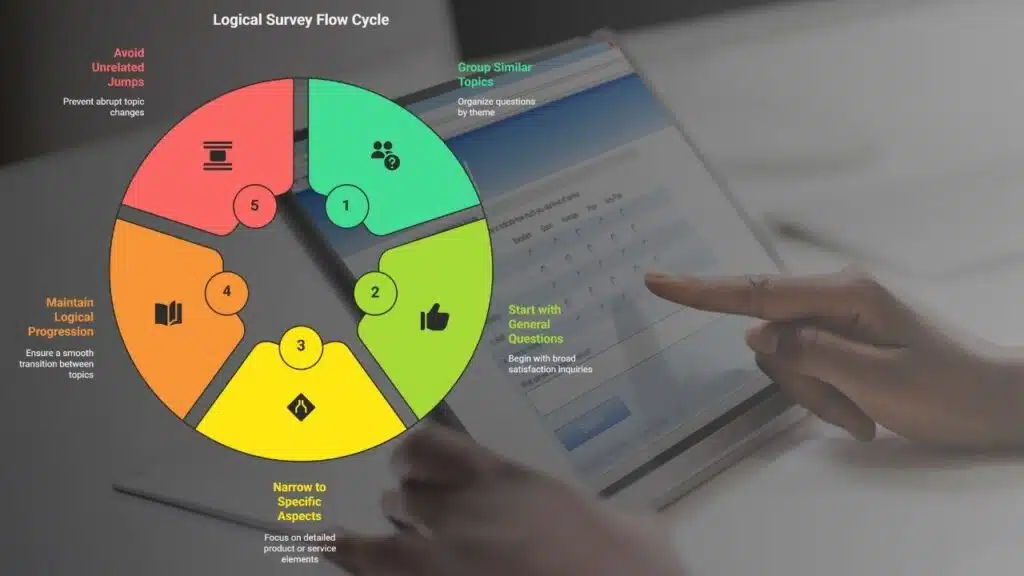
Question order matters. Group similar topics together and move from general to specific. For example, start with broad questions about overall satisfaction, then narrow down to specific aspects like product quality, delivery times, or support experiences.

This logical progression makes the survey feel natural and easier to complete. Avoid jumping between unrelated topics, as it can disrupt the respondent’s train of thought and lead to inconsistent answers.

5. Test Before Launching

Even well-planned surveys can have flaws that only become apparent during testing. Share your survey with a small group of colleagues or trusted customers first. Ask for feedback on clarity, length, and ease of use.

Testing helps identify any confusing wording, technical glitches, or layout issues before your survey goes live. It also allows you to estimate completion time, which can influence how many people finish it. A well-tested survey builds confidence that the data you collect will be accurate and actionable.

Final Thoughts

Creating an effective online survey involves more than just asking questions. It requires strategic planning, a user-friendly design, and a thoughtful approach to data collection. By applying these five tips, you can boost response rates, improve data accuracy, and gather insights that genuinely reflect your audience’s views. With the right preparation, your surveys can become a powerful tool for decision-making and business growth.



Subscribe to Our Newsletter

Related Articles

Top Trending

App safety checks for parents shown through a mother guiding her child on a tablet, helping viewers understand safe and supervised app use at home.
How to Audit Mobile Software: 9 App Safety Checks for Parents
Common Machine Learning Mistakes: illustration of a beginner working on an ML project with unreliable data, data leakage, overfitting, and poor model metrics.
10 Common Machine Learning Mistakes Beginners Should Avoid
An illustration titled "Zero-Click Search" showing a hand holding a smartphone with a Google search result featuring a Knowledge Panel answer
What Is Zero-Click Search and How to Survive It
Troubleshooting Tips for Python 54axhg5
Python 54axhg5: Bug Fixing And Troubleshooting Tips [Developer’s Guide]
How Influencer Marketing Pricing Really Works

Technology & AI

Common Machine Learning Mistakes: illustration of a beginner working on an ML project with unreliable data, data leakage, overfitting, and poor model metrics.
10 Common Machine Learning Mistakes Beginners Should Avoid
Troubleshooting Tips for Python 54axhg5
Python 54axhg5: Bug Fixing And Troubleshooting Tips [Developer’s Guide]
Best Public Datasets for Practicing Machine Learning
10 Best Public Datasets for Practicing Machine Learning
Ethical Dilemmas of AI: illustration showing AI ethics, algorithmic bias, data privacy, automation, human judgment, values, deepfakes, and the challenges AI creates for technology and humanity
9 Ethical Dilemmas AI Forces Us to Confront
Why Canva Became the Default Design Tool
Why Canva Became the Default Design Tool for Marketers

GAMING

Online Color Game Philippines
Online Color Game Philippines: What Every Beginner Should Know Before Playing
Ways to Reduce Game Development Costs
12 Ways Studios Cut Game Development Costs
NFT game development cost
How Much Does NFT Game Development Cost? A Realistic Budget Breakdown
Reasons Why You No Longer Need the Best Roblox AI Scripter
Forget Best Roblox AI Scripter: 10 Reasons Why You No Longer Need It
Blockchain Platforms for Game Development
The 9 Best Blockchain Platforms for Game Development

Business & Marketing

Raising Seed Capital for SaaS
Raising Seed Capital for SaaS: A Practical Founder’s Blueprint
marketing funnel
What Is a Marketing Funnel and How to Map Yours Step-by-Step
Mobile app for your business planning shown with app wireframes, performance analytics, budgeting notes, and multiple devices used to evaluate development decisions.
10 Questions to Ask Before Deciding on a Mobile App for Your Business
CAC Payback
Why CAC Payback Matters Far More Than Cheap Customer Acquisition
LTV to CAC ratio
The LTV to CAC Ratio: What It Is and Why Everyone Quotes It

EdTech & E-Learning

Why EdTech Pilots Fail
Why EdTech Pilots Fail: Lessons From Real School Rollouts
calendar activities for early learners
7 Calendar Activities for Early Learners to Build Time Sense
Global Disparities in AI Learning
Global Disparities in AI Learning: Why Some Students Are Left Behind
How Long Does It Take a Child to Learn the Alphabet
How Long Does It Take a Child to Learn the Alphabet? A Real Timeline
Games to Encourage Early Language Skills
I Tried 8 Games to Encourage Early Language Skills [One Flopped]

Software & Apps

App safety checks for parents shown through a mother guiding her child on a tablet, helping viewers understand safe and supervised app use at home.
How to Audit Mobile Software: 9 App Safety Checks for Parents
Why Canva Became the Default Design Tool
Why Canva Became the Default Design Tool for Marketers
TikTok Story Viewer
TikTok Story Viewer: 10 Best Tools To View TikTok Stories Privately
Best Browser Based Tools that Replace Desktop Apps
10 Best Browser-Based Tools that Replace Desktop Apps
How to Convert OST to PST Free Online
How to Convert OST to PST Free Online?