
Every six months, another productivity writer attempts digital minimalism by buying a flip phone, deleting their accounts, and declaring themselves cured. Three weeks later, they are quietly back on an iPhone because their real-world work requires multi-factor authentication, rideshares, and flight confirmations.
Smashing your hardware, taking a monk’s vow of silence, or moving off-grid is an impractical stunt. It looks great in an essay; it collapses the moment you need to run a business, coordinate with a remote team, or manage a household across three calendar apps.
Real digital minimalism is an architectural shift: treating personal focus as a finite asset and building physical controls around software designed to harvest it.
If your strategy relies on “self-discipline” or “being more intentional,” you have already lost. You are pitting an exhausted human brain against teams of software engineers whose compensation depends on keeping your eyes glued to a screen. Stop relying on willpower. Re-engineer the environment instead.
Why Digital Minimalism Beats the “Digital Detox” Fallacy
Let’s dismantle a corporate favorite: the weekend digital detox.
Taking two days off from your phone every quarter is the operational equivalent of drinking green juice for forty-eight hours after eating junk food every day for six months. It generates a brief, self-righteous high, changes zero baseline habits, and evaporates the minute Monday morning email traffic hits your inbox.
The problem isn’t that people are weak-willed. The problem is that modern environments have been stripped of low-friction alternatives. When every quiet moment, like standing in line, waiting for an elevator, or sitting in traffic, is met with an effortless reflex to pull out a phone, your brain loses its baseline tolerance for cognitive rest.
Detoxes focus on temporary abstinence. Engineering focuses on changing the default state. You don’t need a temporary break from technology; you need a daily operating system where passive consumption requires deliberate, annoying effort.
Applying Digital Minimalism to Your Hardware
To fix your relationship with portable hardware, stop treating your phone like an all-in-one terminal for your life. Turn it back into what it was originally intended to be: a single-purpose utility tool, roughly as exciting as a tape measure or an analog calculator.
Isolate Endless Feeds to Desktop Workstations
If an application relies on an algorithmic feed, infinite scrolling, or targeted alerts to generate revenue, delete it from your phone immediately. Social networks, news aggregators, message boards, and video sites belong on desktop web browsers, and nowhere else.
Moving consumption exclusively to a desktop computer reintroduces massive physical friction:
-
You have to sit down at a desk.
-
You have to open a browser and type out a full URL.
-
You have to navigate intentionally clunky desktop interfaces.
That micro-friction eliminates 90% of compulsive checking. If a platform isn’t important enough for you to sit at a desk and type in a web address, it was never worth your time in the first place.
Strip Visual Rewards from the Interface
Modern mobile operating systems are designed like slot machines: bright primary colors, red badges, subtle haptic vibrations, and variable reward layouts.
Remove those triggers from your phone’s software:
-
Turn on permanent grayscale. Visual saturation acts as a constant subconscious reward. Removing display color flattens the appeal of mindless scrolling. Scanning a social feed in grayscale feels about as exhilarating as reading an unformatted spreadsheet.
-
Eradicate non-human notifications. Turn off alerts for everything except direct communications from actual people (calls and direct texts). News flashes, game updates, app reminders, and promotional pings exist solely to pull you back into an app.
-
Purge notification badges. Red circles with numbers inside are engineered stress triggers. Disable them across every app, including email and messaging tools. Check your inbox when you actively decide to open it, not when a red dot demands your attention.
Create Hard Physical Perimeters
Keep hardware away from your body when you don’t actively need it for a specific task.
Buy a basic analog alarm clock. Stop charging your phone on your nightstand. When your phone serves as your morning alarm, your day begins in a defensive, reactive posture, scrolling through headlines, messages, and emails before your feet hit the floor. Charge your hardware in a completely different room overnight. Your first half-hour of every day should belong to your own thoughts.
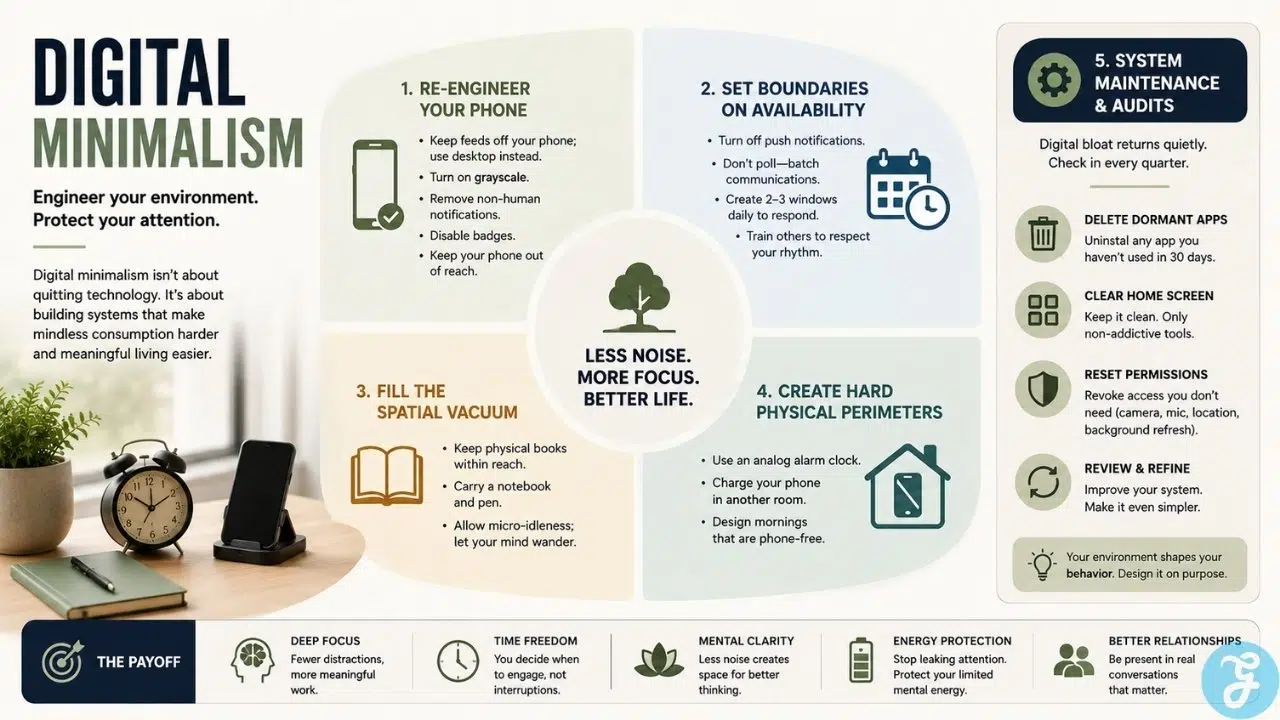
Digital Minimalism at Work: Setting Availability Boundaries
The single biggest driver of digital clutter is the delusion of immediate availability.
Knowledge work has convinced itself that responding to a chat message or email within four minutes is the primary metric of human value. In reality, constant availability guarantees shallow execution, broken focus, and persistent, low-grade distraction.
Kill Real-Time Polling
Disable push notifications for work email, messaging platforms, and project management tools on your phone. Better yet, remove work communication apps from your personal mobile devices entirely if your role permits it.
If you check your inbox every nine minutes while trying to write code, review strategy, or draft a complex report, you aren’t actually working; you are just toggling between micro-distractions.
Establish Batch Windows
Process communication in dedicated, pre-determined blocks. Two or three windows a day (for instance, 10:00 AM, 2:00 PM, and 4:30 PM) are more than enough for almost every professional role that doesn’t involve active infrastructure outages.
Batching your responses trains colleagues and clients on how to interact with you. People adapt quickly when they realize you answer thoroughly three times a day rather than haphazardly every twelve minutes. If a true emergency occurs, people will call your phone directly. They rarely do, because 99% of “urgent” messages are simply someone else offloading their poor planning onto your schedule.
Filling the Spatial Vacuum
If you successfully dismantle your digital consumption habits without replacing them, your system will crumble within a week.
Boredom is a powerful psychological force. When you strip away video apps, news streams, and social feeds, your brain experiences a sudden void. If you leave that space blank, friction alone won’t save you; you will eventually invent new, equally unproductive digital habits to fill the silence, like compulsively checking local weather forecasts or real estate listings.
Re-Establish Analog Defaults
Build physical, low-friction defaults before you purge your digital habits:
-
Keep physical books in high-traffic areas. Place a book on your desk, your coffee table, and your nightstand. Make reaching for physical paper easier than unlocking a device.
-
Carry a pocket notebook and pen. When an idea, task, or sudden urge to look up a trivial fact strikes during deep work, write it down on paper. Don’t open a browser tab. Don’t open a notes app. Park the thought on paper and return to what you were doing.
-
Normalize micro-idleness. Train yourself to do nothing while standing in line, waiting for transport, or sitting in a lobby. Let your mind wander. The capacity to sit quietly with your own thoughts for three minutes without electronic stimulation is a foundational requirement for high-level creative problem-solving.
Long-Term Digital Minimalism: System Maintenance & Audits
Digital bloat creeps back into your routines quietly. You download an app for a restaurant menu, accept a new messaging channel for a short-term project, or re-enable notifications for a travel booking. Within six months, your phone reverts to its original chaotic state.
Set a recurring calendar event on the first day of every quarter to run a quick maintenance sweep:
-
Delete dormant applications: Uninstall any app you haven’t opened in thirty days. You can always redownload it later if necessary.
-
Clear home screen clutter: Keep your primary screen completely clear, or limit it exclusively to non-addictive utility applications (camera, maps, calendar, calculator).
-
Reset permission logs: Revoke camera, microphone, background refresh, and location permissions for apps that don’t strictly require them to function.
Digital minimalism isn’t a lifestyle brand or a self-help philosophy. It’s an aggressive defense mechanism for your attention. Build systems that make passive consumption annoying, inconvenient, and useless. The focus takes care of itself.