

The standard for digital capture in 2026 has shifted from basic video logging toward intelligent production. Modern creators now demand tools that can handle high frame rate gaming while simultaneously offering AI features for tutorial clarity. This evolution ensures that even a single user can produce content that looks professionally edited with minimal manual effort.
Finding the best screen recording software for tutorials and gaming requires a balance of performance and post-production flexibility. While gamers often prioritize low system impact and high resolution, tutorial creators look for annotation tools and clear audio management. The current market offers specialized solutions that cater to both ends of the spectrum through hybrid engines and cloud-based processing.
How We Chose Our Top 13 List?
Our selection process for the 2026 rankings involved analyzing recording stability and the depth of integrated editing features. We prioritized software that offers seamless transitions between raw capture and finished content.
We applied the following weightings to our research and comparison:
| Criteria | Weighting | Focus Area |
| Performance Impact | 40% | CPU and GPU usage during high-load tasks |
| Editing Suite | 30% | Depth of annotation and timeline tools |
| AI Integration | 30% | Automated noise removal and smart zooming |
The 13 Best Screen Recording Software For Tutorials and Gaming Content Creators:
The following thirteen tools represent the most reliable and feature-rich options available for creators in 2026. Each selection has been vetted for its ability to produce high-quality output across various workflows.
1. OBS Studio
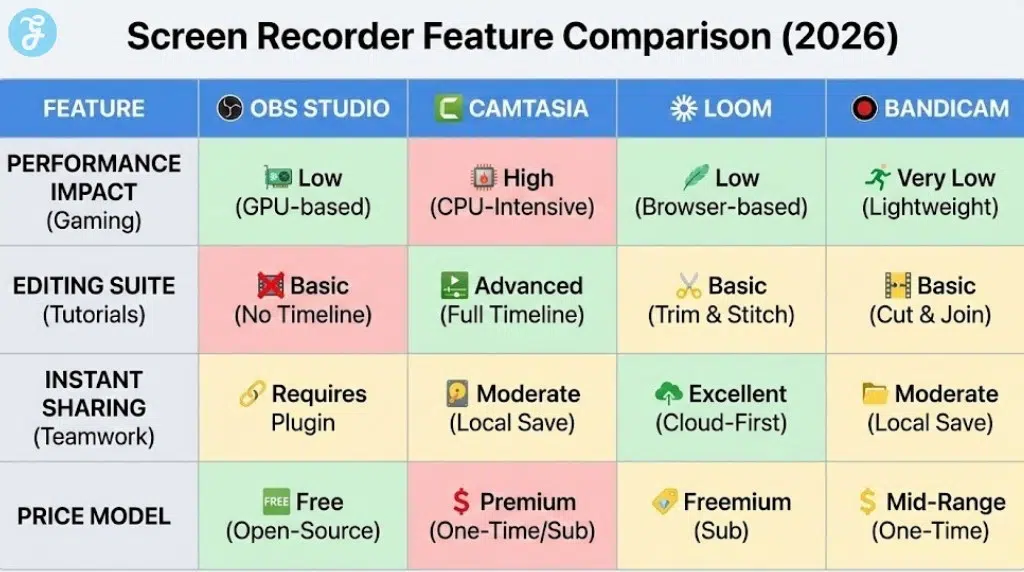
OBS Studio remains the undisputed champion of open-source capture for both high-end gaming and complex tutorials. It allows for unlimited scene switching and supports a massive library of community-driven plugins. The 2026 version includes improved hardware acceleration that practically eliminates frame drops on modern GPUs.
Special Features:
-
Advanced audio mixer with per-source filters and noise gates.
-
Support for multiple simultaneous encoding outputs.
-
Modular user interface that can be rearranged for any workflow.
Things to Consider:
-
The steep learning curve can be intimidating for casual users.
-
It does not include a built-in video editor for post-production.
-
Setting up complex scenes requires significant initial time investment.
Best for: Power users who want total control over their recording environment.
2. Camtasia
Camtasia is widely considered the gold standard for creating professional-grade educational content and software demos. It combines a high-quality recorder with a full-scale video editor that is specifically tuned for instructional design. The 2026 update features AI-powered cursor smoothing and automatic background removal for webcams.
Special Features:
-
Extensive library of pre-built callouts and animations and lower thirds.
-
Interactive quizzing features that can be embedded directly in the video.
-
Dedicated audio leveling tools to maintain voice consistency.
Things to Consider:
-
The premium price tag is a major hurdle for hobbyists.
-
It can feel sluggish when editing very long 4K gaming files.
-
Only available as a one-time purchase or annual subscription.
Best for: Educators and corporate trainers who need polished tutorial output.
3. Bandicam
Bandicam has maintained its reputation as the most lightweight game recorder for Windows users. It utilizes hardware acceleration to capture 4K video at up to 480 frames per second without slowing down the game. The software is particularly effective for those using older hardware who still want high-definition results.
Special Features:
-
High-speed game recording mode that uses DirectX or OpenGL.
-
Real-time drawing and mouse highlight effects during capture.
-
Ability to record external devices like Xbox or PlayStation via HDMI.
Things to Consider:
-
The free version includes a watermark and 10-minute time limit.
-
It is strictly limited to the Windows operating system.
-
The built-in editing features are very basic compared to competitors.
Best for: Hardcore gamers who need maximum performance with minimal overhead.
4. Loom
Loom has redefined asynchronous communication by making screen recording as fast as sending a text message. It is a web-first tool that provides an instant shareable link the moment you stop recording. The 2026 AI integration automatically removes filler words and generates a written summary of your video.
Special Features:
-
Instant cloud upload with no manual rendering required.
-
AI-driven “Filler Word Removal” to clean up spoken audio.
-
Interaction features like comments and emoji reactions on the video page.
Things to Consider:
-
The free tier has strict limits on video length and total storage.
-
It requires a stable internet connection for the best experience.
-
Not suitable for high-fps gaming or offline archival.
Best for: Professionals who need to share quick walkthroughs or feedback.
5. Movavi Screen Recorder
Movavi is built for the user who wants high-quality results without reading a manual. It features a clean interface that lets you capture specific windows or regions with two clicks. The 2026 version adds a “Schulable Recording” mode that can capture webinars or streams automatically.
Special Features:
-
Real-time drawing on the screen during the recording process.
-
Built-in screenshot tool with basic annotation and sharing.
-
Separate audio and video streams for easier post-production editing.
Things to Consider:
-
The trial version places a watermark on all exported content.
-
Advanced users might find the lack of scene management limiting.
-
Puts a slight strain on system resources during 4K capture.
Best for: Casual creators who value a fast and intuitive workflow.
6. EaseUS RecExperts
This tool has gained popularity for its “one-button” approach to complex recording tasks. It handles everything from encrypted streaming videos to protected game windows with ease. The 2026 update includes an AI video enhancer that can upscale low-resolution captures in real time.
Special Features:
-
Dedicated game recording mode with customizable frame rates.
-
Task scheduler for automated recording of online meetings.
-
Built-in media player and basic trimming editor.
Things to Consider:
-
Some of the most advanced AI features are behind a paywall.
-
The interface can feel a bit cluttered with promotional offers.
-
Not as powerful as OBS for multi-source broadcasting.
Best for: Beginners who want a safe and reliable all-around recorder.
7. NVIDIA ShadowPlay
ShadowPlay is a free feature for anyone with a modern NVIDIA graphics card. It uses the dedicated NVENC encoder on the GPU to record gameplay with nearly zero impact on performance. The “Instant Replay” mode is a favorite for gamers who want to save the last five minutes of action after a great play.
Special Features:
-
Hardware-level encoding that minimizes CPU usage.
-
Automatic highlight capture for supported games.
-
Integrated broadcast tools for streaming directly to social platforms.
Things to Consider:
-
Requires an NVIDIA GPU and the GeForce Experience software.
-
Lacks the annotation and tutorial tools found in paid software.
-
Customization options for non-gaming tasks are limited.
Best for: NVIDIA users who want a simple and performance-friendly game recorder.
8. Snagit
Snagit is the ultimate tool for creating documentation and step-by-step written guides from video. It allows you to take a screen recording and then pull specific frames into a template to create a PDF manual. The 2026 version features “Picture-in-Picture” recording that is perfect for software walkthroughs.
Special Features:
-
“Step Tool” that automatically numbers items in a screenshot.
-
Ability to turn screen recordings into animated GIFs instantly.
-
Panoramic scrolling capture for long webpages or documents.
Things to Consider:
-
It is not designed for gaming or high-motion video.
-
The video editing features are restricted to simple trimming.
-
Requires a one-time purchase that can be pricey for single users.
Best for: Technical writers and anyone creating internal company documentation.
9. ScreenPal
Formerly known as Screencast-O-Matic, ScreenPal provides a balanced set of tools for educators and small businesses. It offers a unique script manager that helps you sync your voiceover with your on-screen actions perfectly. The cloud hosting platform makes it easy to organize and share your entire video library.
Special Features:
-
Integrated script-to-video tool for organized tutorial creation.
-
Stock library of music and images for use in the editor.
-
Cross-platform support including a powerful mobile recording app.
Things to Consider:
-
The free version is limited to 15-minute recordings.
-
Some of the best editing tools require a Premier subscription.
-
The interface feels a bit more “educational” than “creative”.
Best for: Teachers who need to create structured and scripted video lessons.
10. Clipchamp
Clipchamp is the native video editor and recorder for Windows 11 and 12. It provides a surprisingly powerful set of tools for a built-in app, including AI text-to-speech and social media templates. Because it is integrated with OneDrive, it is one of the easiest ways to move recordings between devices.
Special Features:
-
AI text-to-speech with realistic voices for narration.
-
Direct integration with Windows for a seamless desktop experience.
-
Large library of stock assets and transitions for quick edits.
Things to Consider:
-
High-resolution exports were previously locked behind a subscription.
-
It is a web-based app so it can be slow on poor connections.
-
Not ideal for recording intensive 3D games due to browser overhead.
Best for: Windows users who want a free and integrated editing solution.
11. CleanShot X
CleanShot X is widely considered the best utility for macOS users who value design and speed. It replaces the native Mac screenshot tool with a much more powerful suite that includes scrolling capture and video recording. The 2026 version includes “Desktop Hider” which cleans up your icons before you hit record.
Special Features:
-
Clean and minimalist interface that feels native to macOS.
-
Built-in cloud storage for instant link sharing of clips.
-
Ability to record the screen and webcam and system audio simultaneously.
Things to Consider:
-
Only available for Mac users which limits cross-platform teams.
-
It is more of a utility than a full-scale video production suite.
-
Requires a subscription for the Pro cloud features.
Best for: Mac power users who need a fast and beautiful capture workflow.
ShareX is the open-source champion for Windows power users who love automation. It allows you to set up complex workflows where a recording is automatically cropped and uploaded and shortened to a URL. While the interface is dated, the level of customization is unmatched by any other free tool.
Special Features:
-
Supports over 80 different destination platforms for uploads.
-
Built-in image editor and OCR tool for extracting text.
-
Zero advertisements or watermarks despite being entirely free.
Things to Consider:
-
The interface is very technical and can be confusing.
-
It is not optimized for high-fps game recording.
-
Lack of an integrated video timeline makes editing difficult.
Best for: Technical users who want to automate their capture and sharing process.
13. iSpring Suite
iSpring Suite is a specialized tool for creators who need to build full e-learning courses. It allows you to record your screen and then build interactive elements around the video like tabs and timelines. It is an industry favorite for those who need to track learner progress and engagement.
Special Features:
-
Seamless integration with PowerPoint for presentation recording.
-
Built-in interaction templates for creating digital courses.
-
Professional audio editor for cleaning up voiceover recordings.
Things to Consider:
-
Extremely expensive compared to standard screen recorders.
-
Targeted almost exclusively at the corporate training market.
-
Overkill for someone just looking to record gaming clips.
Best for: Professional instructional designers and corporate trainers.
Screen Recording Market Overview 2026
The market is currently defined by a move toward all-in-one platforms that combine recording and hosting and editing. We are seeing a significant increase in browser-based tools that rival traditional desktop applications in performance.
| Software Name | Primary Use | Platform | 2026 Pricing |
| OBS Studio | High-End Gaming | Win, Mac, Linux | Free |
| Camtasia | Pro Tutorials | Win, Mac | Premium |
| Bandicam | Windows Gaming | Windows | Mid-Range |
| Loom | Quick Explainer | Web, Win, Mac | Subscription |
| CleanShot X | macOS Productivity | macOS | Value |
How Should You Choose The Best Option For You
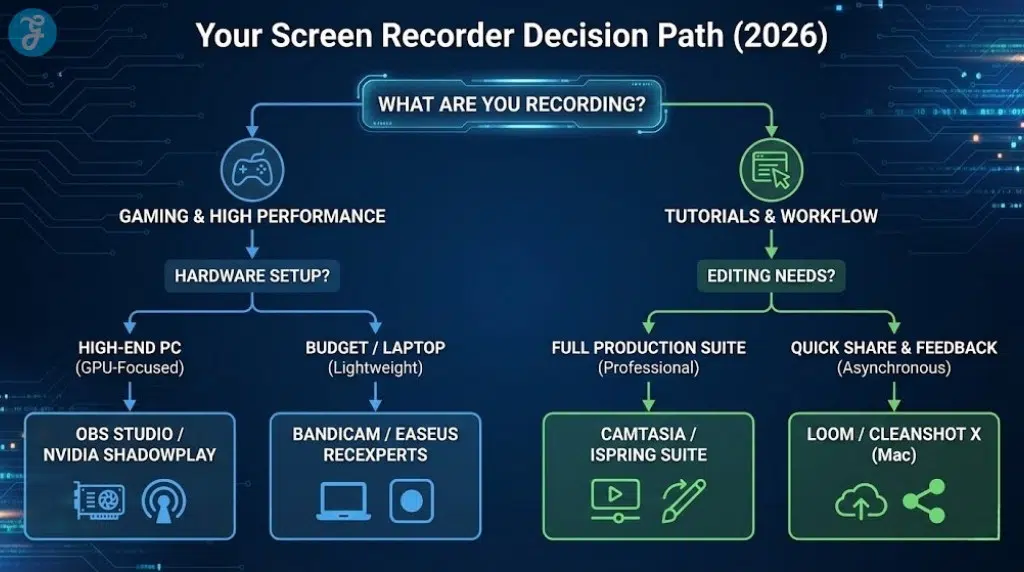
Selecting the best screen recording software for tutorials and gaming depends on your specific output goals. If your priority is making high-fidelity gaming clips with no lag, you should stick to hardware-specific tools like NVIDIA ShadowPlay or high-performance apps like Bandicam. These tools are optimized to use your GPU, ensuring that your gameplay remains smooth while you record.
For tutorial creators, the decision should be based on the level of editing you need. If you want a polished and professional look with animations, Camtasia is worth the investment. However, if you just need to share quick thoughts with a team, the AI-driven features of Loom or the integrated simplicity of Clipchamp are much more efficient choices for a daily workflow.
To recap:
| Category | Top Pick | Primary Reason |
| Best for Gaming | OBS Studio | Unmatched performance and customization for power users. |
| Best for Tutorials | Camtasia | The most complete suite for professional instructional design. |
| Best for Teams | Loom | Fastest way to record and share and collaborate on clips. |
| Best for Mac | CleanShot X | Beautifully designed utility that fits the macOS ecosystem. |
Wrap-Up
The variety of tools available in 2026 ensures that every content creator can find a solution that fits their skill level and budget. From the open-source power of OBS to the AI-enhanced speed of Loom, the best screen recording software for tutorials and gaming has never been more accessible. By understanding whether you need deep editing or simple capture performance, you can choose a tool that streamlines your creative process. Investing in the right software today will save you hours of post-production work and significantly improve the quality of your digital content.
























