


The difficult part is not finding an app that a toddler will tap. It is finding one that suits the child’s age, holds attention without becoming frantic and offers something more useful than a stream of sounds and rewards.
A newly two-year-old may need large touch targets, simple cause-and-effect play and familiar songs. By four, some children are ready for letter sounds, counting sequences and short guided lessons. Others still learn more comfortably through stories, building and pretend play.
That difference shaped this list of the best apps for toddlers. Age fit, design, cost transparency, adult involvement and practical learning value mattered more than the number of games in a library. Free options rank highly when they are genuinely useful. Paid apps earn their place only when they offer something meaningfully different.
App features, subscription terms and availability can change by device and country. Check the current store listing before starting a trial or paying for a plan.
The Quick Picks
Parents who do not want to compare all nine apps can start here:
- Best free all-rounder: Khan Academy Kids
- Best paid preschool prep app: Sago Mini School
- Best for open-ended exploration: Pok Pok
- Best for building and shared play: LEGO DUPLO World
- Best free app with familiar characters: PBS KIDS Games
- Best for early English phonics: Duolingo ABC
- Best calmer alternative: Hungry Caterpillar Play School
- Best for a large English-learning library: Lingokids
- Best for older preschoolers who like structured lessons: Montessori Preschool
These apps are not interchangeable. A child who resists formal activities may get more from Pok Pok than from a phonics programme. A four-year-old who keeps asking what words say may be ready for Duolingo ABC, even if a younger sibling is not. Families looking beyond the toddler years can use Best Educational Apps for Kids as an age-by-age reference once that wider guide is published.
Before Downloading Any Toddler Learning App
Look Past the Age Label
The age range supplied by a developer is a useful starting point, but it cannot account for differences in language, attention, hand control or previous experience with touchscreens. Store ratings can create additional confusion. An Apple rating such as 4+ concerns the suitability of an app’s content. It is not a developmental assessment saying that every child under four is unable to use the app.
Open the first activity with the child and watch what happens. Random tapping can sometimes complete a task by accident. Intentional use looks different: the child follows a direction, anticipates what an object will do, repeats a word or returns to an activity with a clear purpose.
Find Out What “Free” Actually Means
Some apps on this list are completely free. Others provide a small selection before introducing a subscription, annual plan or content packs. A trial should answer more than whether the child likes the characters. Check the sections the family would actually use. A large phonics library has little value when the child only wants the drawing screen.
Before paying, confirm:
- The renewal date and local price
- What remains available without a subscription
- Whether downloaded activities work offline
- How many child profiles are included
- Whether access works across the household’s devices and accounts
- How to cancel through the relevant app store
Annual plans can look economical when divided into monthly figures. They are poor value when a toddler loses interest after three weeks.
Notice What the App Replaces
A short activity can lead into useful conversation or physical play. A shape game might continue with a search for circles around the house. A story app can lead to drawing a character or acting out part of the plot.
The same app adds less value when it regularly replaces sleep, movement, printed books or conversation. Screens are also easy to turn into the automatic solution for every wait, meal and difficult emotion. Families do not need perfect rules, but children need other ways to play, settle and stay occupied.
What Most Lists Miss About Apps for 2 Year Olds
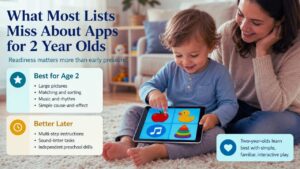
Apps for children aged two to five are often presented as though they serve one neat developmental stage. They do not. A two-year-old may not understand an instruction such as “drag the picture that begins with this sound.” The child might still reach the next screen by tapping repeatedly. That can look like independent learning when it is really trial and error.
At this age, familiar pictures, large objects, matching, sorting, music and simple cause-and-effect play are often easier to use meaningfully. More structured preschool prep apps become valuable later, when the child can listen to a short instruction and respond on purpose. Readiness is a better guide than pressure to begin formal learning early.
1. Khan Academy Kids: The Best Free Starting Point
Khan Academy Kids is the most practical first download for many families. It covers several areas of early learning without introducing advertisements, subscriptions or paid content packs.
| What to Know | Details |
| Recommended age range | Ages 2–8 |
| Access model | Completely free |
| Main content | Stories, songs, drawing, phonics, early maths and logic |
| Advertising | No third-party advertising |
| Strongest fit | Families seeking a broad free learning app |
| Main limitation | The large library can distract younger toddlers |
Its broad age range is both an advantage and a drawback. A family can keep using the app as a child moves from songs and simple stories towards number work and early reading. It can also help parents discover which activities hold the child’s attention before they spend money on a specialized app.
A large library does not mean every activity is suitable for a two-year-old. Younger children may learn how to move between menus without understanding what the lesson is asking them to do. Select one or two suitable sections at first. A child who repeatedly returns to books may benefit from more shared reading. One who chooses drawing or puzzles may respond better to creative or problem-solving activities.
Khan Academy Kids ranks first because it removes the pressure to make an immediate purchase. Families can explore different areas of learning and decide later whether a paid app would add anything useful. Children who become distracted by large menus may prefer the smaller and more predictable environments in Pok Pok or Hungry Caterpillar Play School.
2. Sago Mini School: The Strongest Paid Preschool Prep Option
Sago Mini School offers a more guided experience than Khan Academy Kids. It suits families looking for playful activities that still resemble the subjects and routines children may encounter in preschool.
| What to Know | Details |
| Recommended age range | Ages 2–5 |
| Access model | Trial followed by a subscription |
| Main content | Tracing, counting, phonics, shapes, science and stories |
| Strongest fit | Three- and four-year-olds ready for guided activities |
| Check before paying | Device sharing, account access and Piknik bundle terms |
| Main limitation | The cost may not be justified when only a few activities are used |
Although the stated range begins at two, many activities make more sense for children who can listen to a short instruction and respond deliberately. That often means the app becomes more useful around three or four. Parents should also distinguish it from Sago Mini World. Sago Mini School focuses on learning activities. Sago Mini World is more heavily centred on pretend play, characters and open-ended environments.
Full access requires a subscription after the trial. Sago Mini School is also included in the broader Piknik bundle. That bundle can offer reasonable value when a household uses several included children’s apps. It is harder to justify when one child only uses a small corner of Sago Mini School.
Apple households should check account-sharing terms before subscribing. Access bought through one Apple ID may not automatically carry across separate accounts through standard Family Sharing. This is the strongest paid preschool prep option because its activities feel connected rather than thrown together. It is still not a necessary purchase when a child is already engaged with free alternatives.
3. Pok Pok: Open-Ended Play Without Scores or Levels
Pok Pok is one of the more unusual toddler learning apps because it does not present itself as a series of lessons.
| What to Know | Details |
| Recommended age range | Ages 2–7 |
| Access model | Trial followed by a subscription |
| Main content | Creative play, cause and effect, patterns and experimentation |
| Rewards and scoring | No scores, levels or required answers |
| Strongest fit | Children who prefer exploration over formal lessons |
| Main limitation | No structured phonics or maths curriculum |
Its digital playrooms contain objects, sounds and small systems children can explore. They might arrange a scene, move objects through a space, build a pattern or discover how one action changes another. There is no correct route through most activities. That can work especially well for toddlers who ignore spoken instructions or become frustrated when an app keeps marking answers as right or wrong.
Pok Pok also has practical value in multilingual homes because many activities do not depend on reading or understanding a specific language. An adult can add words naturally by naming objects, describing movement or asking what the child is building.
The lack of formal lessons will disappoint parents looking for phonics, tracing or measurable progress. That is not a flaw in the app. It is a reason to choose something else when structured preschool preparation is the priority. Pok Pok is best treated as a collection of thoughtful digital toys rather than a curriculum.
4. LEGO DUPLO World: Best for Building Together
LEGO DUPLO World combines familiar blocks, vehicles, animals and characters with simple building and problem-solving activities.
| What to Know | Details |
| Recommended age range | Ages 3–6 |
| Access model | Limited free content with purchases or subscription options |
| Main content | Building, pretend play, sorting and simple problem-solving |
| Shared-play feature | Supports multi-touch interaction |
| Strongest fit | Children who enjoy vehicles, blocks and imaginative scenes |
| Main limitation | Extra content can become costly when several packs are purchased |
The current intended range begins at three. Some younger toddlers may enjoy activating sounds and moving large objects, but the app should not be treated as an ideal independent option for every two-year-old. Multi-touch support is one of its most useful features. An adult and child can interact with the same scene at the same time. That makes it easier to build together, take turns and talk about colour, size, position or what should happen next.
The initial download contains limited material. Additional areas may be sold as content packs or provided through subscription access, depending on the platform and country. Do not buy several packs during the first session. A child who only repeats vehicle sounds may be entertained, but that does not mean the larger collection will offer good value. Extra content makes more sense when the child builds scenes, moves characters through routines, or narrates what is happening.
LEGO DUPLO World ranks above the remaining apps because it makes shared play easy. It is less suitable for families looking for a clear reading or math sequence.
5. PBS KIDS Games: Excellent Free Content That Needs Adult Sorting
PBS KIDS Games brings together activities based on programs such as Daniel Tiger’s Neighborhood, Sesame Street, Curious George, and Wild Kratts.
| What to Know | Details |
| Recommended age range | Ages 2–8 |
| Access model | Free |
| Content library | More than 280 games |
| Language support | More than 50 games available in Spanish |
| Strongest fit | Children who recognise PBS KIDS characters |
| Main limitation | Many games are too advanced for younger toddlers |
Familiar characters can make an activity easier to introduce. A toddler who already knows Daniel Tiger may be more willing to explore a game about feelings, bedtime, or daily routines than a similar lesson led by an unfamiliar character. The app’s broad age range creates a sorting problem. Games intended for older children sit beside simpler toddler activities. Some require reading, memory or fine control that a two- or three-year-old may not yet have.
Parents will get better results by choosing a small group of manageable games instead of opening the whole library. Selected titles can also be downloaded for offline use, which is helpful for travel when the content is prepared in advance. PBS KIDS is primarily a US service. Families elsewhere should check whether the app and specific programs are available in their regional store.
6. Duolingo ABC: Useful Only When the Child Is Ready for Letters
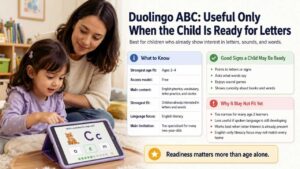
Duolingo ABC is different from the broader learning apps above. Its purpose is early English literacy.
| What to Know | Details |
| Strongest age fit | Ages 3–4 within this guide |
| Access model | Free |
| Main content | English phonics, vocabulary, letter practice and stories |
| Strongest fit | Children already showing interest in letters and words |
| Language focus | English literacy |
| Main limitation | Too specialised for many two-year-olds |
A child who points to signs, asks what letters say or enjoys sound games may be ready for its short phonics and vocabulary activities. The app is free and does not place the core reading sequence behind a premium plan. For most two-year-olds, the content is too narrow. A child still working on naming familiar objects and building spoken language may gain little from repeated letter exercises.
Duolingo ABC is also based on English sounds and literacy patterns. Families should consider whether that supports the language the child is learning to read at home or in preschool. The app becomes useful when interest in letters is already present. Downloading it early simply because a child has turned three is not necessary.
7. Hungry Caterpillar Play School: A Calmer Place to Begin
Hungry Caterpillar Play School is a gentler alternative to apps filled with fast animations, loud rewards, and crowded menus.
| What to Know | Details |
| Recommended age range | Ages 2–6 |
| Access model | Free sample followed by a subscription |
| Main content | Stories, art, numbers, letters, nature, music and puzzles |
| Strongest fit | Children who prefer a slower visual pace |
| Offline use | Downloaded content can be used offline |
| Main limitation | Not a replacement for hands-on Montessori materials |
Eric Carle’s artwork gives the app a familiar storybook feel. Its strongest feature is not the size of the library but the ease with which its activities can connect to books, crafts, and conversation. After a color or nature activity, a parent might open an Eric Carle book, make a paper collage, or look for similar colors and animals outside. That continuation gives the screen activity more value.
The slower visual style may suit children who become overstimulated by busier apps. Sample content is available before the wider subscription library is opened, so families can judge the pace before paying. The app uses some Montessori-related language in its description. Parents should not mistake that for a digital version of a Montessori classroom. A screen cannot reproduce the physical materials, movement, and hands-on self-correction central to that approach.
8. Lingokids: Plenty of Content, but Not Automatically Good Value
Lingokids offers one of the largest collections in this list, covering songs, games, stories, vocabulary, early maths and literacy.
| What to Know | Details |
| Recommended age range | Ages 2–8 |
| Free access | 10 rotating activities per day for one child profile |
| Paid access | Larger library, offline use, more profiles and progress features |
| Main content | English vocabulary, songs, stories, early maths and literacy |
| Strongest fit | Families seeking regular English-language exposure |
| Main limitation | The large library may encourage constant activity switching |
The free Basic plan gives families enough access to assess the voices, songs and teaching style before entering payment information. The paid Plus plan opens the wider library and adds offline use, extra profiles, and progress-related features. Its scale can sound more valuable than it really is. Thousands of activities do not help when a child constantly switches games without repeating or applying anything.
Lingokids makes more sense when the family has a defined purpose, such as increasing exposure to spoken English or providing content for several children at different stages. Before subscribing, decide what the plan is expected to provide. “More activities” is too vague. English vocabulary, early math practice, or multiple child profiles are clearer reasons.
Prices and trial conditions vary by country, platform, and promotion. Check the payment screen for the current charge and renewal date.
9. Montessori Preschool: A Niche Choice for Older Preschoolers
Montessori Preschool from Edoki Academy is the most structured app in this ranking.
| What to Know | Details |
| Recommended age range | Ages 3–7 |
| Access model | Trial followed by a subscription |
| Main content | Phonics, writing, numbers, shapes, music and practical-life themes |
| Language options | Several learning and interface languages |
| Strongest fit | Older preschoolers who enjoy structured activities |
| Main limitation | Less suitable for two-year-olds and children who prefer free play |
Its subject areas include phonics, writing, numbers, colours, shapes, practical-life themes, music and introductory coding. It also offers several language options and progress features for parents or educators. This is mainly a choice for older three-year-olds and four-year-olds who enjoy clear instructions, organised subjects and visible progression.
Children who dislike tracing or lesson-style tasks may find it restrictive. Pok Pok or LEGO DUPLO World would usually be a better fit for them, even if those apps appear less academic. The Montessori name also needs context. Digital activities cannot reproduce the weight, texture, movement and physical self-correction of traditional Montessori materials.
Montessori Preschool ranks ninth because its age fit is narrower and full access requires payment. For a four-year-old who genuinely enjoys formal activities, however, it may be more useful than several options ranked above it.
How to Choose by Age and Interest?
Around Age Two
Khan Academy Kids and Pok Pok are the safest places to begin. Hungry Caterpillar Play School may also suit children who enjoy songs, picture books and a slower visual style.
Stay nearby and watch for deliberate interaction. A toddler who can open an activity alone may still need help understanding it.
Around Age Three
Sago Mini School and LEGO DUPLO World become more practical once a child can follow short instructions and use drag-and-drop controls. PBS KIDS Games can work well after an adult selects a few manageable titles.
A child who has started asking about letters may be ready to try Duolingo ABC without completing long sessions.
Around Age Four
Four-year-olds who enjoy guided activities may be ready for Duolingo ABC, Montessori Preschool, Lingokids, or the more structured parts of Khan Academy Kids.
A preference for pretend play does not mean a child needs to be pushed towards lesson-style screens. Pok Pok and LEGO DUPLO World can still support planning, vocabulary, and problem-solving.
Common Mistakes That Reduce an App’s Value
- Installing too many at once: A large folder encourages switching. Start with one broad app and one specialised option.
- Testing only the opening screen: Attractive characters do not reveal whether the actual activities suit the child.
- Paying during the first session: Use the free sample long enough to see whether the child returns to something meaningful.
- Confusing navigation with understanding: Ask the child to name, explain, copy or demonstrate something away from the screen.
- Using the app for every difficult moment: A screen can help during travel or illness without becoming the only way a child waits or settles.
- Comparing children: Language, attention, and hand control develop at different rates. Readiness matters more than another child’s app routine.
For later learning stages and recommendations across a wider age range, see Best Educational Apps for Kids once the pillar guide is available.
Final Thought
Most families do not need nine apps. They need one sensible starting point and enough time to see how the child uses it. Begin with Khan Academy Kids when cost and variety matter most. Try Pok Pok when the child prefers open-ended exploration. Consider Sago Mini School when a three- or four-year-old is ready for more directed preschool activities. Duolingo ABC belongs on the device only when interest in English letters and sounds is already present.
Keep the first sessions short and stay close enough to notice what the child understands. Among the best apps for toddlers, the most useful one is usually the app that leads to something beyond the screen: a new word, a retold story, a drawing, a building idea, or a question the child wants to explore.
Frequently Asked Questions (FAQs) About Best Apps Toddlers
Which App Is Best for a Two-Year-Old?
Khan Academy Kids is the most practical free starting point because it includes simple stories, songs, and early-learning activities without advertising or subscriptions. Pok Pok is a strong alternative for children who prefer exploring objects and scenes rather than following lessons. Most two-year-olds will still benefit from having an adult nearby, even when the controls appear simple.
Why Does an App for Toddlers Show a 4+ App Store Rating?
The App Store age rating concerns the type of content in the app and how it is classified for parental controls. It is not the same as the developer’s intended developmental range. Parents should consider both labels, then inspect the actual activities. An app can contain content considered suitable for all ages while still being designed for children aged two or three.
Can Toddler Learning Apps Help With Speech and Language?
They can provide pictures, songs, repeated words, and opportunities for naming or turn-taking. Their value increases when an adult pauses, repeats the word, waits for the child to respond, and connects it with something familiar. An app is not a substitute for ordinary conversation or professional assessment when a parent or caregiver has concerns about a child’s communication development.

























