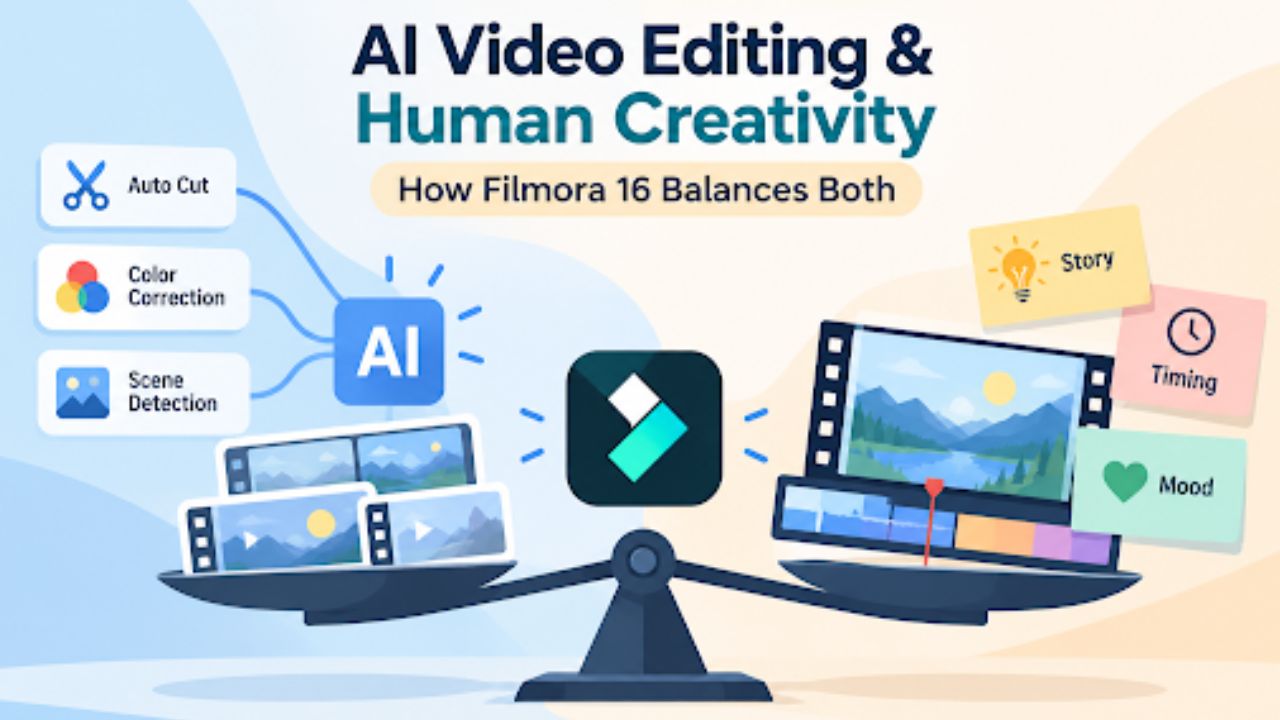
Editors can work with the same footage and tools yet create completely different videos. Software can sort clips and balance color quickly, but the editor decides which moments deserve the audience’s attention. Story, timing, emotion, and emphasis still depend on human judgment.
Filmora 16 supports this balance through AI-assisted footage organization and automated color correction, while leaving storytelling, pacing, and visual decisions in the editor’s hands.
Part 1: What AI Video Editing Does Best in Filmora 16
AI is most useful when repetitive work grows with the amount of footage. Multiple phone clips give Filmora 16 three practical jobs where AI can reduce preparation before the volunteer makes the creative decisions:
- Footage Analysis: AI Media Analysis analyzes supported video and image files and generates keywords, descriptions, ratings, and editing suggestions based on visual content such as subjects, scenes, and actions. These results help the volunteer narrow the footage library and prioritize potentially useful clips for review.
- Repetitive Preparation: Speech to Text generates an initial caption draft for the voice-over. With Smart Text Correction enabled during generation, potentially incorrect words can be flagged for review. The volunteer can then check suggested fixes, particularly for pet names and other terms that may be misrecognized.
- First-Pass Assistance: Auto Color provides an automatic starting point for improving exposure, contrast, and overall color in dim footage. The volunteer can adjust the effect strength and refine individual clips manually to maintain a more consistent visual appearance.
Part 2: Where Human Judgment Still Matters in Video Editing
AI tools can analyze footage, automate repetitive tasks, and suggest improvements, but creative decisions still require human judgment. Editors must decide which moments tell the story, how scenes flow, and what visual style best communicates the message. The following 4 areas show where human creativity remains essential in video editing.
Choose the Moments That Tell the Story
AI Media Analysis might score an energetic clip, but that does not automatically make it the best opening. For a basic pet clip, the volunteer might instead start with their dog asleep across a visitor’s feet, showing his calmer side immediately. The ball chase within the clip stays briefly to reveal another part of his personality without defining the whole story.
Set the Right Video Pacing
Analysis can help locate useful moments, but the editor decides how long viewers see them. Most shots can stay relatively short, while the dog resting his head on the volunteer’s knee gets more time. Holding that moment also gives the voice-over room to finish naturally. Faster cuts could create a very different impression of his personality.
Keep the Visual Style Consistent
The shelter wants their pet’s coat and surroundings to look natural, so the volunteer avoids an aggressive filter or heavy creative grade. Color correction can balance footage without forcing a stylized appearance. A consistent title treatment across adoption videos also helps viewers recognize the shelter’s content when it appears on social platforms.
Shape the Emotional Impact
AI Media Analysis can provide visual descriptions and editing suggestions, but the editor decides which emotion the final sequence should convey. The pet’s video closes with him looking toward the camera before the adoption details appear. Soft background music supports the voice-over without covering quieter natural sounds, including his snoring during the resting shot.
Part 3: AI vs. Manual Editing: A Practical Filmora 16 Test
A video shows where AI assistance ends and the editor’s judgment begins. AI Media Analysis can help review footage, Auto Color can provide a first correction, and keyframes leave motion in the editor’s hands. The table below compares what each Filmora 16 tool handles with what the volunteer still decides:
| Tool | What the Tool Can Assist With | What the Editor Still Decides |
| AI Media Analysis | Generates keywords, descriptions, ratings, and editing suggestions to help prioritize footage for review. | Which clips best represent the pet’s personality and belong in the final sequence. |
| Auto Color Correction | Provides an automatic starting point for exposure, contrast, and overall color correction. | How strongly to apply the correction and how to maintain consistent color across shots. |
| Keyframes | Interpolates movement between manually defined keyframes. | The position, scale, timing, and easing of each animation. |
Auto Color provides the technical starting point, while Filmora’s manual color controls can bring the late-afternoon yard footage closer to the indoor shots. The push-in uses keyframe animation, with Ease In and Ease Out available to smooth the change in speed. Unlike the AI-assisted tasks, the keyframed movement depends on values and timing chosen directly by the volunteer.
Part 4: Why AI and Human Editing Work Better Together
Filmora 16 works best here when AI handles repetitive preparation, and the editor keeps control of the final decisions. The workflow does not require choosing between automatic assistance and manual editing. These three parts of Filmora show how both can work together on the same project:
- Start AI Analysis Manually: AI Media Analysis begins after the editor selects footage and starts the analysis. For the pet’s video in this case, the volunteer can analyze only the relevant clips instead of including unrelated shelter footage.
- Adjust AI Results: Auto Color provides an automatic starting correction rather than locking in the final look. Its “Strength” control lets the editor reduce or increase the result, while manual color controls remain available when individual clips need further correction.
- Refine Everything on the Timeline: AI-assisted preparation feeds into the same editing workflow used for trimming, color work, and keyframe animation. The volunteer can use analyzed footage, refine its color, and build custom motion without exporting the project between separate editing applications.
That division keeps AI focused on repetitive work while the editor controls the story, timing, color, and movement. Creators can explore Wondershare Filmora 16 with their own footage to see where AI assistance saves work and where manual decisions still matter.
Final Thoughts
AI video editing works best when automation supports creativity rather than replacing it. Filmora 16 simplifies footage analysis, color correction, and repetitive editing tasks, allowing creators to focus on storytelling, pacing, and visual impact. Combining these AI-assisted features with manual editing controls helps produce professional videos while keeping creative decisions in the editor’s hands.