Slack Gets a Discord-Style Makeover with Dedicated DM Tab and Activity View

Slack Gets a Discord-Style

Slack is unveiling a fresh look aimed at enhancing user focus and productivity. The most notable tweak is in the sidebar.

If you’re someone who juggles multiple workspaces, you’ll observe that individual tiles for each workspace have been merged into one.

This consolidation makes room for innovative navigation features on the left. The redesign reflects Slack’s commitment to a more streamlined and intuitive interface.

Slack’s sidebar has gotten a refreshing update. Now, you’ll spot buttons for Home, DMs, Activity, Later, and a More section, not to mention a handy search icon and a spanking new Create button. The Home view? It feels familiar, acting as your gateway to channels, unread notifications, drafts, apps, and a whole lot more.
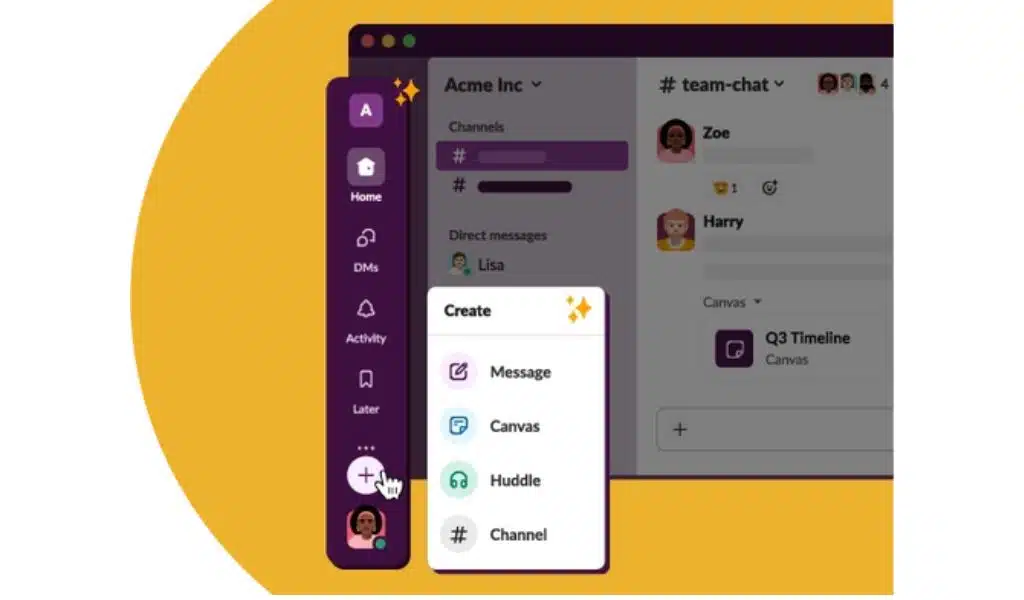
Slack Gets a Discord Style
Photo Credit: Slack

And for those who cherish their DMs, you’re in for a treat. The DMs section is more organized now, clustering all your one-on-one chats together. Plus, it previews the latest message from each conversation, and there’s a nifty option to display only those messages you’ve yet to open.

Slack’s got some snazzy updates to walk you through!

First up, the Activity feed. Now it’s a one-stop-shop combining threads, mentions, and reactions. But if you like things sorted, there are dedicated tabs for each within this section. The Later section? It’s organized with tabs for actions you’re working on, those you’ve checked off, and the ones you’ve archived. And for the curious souls, the More section is your toolkit corner – hosting apps, workflows, canvases, and huddles.

Remember the draft message option? Well, it’s taken a backseat. Say hello to the new ‘Create’ button. Whether you’re in the mood to fire up a message, kick off a huddle, start on a canvas, or initiate a new channel, this button’s got you covered. And a little something extra – there’s this cool hover feature. Just float your mouse over icons like DMs or Activity, and you’ll get a sneak peek without straying from your work.

On the mobile front, Slack’s got some tailored updates too. For the iPhone, iPad, and Android users, you’ll find convenient tiles at the screen’s pinnacle. A single tap and you’re diving into your unread messages or threads. And for the swift-scrollers, swiping through unreads just became a breeze. Wrapping up the makeover, Slack’s jazzing things up with brand-new themes – think deeper customization and vibrant colors.

In a nutshell, Slack’s not just about business; it’s blending in some fun and functionality!


Subscribe to Our Newsletter

Related Articles

Top Trending

On This Day September 9
On This Day September 9: History, Famous Birthdays, Deaths & Global Events
Best Assessment and Quiz Tools for Teachers
12 Best Assessment and Quiz Tools for Teachers
11 Best Productivity Apps for Mac to Cut Everyday Busywork
Top SaaS Ideas from Reddit Pain Points
10 SaaS Ideas Pulled Straight From Reddit Pain Points
Best Productivity Apps Without a Subscription
12 Best Productivity Apps Without a Subscription [Pay Once or Pay Nothing]

Technology & AI

Best Assessment and Quiz Tools for Teachers
12 Best Assessment and Quiz Tools for Teachers
11 Best Productivity Apps for Mac to Cut Everyday Busywork
Top SaaS Ideas from Reddit Pain Points
10 SaaS Ideas Pulled Straight From Reddit Pain Points
Best Productivity Apps Without a Subscription
12 Best Productivity Apps Without a Subscription [Pay Once or Pay Nothing]
best Marketing reporting tools
10 Best Tools for Building Marketing Reports

GAMING

Complete Guide on Game Programgeeks
Game Programgeeks: A Complete Guide on PC, Game Dev, and Tech
Online Color Game Philippines
Online Color Game Philippines: What Every Beginner Should Know Before Playing
Ways to Reduce Game Development Costs
12 Ways Studios Cut Game Development Costs
NFT game development cost
How Much Does NFT Game Development Cost? A Realistic Budget Breakdown
Reasons Why You No Longer Need the Best Roblox AI Scripter
Forget Best Roblox AI Scripter: 10 Reasons Why You No Longer Need It

Business & Marketing

Choosing the Right Heat Sealer for Your Packaging Line
Container Hire in Melbourne A Practical Guide for Builders and Businesses
Container Hire in Melbourne: A Practical Guide for Builders and Businesses
Tie Down Straps 101 A Practical Guide to Securing Your Load
Tie Down Straps 101: A Practical Guide to Securing Your Load
Low Minimum Order Merchandise
Big Impact, Small Batch: The Strategic Power of Low Minimum Order Merchandise
A side-by-side illustration exposing link building myths by contrasting budget lost on spammy backlinks with long-term SEO growth to help marketers protect their investment.
Stop Wasting Money: 10 Link Building Myths Ruining Your ROI

EdTech & E-Learning

Best Assessment and Quiz Tools for Teachers
12 Best Assessment and Quiz Tools for Teachers
How EdTech Startups Make Money
How EdTech Startups Make Money: Business Models Explained
Teaching Alphabets to Children at Home
How to Teach the ABCs at Home Without a Classroom
What Is Number Sense
What Is Number Sense and How Do Kids Develop It?
Best VR and AR Apps for Education
9 Best VR and AR Apps for Education

Software & Apps

Best Assessment and Quiz Tools for Teachers
12 Best Assessment and Quiz Tools for Teachers
11 Best Productivity Apps for Mac to Cut Everyday Busywork
Best Productivity Apps Without a Subscription
12 Best Productivity Apps Without a Subscription [Pay Once or Pay Nothing]
best Marketing reporting tools
10 Best Tools for Building Marketing Reports
Best Project Management Tools for Freelancers
10 Best Project Management Tools for Freelancers