


Slack Gets a Discord-Style Makeover with Dedicated DM Tab and Activity View

Slack Gets a Discord-Style

Slack is unveiling a fresh look aimed at enhancing user focus and productivity. The most notable tweak is in the sidebar.

If you’re someone who juggles multiple workspaces, you’ll observe that individual tiles for each workspace have been merged into one.

This consolidation makes room for innovative navigation features on the left. The redesign reflects Slack’s commitment to a more streamlined and intuitive interface.

Slack’s sidebar has gotten a refreshing update. Now, you’ll spot buttons for Home, DMs, Activity, Later, and a More section, not to mention a handy search icon and a spanking new Create button. The Home view? It feels familiar, acting as your gateway to channels, unread notifications, drafts, apps, and a whole lot more.
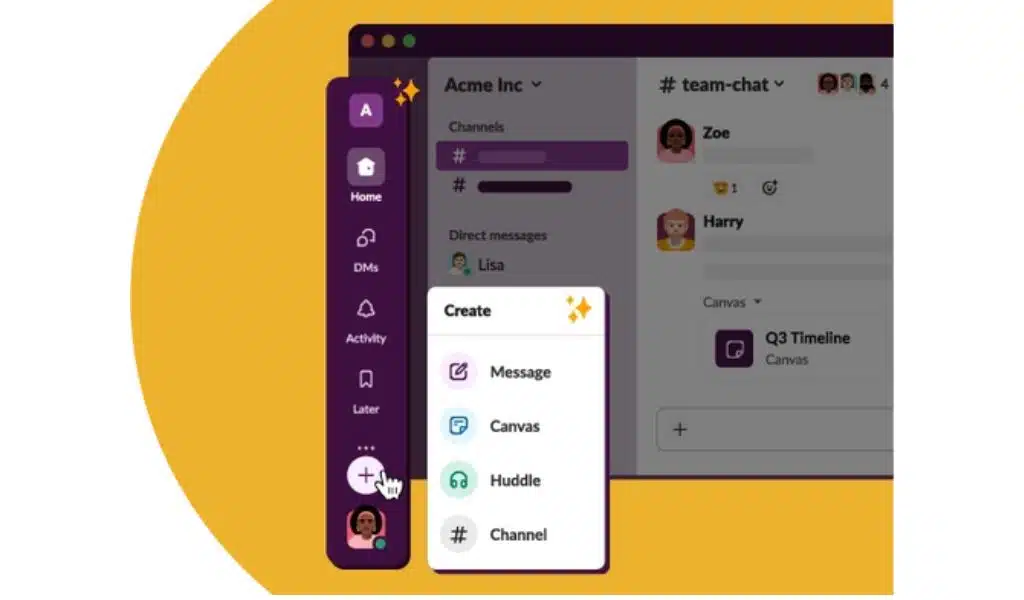
Slack Gets a Discord Style
Photo Credit: Slack

And for those who cherish their DMs, you’re in for a treat. The DMs section is more organized now, clustering all your one-on-one chats together. Plus, it previews the latest message from each conversation, and there’s a nifty option to display only those messages you’ve yet to open.

Slack’s got some snazzy updates to walk you through!

First up, the Activity feed. Now it’s a one-stop-shop combining threads, mentions, and reactions. But if you like things sorted, there are dedicated tabs for each within this section. The Later section? It’s organized with tabs for actions you’re working on, those you’ve checked off, and the ones you’ve archived. And for the curious souls, the More section is your toolkit corner – hosting apps, workflows, canvases, and huddles.

Remember the draft message option? Well, it’s taken a backseat. Say hello to the new ‘Create’ button. Whether you’re in the mood to fire up a message, kick off a huddle, start on a canvas, or initiate a new channel, this button’s got you covered. And a little something extra – there’s this cool hover feature. Just float your mouse over icons like DMs or Activity, and you’ll get a sneak peek without straying from your work.

On the mobile front, Slack’s got some tailored updates too. For the iPhone, iPad, and Android users, you’ll find convenient tiles at the screen’s pinnacle. A single tap and you’re diving into your unread messages or threads. And for the swift-scrollers, swiping through unreads just became a breeze. Wrapping up the makeover, Slack’s jazzing things up with brand-new themes – think deeper customization and vibrant colors.

In a nutshell, Slack’s not just about business; it’s blending in some fun and functionality!


Subscribe to Our Newsletter

Related Articles

Top Trending

Avtub
Avtub: The Ultimate Hub For Lifestyle, Health, Wellness, And More
Remote Job Portfoli
Remote Job Portfolio Guide: Build Case Studies That Get Hired
Waste-to-Energy Technology
How Waste-to-Energy Technology Is Solving Two Problems At Once
Winning Upwork Proposal
Winning Upwork Proposal Strategy: From First Line to Final Reply
How to Enable Two-Factor Authentication
How to Enable Two-Factor Authentication on All Online Accounts

Fintech & Finance

HONOR 600 Pro vs HONOR 600 Lite 5G
HONOR 600 Pro vs HONOR 600 Lite 5G: Full Comparison with Expected India Pricing
How to Dispute a Credit Card Charge Successfully
How To Dispute A Credit Card Charge Successfully
How to Protect Yourself from Financial Scams
Financial Scam Prevention Tips to Protect Your Money
The Truth About Buy Now Pay Later Services
best UK current accounts 2026
9 Best UK Current Accounts with the Highest Interest and Best Perks in 2026

Sustainability & Living

Waste-to-Energy Technology
How Waste-to-Energy Technology Is Solving Two Problems At Once
A Guide to a Minimalist Lifestyle in a Busy City
Green Hydrogen Fuel
The Rise Of Green Hydrogen As A Clean Fuel Source
energy-efficient LED lights and appliances
Benefits of Using Energy-Efficient LED Lights and Appliances
Wind Power Global Energy Markets
How Wind Power Is Reshaping Global Energy Markets

GAMING

best gaming mice for every hand
The 11 Best Gaming Mice That Suits the Hands of All Sizes
Best Gaming Monitors Compared
9 Best Gaming Monitors Compared: Unlock Next Level Gaming
Custom Mechanical Keyboard
DIY: Build a Custom Mechanical Keyboard That Feels Like Yours
Best Indie Games Of Recent Years
The 7 Best Indie Games Of Recent Years You Should Not Miss
open-world games done right
The 9 Best Open-World Games Done Absolutely Right

Business & Marketing

The Truth About Buy Now Pay Later Services
Guest Posting In 2026
Guest Posting In 2026: Is It Worth It? And How To Do It Right
New Zealand social media marketing
13 Critical Facts About How New Zealand's Small Market Forces Brands to Be Creative on Social Media
Cold Email in 2026
Cold Email In 2026: What Works, Lands In Spam, And What Converts
Entrepreneurial Spirit Promotes Social Change

Technology & AI

How to Enable Two-Factor Authentication
How to Enable Two-Factor Authentication on All Online Accounts
Frehf
The Secrets of Frehf: Your Complete Guide to Understanding Frehf
AI Animation Styles Explained
AI Animation Styles Explained: The Smart Way to Make AI Videos Feel Professional
Check Your Real Internet Speed
How to Check Your Real Internet Speed and Detect ISP Throttling
Custom Mechanical Keyboard
DIY: Build a Custom Mechanical Keyboard That Feels Like Yours

Fitness & Wellness

Avtub
Avtub: The Ultimate Hub For Lifestyle, Health, Wellness, And More
resistance band routines
13 Resistance Band Routines to Build Strength at Home: Say Goodbye to Boring Workouts!
beginner home workouts
9 Beginner Home Workouts to Try for Real Results: Start Your Fitness Journey!
setting realistic fitness goals
Setting Realistic Fitness Goals: A Beginner’s Practical Guide That Actually Works
best home workouts guide
39 Home Workout Routines for Every Fitness Level to Get Fit Without a Gym
























