Listen to the Podcast:
Curious about how to unsubscribe from Audible? Although it is a wonderful service, there are times when you simply do not have the time to listen to the audiobooks for which you are paying a recurring fee.
Are you interested in finding out how to terminate your subscription to Audible? Even though it is a wonderful service, there are times when you simply do not have the time to listen to the audiobooks for which you are paying a recurring fee. This can be frustrating.
Amazon purchased Audible in 2008 in an effort to broaden its selection of audiobooks. Since then, the company has established itself as the industry standard in audio production. The business has expanded into the production of podcasts and expensive audio series in addition to audiobooks.
Their app is currently compatible with Android, iOS, Windows, macOS, and Amazon’s version of Android, Fire OS.
What Types of Subscriptions Does Audible Offer?
In addition to books, Audible also provides podcasts and other forms of audio content. You can choose from a variety of subscription plans on Audible, or you can buy individual audiobooks if you prefer. Audible currently offers the following subscription plans:
Audible Plus
- $7.95 per month
- No Credits
Unlimited listening to audiobooks, podcasts, and Audible Originals is included in Audible Plus, a monthly subscription service. Instead of providing credit to buy audiobooks, this plan gives you access to a library with a changing selection of titles.
Audible Premium Plus
- $14.95 per month
- Credits: 1 per month
- $22.95 per month
- Credits: 2 per month
A monthly subscription to Audible Premium Plus grants access to all Audible Plus content and can be used to purchase any audiobook in the Audible library. There are special offers and discounts on audiobooks only available to members of this plan.
Audible Premium Plus Annual
- $149.50 per year
- Credits: 12 per year
- $229.50 per year
- Credits: 24 per year
With an annual subscription to Audible Premium Plus, you can enjoy all the same features as with a monthly plan, but at significant savings.
Audible Gift Memberships
You can give the gift of Audible to a loved one or friend with an Audible Gift Membership. Numerous subscription tiers are available, from Audible Plus to Audible Premium Plus.
Audible Escape (discontinued)
There used to be a subscription service called Audible Escape that let you listen to any romance audiobook you wanted, whenever you wanted. However, beginning in 2020, this strategy will no longer be implemented.
How to Unsubscribe from Audible
If you want to end your subscription to Audible quickly, just read on. No more than a minute, at most.
Although Audible will make you jump through a few hoops before canceling your subscription, the process is easy and straightforward.
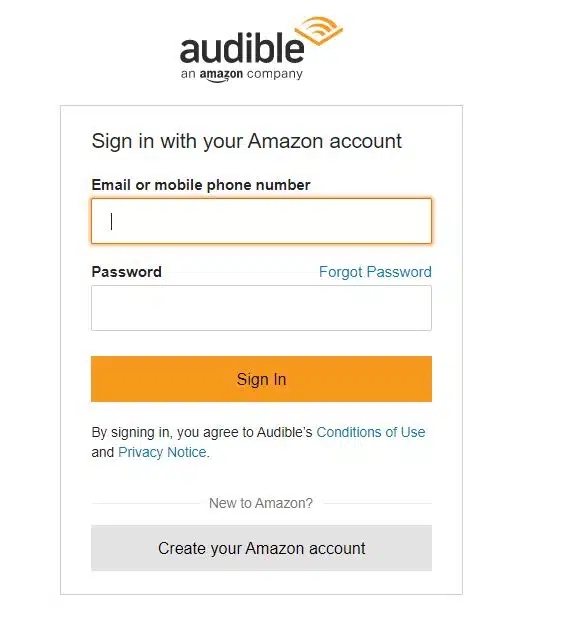
- To access your Audible library, please log in to the Audible website.

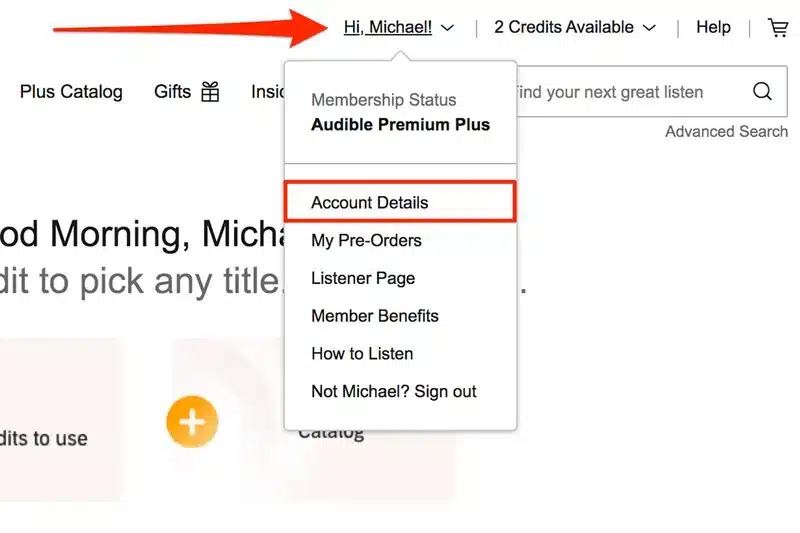
- Select “Account Details” from the drop-down menu that appears when you click on your name in the top right corner of the screen.

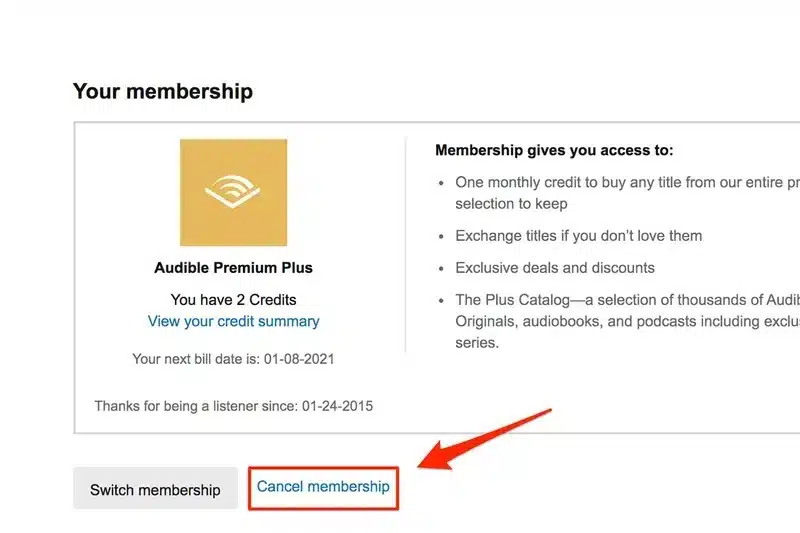
- You can terminate your membership by visiting the “Account Settings” page and selecting “Cancel My Membership.”
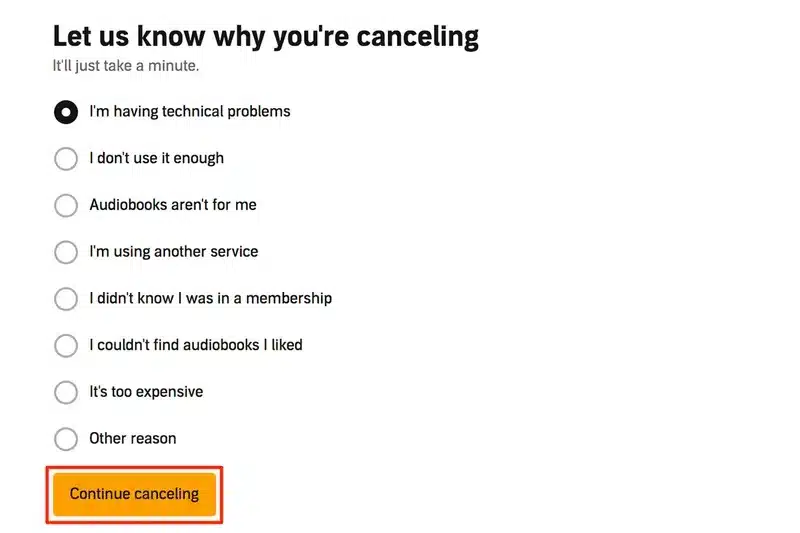
- To cancel your subscription, just follow the on-screen instructions.
How to Cancel Audible from iOS
If you want to cancel your Audible subscription on iOS, you can follow these steps:
- Launch the Audible app on your iPhone or iPad and log in.
- To see additional content, select the “More” button from the screen’s rightmost corner.
- Choose “Settings” from the drop-down menu.
- Select “Manage Your Membership” from the “Account Details” menu.
- Click the “Cancel Membership” button and then follow the on-screen instructions.
Even after canceling, your audiobooks will remain available for as long as you like.
To get a refund if you’re eligible for one after canceling your subscription through the iOS app, you’ll need to get in touch with Audible’s customer support.
If you purchased an Audible subscription through the Apple App Store, you cannot terminate your membership by using the Audible app.
How to Cancel Audible on Amazon
To cancel your Audible subscription on Amazon, you can follow these steps:
- Sign into your Amazon account on the website.
- To access your account, hover over “Account & Lists” in the top right corner, and then select “Your Account.”
- Navigate down to the “Digital Content and Devices” subheading, and then click “Content and Devices.”
- To access your Audible account, go to the “Devices” menu at the top of the page and click on “Registered Devices.”
- To terminate your Audible subscription, access the account settings by clicking the “Actions” button and then the “Cancel Audible Membership” option.
- To successfully cancel, please proceed as directed.
Even after canceling, your audiobooks will remain available for as long as you like.
Also, if you subscribed to Audible through Amazon, you can terminate your membership by going to the “Account & Lists” menu, choosing “Memberships & Subscriptions,” and then clicking “Audible Membership.”
From there, you can click “Cancel Membership” and follow the instructions to complete the cancellation process.
How to Cancel Audible from Android
To cancel your Audible subscription from an Android device, follow these step-by-step instructions:
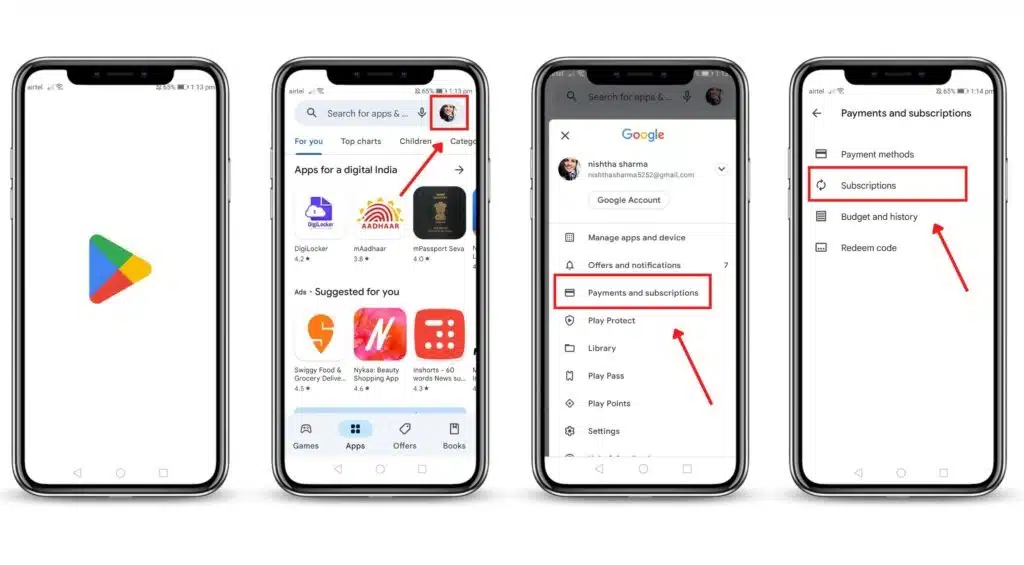
- You’ll need to leave the Audible app in order to terminate your subscription. To access the internet on your Android device, you’ll need a browser like Chrome, Firefox, or Samsung Internet.
- Visit the Audible site in your browser of choice and log in to your Audible account. In the event that you are not redirected automatically, click the “Sign In” button at the top right of the page.
- Once logged in, click the menu icon (three parallel lines) in the top left corner of the page. If you click it, a menu will appear; select “Account Details.”
- You can view your membership information in the “Your Membership” section of the “Account Details” page. Find the option to “View membership details” and click it.
- Scroll down on the “Membership details” page until you see the “Cancel membership” link or button. You’ll find it near the bottom of most pages. Use your finger to tap on it.
- If you cancel your Audible subscription, the company may offer you different services or request feedback on why you’ve decided to cancel. If you’re interested in providing the requested information, just follow the on-screen prompts. The last step is to cancel your membership by clicking the “Cancel membership” or “Continue canceling” button.
- After canceling your Audible membership successfully, you will receive a confirmation email. To verify the cancellation, please check your email.
Final Words
Unsubscribing from Audible is easy and doesn’t take much time, so you can keep track of your subscriptions well. Follow the steps in this guide to cancel your membership and stop being charged in the future. If you ever decide to come back, remember that Audible has a large collection of audiobooks, podcasts, and other things.
You can save this page as a bookmark or send it to friends who might find it useful. Explore our website to learn more about how to make the most of your digital experiences and find more tips and tools for managing online subscriptions.