A Step-by-Step Guide on How to Make a Reel on Facebook

How to Make a Reel on Facebook

Listen to the Podcast:

Facebook Reels are short videos, up to 90 seconds, in a vertical format that you can view on your Reels page or the main Facebook feed. Meta is rolling out Reels globally to all users of Facebook’s iOS and Android apps in more than 150 countries. Here’s everything you need how to make a reel on Facebook.

What are Facebook Reels?

Often described as a TikTok clone, Reels debuted on Instagram last year.

Facebook didn’t start rolling out Reels until 2021 and was limited to the United States. In 2022, Facebook launched Reels globally. (Note that Meta, which owns Facebook, also owns Instagram.)

In any case, with Reels, you can edit quick videos, add music or use the audio from someone else’s video. Reels can be recorded in a series of clips or all at once, using videos uploaded from your phone’s photo library or uploading new videos during the creation process. You can also “remix” other people’s videos (make a duet with them) and upload clips up to 60 seconds long. You can also save drafts, and Meta is adding even more snipping tools in 2023.

Other: How to Get TikTok Followers?

TikTok, which helped popularize short video content, offers all these possibilities. But unlike TikTok, you don’t have to download anything else to use Reels. Just open Facebook or Instagram.

This is how Facebook describes Reels:

“Facebook Reels is a new way to create short, entertaining videos, get discovered by new audiences, and become part of cultural moments on Facebook. You can add effects and music to your reel, or use your own original audio, allowing you to bring your videos to life. your ideas and share them with your audience. The Reels you create will appear in places like the Facebook Feed, the Reels section of Facebook, or your Reels profile.”

How to make a Reel on Facebook and share them

To create a Facebook Reel, follow these steps:

  1. Tap Create in the Reels section of the Feed
    • Or tap the camera icon in the top right corner when viewing a roll.
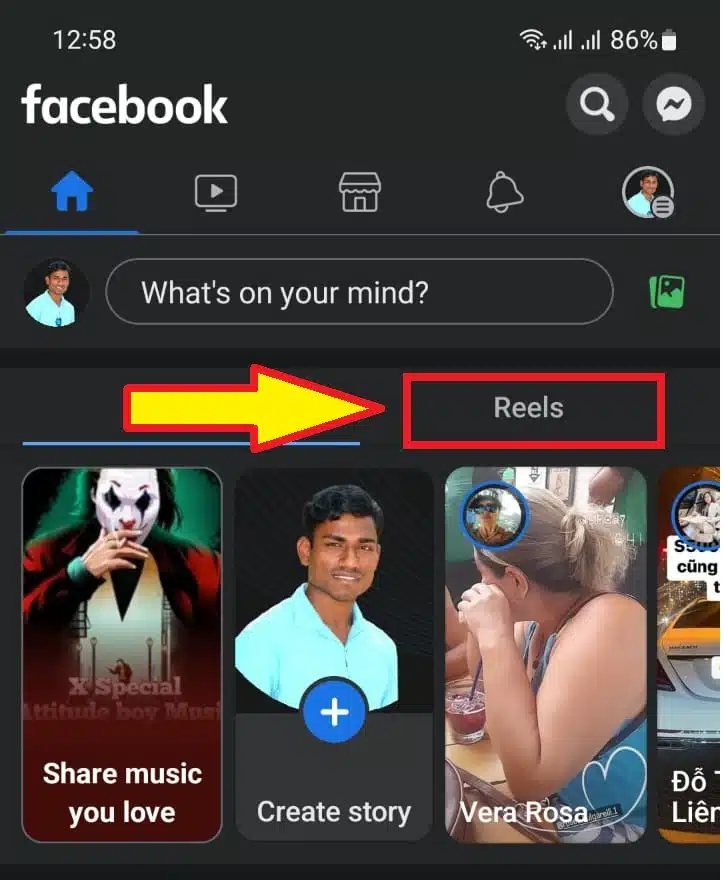
Tap Create in the Reels section
Tap Create in the Reels section.

2. Add a video to your reel:

    • Tap the record button to add a new video.
    • Tap the photo icon in the left corner to add video clips to your camera roll.
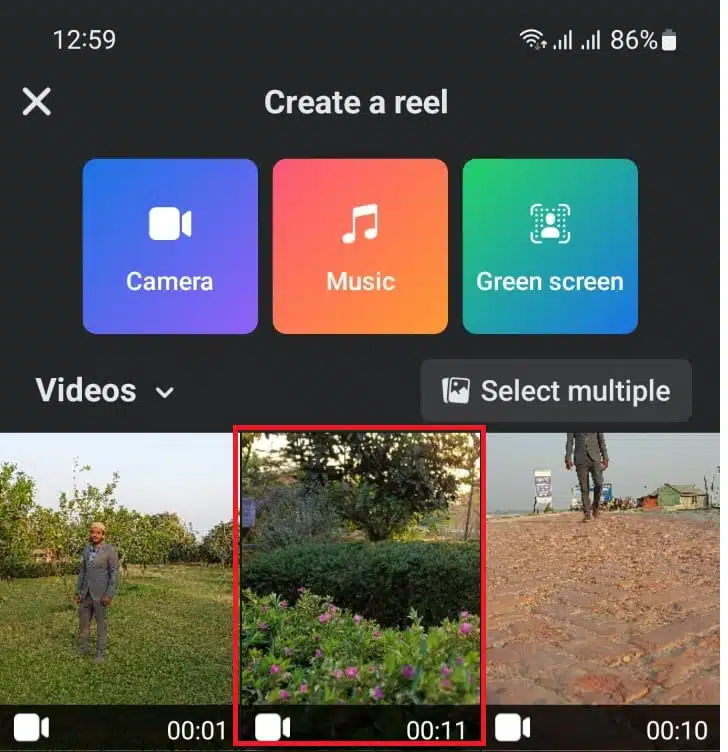
Add a video to your reel
Add a video to your reel.

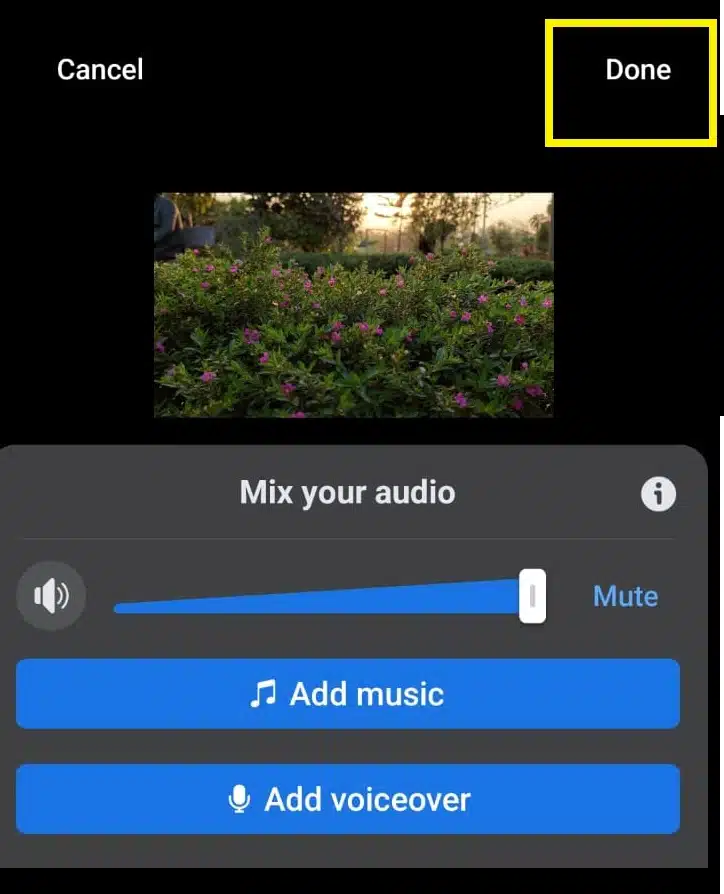
3. Add audio, text, effects, subtitles, or a timer to your reel.

    • Touch their respective icons on the right side of the screen.
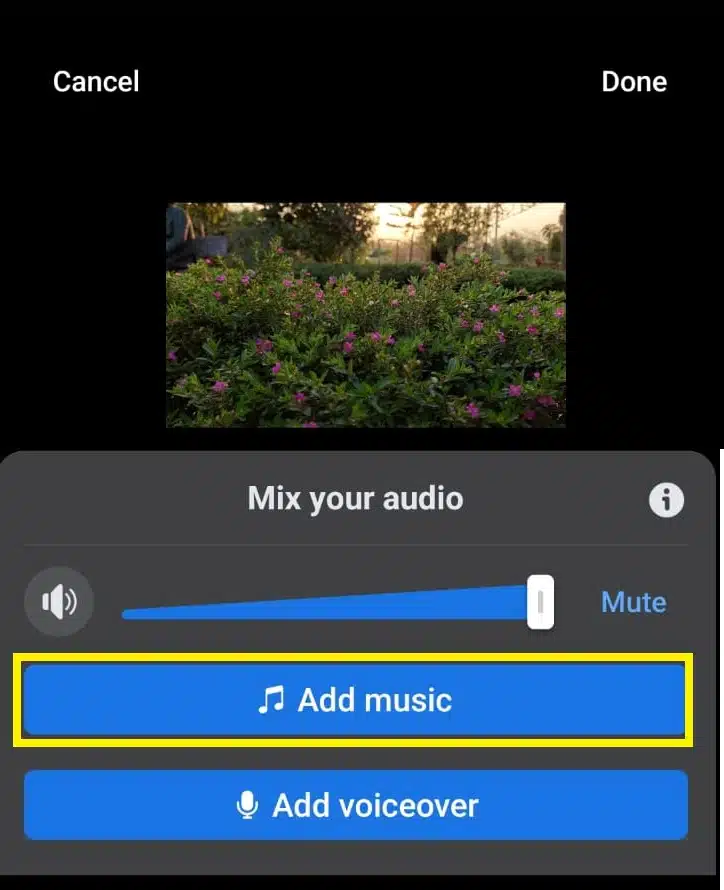
Add audio
Add audio

4. Tap Next when you’re done.

Tap Next When Done
Tap Next When Done

5. Write a description for your reel.
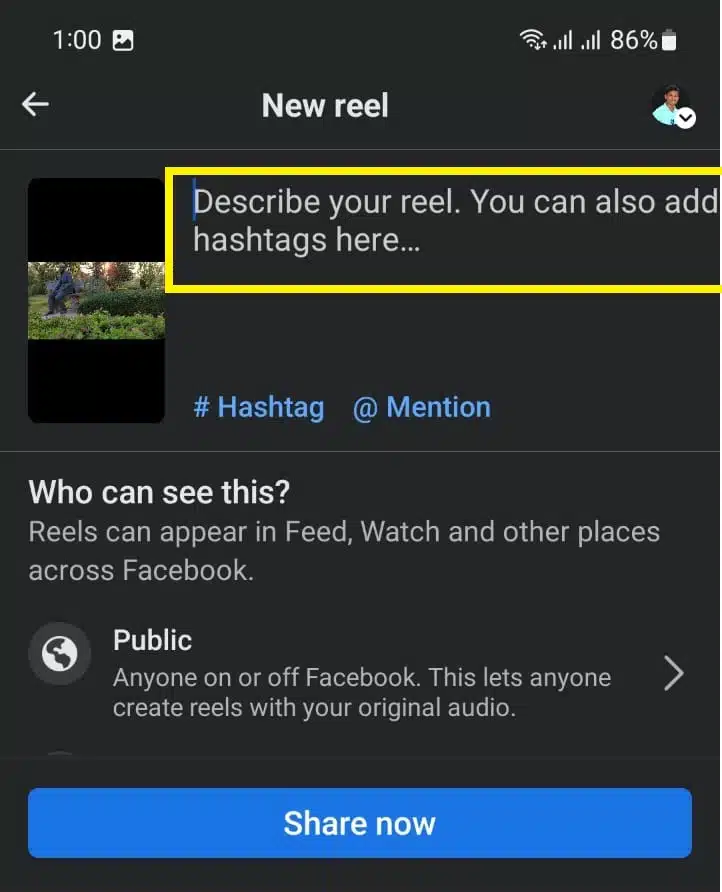
Write a description for your reel

6. Choose an audience.

    • The reels are public by default. (See notes below for more details.)
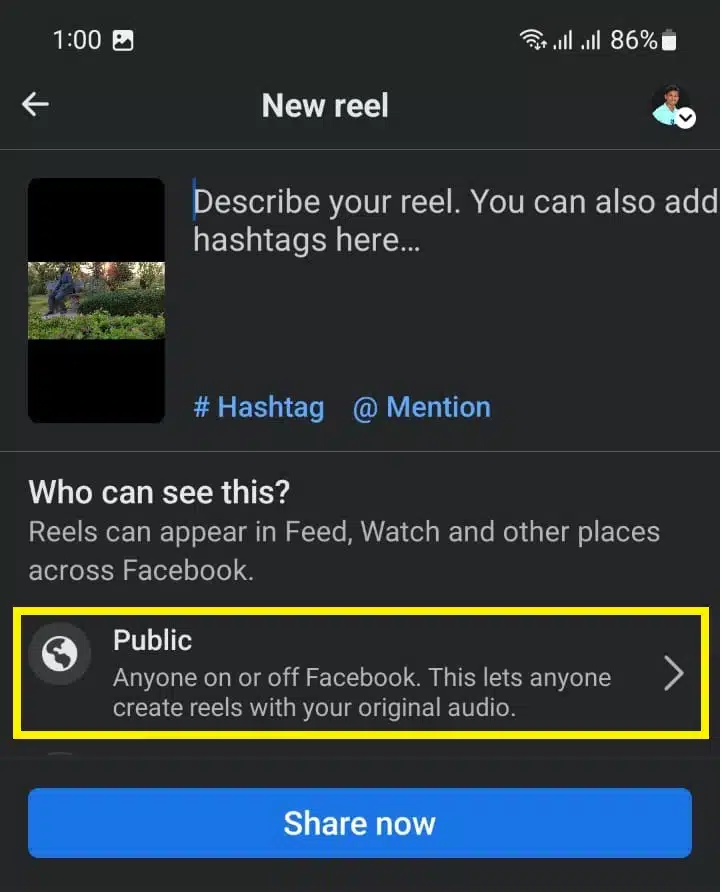
Choose an audience
Choose an audience

7. Tap Share Reel to post your reel.

    • The description will appear on your Reels profile, where people can find any reels you’ve shared.
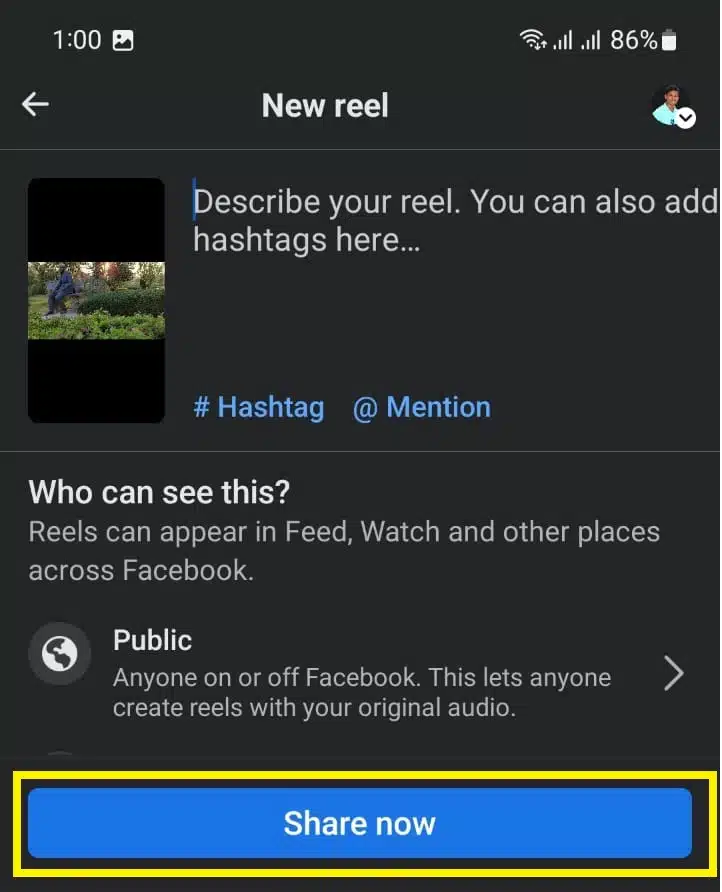
Tap Share Reel to post your reel

If you’re 18 or older, Reels on Facebook are set to public, but you can change the audience for each reel. Your friends can also see your reels in areas like the Facebook feed.

Where do the reels appear on Facebook?

For now, on Facebook, the Reels you create will appear in places like the Facebook Feed, the Reels section of Facebook, or your Reels profile.

But Meta said that starting in February 2022, users can share Reels in more places on Facebook, including in Stories and the platform’s Watch tab.




Subscribe to Our Newsletter

Related Articles

Top Trending

girls in STEM strategies with visible results
Encouraging Girls in STEM: Strategies That Work and Build Real Confidence!
Best Online Courses to Learn Advanced SEO Metrics
From GA4 to AI Search: Best Courses to Upgrade Your SEO Skills
Green Hydrogen Fuel
The Rise Of Green Hydrogen As A Clean Fuel Source
energy-efficient LED lights and appliances
Benefits of Using Energy-Efficient LED Lights and Appliances
Check Your Real Internet Speed
How to Check Your Real Internet Speed and Detect ISP Throttling

Fintech & Finance

HONOR 600 Pro vs HONOR 600 Lite 5G
HONOR 600 Pro vs HONOR 600 Lite 5G: Full Comparison with Expected India Pricing
How to Dispute a Credit Card Charge Successfully
How To Dispute A Credit Card Charge Successfully
How to Protect Yourself from Financial Scams
Financial Scam Prevention Tips to Protect Your Money
The Truth About Buy Now Pay Later Services
best UK current accounts 2026
9 Best UK Current Accounts with the Highest Interest and Best Perks in 2026

Sustainability & Living

Green Hydrogen Fuel
The Rise Of Green Hydrogen As A Clean Fuel Source
energy-efficient LED lights and appliances
Benefits of Using Energy-Efficient LED Lights and Appliances
Wind Power Global Energy Markets
How Wind Power Is Reshaping Global Energy Markets
Circular Economy Basics
Circular Economy Explained: Why Waste Is A Design Flaw
Eco-Friendly Bathroom Plan
Eco-Friendly Bathroom: My 30-day Conversion Plan With Products [Join the Challenge]

GAMING

Custom Mechanical Keyboard
DIY: Build a Custom Mechanical Keyboard That Feels Like Yours
open-world games done right
The 9 Best Open-World Games Done Absolutely Right
best couch co-op games
10 Best Couch Co-Op Games Worth Playing Together With Family and Friends
best story driven games
13 Best Story-Driven Games That Stay With You In Your Memories
multiplayer games worth playing
The 8 Best Multiplayer Games Worth Playing With Friends

Business & Marketing

The Truth About Buy Now Pay Later Services
Guest Posting In 2026
Guest Posting In 2026: Is It Worth It? And How To Do It Right
New Zealand social media marketing
13 Critical Facts About How New Zealand's Small Market Forces Brands to Be Creative on Social Media
Cold Email in 2026
Cold Email In 2026: What Works, Lands In Spam, And What Converts
Entrepreneurial Spirit Promotes Social Change

Technology & AI

Check Your Real Internet Speed
How to Check Your Real Internet Speed and Detect ISP Throttling
Custom Mechanical Keyboard
DIY: Build a Custom Mechanical Keyboard That Feels Like Yours
My Image Search Techniques
Mastering Image Search Techniques: Your Ultimate Guide To Reverse Image Search
AI in modern classrooms
How AI in Modern Classrooms Is Transforming Learning
Tikcotech
The Power of Tikcotech: Your All-in-One Solution For TikTok Success

Fitness & Wellness

beginner home workouts
9 Beginner Home Workouts to Try for Real Results: Start Your Fitness Journey!
setting realistic fitness goals
Setting Realistic Fitness Goals: A Beginner’s Practical Guide That Actually Works
best home workouts guide
39 Home Workout Routines for Every Fitness Level to Get Fit Without a Gym
beginners fitness guide
Beginner’s Complete Fitness Guide: A Practical Beginners Fitness Guide for Real Life
DIY Ergonomic Home Office Setup
How I Changed My Home Office After Three Spine Surgeries