

Listen to the Podcast:
We will explain how to upload youtube shorts, the new type of video with which the Google platform competes with TikTok and Instagram Reels. This feature has started to reach YouTube users, and if you don’t have it yet, it will be coming to you over the next few days, although it’s doing it in the Android app first.
Its operation is straightforward, and we will start by explaining how you can see and manage the ones that appear to you. Then, we will tell you to step by step how you can create your own. The videos are a maximum of 15 seconds and must be recorded vertically.
How YouTube shorts work
The new TikTok videos on YouTube, called Shorts, are integrated into your Subscriptions section. Click on it within the app, and in addition to the regular videos and the rest of the content of the accounts you follow; you will also start to see a section with several Shorts. You will only have to click on them to see them.
When watching the videos, swipe up to see the next one and swipe down to return to the previous one. To return to the main screen, you have an arrow at the top left. In the Subscriptions section, when they appear, you can also leave your finger pressed on one to indicate if you are not interested because, in addition to the Short Films from users you follow, others will also appear.
More Read: YouTube Introduces Monetization for Licensed Music
How to upload YouTube shorts: Step-by-step guide
- You need to open the YouTube mobile app to post your short videos. Once inside, click on the + button of Create at the bottom in the center with the plus symbol, which is used to publish new content on YouTube from mobile.
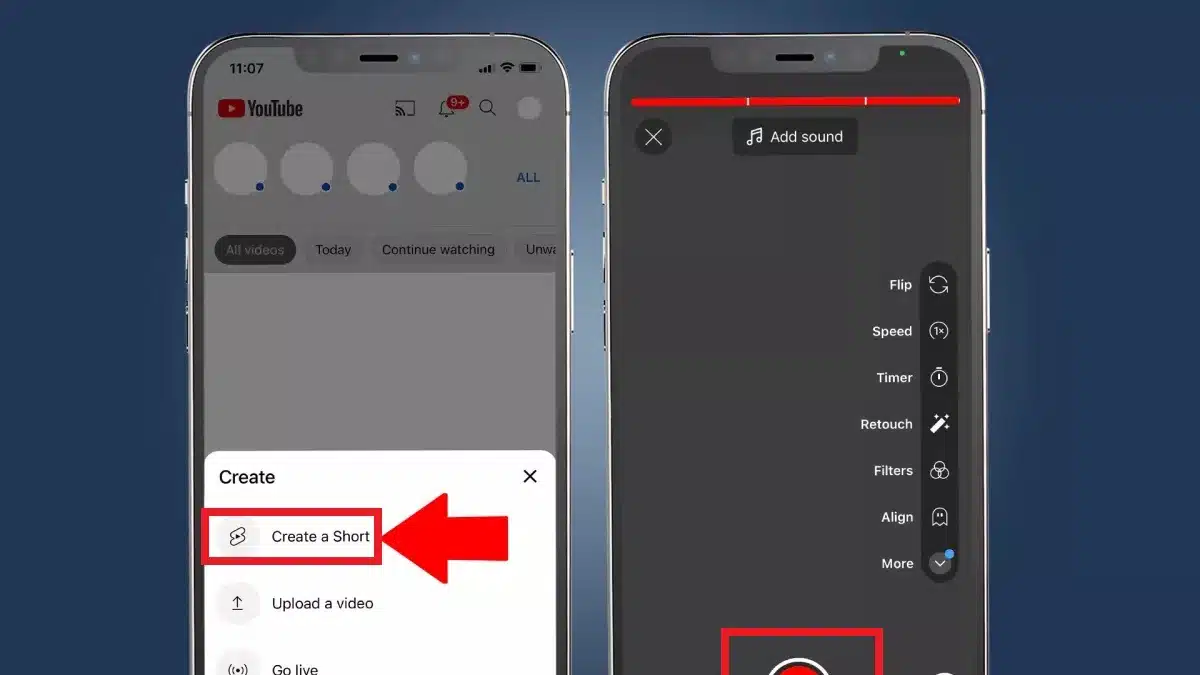
2. A window with options will open when you click the button to create new content. Here, if the option has already been implemented on your mobile, you can click on where it says Create a short, which is for making TikTok-type videos.
3. You will enter the short creation screen. Here below, you have the red button to start recording the video. Still, on the left and right, you will also see the options to switch the camera of your mobile between the rear and front or upload videos that you already have in your photo gallery. On the top right, you will see the Speed and Timer options.
4. If you click on the Speed and Timer options, you can decide the speed at which the video is recorded in the first one. The x1 is the normal speed, so with the other options, you can make it slow motion, or everything goes fast motion. With the timer options, you can set a countdown or a time limit for the video recording.
5. The recording process is simple. All you have to do is hold down the record button, and above, you will see how the bar that indicates how long you can record the short is completing.
6. When you release the record button, the recording will pause. Above, you will see the time you have left, and you can keep pressing again to continue recording. In addition, to the left of the recording button, you will see the delete button, which is used to delete what you have recorded, and to the right, you will have the Next button to go to the publication process.
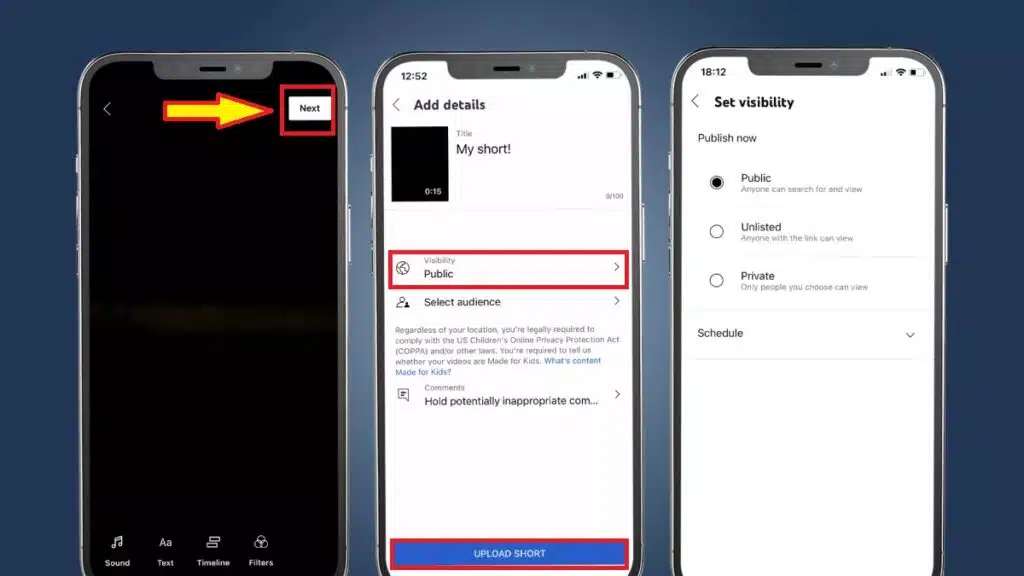
7. You will go to the editing screen when you click Next. There are few options, although you can add a text with its corresponding option or manage the chronology. When you have it, press the Next button at the top right.
8. You will go to the last screen, where you have to write a short title and click Upload to publish it. In addition, you will also have options below to decide which users will be able to see it since perhaps you do not want it to be public or specific people can see it.
Related Read: How to Promote a Business on YouTube
How to add audio to YouTube shorts?
You can accompany your Shorts with a song or an audio clip from the YouTube catalog, free for personal and non-commercial purposes. To use these registers, you have two alternatives:
- Before starting any recording, you can press Add sound and choose the audio that you find most convenient.
- The second option is to add it after recording (after pressing the verification ticket) in the Sound option at the bottom of the editing screen.
In either case, the sounds in the YouTube library only offer a maximum duration of 15 seconds.
Advantages of YouTube Shorts
The YouTube platform already has a massive community of creators worldwide and thousands of users who use the application daily.
It is only a matter of opening another menu to find a new world. You won’t use up more storage space on your phone or deal with the wait and uncertainty of new apps.
For expert creators
If you have been creating content on YouTube for a long time, you can connect with new audiences and expand your horizons.
Even though you have a loyal following, you’ll be getting your content out in a more friendly format to those who aren’t drawn to the traditional video format. You can place your “Shorts” section on your main channel to give your followers quick access.
For starters
And if you are the complete opposite, a new user who has never been involved in video creation, this is the place for you as well.
If you want to be just an observer, Youtube will recommend the Shorts of the channels you already follow and some with similar content. When you want to create your content, the creation tools will make your life so much easier, plus you’ll feel more comfortable joining communities that have been building for a long time on various topics and types of content.





















