
If you pay for most things with a debit card and still end the month with nothing saved, you may wonder how round-up savings apps work and if they can help. Here’s the short answer: each time you buy something, the app rounds the price up to the next dollar. Then it moves the extra cents into savings or an investment account.
That builds a saving habit with no effort, but it usually adds up to only tens of dollars a month. Research links saving a fixed amount on a schedule to bigger gains in most people saved in a year, and a monthly fee can eat a big part of a small balance. Below, you’ll find a quick way to estimate your own yearly total, check whether a fee cancels it out, and choose the setup that fits you.
What Are Round-Up Savings Apps?
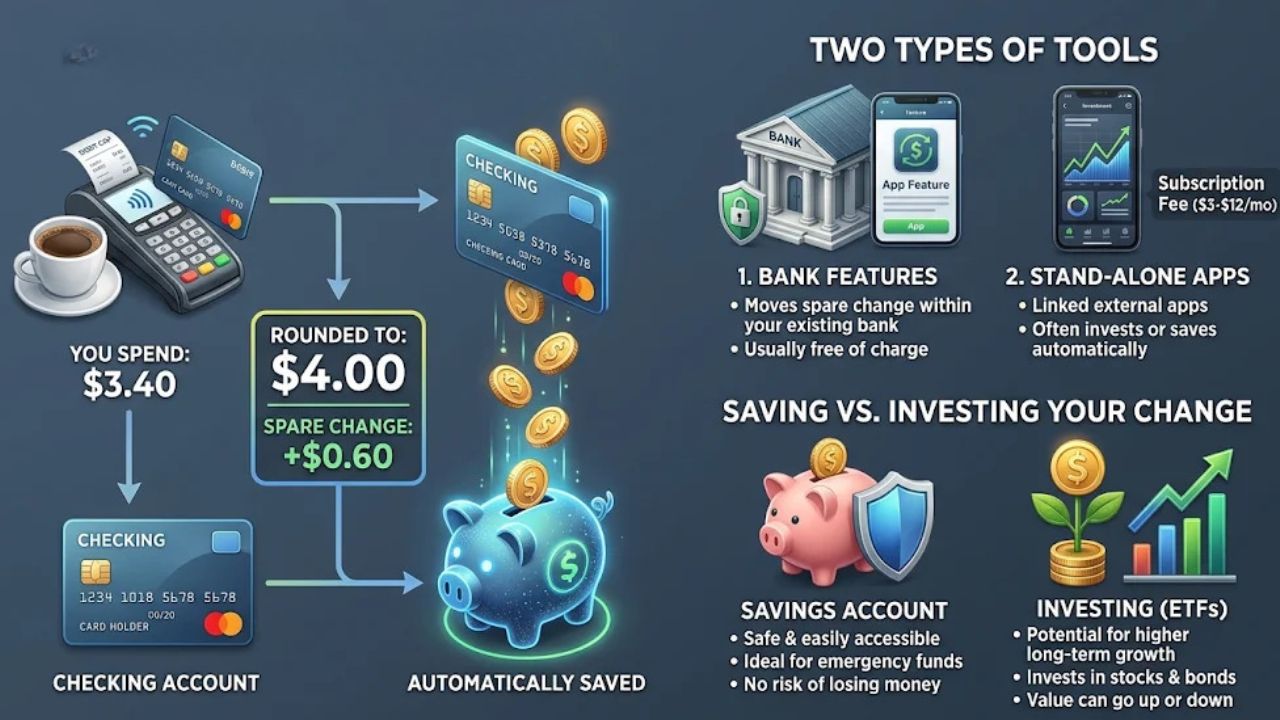
A round-up savings program saves small amounts of money automatically, based on what you buy with your debit card. You keep shopping the way you always do, and the tool saves the extra cents for you.
Here is the basic idea. Each purchase gets rounded up to the next whole dollar. The difference moves on its own into a linked savings account.
So the “spare change” isn’t real coins. It’s the gap between what you paid and the next dollar. The app pulls that gap from your checking account and puts it somewhere else.
Two Main Kinds of Round-Up Tools
Round-up tools come in two main kinds, and the difference matters for your wallet.
Features built into your bank: Many banks and credit unions have a round-up option in their own app. It moves your spare change from checking into a savings account at the same place.
For example, the credit union Solarity describes its round-up program as a feature that saves small amounts based on your everyday debit card purchases. To use a feature like this, you may need an eligible checking and savings account at that bank. There’s often no added fee for the round-up itself, but check whether the accounts carry any fees of their own.
Paid apps from other companies: These are stand-alone apps you link to your bank. Some just save your change, and others invest it.
Acorns is one example of a paid investing app. It puts your round-ups into a portfolio of funds, much like a robo-advisor does.
The big difference is cost. Acorns charges a flat monthly fee instead of a percentage of your balance like most robo-advisors. Its plans cost $3, $6, or $12 a month. A free bank feature adds no round-up fee, so it costs little or nothing to try.
Saving vs. Investing Your Change
A savings account keeps your money safe and easy to reach. It’s a good home for an emergency fund, which is cash set aside for surprise bills.
An investing app buys ETFs, or exchange-traded funds. These are baskets of many stocks or bonds.
ETFs can grow faster over many years thanks to compound growth, but they can also drop in value. If you might need the money soon, a savings account is the safer place for it.
How Do Round-Up Savings Apps Work?
Round-up tools watch your debit card purchases. After each one, they work out the spare change and move it for you. Setup takes only a few minutes.
How to Turn On Round-Ups
The exact screens differ by bank or app, but most setups follow the same steps.
- Pick your tool. First, check your own bank’s app for a round-up or “save the change” option. If it has one, start there, since it often adds no fee. If not, you can download a separate app.
- Link your checking account and debit card. If you use a separate app, you’ll sign in to your bank through a secure screen. This lets the app see your purchases and pull your spare change.
- Choose where the money goes. Pick a savings account or, in an investing app, a portfolio. For a first goal like an emergency fund, a savings account is the simple choice.
- Turn round-ups on. Flip the switch. Some apps also let you add a multiplier, which saves more than your spare change on each purchase.
- Check back after a week or two. Look at how much moved and make sure your checking balance still covers your bills. Then decide whether to keep going, add a fixed transfer, or make changes.
How the Rounding Math Works
The math is simple. Take the next whole dollar and subtract what you paid.
- Say you buy a coffee for $3.50.
- The next whole dollar is $4.00.
- $4.00 minus $3.50 leaves $0.50.
- That $0.50 is your round-up. It moves to savings.
Every purchase has a different round-up. A buy that ends in .95 saves just a nickel, while a buy that ends in .05 saves 95 cents.
Over a month, these tend to even out. A purchase that lands on a whole dollar, like $12.00, may save nothing at all. That’s normal.
When the Money Actually Moves
Some tools move each round-up right away. Others collect your spare change first and move it in one batch.
Acorns, for example, waits until your spare change reaches $5. Then it invests that amount. So you may see several small round-ups pile up before anything is invested.
Either way, the money comes out of your checking account. That’s worth remembering if your balance often runs low. We’ll come back to this in the downsides section.
How Much Can You Really Save With Round-Ups?
Here’s the honest answer: for most people, round-ups save tens of dollars a month, not hundreds. One estimate says two purchases a day with an average round-up of $0.50 adds up to about $30 a month. That’s about $360 a year.
Acorns users who invest through round-ups alone put in about $30 to $50 a month on average. Another estimate puts three months of normal spending at about $100 to $300. The total depends on how many purchases you make and whether you use a multiplier.
Work Out Your Own Yearly Total
You don’t need a fancy tool for this. Use this simple formula:
Purchases per day × average round-up × 30 days × 12 months = your yearly round-up total
If you don’t know your average round-up, use $0.50. That’s a fair middle guess, since round-ups run from a few cents to 99 cents.
To count your purchases per day, open your bank app. Count your debit card purchases from last month, then divide by 30.
Say you made 45 card purchases last month. That’s 45 ÷ 30, or 1.5 a day. Then 1.5 × $0.50 × 30 × 12 comes to $270 a year.
| Spender Type | Card Purchases per Day | Average Round-Up | Per Month | Per Year |
| Light | 1 | $0.50 | $15 | $180 |
| Medium | 2 | $0.50 | $30 | $360 |
| Heavy | 3 | $0.50 | $45 | $540 |
The medium row matches the $30 a month and $360 a year estimate above. The heavy row sits inside the $30 to $50 a month that Acorns users tend to invest through round-ups. The light row is just the same math with one purchase a day.
Check Whether a Fee Cancels It Out
Now compare your yearly total with a year of fees. A $3 monthly fee costs $36 a year. A $6 fee costs $72, and a $12 fee costs $144.
The table below divides a year of fees by a year of round-ups. It is not an investment fee rate. It simply shows how much of the money you put in goes to the app, and how much is left.
| Yearly Round-Ups | 3/MonthFee(36/Year) | 6/MonthFee(72/Year) | 12/MonthFee(144/Year) | No Round-Up Fee |
| $180 (light) | Fee eats 20%, $144 left | Fee eats 40%, $108 left | Fee eats 80%, $36 left | $180 left |
| $360 (medium) | Fee eats 10%, $324 left | Fee eats 20%, $288 left | Fee eats 40%, $216 left | $360 left |
| $540 (heavy) | Fee eats about 7%, $504 left | Fee eats about 13%, $468 left | Fee eats about 27%, $396 left | $540 left |
The amounts left are before any investment gains or losses. Look at the light row. On the top plan, the fee takes most of what you put in.
Here’s the quick test. If a year of fees equals or beats your yearly round-ups, the fee eats all of those round-ups.
Say you make one card purchase every other day, with a $0.50 average round-up. That’s 0.5 × $0.50 × 30 × 12, or $90 a year. A $144 yearly fee would cost more than all your round-ups put together.
Keep in mind that this test weighs the fee against round-ups alone. A paid plan may come with other features, so judge those on their own if they matter to you.
Why a Flat Fee Hurts Small Balances Most
A flat fee stays the same whether you have $30 or $3,000. That’s why it hits small accounts hardest.
Say your round-ups put $30 into an investing app in your first month. A $3 fee that month is 10% of that $30 balance. On a much larger balance, the same $3 would barely show.
One review of Acorns makes the same point. If you only add money through round-ups, your fee compared with your balance will be fairly high. So if you pay for an app, plan to add more than spare change.
What Are the Benefits of Round-Up Savings Apps?
Round-ups aren’t a magic money machine. Still, they do a few things very well, especially if saving has always felt hard.
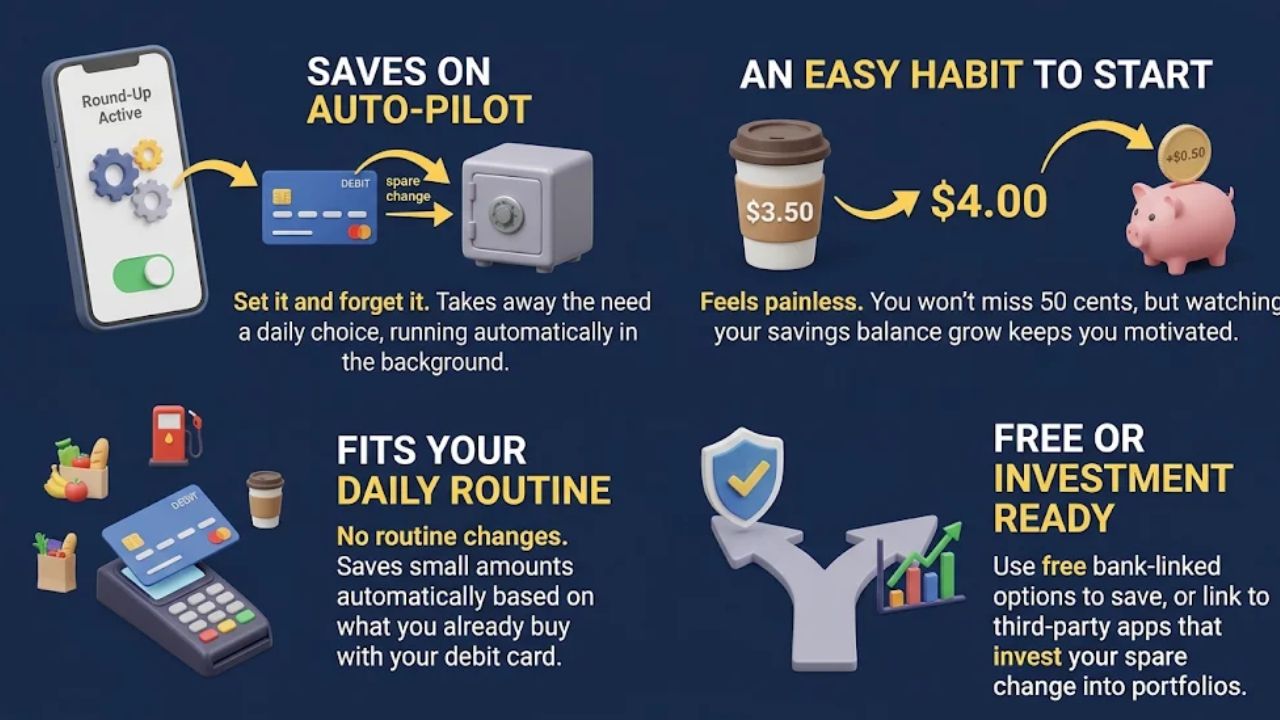
You Save Without Thinking About It
Most people don’t fail at saving because they don’t care. They fail because saving takes a choice, again and again, and life gets in the way.
Round-ups take that choice away. They remove the need to think about saving at all. You set it up once, and it runs in the background.
It’s an Easy Habit to Start
There’s a reason round-ups are so popular. In one big study of savings app data, 81% of savings goals used a rule like rounding up each purchase.
A round-up feels painless. You won’t miss 50 cents from a coffee the way you’d miss $50 taken from your paycheck.
For someone who has never saved before, that small first win matters. Seeing a balance grow, even slowly, can make saving feel real.
It Fits the Way You Already Pay
Round-ups work best when you use your debit card often. If you tap your card for groceries, gas, lunch, and coffee, you’ll get lots of small round-ups each week. You don’t have to change your routine.
It Can Be Free, and It Can Lead to Investing
If your bank offers round-ups with no added fee, every cent that moves stays yours. That makes a bank feature a low-risk way to test whether round-ups help you.
Investing apps put your spare change into ETF portfolios. For some people, that’s an easy first step into the stock market without picking stocks. Just check the fee table above first.
A Fair Word on “Discipline”
Some articles say round-ups turn you into a more careful money manager. That’s not proven. As you’ll see below, there’s some evidence that people may spend more after turning them on.
A fairer way to say it: round-ups can help you start a habit. They don’t do the hard part of saving on their own.
What Are the Downsides of Round-Up Savings Apps?
Round-ups are easy, but easy isn’t the same as strong. Here are the main drawbacks to weigh before you turn them on.
- The totals are small. Round-ups depend on how often you use your card, and they work best when you use your debit card regularly. If you make one purchase a day or less, you may save only about $15 a month. That won’t build a real emergency fund on its own.
- Monthly fees can eat your savings. Check whether an app charges a monthly fee, since subscription fees can wear away the benefit. See the fee table above for how much a flat fee takes at each spending level.
- Flat fees hit small balances hardest. Acorns uses a flat monthly fee, not a percentage of your balance. If round-ups are your only deposits, your fee compared with your balance will be fairly high.
- They may nudge you to spend more. A summary of one research paper, listed for a 2023 economics conference, found that households spent more after joining a round-up program. Most of the extra was on things they wanted, not things they needed, and in the short run it hurt their finances. The full paper wasn’t available to review, so treat this as a warning sign, not a final verdict. One possible reason is that knowing you save a little with each purchase can make spending feel less bad.
- Some app features can work against you. Consumer Reports looked at four popular savings apps. It said these tools can hurt users’ finances if people don’t fully understand their risks and shortcomings. It also asked the Consumer Financial Protection Bureau (CFPB) to look into features that may undermine people’s saving goals.
- They can squeeze a tight budget. Round-up apps assume you already have enough money to cover your bills. They just help you save a little extra on top. If your checking account runs close to zero, those small pulls can leave you short when a bill comes due.
- Spending-based rules save less. Round-ups only save when you spend. Rules tied to spending are the most popular, but they are linked to less saved over time than rules that save a set amount no matter what.
- Investing adds risk. If your change goes into an investing app, your balance can go down as well as up. That’s fine for long-term money. It’s not ideal for an emergency fund you might need next month.
None of these mean round-ups are bad. They just mean round-ups shouldn’t be your whole plan.
How to Lower the Risks
A few simple habits take care of most of these problems.
- Start with a bank feature that adds no fee. No fee means nothing gets eaten.
- Watch your spending for the first month. Compare it with the month before. If it went up by more than your round-ups, the tool isn’t helping.
- Keep a small cushion in checking. Make sure round-ups never pull you below what your bills need.
- Think about a fixed transfer. If you can afford one, it may matter more than round-ups. More on why below.
Do Round-Up Savings Apps Really Help? What the Research Shows
Round-ups help a little. But the best research available says they are not the strongest way to save.
The CFPB Study: Guaranteed Rules Win
The Consumer Financial Protection Bureau studied real data from Qapital, a personal finance app. It compared two kinds of saving rules.
Spending-based rules save only when you do something, like buy a coffee. Round-ups are the classic example.
Guaranteed rules save a set amount no matter what. For example, $25 every payday, whether you spend a lot or a little.
Round-up style rules were by far the most popular. They showed up in 81% of savings goals. But they were linked to lower savings than guaranteed rules.
The gap was big. Guaranteed rules showed roughly a 1.5 to 3.5 times larger increase in how much people saved within a year, compared with spending-based rules.
That’s a finding about groups of app users. It isn’t a promise that your own savings will grow by that much if you switch.
Saving From Your Paycheck
Other research points the same way. The Financial Health Network found that people liked round-ups the most of all the ways to fund savings. But they also knew round-ups had limits as a way to save well.
The same research looked at a Chime feature that automatically saves 10% of each direct deposit. According to the Financial Health Network research summary, users of that feature saved about $200 a month on average.
Compare that with the $30 to $50 a month that Acorns users invest through round-ups alone. These two numbers come from different sources and different groups of people, so they aren’t a side-by-side test. They don’t prove what any mix of tools will do for you, but they do show the size gap between spare change and a slice of each paycheck.
What This Means for You
- Round-ups are the most popular rule, not the strongest one. Popular and effective aren’t the same thing.
- Saving from your paycheck tends to beat saving from your spending. A fixed transfer happens whether you shop or not, so it can’t shrink in a slow month. Guaranteed rules were linked to bigger gains in the most saved within a year.
- Round-ups work best as a sidekick. Our advice is to use them for extra savings on top of a fixed transfer when you can afford both, not as your main plan.
- Keep an eye on spending. If round-ups make you feel free to spend more, they may cost you more than they save.
Bottom Line: Should You Use a Round-Up App?
Round-ups can be worth turning on, as long as you use them the right way. Treat them as a free starter habit, not your main way to save.
In the CFPB study, guaranteed rules were linked to roughly 1.5 to 3.5 times larger increases in the most saved within a year. That’s not a set multiplier for you, but it points toward a fixed transfer as the stronger tool.
First, Check Your Bills and Buffer
Both round-ups and fixed transfers move your own money out of checking. So before you pick a setup, add up your bills for the month and decide on a small cushion you want to keep.
If your checking account can’t cover your bills plus that cushion, don’t turn on either one yet. Round-up apps assume you can already cover your expenses. Come back to this once you have a little room.
Pick the Setup That Fits You
- Round-ups alone. This is an optional small start when your yearly round-up estimate fits your budget and you use your debit card often. Round-ups work best for regular debit card users.
- If you go this way, use a bank feature that adds no fee, not a paid app. It’s a gentle way to test the habit before you commit to a set amount.
- Round-ups plus a fixed transfer. This combo makes sense when three things are true. You can use a feature with no round-up fee, your checking cushion stays safe after both pulls, and your spending doesn’t creep up.
- Set a fixed amount you can afford to move to savings each payday, even if it’s small. Then let round-ups add a bit extra on top. You get the stronger rule and the easy habit together.
- A fixed transfer alone. This fits if you don’t use your card much, or if you notice yourself spending more with round-ups on. Pick an amount and a day that your budget can handle, such as right after payday.
A fixed transfer does the heavy lifting anyway. You can always add round-ups later if you want.
The Fee Rule
Never pay a fee that takes a big bite out of what you save. Subscription fees can wear away the benefit of a round-up app.
Use the formula from earlier: purchases per day × average round-up × 30 × 12. Then subtract 12 months of fees.
If the fee equals or beats your round-ups, it eats them all. If it takes a large share, skip the paid app or plan to add more money each month so the fee becomes a smaller slice.
Your Next Steps
- Add up your monthly bills and choose a checking cushion you won’t go below.
- Count last month’s debit card purchases and estimate your yearly round-ups.
- Pick one of the three setups above based on your budget and how you pay.
- If you chose round-ups, check whether your bank offers them with no added fee, and send the money to savings first.
- If you chose a fixed transfer, set an amount you can afford for each payday, even a small one.
- After a month, check two things: how much you saved, and whether your spending crept up.
Now you know how round-up savings apps work and what they can and can’t do. They won’t make you rich. But used with care, and paired with a steady transfer when you can afford one, they can help turn “I can’t save” into a real, growing balance.
Frequently Asked Questions About Round-Up Savings Apps
1. How do round-ups work in a savings app?
Open the app, link your debit card, and each purchase gets rounded up to the nearest dollar with the spare change going to savings. Apps like Acorns use this method so a $13.40 lunch automatically saves 60 cents, and you can often choose to multiply the round-up to $2 or $5 per transaction.
2. Can round-ups help me pay off loans?
Yes, some apps send your spare change to debt instead of savings. Wisr lets you use round ups to pay down personal loans, and ANZ Plus allows you to apply extra funds toward your home loan.
3. Do banks have their own round-up plans?
Yes, Bank of America launched Keep the Change, one of the most widely used programs in the US that moves rounded-up change into savings. Community Bank – Parkersburg offers a similar Save the Change plan for their customers.
4. Do round-up savings apps really help?
They help you build savings gradually, with most users accumulating $20 to $50 extra per month. Watch for monthly fees, since a $3 subscription can eat up half your savings from small purchases. Be careful with online advertising on Facebook and other Meta products that promote cryptocurrency round-up schemes, as these often hide the real risks.