

A growing business can spend a surprising amount of time moving the same information between tools. An order arrives, someone copies it into a spreadsheet, another person checks the details, and a customer waits for an update. Automation may help—but the right answer is not always a new AI agent or a complicated integration.
Start with the work you need to improve. A built-in rule may handle a simple reminder; an API integration may connect two systems; a screen-based bot may bridge a legacy application; and AI may help interpret a document before a person approves the result. This guide explains how to choose among those approaches, estimate the real cost, and run a pilot you can evaluate.
Our recommendations draw on publicly available technical guidance rather than hands-on tests of specific products. The examples and financial figures below are hypothetical.
Start With the Decision, Not the Software
Choose one workflow with a recognizable beginning and end. “Improve operations” is too broad. “Reduce the time between receiving a supplier invoice and routing it for approval” is a decision you can measure.
Follow several real cases with the people who do the work. Record the trigger, inputs, systems touched, decisions, handoffs, exceptions and final outcome. Do not record only the ideal process: ask what happens when a record is missing, a customer changes a request, or a manager is away. If the team cannot agree on the current policy, settle that before encoding it.
Compare the Main Automation Approaches
| Approach | Practical fit | Main advantage | Important limitation |
|---|---|---|---|
| Improve the manual process | Unclear rules, low volume or sensitive judgment | Removes unnecessary work before investing | Still requires staff time and consistency |
| Built-in rules | Reminders and approvals inside one application | Fewer moving parts when the feature fits | Restricted to the product’s functions and plan |
| Workflow platform or connector | Common triggers and actions across supported apps | Faster configuration for standard handoffs | Connector permissions, limits and pricing vary |
| API integration or custom code | Defined data exchange and specialized business logic | Control over validation and error handling | Requires engineering, maintenance and supported access |
| Robotic process automation (RPA) | Repeatable steps in an interface without a suitable integration | Can work through an existing screen | Interface changes and exceptions can interrupt a bot |
| AI-assisted workflow | Variable text or documents that require interpretation | Can propose classifications, extractions or drafts | Outputs require evaluation and may be wrong |
| Agentic workflow | Bounded tasks where flexible sequencing is justified | Can select among authorized tools or steps | Broader action permissions increase oversight needs |
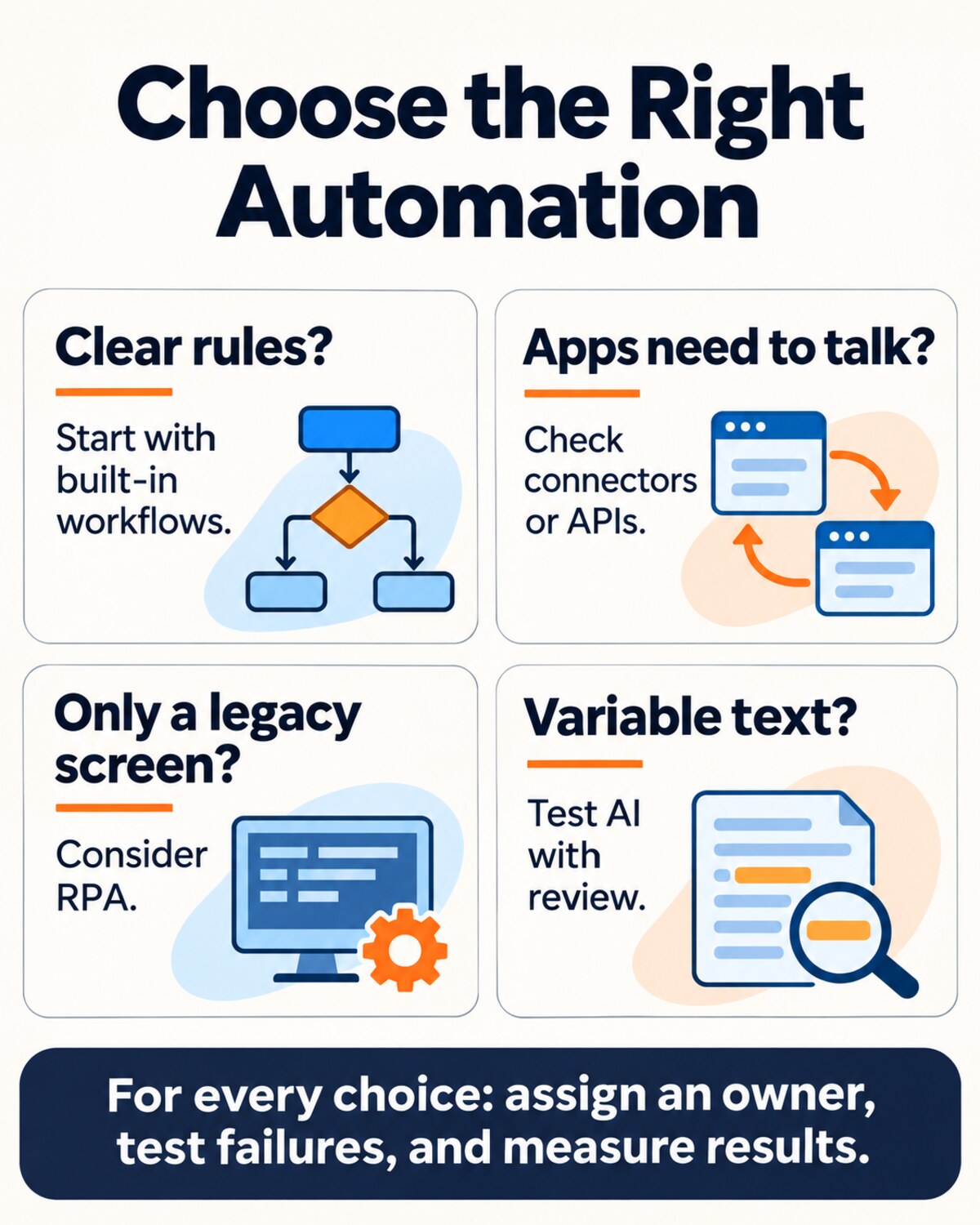
These are building blocks, not mutually exclusive products. One process may use a built-in approval, an API to retrieve records and an AI component to summarize a document. The useful comparison is how well the complete arrangement meets your needs, not which label sounds most advanced.
1. See Whether Your Existing Tools Are Enough
Before buying another platform, inspect the features already available in your accounting, customer-support or project-management software. A rule that assigns a ticket, sends a reminder or asks a manager for approval may already exist. Confirm whether it is included in your plan and whether the people who need it have the right permissions.
This is often a good starting point when all relevant information stays in one system and the process follows clear rules. Its limit is visibility: a native feature may not see events in another application or provide the exception handling you need. Ask what happens when the recipient leaves, a task is overdue or the underlying record changes.
2. Use a Connector When the Handoff Is the Problem
A workflow platform connects triggers and actions across applications. For example, a signed form might start a workflow that creates a project record, notifies the account owner and schedules a kickoff task. Prebuilt connectors can reduce setup work, but they do not remove the need to define the process.
Check whether each connector supports the exact event and action—not merely the application’s name. Review authentication, rate limits, supported fields, polling delays and task-based billing. Test what happens when a connection expires or a step succeeds but the next one fails. If the connector cannot show enough detail to diagnose an error, calculate the operational cost of that gap.
3. Choose an API or Custom Integration for a Defined Contract
An application programming interface lets software request data or an action through an interface provided by another system. APIs are a connection method, not a complete business process. You still need logic that decides when to call the API, validates the response and routes failures.
Custom integration becomes more attractive when the business needs unusual validation, reliable synchronization, ownership of the code or a capability unavailable through a connector. Compare that control with the cost of maintaining credentials, monitoring changes, writing tests and supporting the integration after its original developer moves on.
Pay particular attention to retries. If an order-creation request times out, the original request may have succeeded even though the response was lost. Retrying blindly can create a duplicate. The Amazon Builders’ Library describes how idempotent API design can make supported retries safer. Where the destination does not offer that protection, design a reconciliation process rather than assuming repeat requests are harmless.
4. Consider RPA When Work Must Happen on a Screen
RPA uses software to carry out defined interactions with an interface. Consider it when a necessary legacy system lacks a suitable, authorized integration and the task follows a stable sequence—for example, entering approved data into a desktop application.
Ask who owns the account used by the bot, whether the application permits this use, and how the bot handles changed screens, multi-factor authentication and unexpected messages. Run it with the minimum access needed. RPA can bridge a gap, but a screen change can interrupt a process that appeared stable. A supported integration may be easier to maintain when it meets the same need.
5. Add AI Only Where Interpretation Earns Its Place
AI may be worth testing when inputs vary in ways that make ordinary rules difficult to maintain: customer emails describe similar issues in different words, or supplier documents arrive in inconsistent layouts. The model might propose a category, extract fields or draft a summary. A separate, deterministic check can validate the proposal against known records and policy.
Do not assume a fluent answer is correct. Assemble representative cases, including incomplete and unusual examples, and compare output with a reliable answer key. Track errors that matter to the business—not only an overall accuracy percentage. A model that misroutes a rare fraud complaint may be unacceptable even if it handles routine requests well.
The NIST Generative AI Profile identifies risks including inaccurate generated content and overreliance on automated outputs. Decide who can inspect a result, how errors are reported and whether sensitive data may be sent to a provider under your organization’s terms. For high-impact decisions, set a meaningful approval step before an action is taken.
What About AI Agents?
An agentic system may choose a sequence of tools or actions toward a defined goal. That flexibility can help with work that has genuinely variable paths, but it changes the control problem: you must understand what the system may access and what it can do. Start with a narrow task, restricted tools and a clear stop condition. Require approval before consequential changes such as issuing payments, deleting records or communicating binding commitments.
Salesforce’s architecture guidance distinguishes predictable workflows from cases where flexible decision-making may be appropriate. Treat vendor guidance as a design input, not proof that an agent is necessary for your business.
A Decision Framework You Can Use Before Buying
- Define the result and owner. Name the person responsible for the workflow and the outcome you want to improve.
- Measure the baseline. Count cases, handling time, waiting time, errors and exception types over a representative period. Separate active work from time waiting in a queue.
- Map each step. Mark structured versus unstructured inputs, required systems, decisions, approvals and the information needed to resolve exceptions.
- Set constraints. Identify privacy, permissions, retention, supplier agreements, financial controls and recovery requirements relevant to your organization.
- Shortlist the simplest viable designs. Include process improvement and native features alongside connectors, custom integration, RPA or an AI-assisted step where relevant.
- Test failure paths. Include duplicate events, missing data, service outages, revoked access and incorrect interpretations. Decide who receives the alert and what a safe retry looks like.
- Compare total cost and outcomes. Include setup, subscription, usage, training, monitoring, staff review, maintenance and expected correction work.
- Choose a limited pilot. Define success thresholds, an owner, a review date and a rollback route before expanding.
Worked Example: Routing Supplier Invoices
Imagine a small distributor receives invoices by email. Staff read each document, check the supplier and amount, then route it for approval. The company wants fewer missed approvals without allowing an unverified invoice to initiate a payment.
| Step | Possible approach | Control |
|---|---|---|
| Receive the invoice | A mailbox rule or workflow trigger creates a case | Log the source and flag missing attachments |
| Read the document | A document tool or AI proposes supplier, invoice number and amount | Validate fields against the document and approved supplier records |
| Check for duplication | A defined rule compares relevant invoice identifiers | Route uncertain matches to staff; do not silently discard them |
| Route approval | Use explicit approval thresholds and an assigned backup | Escalate overdue, unusual or incomplete cases |
| Update the accounting system | Use a supported connector or API after approval | Record status, handle failures and reconcile before retrying |
This design gives AI a limited interpretation role while keeping payment authority with the established approval process. If invoices are already consistently structured, a simpler extraction rule may be enough. If supplier details cannot be matched reliably, the right pilot may be a human review queue rather than automatic routing.
Calculate the Cost Beyond the Subscription
Consider an illustrative pilot processing 800 cases a month. Assume staff spend six minutes per case today. A proposed workflow reduces active handling to two minutes for 75% of cases; the remaining 25% still need six minutes. That saves 2,400 minutes, or 40 hours, a month before monitoring and correction work.
If the fully loaded staff cost is hypothetically $30 an hour, gross capacity released is $1,200 monthly. Suppose recurring software, monitoring and maintenance cost $500, and additional review or correction uses $200 in staff time. Estimated net monthly benefit is $500. With a $3,000 setup cost, the simple payback is six months, assuming the volume and savings persist. This does not guarantee cash savings: the business must actually redeploy capacity or avoid another cost.
Test the assumptions. If only half the cases qualify, or error correction takes longer, the payback changes. Include one-time design and training, integration changes, usage peaks, security review and exit costs. Compare the result against improving the manual process as well as against competing tools.
What to Ask a Vendor or Internal Team
- Which exact triggers, fields and actions are supported in our applications and plan?
- What happens when a step succeeds but the confirmation is lost? How are duplicates detected?
- Where is our data processed, retained and used, and can we restrict access or delete it?
- Can we inspect logs, export workflow definitions and transfer ownership?
- Which limits, usage charges and support commitments apply at our expected volume?
- How are model changes, false positives and material errors identified and reviewed?
- How do we pause the workflow, recover queued work and return to a manual process?
Run a Pilot That Can Fail Safely
Start with a small set of real, permitted cases or representative test data. For higher-impact steps, run the automation in observation mode first: let it propose an outcome while a person performs the actual decision. Compare both results and record differences. Check whether the tool saves time after accounting for review, exceptions and rework.
Set a stop rule before launch: for example, pause if the workflow creates duplicate records, misses an agreed error threshold or loses access to a required system. Assign a person to investigate and give staff a clear way to override it. Only widen the pilot after the team can explain not just the average result, but also what happens when the process goes wrong.
The Right Approach Can Be a Combination
A good choice may be a simple rule, a connector, a supported API, a screen-based bot or an AI-assisted step with human review. It may also be a redesigned manual process. Pick the combination that meets the business objective with acceptable cost, control and maintenance—and revisit it when the workflow or its risks change.