
AI subscriptions are easy to start and harder to judge. A paid plan may promise a stronger model, more credits, faster responses, private workspaces, automation, or professional exports. A longer feature list, however, does not always produce better work.
The AI features worth paying for solve a repeated problem. They remove a limit, reduce correction time, protect sensitive information, connect to an existing workflow, or produce files that are ready for real use. Features are mostly marketing when their value rests on a vague label, an impressive demonstration, or credits that are difficult to translate into finished work.
Generation speed is only one part of the calculation. Review, retries, corrections, approvals, and failed exports also consume time. Some AI features create more review work than they save, even when the first output appears quickly.
This is a research-based buying guide, not a hands-on test of every platform. Plans, limits, and product terms can change.
Check Three Things Before Paying
A paid feature should pass three practical tests:
- It removes a real limit: The free tier already interrupts a task you perform regularly.
- Its value can be measured: It saves time, improves accepted output, replaces another expense, or adds a required control.
- Your work can survive without it: Original files, exports, and core controls remain usable if the subscription ends or the AI fails.
Anyone still choosing a first assistant should compare the best AI tools for non-technical users before paying for several overlapping services.
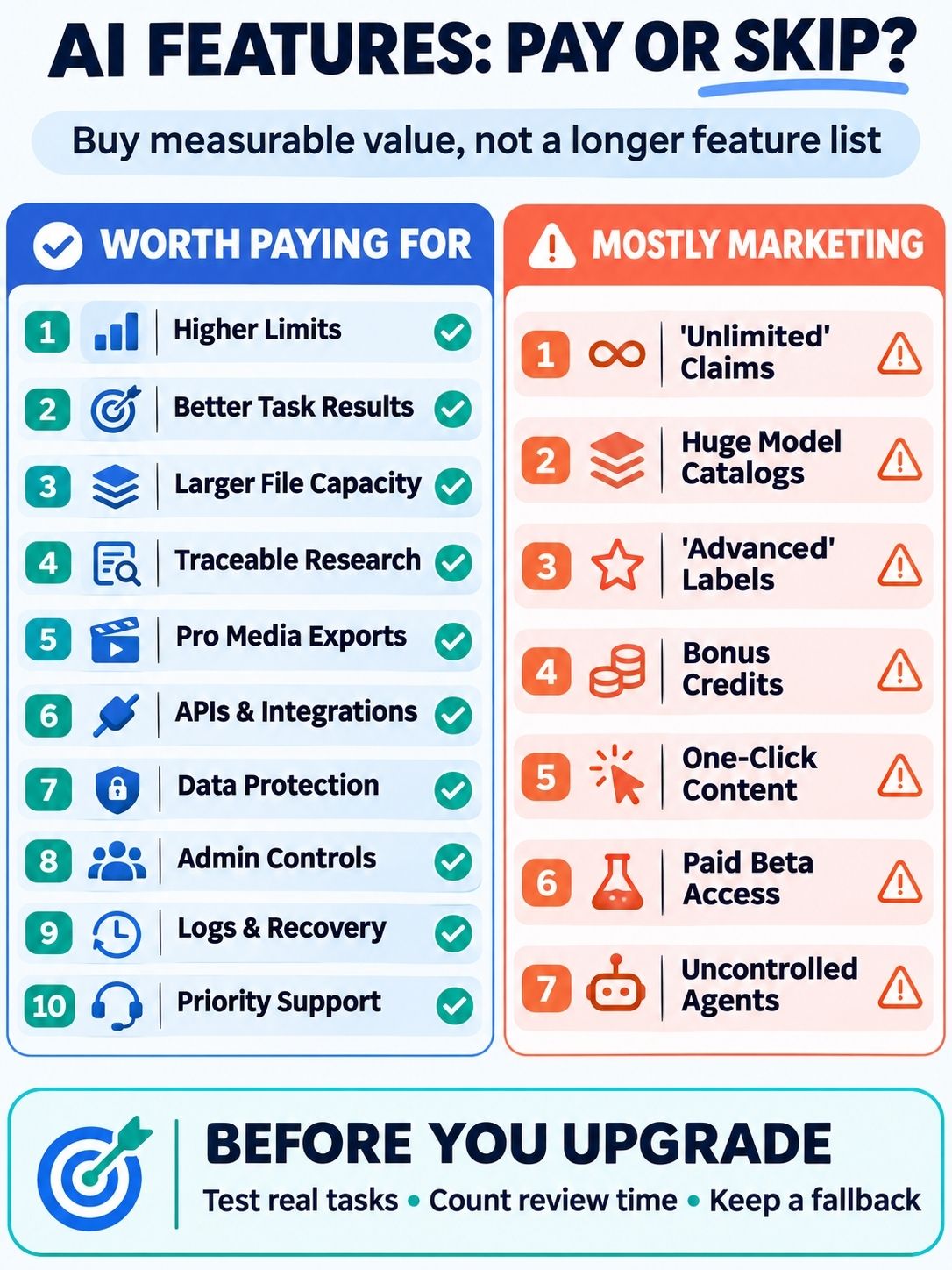
10 AI Features Worth Paying For
The AI features worth paying for are not necessarily the flashiest. They justify their cost by removing a repeated bottleneck, producing more usable output, protecting business data, or making an existing workflow easier to manage. The following ten features offer the clearest practical value when matched to a real need.
1. Higher Limits That Remove a Regular Bottleneck
Higher limits make sense when a free allowance repeatedly interrupts useful work. Track whether the restriction affects messages, uploads, research runs, coding sessions, images, video, or storage. Then count how often it causes delays or forces a move to another service. Capacity has value when it keeps an active workflow moving. Unused credits that expire each month do not.
2. A Better Model for a Measurable Task
A premium model is worth the cost when it performs better on the buyer’s actual work. Run the same prompts and success criteria on the free and paid options. For writing, measure editing time and factual accuracy. For code, run tests. For data work, verify ranges, formulas, units, and exclusions because AI can make spreadsheet errors without showing a warning. Count accepted results, not impressive first drafts.
3. Larger File and Context Capacity
Larger context windows can help with research papers, contracts, transcripts, codebases, and related document sets. The benefit is less splitting, uploading, and repeated explanation. Check supported formats, file limits, retention, retrieval behavior, and source references. Accepting a large document does not guarantee that the system will notice every exception inside it.
4. Research With Traceable Sources
A paid research mode earns its price when it shortens the route from a claim to its evidence. It should identify relevant sources, distinguish current information from older material, and show where important statements came from. Links that merely look like citations are not enough. Readers still need to open them and confirm that the cited passage supports the answer.
5. Professional Media Controls and Exports
Creative AI becomes more valuable when it provides the resolution, file type, editing controls, consistency, and usage rights a real project requires. Judge the cost per accepted asset, including failed attempts and corrections, rather than the advertised price per generation. This comparison of unified AI creative platforms shows why exports and credit rules matter as much as model choice.
ImagineLab Art is an example of a workspace combining image, video, voice, music, writing, and infographic tools through one credit system. Its value depends on whether that workflow replaces subscriptions a creator already uses.
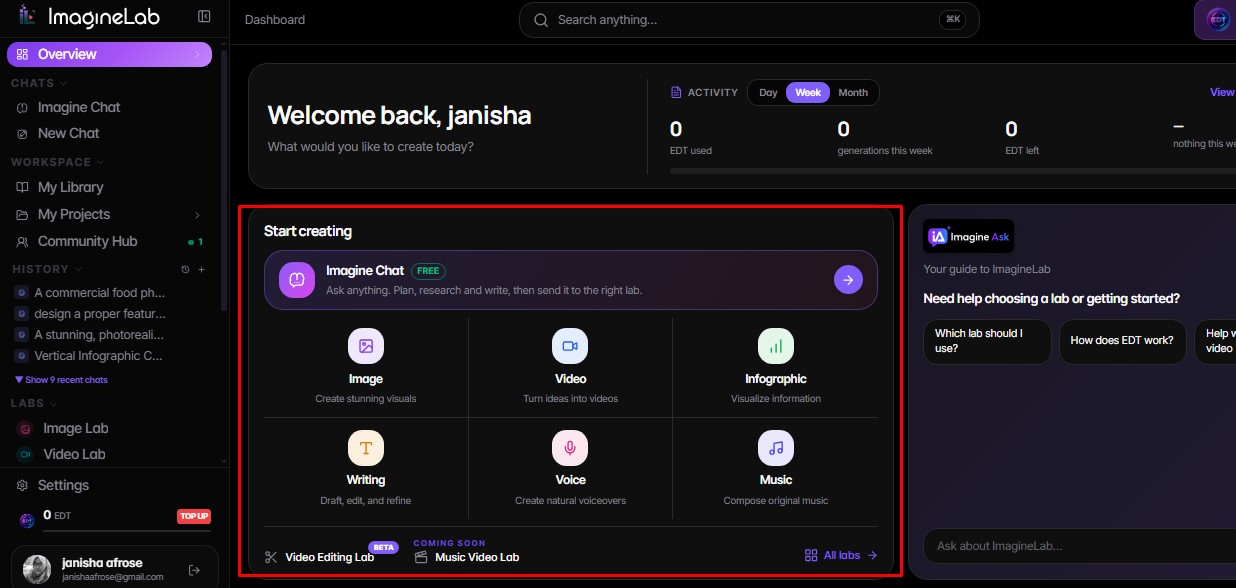
Disclosure: ImagineLab.art is our in-house software built within Editorialge’s business ecosystem.
6. APIs, Batch Tools, and Useful Integrations
An API or native integration can remove repeated copying, uploading, and setup. It may process a content queue, classify requests, generate approved variations, or connect an assistant to selected company information. Before paying, check authentication, permissions, rate limits, error handling, logs, export formats, and the cost of failed jobs. A page full of integration logos is not proof of a reliable workflow.
7. Business Data Protections
Some business plans offer different data terms from consumer accounts, including no-training defaults for workspace content, retention controls, data residency, or stronger access restrictions. These protections can matter more than extra messages when employees handle client files, internal code, or confidential plans.
Review the exact account terms. A training toggle does not automatically control memory, chat history, connected apps, shared links, and deletion. These AI privacy settings help separate those controls.
8. Admin, Identity, and Permission Management
Team plans can justify their cost when administrators need central billing, single sign-on, role assignment, domain verification, member removal, or spending limits. These controls keep company work out of unmanaged personal accounts.
The longest enterprise checklist is not always the best choice. Each control should answer a real requirement from security, legal, procurement, or a client contract.
9. Logs, Version History, and Recovery
AI work should be traceable when errors matter. Useful paid controls include activity history, named owners, change records, original-file access, approval logs, undo options, and rollback.
Recovery matters most when AI can affect customers, public content, code, or business records. The AI add-ons that need a non-AI fallback are often the same tools that require stronger recovery controls.
10. Priority Processing and Support
Faster queues and stronger support are worth paying for when delays threaten client delivery or production work. Check what “priority” means. It may indicate faster access during busy periods without guaranteeing a response time.
Businesses should distinguish ordinary tickets, priority support, contractual service levels, and a named account contact. If waiting has no meaningful cost, premium processing may solve the wrong problem.
7 AI Features That Are Mostly Marketing
These features are not always useless. They are weak reasons to upgrade when the provider cannot connect them to measurable work.
1. “Unlimited AI” With Hidden Boundaries
Unlimited use may still involve fair-use rules, slower queues, model-specific caps, or separate charges for images, video, research, coding, and agents. Buyers need the limits for the exact task, not the headline.
2. A Huge Model Catalog
Dozens of models may help specialists, but they can also create another selection problem. Model count has little value when exports are weak, credit costs are unclear, or users cannot move prompts and settings between models.
3. “Advanced Intelligence” Labels
Words such as pro, ultra, expert, and deep reasoning describe tiers, not proven value. The paid option must reduce corrections, improve accepted output, or complete a task the lower tier cannot handle.
4. Bonus Credits With Unclear Burn Rates
A large credit balance can disappear quickly when premium models, video, upscaling, retries, and revisions draw from the same wallet. Convert credits into accepted images, usable video minutes, processed documents, or completed jobs before judging the offer.
5. One-Click “Finished” Content
Instant articles, presentations, and campaigns look good in demonstrations. They often need source checks, brand editing, accessibility work, layout corrections, and approval. First-draft speed should not be sold as finished-work quality.
6. Paid Access to Unstable Beta Features
Beta access can help developers and early adopters, but it is a weak reason for an annual subscription. A beta may change, disappear, or lack reliable exports. Pay for useful features that exist now, not a roadmap.
7. Autonomous Agents Without Control
Broad autonomy becomes risky when an agent can send messages, alter records, publish content, or spend money without approval. Valuable agent features include scoped permissions, visible plans, logs, spending limits, pause controls, and rollback.
The AI governance rules every business should establish offer a practical starting point. The voluntary NIST AI Risk Management Framework also emphasizes transparency, accountability, and ongoing risk management.
Without those controls, autonomy is not a premium feature. It is an operational risk.
Run a Short Upgrade Test
Use three tasks from a normal week rather than a polished demonstration:
- Record the current time and acceptable result.
- Run the same inputs through the free and paid options.
- Count retries, rejected output, review time, and export work.
- Test what remains available after the AI is disabled or its allowance ends.
- Check privacy, retention, cancellation, and file-access terms.
Then estimate:
Monthly value = conservative value of time saved + subscriptions replaced − plan price − review and recovery costs
Teams can use subscription tracker apps to identify overlapping renewals before deciding whether one AI plan can replace several tools.
Pay for the Constraint, Not the Label
The best AI features worth paying for remove a limit that already costs time, money, control, or confidence. Marketing features sell possibility. Useful features prove their value through accepted work. Test the task, count the complete cost, keep a fallback, and upgrade only when the difference is clear.