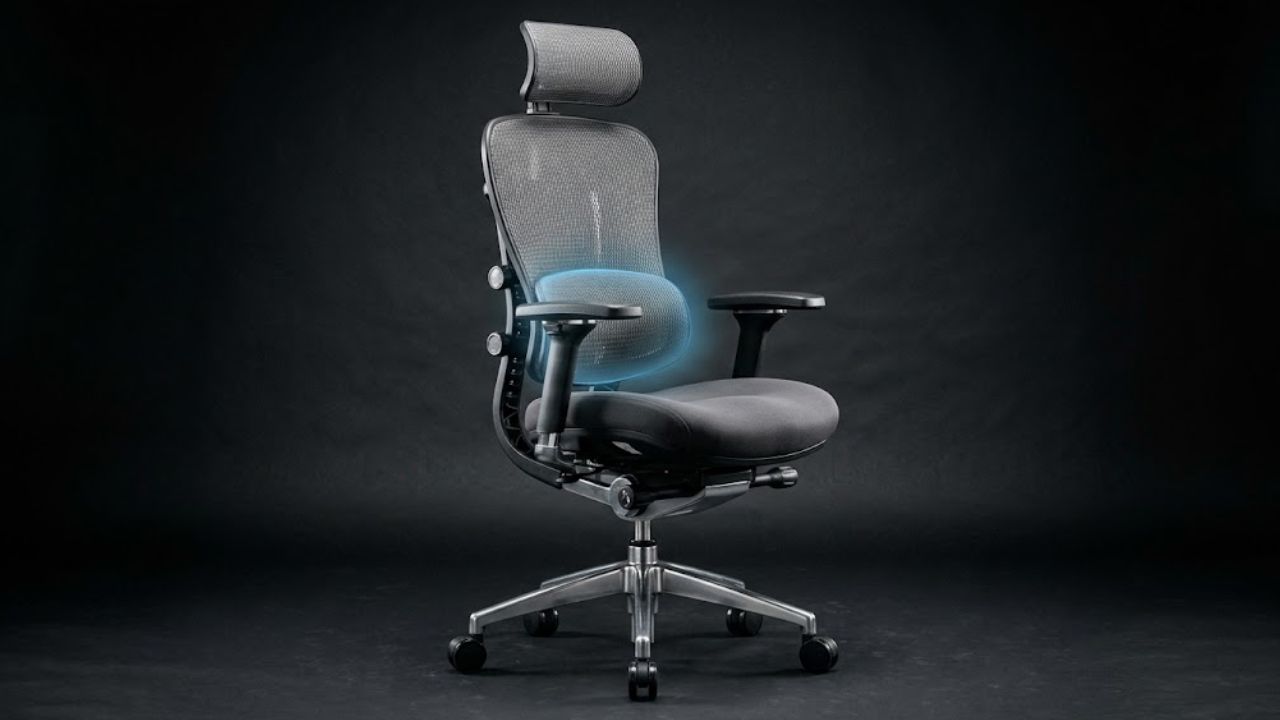
A chair can look perfectly supportive in a product photo and still be wrong for your body. The lumbar pad might sit too high, the seat could press against the backs of your knees, or the armrests might prevent you from moving close enough to your desk. Those mismatches matter more than an expensive label.
For anyone shopping for an ergonomic office chair while dealing with back discomfort, the first priority is adjustability. A chair should accommodate your body and working position—not force you into one supposedly perfect posture.
The 12 chairs in this guide stand out for different combinations of back support, seat adjustments, recline mechanisms, and fit options. They range from premium office furniture to more accessible models.
Important: These are research-based product selections, not hands-on tests or medically proven pain-relief products. A 2021 systematic review found low-quality and conflicting evidence that office-chair interventions reduce lower-back pain. Chair selection should support a comfortable workstation, not replace appropriate medical assessment or treatment.
The 12 Best Ergonomic Office Chairs at a Glance
| Office chair | Best fit-based use case | Feature worth examining |
| Steelcase Leap | Overall adjustability | Height-adjustable lumbar and lower-back firmness |
| Herman Miller Aeron | Breathable mesh and size choices | Three chair sizes and configurable PostureFit SL |
| Haworth Fern | Flexible full-back support | Wave Suspension backrest |
| Steelcase Gesture | Multiple devices and arm positions | Highly adjustable 360-degree arms |
| Herman Miller Embody | Dynamic backrest and seat support | Backfit and Pixelated Support |
| Haworth Zody II | Fine-tuning lower-back support | Pelvic and Asymmetrical Lumbar system |
| Steelcase Amia | Cushioned seat with adaptive lumbar | Height-adjustable LiveLumbar |
| Humanscale Freedom Task | Automatic recline | Body-weight-responsive backrest |
| Branch Ergonomic Chair Pro | Adjustable midrange option | Two-way lumbar and 5D arms |
| Haworth Soji | Configurable professional task chair | Seat-depth adjustment and optional lumbar |
| HON Ignition 2.0 | Conventional workplace seating | Adjustable lumbar and seat slider on selected versions |
| FlexiSpot C7 | Dynamic lumbar support | Self-adaptive lumbar mechanism |
The order reflects a practical range of design approaches, not independently measured clinical effectiveness. Specifications, available options, and prices may vary by configuration and market.
1. Steelcase Leap — Best Overall for Extensive Adjustability
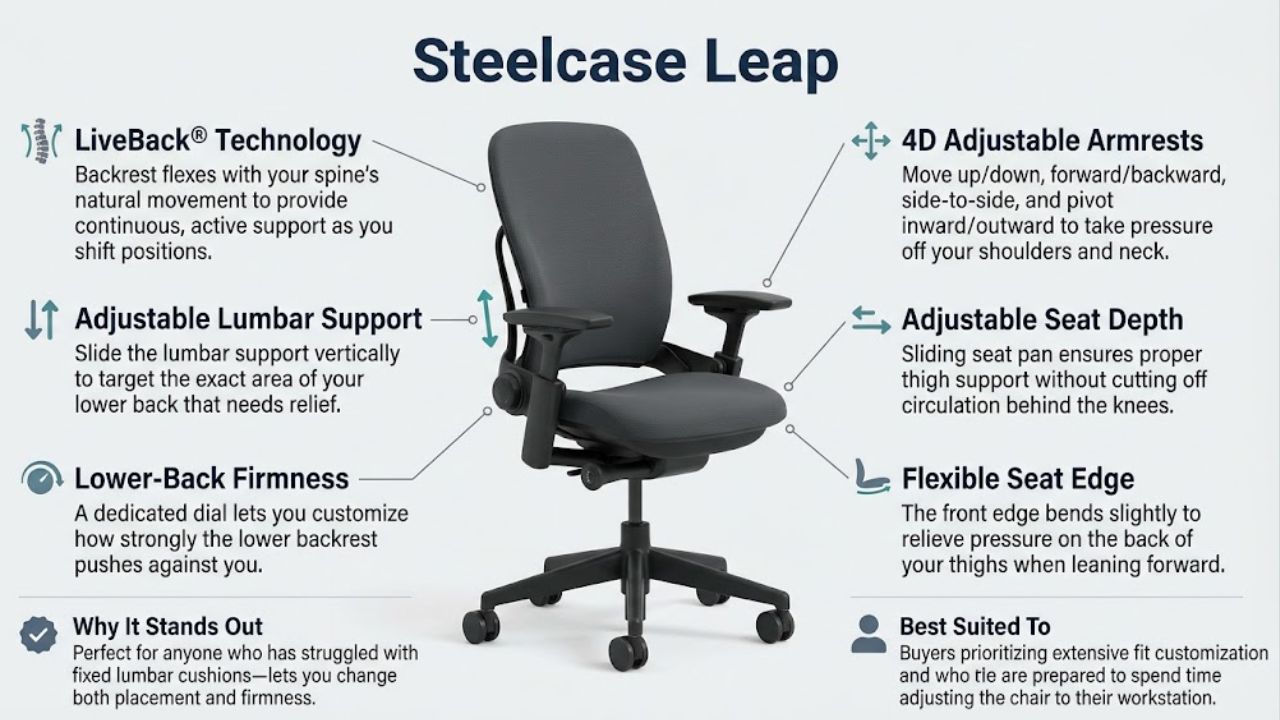
The Steelcase Leap earns its place because it offers unusually detailed control over how the chair supports the lower back.
Its LiveBack mechanism allows the backrest to flex with movement. More importantly for a fit-focused buyer, the standard lumbar support can move vertically, while a separate lower-back firmness control changes how strongly that area is supported.
The chair also offers seat-depth adjustment, flexible seat edges, recline settings, and four-dimensional armrests on the relevant configuration.
Why it stands out: Someone who has struggled with a fixed lumbar cushion may appreciate being able to change both its placement and the firmness felt against the lower back.
What to consider: More adjustments are useful only when they are correctly set. The padded back and seat will also feel different from the suspended mesh used by some competing chairs.
Best suited to: Buyers prioritizing extensive fit customization and who are prepared to spend time adjusting the chair to their workstation.
2. Herman Miller Aeron — Best for Breathable Mesh and Multiple Sizes
The Herman Miller Aeron takes a different approach from many conventional padded task chairs.
Its 8Z Pellicle suspension replaces traditional upholstered seat and back cushions with a breathable material designed to distribute support across different zones. Depending on configuration, its PostureFit SL system provides adjustable support around the sacral and lumbar regions.
Aeron comes in three sizes—A, B, and C—rather than relying on one chair frame to accommodate nearly everyone.
Why it stands out: The multiple sizes offer a useful fitting decision before choosing armrests, tilt controls, and back-support options.
What to consider: Size selection is particularly important because the seat depth is determined by the chair size rather than adjusted using a sliding seat. Some buyers may also prefer a padded seat over firmer suspended mesh.
Best suited to: People who prefer mesh seating and can try different Aeron sizes before committing.
3. Haworth Fern — Best for Flexible Full-Back Movement
The Haworth Fern uses a Wave Suspension system designed to flex as the user changes position.
Its backrest has a distinctive frameless feel, allowing movement without the rigid perimeter found on many conventional chairs. Available adjustments include seat depth, pneumatic height, synchronized tilt, forward tilt, and various arm configurations. Height-adjustable lumbar support is available depending on the selected model.
Why it stands out: Its flexible back makes Fern an interesting option for workers who dislike the sensation of a rigid backrest.
What to consider: Lumbar support and arm features should be checked on the exact configuration. Some people may prefer more defined lumbar contact than others.
Best suited to: Workers who frequently shift between upright typing, reading, and reclining positions.
4. Steelcase Gesture — Best for Multiple Devices and Arm Positions
Office work rarely involves keeping both forearms in one fixed position. People move between keyboards, notebooks, tablets, and phones.
The Steelcase Gesture is designed around these variations. Its highly adjustable arms move through a broad range of positions, while the backrest’s 3D LiveBack mechanism responds to movement.
Gesture also includes seat-height and seat-depth controls, back-tension adjustment, and recline stops. Additional lumbar support is available on applicable configurations.
Why it stands out: The arm system offers greater flexibility for changing tasks without constantly leaving the chair.
What to consider: Buyers primarily interested in highly localized lumbar-firmness adjustments should compare Gesture directly against Leap.
Best suited to: Multidevice users who need adaptable arm positioning and backrest movement.
5. Herman Miller Embody — Best for Distributed Back and Seat Support
The Herman Miller Embody is visually distinctive, but its more important feature is the way its backrest and seat respond to movement.
Embody uses Pixelated Support beneath the seating surfaces and a Backfit control that helps align the backrest with the user’s spinal curve. The chair also offers adjustable seat depth and recline controls.
Unlike a chair built around a large, separately protruding lumbar pad, Embody attempts to distribute contact across a broader support structure.
Why it stands out: It provides an alternative approach for buyers who prefer a supportive backrest without a prominent lumbar cushion pressing into one area.
What to consider: The backrest’s feel is distinctive and may not suit every preference. An extended showroom trial is especially valuable given the chair’s premium positioning.
Best suited to: Buyers interested in a dynamic support system and willing to test whether its overall backrest geometry suits them.
6. Haworth Zody II — Best for Fine-Tuning Lumbar Support
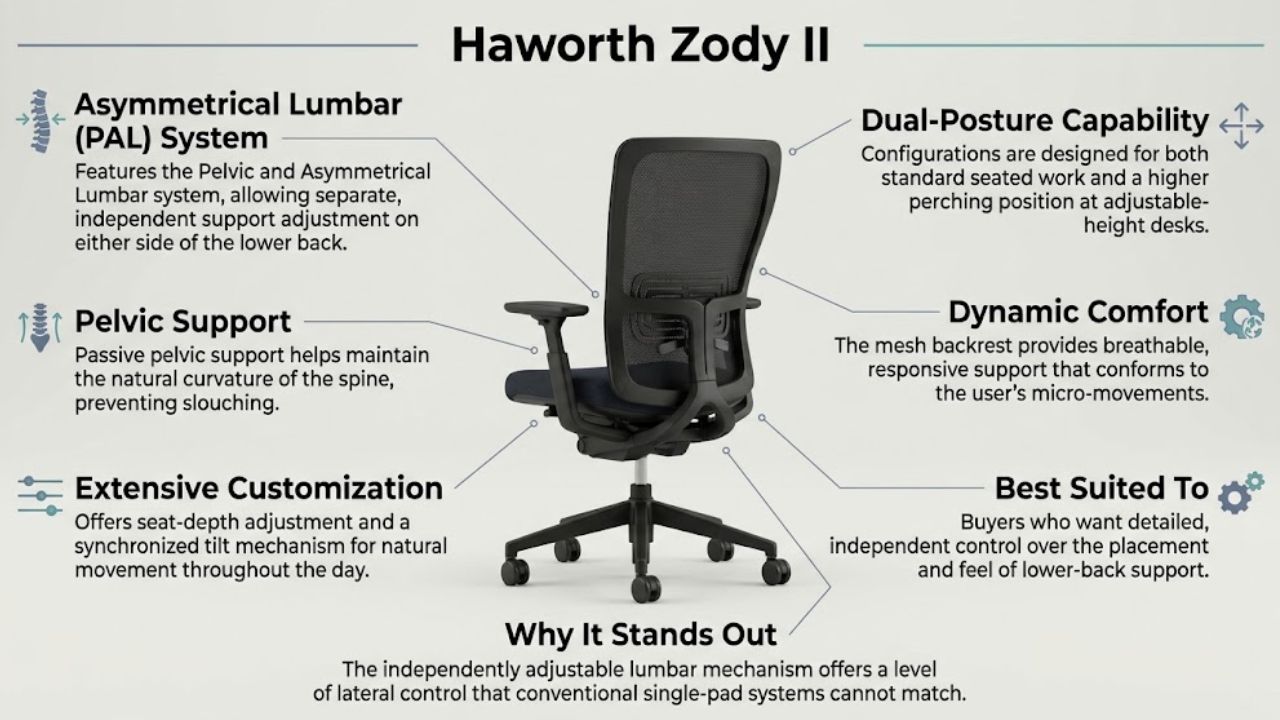
The Haworth Zody II is notable for its Pelvic and Asymmetrical Lumbar (PAL) system.
The system allows separate adjustment of support on either side of the lower back, along with pelvic support. Zody II also offers seat-depth adjustment, synchronized tilt, and configurations designed for both standard seated work and a higher perching position at adjustable-height desks.
Why it stands out: The independently adjustable lumbar mechanism offers a level of control that conventional single-pad systems do not provide.
What to consider: The asymmetric settings are not a medical treatment or a reason to deliberately force the body into an uneven posture. They are fitting controls that should feel comfortable, and the exact PAL configuration should be confirmed.
Best suited to: Buyers who want detailed control over the placement and feel of lower-back support.
7. Steelcase Amia — Best for a Cushioned Seat and Adaptive Lumbar
The Steelcase Amia combines a conventional upholstered appearance with a more sophisticated internal support system.
Its LiveLumbar mechanism uses height-adjustable spring support in the lumbar region. Amia also provides seat-height and seat-depth adjustment, recline controls, and configurable four-dimensional armrests.
The upholstered seat uses flexible edges and adaptive cushioning, providing a different sitting experience from full-mesh designs.
Why it stands out: Amia offers an approachable combination of lumbar adjustment and cushioned seating without requiring the unusual seat or backrest design of some premium alternatives.
What to consider: It is worth comparing the pressure and firmness of the LiveLumbar mechanism with the more manually tunable system on Leap.
Best suited to: People who prefer upholstered task chairs but still want substantial ergonomic adjustments.
8. Humanscale Freedom Task — Best for Automatic Recline
The Humanscale Freedom Task reduces reliance on multiple recline-tension knobs.
Its weight-responsive mechanism provides support as the sitter changes position, and the backrest pivots to accommodate movement. The chair’s arm support also moves with the user during recline.
This makes Freedom an interesting contrast to manually controlled chairs, where users select resistance and preferred backstop positions.
Why it stands out: A simpler automatic recline experience may appeal to people who dislike constantly managing chair controls.
What to consider: Automatic resistance will not suit every personal preference. Buyers who want precise manual recline settings should compare it with more conventional adjustment systems.
Best suited to: People who regularly lean back during work and prefer fewer manual reclining adjustments.
9. Branch Ergonomic Chair Pro — Best Midrange Adjustability
The Branch Ergonomic Chair Pro aims to provide an extensive adjustment range without entering the highest-priced office-chair category.
Its features include a removable lumbar support cushion adjustable in height and depth, seat-height and seat-depth controls, forward tilt, tilt tension, and five-dimensional armrests.
Branch lists the standard chair as suitable for approximately 5 feet 2 inches to 6 feet 2 inches tall, with a stated 275-pound weight capacity. A taller cylinder configuration is available.
Why it stands out: The two-way lumbar control offers a practical way to change how far the support projects into the lower back.
What to consider: The padded lumbar element may feel too prominent for some users. Check the return policy, seat-height range, and cylinder option before ordering.
Best suited to: Home-office workers seeking a broad set of adjustments at a relatively accessible price compared with premium flagship chairs.
10. Haworth Soji — Best Configurable Professional Task Chair
The Haworth Soji provides many conventional ergonomic adjustments in a clean, professional design.
It includes height adjustment, tilt-tension control, a back lock, and 2.5 inches of seat-depth adjustment. Depending on configuration, buyers can add features such as height-adjustable lumbar support, four-dimensional arms, and forward tilt.
Haworth lists a standard seat-height range of approximately 16.4 to 21 inches.
Why it stands out: Its adjustable seat depth and configurable features make it a practical candidate for offices choosing chairs for different workers.
What to consider: Not every configuration includes the same lumbar, arm, or tilt options. A lower-priced version may lack a feature the buyer expects.
Best suited to: Home offices and conventional workplaces that prioritize ergonomic adjustability, professional styling, and configurable options.
11. HON Ignition 2.0 — Best for Conventional Workplace Seating
The HON Ignition 2.0 family includes several task-chair configurations rather than one universal specification.
Selected mesh-back task versions feature adjustable lumbar support, seat-depth adjustment through a slider, height- and width-adjustable arms, and synchronized tilt.
These controls cover several of the ergonomic considerations identified in OSHA’s workstation guidance.
Why it stands out: Ignition 2.0 offers a familiar commercial task-chair design with useful adjustment mechanisms available on selected versions.
What to consider: The model family includes variations in upholstery, seat controls, lumbar support, and backrest design. Verify the exact manufacturer product number and the features included before buying.
Best suited to: Buyers seeking a traditional office chair with established task-chair controls rather than an unconventional support mechanism.
12. FlexiSpot C7 — Best for Self-Adaptive Lumbar Support
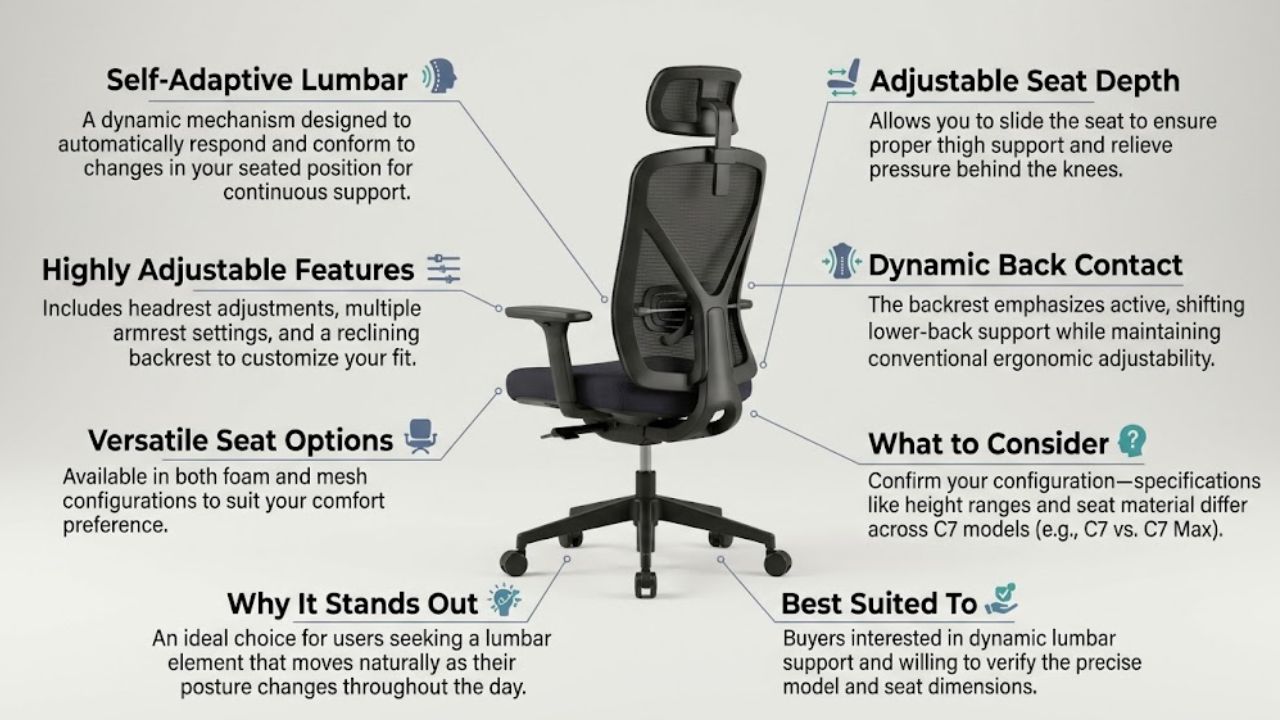
The FlexiSpot C7 features a self-adaptive lumbar mechanism designed to respond to changes in seated position.
The manufacturer also lists adjustable seat depth, a reclining backrest, headrest adjustments, and multiple armrest settings. Some versions offer foam seats, while others feature mesh options.
The C7’s design emphasizes dynamic lower-back contact while allowing several conventional adjustments.
Why it stands out: Buyers interested in a lumbar element that moves as their posture changes may find this approach worth testing.
What to consider: FlexiSpot sells several similarly named versions and configurations, including C7 and C7 Max. Seat dimensions, recommended height ranges, lumbar adjustments, and other specifications are not necessarily interchangeable.
Best suited to: Buyers interested in dynamic lumbar support and willing to verify the precise model and seat dimensions.
How to Choose an Ergonomic Office Chair When You Have Back Pain
The best chair is not necessarily the one with the most controls. Its adjustments must reach the positions your body actually needs.
The Occupational Safety and Health Administration (OSHA) provides guidance on lumbar support, seat dimensions, adjustable backrests, armrests, and working posture.
Five questions can make a chair comparison much more useful.
Does the Lumbar Support Meet Your Back in the Right Place?
A chair’s lower-back support should follow the natural curve of the lumbar spine without producing uncomfortable localized pressure.
Height-adjustable lumbar pads provide more fitting flexibility than fixed cushions. Depth and firmness controls offer additional options, but aggressive support is not automatically better.
Can You Sit Back Without the Seat Pressing Against Your Knees?
Seat depth is easy to overlook.
If a seat is too long, the user may slide forward and lose contact with the backrest. If it is too short, the thighs may lack sufficient support.
With your back supported, check that there is comfortable clearance behind the knees and that the chair supports your thighs without pressing into them.
Can Your Feet Stay Supported?
Chair height should allow your feet to rest firmly on the floor or a stable footrest.
A chair that is too tall may leave the feet dangling. A chair set too low relative to the desk can lead to raised shoulders or awkward arm positioning.
The chair and desk should be evaluated together.
Can You Change Position Without Losing Support?
A good working position is not one rigid posture maintained for an entire day.
Look for a backrest that reclines smoothly, a resistance level you can comfortably manage, and adequate support while seated upright or slightly reclined.
OSHA also recommends regularly changing working positions, standing, and walking rather than remaining motionless for prolonged periods.
Do the Armrests Help or Get in the Way?
Armrests should support your forearms while allowing relaxed shoulders and elbows near the body.
If the armrests prevent the chair from approaching the desk, you may start reaching forward and leaning away from the backrest. That can undermine the benefit of otherwise useful chair adjustments.
Editorialge’s guide to choosing an ergonomic office chair covers these basic fitting considerations in more detail.
How Much Should You Spend?
A higher price can buy more adjustability, more material choices, longer warranties, and different support mechanisms. It does not establish greater medical benefit.
Before deciding on a budget, consider how long you use the chair, whether its adjustment range fits your body, how easily you can access replacement parts, and whether a practical trial or return policy is available.
The Editorialge guide to ergonomic office chairs under $300 provides another starting point for budget research. Recheck its listed models, prices, and availability before purchasing, since the chair market changes and specifications vary.
Used or refurbished premium chairs are another possibility. However, assess the condition of the gas cylinder, recline mechanism, upholstery, armrests, casters, and support controls, as well as who provides the warranty.
A well-fitting chair in good condition is a better purchase than an expensive chair whose dimensions never suit you.
Can an Ergonomic Office Chair Actually Relieve Back Pain?
This question deserves more caution than chair marketing often provides.
A supportive chair can improve the fit of a workstation and help a worker maintain more comfortable positions. But that does not mean a chair has been shown to treat the medical causes of back pain.
A systematic review published in 2021 examined chair interventions among office workers and found that the quality of evidence for reducing lower-back pain and discomfort was very low to low, with conflicting findings.
That makes it inappropriate to promise that a particular chair will correct a spinal condition, eliminate chronic pain, or prevent an injury.
Back pain can arise from many causes beyond seating. Persistent or worsening symptoms deserve appropriate clinical assessment. New bladder or bowel dysfunction, loss of sensation around the groin, or significant neurological symptoms can require emergency medical evaluation.
For ordinary office comfort, the practical approach is to find seating that fits, arrange the workstation appropriately, and change positions regularly.
The Final Buying Decision
The Steelcase Leap provides one of the broadest combinations of lumbar and recline adjustments in this selection. The Herman Miller Aeron deserves attention from buyers who prefer breathable mesh and can choose among three frame sizes. The Haworth Zody II is distinctive for its independently adjustable lower-back support, while the Branch Ergonomic Chair Pro offers an extensive set of controls in a lower price category than many premium flagships.
These are differences in design and configuration, not proof that one chair will resolve back pain more effectively than another.
Before buying, try the chair with your actual working posture. Adjust its height, seat depth, lumbar support, armrests, and recline. Spend time typing, reading, and changing position rather than judging the chair after a few seconds of sitting.
The most useful question is not whether a chair is advertised as orthopedic or ergonomic. It is whether you can make it fit your body, your desk, and the way you work.
That is where a better seating decision begins.