The Critical Path Method (CPM) is one of the scheduling techniques I use to understand which sequence of work controls a project’s completion date. It identifies the longest path of dependent tasks and shows which activities cannot be delayed without affecting the deadline.
While working on web products such as ImagineLab.art and RankPilot.ai, I have seen how a delay in one seemingly small task can hold up an entire release. A design may be ready, but development cannot begin because an API decision is still pending. A page may be built, but publication must wait for verification or final approval.
To calculate the critical path, I list the tasks, estimate their durations, map their dependencies, and calculate their earliest and latest possible start and finish times. The result is a forecast, not a guaranteed delivery date. In my experience, inaccurate estimates, overlooked dependencies, third-party API issues, and limited developer availability can all change the critical path after work begins.
The following explanation and examples show how I use the method in practical web development and publishing projects.
What the Critical Path Method Tells Me
The critical path is the longest continuous sequence of dependent tasks from the beginning of a project to its completion. If one of those tasks is delayed, the project will generally finish late unless we recover the time elsewhere.
CPM also shows me which tasks have float. Float is the amount of time a task can move without delaying a successor or changing the planned project finish date.
I do not treat the word “critical” as meaning that a task is necessarily difficult, risky, or technically advanced. It only describes the task’s effect on the schedule.
For example, integrating a new AI model may involve complex development work, but it may still have some float if another part of the project takes longer. On the other hand, a routine approval can become critical if development or publication cannot proceed without it.
In a straightforward schedule without special date constraints, tasks on the critical path normally have zero total float. In a more complicated project, however, fixed deadlines, separate work calendars, resource limitations, and software settings can affect how float appears. For that reason, I check the actual chain of dependencies rather than relying only on a “critical” label produced by project-management software.
How I List Tasks and Dependencies
I begin with the final deliverable and break it into tasks that can be estimated, assigned, and tracked.
“Launch the website” is not a useful task because it is too broad. I would separate it into activities such as approving the page design, developing the frontend, connecting the backend, integrating payment functions, testing the page, and approving the production release.
For every task, I record two basic details:
- How long I expect the task to take
- What must be completed before it can begin
I also use consistent time units. If development is estimated in working days but an external service is measured in calendar days, I make that distinction clear. Mixing the two without explanation can make the final schedule misleading.
Reviews, approvals, testing, content preparation, deployment, and handoffs are easy to overlook. I include them because these smaller activities often cause real delays.
The dependency I encounter most often is finish-to-start: one task must finish before another can begin. A network diagram is useful here because it places tasks in boxes and uses arrows to show how they are connected.
I also check whether work that appears to be parallel can genuinely happen at the same time. If the same developer is responsible for two tasks, both cannot always proceed in parallel. The same issue arises when several features depend on one API provider, reviewer, designer, or test environment.
A Simple Website Launch Example
Before applying CPM to a larger product, I find it helpful to begin with a small website-launch example.
Suppose our team is preparing a basic landing page. I might divide the work as follows:
- A — Define the page scope: 2 days
- B — Draft the page design: 3 days, after A
- C — Prepare the launch content: 4 days, after A
- D — Build the page: 5 days, after B
- E — Review the content: 2 days, after C
- F — Test and publish: 1 day, after D and E
After Task A, the design and content work can proceed at the same time. Development must wait for the design, while editorial review must wait for the content. Testing and publication cannot begin until both the completed page and the reviewed content are ready.
This creates two paths:
- A → B → D → F: 2 + 3 + 5 + 1 = 11 working days
- A → C → E → F: 2 + 4 + 2 + 1 = 9 working days
The design and development path is longer, so it controls the minimum planned duration of 11 working days.
The content branch has two days of total float. I treat this as a shared cushion across Tasks C and E. It does not mean that both tasks can each be delayed by two days independently. If content preparation uses one day of the available float, only one day remains for the review.
This calculation assumes that the work follows one calendar, no holidays interrupt the schedule, and there are no resource conflicts. If the same person must design the page and prepare its content, the two branches may no longer be able to run in parallel.
How I Calculate the Critical Path Method
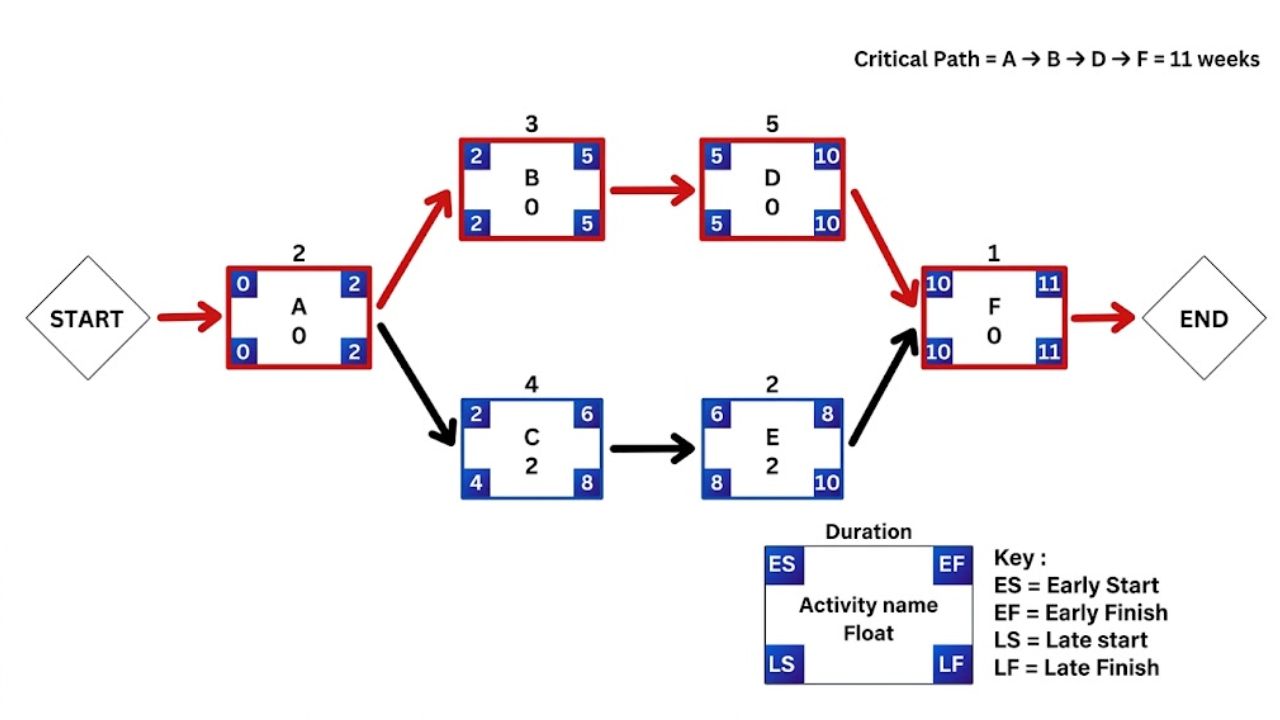
I calculate the Critical Path Method using a forward pass, a backward pass, and a float check. For a small project, I can complete the calculation manually or in a spreadsheet.
1. I Complete the Forward Pass
I give the first task an earliest start of zero and add its duration to calculate its earliest finish.
When a task has more than one predecessor, I use the latest earliest-finish time among them. The task cannot begin until all required predecessors are complete.
In the website example, Task A runs from time 0 to time 2. Tasks B and C can then begin at time 2. Task B finishes at time 5, while Task C finishes at time 6.
Task D runs from time 5 to time 10. Task E runs from time 6 to time 8. Task F must wait for both, so it starts at time 10 and finishes at time 11.
Based on the current estimates and dependencies, 11 working days is the earliest possible finish.
2. I Work Backward From the Finish
Next, I calculate how late each task can start or finish without delaying the planned completion date.
I begin with Task F, which must finish by time 11. Since F takes one day, its latest start is time 10.
Tasks D and E must both finish by time 10. Task D takes five days, so its latest start is time 5. Task E takes two days, giving it a latest start of time 8.
Continuing backward gives Task B a latest start of time 2 and Task C a latest start of time 4.
When a task has several successors, I use the earliest latest-start time among those successors. This prevents me from accidentally allowing a task to finish too late for one of its dependent activities.
3. I Calculate the Float
For each task, I subtract the earliest start from the latest start:
Total float = latest start − earliest start
Tasks A, B, D, and F have zero float. They form the critical path:
A → B → D → F
Tasks C and E each show two days of total float, but the two days are shared across their branch.
I also check whether the project has more than one critical path. If two paths have the same duration, both can control the completion date.
How We Applied CPM to ImagineLab.art and RankPilot.ai
Working on ImagineLab.art and RankPilot.ai has shown me why CPM is especially useful for AI-powered web products. These platforms involve more than interface development. Our work can include model and API integration, credit calculations, user authentication, output storage, content workflows, testing, quality control, and deployment.
The case studies below are simplified versions of the workflows I encounter. I have used illustrative durations to explain the scheduling logic without presenting them as exact internal project records.
Case Study 1: An ImagineLab.art Feature Release
When we add a new creative feature to ImagineLab.art, the work does not end with connecting an AI model. The complete workflow may also need frontend controls, backend processing, EDT deductions, error handling, saved generation history, downloads, and quality testing.
For a simplified release, I might organize the tasks like this:
- A — Confirm the feature requirements: 2 days
- B — Design the user workflow: 3 days, after A
- C — Integrate and validate the model API: 5 days, after A
- D — Complete the frontend and backend implementation: 4 days, after B and C
- E — Test generation, EDT billing, storage, and downloads: 3 days, after D
- F — Prepare help content and release materials: 2 days, after D
- G — Approve and deploy the feature: 1 day, after E and F
The two main technical paths are:
- A → B → D → E → G: 2 + 3 + 4 + 3 + 1 = 13 working days
- A → C → D → E → G: 2 + 5 + 4 + 3 + 1 = 15 working days
In this schedule, the API integration path controls the release date.
This is a practical distinction. If the user-interface design finishes a day early but the API integration remains incomplete, the release date does not move forward. The design task may be complete, but development still has to wait for the integration task.
When I see the integration falling behind, I can discuss useful responses with the team. We may assign more development support, reduce the scope of the first release, postpone nonessential settings, or investigate whether part of the implementation can begin with a controlled test response.
Testing also remains on the critical path. A feature may appear complete in the interface while still having problems with credit deductions, failed-generation refunds, stored outputs, or downloads. Cutting the testing period simply to preserve a launch date can create more expensive problems after release.
In this situation, CPM helps us see that reducing the initial scope may be safer than rushing the tasks that protect the user experience.
Case Study 2: A RankPilot.ai Content Workflow
RankPilot.ai presents a different scheduling challenge. A complete content workflow may involve topic selection, source research, outlining, drafting, human editing, fact-checking, citation review, originality checks, SEO review, visual preparation, and publication.
For a research-backed article, I might map the work like this:
- A — Approve the topic, audience, and search intent: 1 day
- B — Collect reliable sources and supporting evidence: 3 days, after A
- C — Build and approve the outline: 1 day, after B
- D — Produce the complete first draft: 2 days, after C
- E — Complete the human editorial rewrite: 2 days, after D
- F — Check facts, citations, originality, and on-page SEO: 2 days, after E
- G — Prepare the page, visuals, and publishing settings: 3 days, after A
- H — Complete final approval and publication: 1 day, after F and G
This produces two paths:
- A → B → C → D → E → F → H: 1 + 3 + 1 + 2 + 2 + 2 + 1 = 12 working days
- A → G → H: 1 + 3 + 1 = 5 working days
The research and editorial path is critical. Page setup and visual preparation can proceed in parallel, but publishing still has to wait for the completed and verified article.
This is something I consider particularly important when evaluating the effect of AI-assisted writing. Generating a first draft faster does not remove the need for research, editorial review, citation checking, and final verification.
If drafting falls from two days to one, the project may finish one day sooner. It does not automatically become a one-day content project. The other dependent activities still need to be completed.
The critical path can also shift. If the editorial work finishes early but a custom visual, page component, or publishing function takes longer than planned, the production branch may become critical. I therefore update the schedule with actual progress instead of continuing to rely on the original calculation.
These two products also demonstrate that the critical path is different for different types of work. For an ImagineLab.art release, model integration and end-to-end technical testing may drive the deadline. For a RankPilot.ai publishing workflow, research, editorial judgment, and factual verification may take control.
CPM does not tell us to rush either sequence. It tells us which delay is most likely to affect the finish date.
How I Use the Result to Protect a Deadline
Once I know the critical path, I focus monitoring and problem-solving on the tasks that directly affect delivery.
If a page design is late, I check whether part of the development can begin with approved components. If an API integration is delayed, I look at whether we can reduce the initial feature scope. If verification is holding up publication, I check whether research and citation review can begin earlier instead of waiting for the full draft.
Completing a task with plenty of float may still be useful, but it will not necessarily move the project finish date forward.
When we need to shorten a schedule, I consider two common approaches: crashing and fast-tracking.
Crashing means adding resources or working time to shorten a task. For example, we might assign another developer to testing or divide a large review between two qualified team members. This may shorten the schedule, but it can increase costs and coordination work.
Fast-tracking means overlapping tasks that were originally planned in sequence. A developer might begin building approved parts of an interface before every design detail is final. An editor might begin checking completed sections before the entire article is drafted.
I use fast-tracking carefully. It can save time, but it also creates a greater risk of rework if an earlier decision changes.
If two paths are tied for the longest duration, shortening only one will not reduce the project timeline. The other path will continue to control the finish date. I also monitor near-critical paths because a small delay can cause one of them to become critical.
Where a CPM Schedule Can Mislead Me
A CPM schedule is only as reliable as the information entered into it. It cannot correct an unrealistic duration estimate or identify a missing dependency by itself.
It also cannot account for an overloaded developer, an unavailable reviewer, an API provider’s delay, or a server issue unless those limitations are reflected in the schedule.
This matters in web development because the same specialist may be involved in several parts of a project. A backend developer may be responsible for API integration, payment logic, and deployment support. Scheduling those tasks as though different people can complete them simultaneously would produce an unrealistic completion date.
Third-party services create another source of uncertainty. An integration may work correctly in testing but require further changes because of rate limits, documentation gaps, response-format changes, or service interruptions.
For that reason, I update the schedule as work progresses. A task that finishes early, runs late, changes scope, or gains a new dependency can shift the path controlling the deadline.
Complex projects require additional care. Fixed release dates, multiple work calendars, resource leveling, and external approvals can all affect float. I review the connected sequence of work and monitor near-critical paths rather than trusting a software-generated label without checking it.
Final Thoughts
From my experience developing and managing web-based products, the Critical Path Method is most valuable when the schedule reflects how the team will actually work.
I include technical dependencies, editorial reviews, approvals, testing, third-party services, and resource limitations. I also recalculate the schedule when the project changes instead of treating the first version as permanent.
For our work on ImagineLab.art and RankPilot.ai, the method helps us separate tasks that are merely active from tasks that genuinely control the delivery date. That makes it easier to decide where additional attention, time, or resources will have a meaningful effect.
The practical question I try to answer is simple: which task must we protect next if we want to keep the planned finish date within reach?
Frequently Asked Questions (FAQs)
Is CPM the Same as a Gantt Chart?
No. I use CPM to analyze dependencies and identify the sequence of tasks controlling the completion date. A Gantt chart displays tasks as bars across a timeline.
They work well together. CPM helps me understand the scheduling logic, while a Gantt chart makes the timing easier to communicate and monitor.
Can the Critical Path Method Show More Than One Critical Path?
Yes. I may find two or more paths with the same longest duration. In that situation, each path can constrain the project’s finish date.
Shortening only one path will not reduce the complete schedule if another equally long critical path remains unchanged.
Does the Critical Path Guarantee the Delivery Date?
No. I treat it as the earliest finish suggested by the current tasks, estimates, dependencies, and resource assumptions.
Unexpected technical issues, resource limitations, external approvals, scope changes, and inaccurate estimates can all move the date. For high-risk projects, I combine CPM with regular schedule reviews, contingency planning, and risk analysis.
Can the Critical Path Change During a Project?
Yes. I have seen the critical path change when a task finishes early, an integration takes longer than expected, or new work is added.
That is why I do not calculate the path only once. I update it as actual progress replaces the original estimates.
Do I Need Project-Management Software to Calculate CPM?
Not for a small project. I can calculate a basic critical path with a spreadsheet or even on paper.
Software becomes more helpful when a project contains many tasks, several dependencies, different calendars, shared resources, and frequent schedule changes. Even then, I still review the dependency logic manually before relying on the result.