Most people do not need a tracker with a hundred settings. They need to remember a small action at the right time, record it in seconds, and see whether the routine is holding. The best habit tracker apps are not interchangeable. Some are built for quick daily check-ins, while others focus on charts, scheduled routines, self-care prompts, or accountability with friends.
This guide compares the best habit tracker apps by looking at reminders, scheduling, progress reports, platform support, free access, and the amount of extra complexity each one creates. App-store pricing and premium limits can vary by country, so check the local listing before paying.
What Most Comparisons Miss
A useful tracker should support recovery, not just reward perfect streaks. If missing Tuesday makes you abandon the plan, a colorful chain has become a liability.
Start with two or three habits attached to fixed actions—after morning tea, before opening your laptop, or after brushing your teeth. Also check whether the app can track the habit in the right format: yes or no, duration, count, or a few days per week.
Best Habit Tracker Apps to Consider
These best habit tracker apps cover different needs, from simple Android check-ins and Apple-focused streaks to gamified routines, goal tracking, self-care prompts, and social accountability. Compare their platforms, scheduling tools, free features, privacy settings, and setup friction before choosing one.
1. Habitify: The Strongest Cross-Platform Starting Point
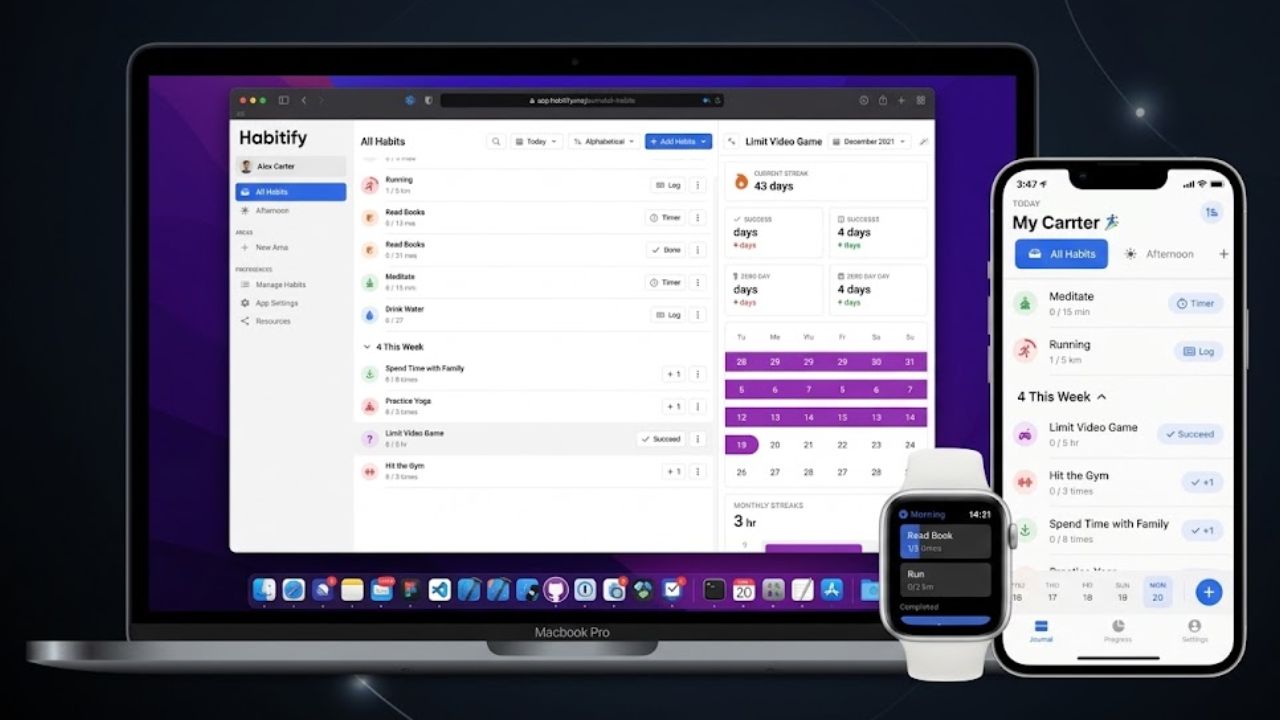
Habitify suits readers who switch between a phone and a computer. It supports iOS, Android, Mac, and web access, with Apple Health, Google Fit, calendar, Zapier, and IFTTT connections documented in its current materials.
That is a lot of reach for one tracker. The risk is overbuilding. A simple reading habit does not need five integrations. Start with a short list and check the current plan limits before subscribing.
2. Loop: The Free Android Choice
Loop Habit Tracker is a focused Android option for readers who want to avoid a subscription. Its official site lists daily reminders, charts, and statistics and describes the app as free and open source.
Distribution is through Google Play and F-Droid, so it is not the obvious pick for an iPhone-and-web household. For Android-only habit check-ins, its lack of decorative extras is a strength.
3. Habitica: When Motivation Needs a Game Layer
Habitica turns habits and tasks into a role-playing game. Completing a real-world task earns experience, gold, gear, and other in-game rewards. Parties and recurring tasks add an accountability element.
It suits students, gamers, or anyone who loses interest in plain checklists. If you only want to tap “done” and leave, the game layer may create more maintenance than motivation. The core experience is free, with optional purchases and subscriptions.
4. Streaks: The Apple-Native Option
Streaks is the clearest Apple-first choice. It can automatically track selected goals through Apple Health, supports non-daily schedules, and works across iPhone, Apple Watch, iPad, Mac, and Vision Pro.
The watch access is useful for habits you record during a busy day. Android users should skip it. Everyone else should review which health permissions they are granting before connecting activity data.
5. TickTick: Habits Inside a Full Task System
TickTick works well when habits belong beside work tasks, study plans, and calendar events. Its habit module sits inside a broader planner with recurring rules, reminders, widgets, and cross-platform access.
That makes it convenient for people already using TickTick. It is less appealing if a crowded task list will bury the few habits you actually want to remember. Check the free-plan limits before moving your entire routine into it.
6. Productive: Guided Routines for Beginners
Productive gives beginners more direction than a blank grid. Templates, goal programs, reflection check-ins, analytics, challenges, and time- or location-based reminders can help turn “exercise more” into a scheduled action.
The same guidance may feel excessive for experienced users. Productive maintains separate iOS and Android help resources, so compare the current free and paid limits before building a long routine.
7. HabitNow: A Practical Android Planner
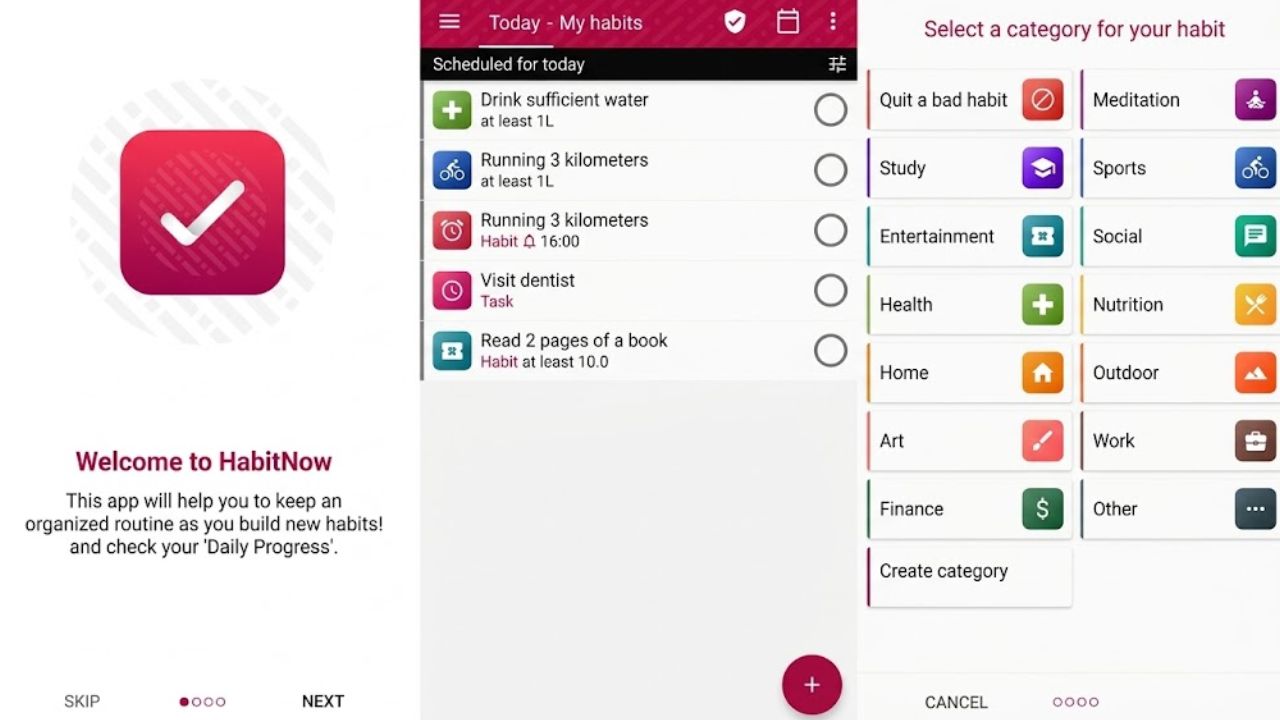
HabitNow combines habits with to-do lists, categories, timers, daily or weekly goals, and reminders in one Android app. It is practical for someone tracking study sessions, chores, exercise, and errands in the same place.
Its policy documents a one-time premium upgrade and optional cloud backup. That is appealing if you dislike subscriptions, but check the backup process before changing phones. A tracker is not very useful if your history disappears during migration.
8. Way of Life: Tracking Patterns, Not Just Streaks
Way of Life is less about collecting streaks and more about spotting patterns. Its color-coded log, diary notes, reminders, and longer-term charts can help users record what happened before an unwanted habit.
It asks little time each day, but it is not a project manager or shared planning tool. Choose it for reflection and pattern tracking, not for managing a complex work system.
9. Strides: For Goals That Need Numbers
Strides is built for goals that need numbers, not only yes-or-no checkboxes. Its current listings describe habit, target, average, and project trackers, along with templates, reports, reminders, and Apple Health integration.
That suits goals such as exercising three times a week or reaching a reading target. Mac support is described differently across current product pages and help documentation, so verify compatibility before choosing Strides for a Mac-based workflow.
10. Finch: Gentler Self-Care Check-Ins
Finch wraps habit and self-care tracking around a virtual pet. It includes goals, mood journaling, breathing exercises, quizzes, and rewards, and is available on iOS and Android.
It is better suited to gentle daily prompts than performance-heavy analysis. Because it can involve mood and personal information, review its privacy and data-safety details before entering sensitive information. It should not be treated as a substitute for professional mental-health care.
HabitShare is designed around accountability with friends. It supports custom daily and weekly habits, reminders, and selective sharing on iOS and Android. Habits are private by default.
That suits study partners, couples, or gym friends. Social pressure can also backfire. If missing a check-in feels embarrassing, a private tracker is likely to last longer. The developer currently presents the app as free.
Final Thoughts
Among the best habit tracker apps, the right choice usually matches your device and your tolerance for structure. Choose Habitify for cross-platform use, Loop or HabitNow for Android, and Streaks or Strides for Apple devices. Habitica suits game-based motivation, while TickTick belongs on the shortlist for people who want an all-in-one planner.
Before paying, create two habits and use the app for seven days. If logging takes too long or the reminders become noise, move on. The best habit tracker apps should make a routine easier to notice and repeat—not turn it into another task to manage.
Frequently Asked Questions (FAQs)
Which of the best habit tracker apps is free?
For Android users, the best habit tracker apps include Loop for a free open-source approach and HabitNow for a more complete routine planner. HabitShare is another free option if accountability matters.
What is the best habit tracker for iPhone?
Streaks is a strong choice for people using Apple Health and Apple Watch. Strides is better suited to users who want flexible goal types and detailed progress reports.
Can these apps track weekly habits?
Several options on this list support weekly or non-daily schedules, including Habitify, Streaks, HabitNow, Strides, and HabitShare. Check the exact scheduling controls before paying for premium features.
Do habit tracker apps really work?
They can reduce the effort of remembering routines and make progress easier to review. They cannot fix an unrealistic habit or an overloaded schedule. Keep the first habit small enough to complete on a difficult day.
Should I use a streak-based tracker?
Use streaks if they encourage consistency without making one missed day feel like failure. If streak pressure makes you quit, choose an app with trend reports, diary notes, or more flexible progress views.