

An e-commerce store can boast exceptional products and genuine search demand yet lose organic traffic to minor technical oversights—such as broken canonical tags, hidden JavaScript content, or vague page titles. The most effective e-commerce SEO fixes target pages with existing value, removing indexing roadblocks and giving search engines a clearer path through your catalog.
Rather than executing a total site overhaul, prioritize high-impact optimizations: resolving canonical errors, refining faceted navigation, fixing duplicate descriptions, and adding structured schema markup. By tackling these technical and on-page wins, online retailers can rapidly reclaim lost search equity, improve organic visibility, and drive immediate revenue growth.
The Warning Count Is Not Your Workload
An SEO crawler can turn one template defect into thousands of warnings. That does not mean thousands of pages require separate edits. Start with a manageable sample: the homepage, several major categories, strategically important products, pages that lost impressions, and one URL from every major template. A problem affecting one product may be a page-level mistake. The same problem across every product is a development priority.
Do not rank tasks by warning volume alone. Duplicate titles on account pages are less consequential than one incorrect canonical covering every collection. Click-through rates also need context. Position, query type, device, brand recognition, and search-result features all affect how often an impression becomes a click.
1. Repair Indexing and Canonical Problems on Important Pages
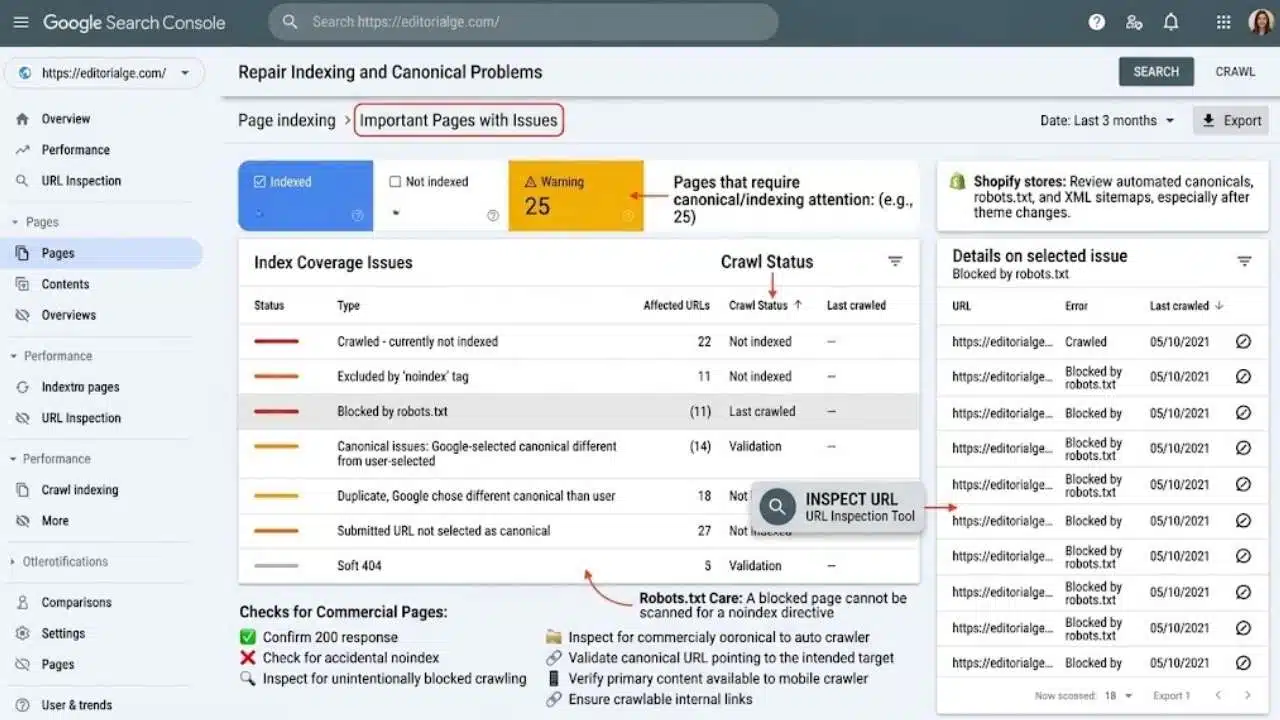
A page must be accessible and eligible for indexing before its copy, links, or structured data can contribute much. Use Google Search Console’s Page Indexing report to find unexpected exclusions. Inspect individual URLs when you need to see Google’s selected canonical, the latest crawl information, or the rendered page. Check the recorded crawl date as well. The report may describe an older version of a page that has since been fixed.
For every commercial page intended to appear in search, confirm that it:
- Returns a successful 200 response
- Has no accidental noindex directive
- Is not unintentionally blocked from crawling
- Points to the intended canonical URL
- Makes its primary content available to Google’s mobile crawler
- Receives crawlable internal links
Important canonical pages should normally appear in the XML sitemap. Sitemap inclusion helps discovery and supports canonicalization, but it does not guarantee crawling or indexing. Redirecting, duplicate, filtered, and non-indexable URLs should not clutter the file.
Not every exclusion is a defect. Checkout, cart, account, internal search, and many filtered URLs make poor search landing pages. The useful target is the canonical version of each important page, not every URL the platform generates.
Robots.txt requires particular care. Google must crawl a page to read its noindex instruction. Blocking that same page in robots.txt can prevent Google from seeing the directive, leaving it aware of the URL without being able to process the page properly.
Shopify generates canonical tags, robots.txt, and XML sitemaps automatically. Store managers should still inspect custom output, especially after theme work. Shopify treats robots.txt.liquid editing as an unsupported customization and warns that incorrect rules can cause serious traffic loss.
2. Rewrite Titles on Pages That Already Have Visibility
Titles are usually a better early target than rewriting an entire catalog. Start with category and product pages already earning relevant impressions.
“Shoes | Store Name” leaves the searcher to guess. “Women’s Waterproof Hiking Shoes | Store Name” identifies the audience, product category, and defining feature. A product title may need its brand, model, capacity, material, or compatibility detail, provided those attributes genuinely influence the buying decision.
Keep the visible H1 aligned with the same subject. It does not need to repeat the title exactly, but the two should not suggest different categories or variants.
Review meta descriptions at the same time. Google may use the supplied description or build a snippet from visible page content, so both need to be accurate. Mention details that help someone assess the result, such as material, compatibility, product range, or delivery terms.
Avoid adding prices, stock promises, and promotions unless the store can keep them current. A stale “free delivery” claim can make a technically optimized result less trustworthy.
Google must recrawl and reprocess a page before title changes can appear. That can take a few days to a few weeks, and repeatedly requesting another crawl does not guarantee faster processing.
3. Make Category Pages Useful Shopping Destinations
Category pages are often better long-term search assets than individual products. They can serve broader commercial searches, remain useful when inventory changes, and help customers compare several options without starting again.
A strong category page does not need a long block of SEO copy above the product grid. It needs enough information to explain the selection and make its differences understandable.
A linen-shirt collection could clarify fits, fabric weights, sleeve styles, care requirements, and suitable seasons. A laptop-charger category may need connector types, wattage differences, device compatibility, and links to brand-specific collections. Those details help a shopper make a decision. A generic paragraph about “high-quality products for every lifestyle” does not.
Keep the products easy to reach. A short introduction and meaningful subcategory links can appear near the top, with more detailed buying guidance placed below the initial listings. Do not bury the merchandise under an essay written primarily to increase word count.
Product descriptions still matter where dimensions, materials, technical specifications, package contents, fit, or compatibility affect the purchase. Rewriting thousands of simple descriptions before improving commercially important categories is rarely the most productive use of editorial time.
4. Give Crawlers a Real Link Path to Valuable Products
Search engines discover pages through links. They do not normally type queries into a store’s search box, and they may not find products that appear only after someone clicks a filter or activates a JavaScript control.
A clear route usually moves from the homepage to categories, from categories to relevant subcategories, and then to products. These connections should use ordinary HTML links with descriptive anchor text.
Infinite scroll and “Load more” buttons need extra attention. They can remain part of the customer experience, but deeper products should also be available through crawlable paginated URLs. Each page in the sequence needs its own URL and canonical. Pointing every paginated page back to page one can hide products that appear deeper in the collection.
Breadcrumbs, buying guides, related subcategories, and carefully chosen product recommendations can improve this structure. Add them where they help customers continue shopping, not simply to manufacture more links.
A product listed in the sitemap but absent from internal navigation is effectively orphaned. Fix the category assignment or template that created the problem rather than adding a one-off manual link that will be forgotten later.
5. Align Product Structured Data With the Page and Feed
Product structured data can make eligible pages available for richer search presentations involving price, availability, ratings, shipping, or returns. It is not a shortcut to better rankings, and a valid implementation does not guarantee that Google will display an enhanced result.
The appropriate properties vary by product, offer, and search feature. For purchasable products, verify that offer details such as price, currency, and availability match the landing page. Product identifiers, variant relationships, shipping information, return terms, and reviews should be added only where they apply and can be maintained accurately.
Consistency is the harder part. Google Merchant Center can flag products when feed data conflicts with the landing page. Variant-heavy catalogs create more opportunities for mismatches because the selected size, color, price, and stock status must agree with the submitted variant.
Before installing another schema app or plugin, inspect the rendered page. A theme, platform component, or existing SEO extension may already produce Product markup. A second implementation can introduce competing prices, availability values, or identifiers.
Test representative pages with Google’s Rich Results Test, then monitor the Product snippets and Merchant listings reports in Search Console. Passing validation confirms that supported markup can be processed. It does not promise extra visibility.
Filters for size, color, brand, material, and price make a large catalog easier to shop. Poorly controlled filters can also produce thousands of URLs showing nearly identical selections.
This is where simplistic advice causes damage. Setting every filtered page to noindex may remove useful landing pages. Allowing every combination to be crawled can waste resources and slow the discovery of new or updated products.
Classify the URLs first. A stable page for “black running shoes” may satisfy real demand and deserve its own heading, copy, links, and self-referencing canonical. A parameter that merely sorts those shoes from the lowest price to the highest usually does not deserve a separate search result.
Use the control that matches the problem. A noindex directive can keep an accessible page out of Google’s index, although the page still needs to be crawled for that instruction to be seen. Robots.txt can restrict crawling of unwanted parameter patterns on larger sites, but it is not a guaranteed removal tool for URLs Google already knows.
Canonical tags can consolidate duplicate signals, yet they do not stop every unwanted URL from being requested. Keep low-value parameter URLs out of sitemaps, avoid linking to them as default category destinations, and return a genuine 404 for empty or nonsensical filter combinations.
Smaller stores whose important pages are discovered promptly do not need an elaborate crawl-budget project. For large or rapidly changing catalogs, however, faceted navigation can be one of the most consequential fixes on this list.
7. Fix Core Web Vitals at the Template Level
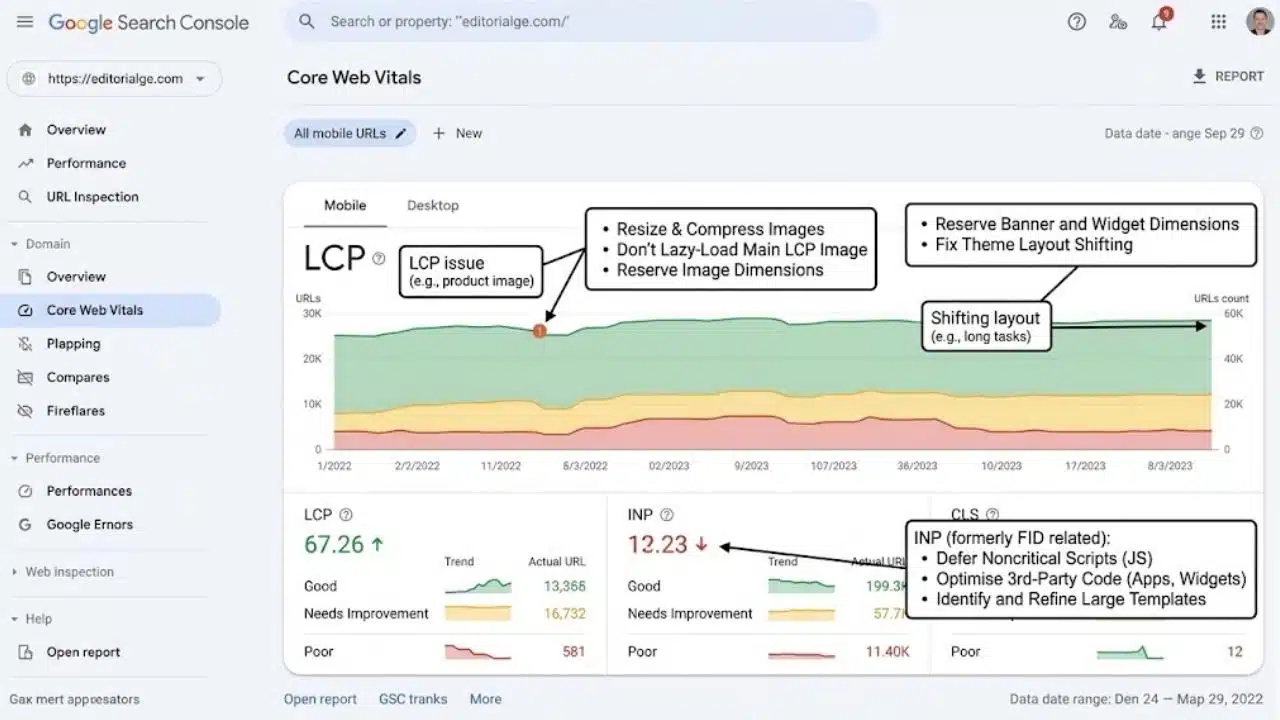
Page speed is often presented as an instant SEO remedy. It is not. Good Core Web Vitals do not guarantee strong rankings, although Google does use them within its ranking systems and poor performance can make shopping unnecessarily difficult.
The current “good” thresholds are:
- Largest Contentful Paint: 2.5 seconds or less
- Interaction to Next Paint: 200 milliseconds or less
- Cumulative Layout Shift: 0.1 or less
These measurements use the 75th percentile of visits. Where available, field data is more useful than a single laboratory test on a fast office connection.
E-commerce templates have predictable problems: oversized product images, banners that shift the layout, variant scripts, review widgets, chat tools, and apps loading code on pages where it is not required.
Start with changes that improve a complete template. Resize and compress images, reserve their dimensions in the layout, avoid lazy-loading the main LCP image, defer noncritical scripts, and remove unused apps or plugins. Third-party tools should load only where their function is needed.
Test these changes before publishing them broadly. Removing code can break analytics, reviews, subscriptions, product variants, or checkout features. A perfect score is not worth losing something customers rely on.
A Practical Starting Order for E-commerce SEO Fixes
Match the work to the evidence. Unexpectedly excluded commercial pages need an indexing and canonical review. Relevant impressions attached to unclear results point toward titles and snippets. Weak category pages may need better guidance and stronger internal links. Large numbers of parameter URLs justify a faceted-navigation audit. Poor performance across a whole template calls for development work.
Apply the chosen fix to a controlled sample. Check the rendered HTML, test the page on mobile, confirm the intended indexability, record the deployment date, and monitor comparable pages and queries. Promotions, seasonality, inventory changes, and ranking volatility can all distort a careless before-and-after comparison.
The most useful e-commerce SEO fixes are precise. Correct the obstruction closest to an existing commercial opportunity, verify what changed, and expand the work only when the implementation holds up.
Final Thoughts
The quickest SEO gains rarely come from fixing every warning or rewriting an entire catalog. They usually come from finding the specific issue holding back pages that already have commercial value. That might be an incorrect canonical, an unclear category title, weak internal navigation, or product information that no longer matches the Merchant Center feed.
Prioritize these e-commerce SEO fixes using evidence from Search Console, analytics, and the store itself. Test changes on a small group of important pages, confirm that the implementation behaves as intended, and expand it only after the result is clear. A focused correction to one valuable template can accomplish far more than a large audit followed by months of low-priority cleanup.
Frequently Asked Questions
How long do e-commerce SEO changes take to appear?
Google says crawling can take from a few days to a few weeks, but crawling does not guarantee indexing or a ranking change. Site authority, crawl frequency, competition, and the scope of the edit all influence what happens next. Treat the deployment date as a measurement reference, not a promised result date.
What should happen to an out-of-stock product page?
Keep the page when the product is expected to return. Show the unavailability clearly and make sure the page, structured data, and Merchant Center feed report the same status. Relevant alternatives or a restock notification can help customers without changing the URL.
How can a store tell whether a fix worked?
Verify the technical result first. Check that Google can crawl the intended page, see its primary content, and process the new canonical, title, or structured data. Then compare impressions, clicks, positions, and landing-page revenue over suitable periods. More organic traffic does not automatically mean more sales.
Can a Shopify app or WordPress plugin handle all these fixes?
Tools can generate metadata, redirects, sitemaps, canonicals, and structured data. They cannot reliably decide which filter combinations deserve landing pages, which categories need original guidance, or which products should receive stronger internal links. Automated output still requires editorial and technical review.
























