

Version control for non-code projects rarely feels urgent while the work is moving smoothly. The problem becomes visible when two credible-looking files disagree, someone reviews an outdated draft, or nobody can confirm which spreadsheet produced the approved figures.
Writers, designers, researchers, marketers, and project teams all face versions of this problem. Files change, decisions evolve, and several people may contribute. Without a clear system, the history of the work becomes scattered across attachments, downloaded copies, comments, chat messages, and vaguely named folders.
I do not think the answer is to force everyone to learn Git. Git was built for software development, and it does not suit every document, design file, spreadsheet, or video. The useful part is the thinking behind it: changes should be traceable, proposed work should be reviewable, approved versions should be obvious, and earlier states should be recoverable.
Version-Control Thinking Is a Working Method, Not a Tool
Version control treats a project as a series of identifiable states instead of one file that keeps changing without explanation. Each meaningful state carries some context: what changed, who changed it, and how it relates to the version before it.
Software teams use terms such as commits, branches, pull requests, merges, and releases. Non-code teams can apply the same logic without adopting the terminology.
| Software concept | Non-code equivalent |
| Repository | The controlled project workspace |
| Main branch | The authoritative working version |
| Commit | A meaningful, recoverable checkpoint |
| Commit message | A short explanation of what changed and why |
| Branch | A separate experiment or proposed direction |
| Pull request | A request for review and approval |
| Diff | A comparison, redline, or change summary |
| Merge | Accepting proposed work into the main version |
| Release | An approved, published, signed, or delivered milestone |
| Revert | Restoring an earlier state without hiding the history |
The labels do not matter as much as the separation they create. A marketing team does not need to call its approval process a pull request. It needs a reliable way to keep proposed changes separate until someone has reviewed and accepted them.
How to Apply Version Control Without Creating Bureaucracy
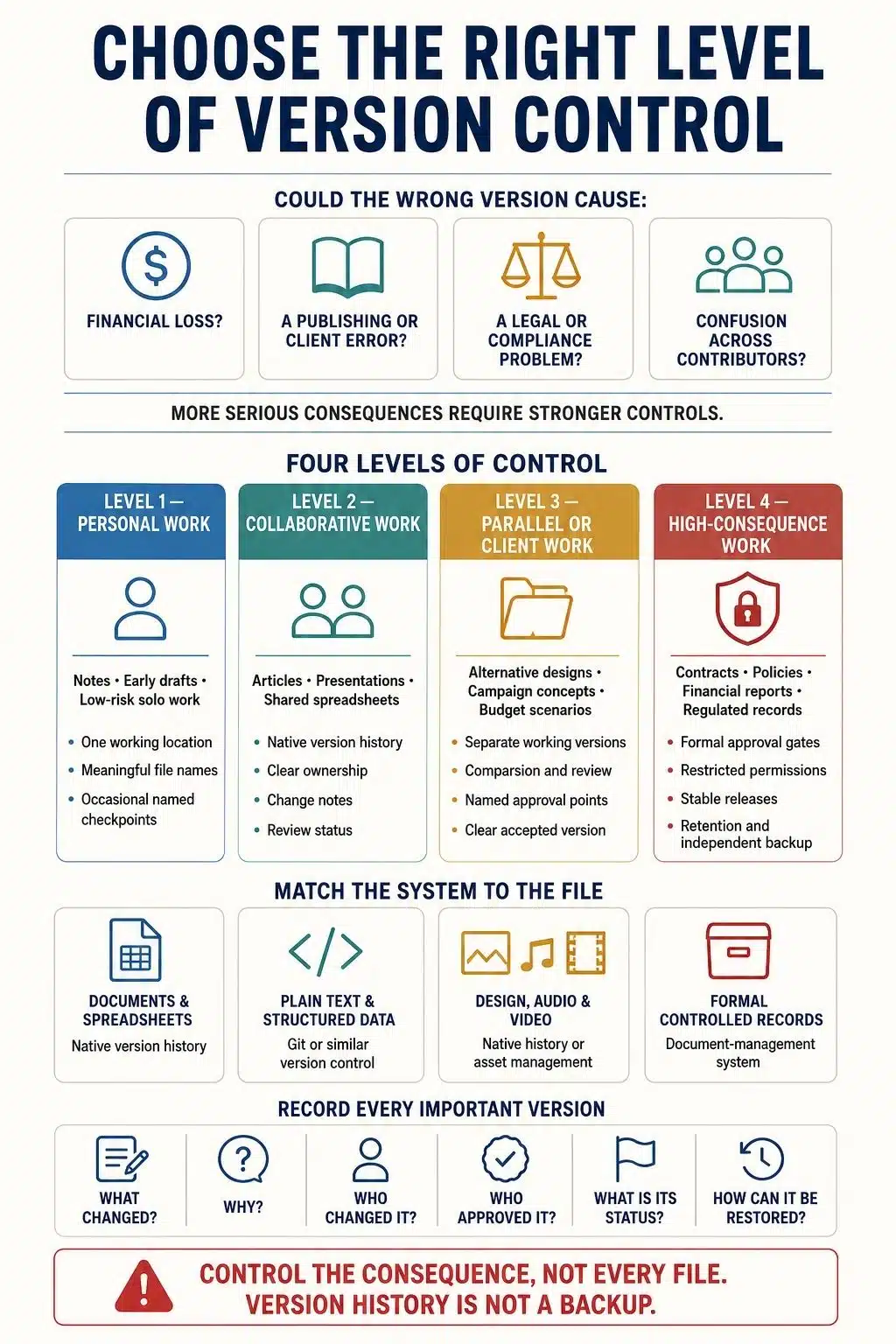
The level of control should match the consequence of getting the version wrong. A personal article draft does not need the same process as a signed contract, financial model, research dataset, or policy that affects an entire organization.
1. Control the Files That Carry Real Consequences
Trying to track every temporary export, rough note, early sketch, and abandoned calculation will make the system difficult to maintain.
I would begin with the files that could cause genuine trouble if someone used the wrong version. These may include:
- Client deliverables
- Approved budgets and forecasts
- Contracts and legal documents
- Policies and operating procedures
- Research data and analysis files
- Published reports and articles
- Campaign plans and production assets
- Presentations used for important decisions
A private brainstorming note may not need formal control. The presentation approved for a board meeting probably does.
This distinction prevents the process from becoming a storage ritual. A file should receive tighter control because its accuracy and status matter, not simply because it exists.
2. Define the Authoritative Version and Its Owner
Every controlled project needs one recognized location where the current work lives. Email attachments, downloaded files, and personal desktop copies should not quietly become competing sources of truth.
The team must know where the authoritative file is stored, who maintains it, who may edit it, and who has the authority to approve it.
It is also important to distinguish the current working version from the latest approved version. They are not always the same.
A policy may be under revision while the previous policy remains officially in force. A campaign may have an active redesign while the approved materials are still being used. Both versions are legitimate, but they represent different states and should be labelled accordingly.
Ownership matters here. Without a named owner, approvals remain undocumented, outdated versions stay in circulation, and nobody closes the project history properly.
3. Create Checkpoints Around Decisions
Automatic saving protects work in progress, but it does not always identify the states worth returning to.
A meaningful checkpoint might be created when:
- The first complete draft is ready for review
- Legal or compliance feedback has been addressed
- A budget assumption has changed
- A client has approved the direction
- A research method has been revised
- The project is ready for publication or delivery
Saving a named version after every minor correction creates noise. Waiting until the project is finished removes the recovery points that could have helped during the work.
The better question is not simply whether the file changed. It is whether the current state represents a decision, milestone, or coherent revision that someone may need to inspect later.
4. Explain Why the Change Happened
“Updated document” is a poor change note. The history may already show that an update occurred. What future collaborators need is the reason behind it.
A useful note might say: Revised the pricing section after finance approved the new assumptions. Or: Removed two claims that could not be supported by the final research.
A good change note usually explains what changed, why it changed, and who requested or approved it. One or two clear sentences are often enough.
This context becomes especially valuable months later, when the people involved may remember the outcome but not the reasoning. It also prevents the same rejected suggestion from returning because nobody recorded why it was rejected the first time.
5. Keep Experiments Separate From Accepted Work
Software branches allow contributors to explore a change without destabilizing the accepted version. Non-code projects often need the same separation.
A designer may test a different visual direction. A finance team may compare two cost assumptions. An editor may restructure an article without losing the accepted draft. A marketer may prepare regional variations of a campaign.
Those are sensible reasons to create a parallel working version.
A small wording correction is not. If every minor edit produces another copy, the workflow recreates the same confusion it was supposed to remove.
Separate versions should represent genuine alternatives, experiments, or future releases. Once a decision is made, the chosen work can be incorporated into the authoritative version. Rejected directions should be labelled or archived so that they are not mistaken for active work.
6. Review Important Changes Before Accepting Them
One of the most useful lessons from software development is that proposed work should be reviewed before becoming part of the accepted version.
For a non-code project, the process can remain straightforward. A contributor prepares a focused change and explains its purpose. A named reviewer compares it with the accepted version, requests revisions if necessary, and either approves or rejects it. Only then does the change become official.
The reviewer should not have to reconstruct the entire project to understand one revision. Focused changes, comparison tools, and clear notes reduce that burden.
Review depth should reflect risk. A social caption may need one editorial check. A contract amendment, financial forecast, public policy, or research conclusion may require several specialists. Applying the same approval process to every change wastes time without improving the work.
7. Mark Approved and Delivered Versions Clearly
A version becomes especially important when it leaves the working environment and begins affecting other people.
That may happen when a file is:
- Approved by a client or department
- Published publicly
- Used for financial reporting
- Signed by the relevant parties
- Submitted to a regulator
- Delivered to production
- Used as the basis for a major decision
These moments deserve a stable label. A meaningful status and date are often clearer than a number alone.
“Client approved, 19 August 2026” tells the reader what happened. “Version 3.7” means little unless the team has defined its numbering system.
Software teams may use major, minor, and patch numbers to communicate compatibility. A non-code team can borrow numeric versioning, but it should first define what each number means. For many projects, plain statuses such as Draft, In Review, Approved, Published, Superseded, and Archived are easier to understand.
8. Make Restoration Part of the Plan
A version history is useful only if the team knows how to recover from it.
Before depending on a platform, check whether earlier versions can be compared, named, retained, restored, or exported. Some tools keep only selected versions permanently, while retention may also depend on organizational settings or storage policies.
Restoring an earlier state should not erase the record of what happened afterward. The restored material should become a new current version, leaving the intervening history available for inspection.
Version history is also not a complete backup. It may not protect the project from account loss, expired retention, platform failure, accidental deletion, or compromised access. Critical releases still need an appropriate independent backup or archive.
Sensitive information requires extra caution. Removing a password, private customer record, confidential source, or restricted dataset from the current file may not remove it from earlier versions. Information that should never be retained should not enter the project history in the first place.
Match the System to the Type of Work
Plain-text files are easy to compare line by line. This makes Git a sensible option for Markdown documents, structured data, documentation, and other text-based material.
Collaborative documents and spreadsheets are usually easier to manage through their native version histories. These tools often support named versions, comments, comparisons, access permissions, and restoration without asking nontechnical contributors to learn a development workflow.
Design files, audio, video, and other large binary assets need a different approach. Their changes may be difficult to compare automatically, and competing versions cannot always be merged cleanly. Native design history, asset-management systems, file locking, or clearly marked milestones may be more practical. Large-file extensions can change how Git stores those assets, but they do not make visual differences easy to review.
Formal policies, contracts, and regulated records may require controls beyond ordinary version history. Approval status, permissions, retention, read-only records, and disposal rules may matter as much as the document itself.
The best system is not the most technical one. It is the lightest system the team can follow consistently while still providing enough protection for the work.
Where the Process Usually Fails
Overengineering is one common problem. If a small team spends more time maintaining the workflow than completing the project, the system will eventually be ignored.
The opposite problem is relying entirely on file names. A date or version number may help identify a document, but it cannot explain why the change occurred or whether anyone approved it.
Scattered feedback also weakens the history. When the file is stored in one place, approval arrives by email, revision notes remain in chat, and the final decision happens during a call, no single record explains the outcome.
Keeping everything forever is not the answer either. Temporary exports, abandoned drafts, and unnecessary copies can make meaningful milestones harder to find while increasing privacy, security, and storage exposure.
A workable process needs clear ownership, selective checkpoints, recorded decisions, and a defined way to close or archive the project. Anything more should earn its place.
Final Thoughts
Version control for non-code projects is not about making writers, designers, researchers, or managers behave like programmers. It is about removing avoidable uncertainty from collaborative work.
A good system makes the accepted version obvious, preserves the reasons behind important changes, separates experiments from approved work, and provides a safe route back when a decision fails.
Start with the files that carry real consequences. Add only the controls the project needs. A modest process that people consistently follow will protect the work better than a sophisticated system they quietly avoid.
Frequently Asked Questions on Version Control for Non-code Projects
1. What does version-control thinking mean?
Version-control thinking means treating a project as a traceable series of changes. Each important version has a clear purpose, status, owner, and relationship to the work that came before it.
2. Can Git be used for Word, Excel, and design files?
Git can store these files, but it cannot always compare or merge their contents effectively. Native document or design history is often easier for complex formats, while Git works particularly well with plain text.
3. How often should I create a new version?
Create a named version after a meaningful revision, approval, delivery, or decision. Saving one after every tiny edit creates noise, while waiting until the end removes useful recovery points.
4. What is the difference between version control and backup?
Version control tracks how a project changes over time. A backup protects the files against broader loss, deletion, account failure, or system problems. Important projects often need both.
5. How should non-code versions be named?
Use labels that communicate status and purpose, such as Draft, In Review, Client Approved, Published, or Archived. Add a date or release number when it helps, but avoid unexplained names such as “final” or “latest.”

























