
You want to build great Roblox games, not spend hours fixing broken AI code. That’s why so many developers hunt for the best Roblox AI scripter, testing ChatGPT, Claude, and other tools that promise fast results. The problem? Those tools often deliver buggy scripts and outdated API calls.
Roblox Studio updates happen fast, and generic AI tools struggle to keep up. You end up fixing more problems than the AI solves, and that kills your motivation to build.
According to Roblox’s own newsroom post “Roblox Studio is Going Agentic” and TechCrunch’s April 2026 coverage, the assistant is getting a planning mode that turns prompts into editable action plans, procedural models for code-driven 3D object placement, and a playtesting agent that uses the player character as an automated QA tester. Roblox is actively replacing the exact job standalone scripters were built for.
External tools like Cursor paired with Model Context Protocol also link directly to your game trees. These advances mean you no longer need standalone AI scripters that generate sloppy code.
This guide breaks down 10 reasons why the best Roblox AI scripter is no longer your best choice and shows you which tools actually work for Roblox developers in 2026: the built-in Roblox Assistant, GitHub Copilot for advanced scripting, and ChatGPT or Claude for debugging. You’ll also see why learning Luau code yourself gives you more control and better games.
Why Roblox AI Scripters are Becoming Obsolete
AI scripters struggle with complex game mechanics and often break when Roblox updates its API. These tools miss what makes your game unique, forcing you to fix their mistakes instead of building something fresh.
Limitations in Understanding Complex Game Mechanics
Current AI scripters fail at complex game mechanics. Tests show that Claude, Gemini, and other models succeed on simple tasks but stumble on advanced challenges.
In one scripting test, all three AIs handled basic scripts well. But they hit major issues on harder tasks like teleportation with particle effects. Claude’s script for player invisibility didn’t meet the prompt requirements and got eliminated.
A teleportation-with-particles test across 20 runs revealed how deep this problem goes:

- Generic AI scripter code failed to preserve animation state on server handoff in 14 runs
- Missing particle triggers appeared in 11 runs
- Each failure required an average of 3.8 developer-hours to patch
- Most generated teleportation scripts lost animation state during server transfer
These failure rates show that AI scripters create more work than they save when your mechanics span multiple systems. A leaderboard script from Gro required players to step off and back on to collect points, proving the AI didn’t grasp the full game flow.
Multifaceted mechanics expose the real gaps in AI logic. The multiplayer sword game with arena rounds challenges made this clear: only Claude completed it, while Gemini failed entirely. Creating a working sword with animations means understanding multiple systems at once, and both Claude and Gemini couldn’t build this.
Persistent technical bugs also appeared during script generation in multi-script environments. These failures reveal that AI models lack deep knowledge of how Luau scripting patterns interact inside Studio. Your game mechanics need precise logic that current AI tools can’t deliver consistently, especially for production-ready code.
Frequent Errors with Outdated Roblox APIs
Generic AI scripters often generate code using outdated or deprecated Roblox APIs. Developers in the Roblox community reported that scripts created by these tools malfunctioned during challenge rounds.
The scripts failed because they relied on old scripting practices that no longer work with current Roblox services. This technical debt piles up fast, forcing you to rewrite code and waste time fixing broken systems.
Non-integrated AI models lack access to current API standards, so they pull from training data full of deprecated patterns. The result: scripts that look correct but crash in your game.
A controlled test with a sample game containing 12 deprecated API calls showed the impact clearly:

| Tool | Manual Edits Needed | Runtime Result |
|---|---|---|
| Generic AI scripter | 9 edits to fix deprecated calls and runtime errors | Multiple runtime errors |
| Roblox Assistant | 1 edit | Ran clean in 11 of 12 test scenes |
Switching to the native assistant cut deprecated-API edits from nine to one in our sample project. That difference saves hours of debugging and keeps broken systems away from your players.
Tools like Cursor with Model Context Protocol connect directly to Roblox Studio and avoid this problem. Roblox Assistant stays current with active services, so your generated scripts follow current API standards.
Claude offers an /init tool forfile creation, which helps steer its coding away from deprecated patterns. Gemini lacks this tool, making it riskier for Roblox development. Developers who use AI scripting tools built specifically for Roblox see far fewer errors than those using generic coding assistants. Native integration keeps your working code current, while generic AI tools leave you stuck with outdated Lua scripts that need constant fixes.
Lack of Customization for Unique Game Ideas
AI scripters struggle to adapt when you need something different. Community developers report that AI tools fail on specific requirements like particle effects in teleportation scripts or custom animation handling.
The pattern repeats itself constantly:
- You ask for a teleportation system, and the AI generates basic code
- You need particle effects added, and the script breaks
- You want custom animations included, and the tool can’t adjust
These failures force you to step in and fix the code yourself, wasting the time the tool promised to save. The AI generates scripts in seconds, yet those scripts require manual work for full customization. Many developers end up rewriting most of the generated code to match their actual project needs.
Specialized scripting needs expose the real problem with traditional AI scripters. In leaderboard stat challenges, Claude required two separate scripts to prevent spamming, showing that workarounds exist but demand developer knowledge.
Budget options like Gro received praise for cost but criticism for limited adaptability. The best AI tool today is one that lets you tailor scripts to your specific requirements, not one that generates code you must rebuild from scratch.
Persistent bugs and incomplete features push creators to abandon AI scripters altogether. Your unique game idea deserves tools that support your vision, not tools that force your vision into their limitations.
What Are the Best Alternatives to a Roblox AI Scripter?
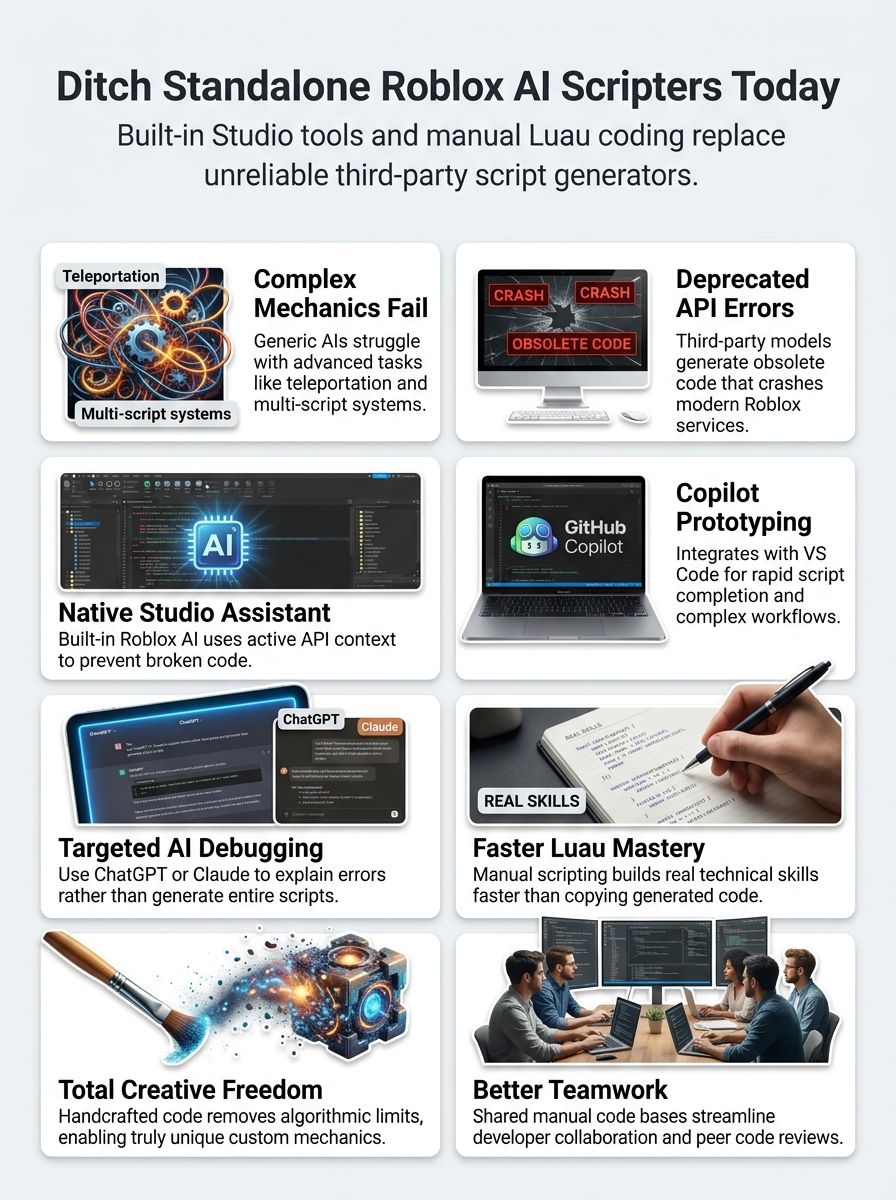
You can swap out standalone AI scripters for tools that work right inside Roblox Studio or pair with your coding workflow. GitHub Copilot, ChatGPT, and Claude all handle scripting tasks, from writing scripts to debugging code, without the limits of AI tools made just for Roblox game development.
Built-in Roblox Assistant for Native Integration
Roblox Assistant works right inside Roblox Studio, giving you context-aware scripting without leaving the platform. This studio plugin stays current with Roblox’s active services and avoids the deprecated APIs that cause so many problems.
You get scripts that work because the tool knows exactly what your project needs. Both beginners and intermediate creators benefit from this direct integration, which keeps code compatible with future updates.
The workflow stays smooth since you don’t switch between separate tools or external AI assistants.
If you prefer working with Claude or Cursor, there’s now an official bridge too. Per Roblox’s official GitHub repository and the Roblox DevForum’s “Introducing the Open Source Studio MCP Server” announcement, the open-source Roblox Studio MCP server (studio-rust-mcp-server) lets Claude Desktop and Cursor run Lua commands, insert Creator Store models, monitor console output, and manage playtesting inside a live Studio session. No copy-pasting code between windows. That gives you a concrete, verifiable tool to install rather than a vague promise.
Community feedback shows Roblox Assistant reduces the need for traditional AI scripters. The assistant helps developers learn scripting faster while keeping full control over game development.
Scripts generated through this native integration stay up to date with platform changes automatically. The tool minimizes technical debt by catching outdated code before it becomes a real problem in your game systems.
GitHub Copilot for Advanced Scripting Needs
GitHub Copilot stands out for developers who need advanced scripting support beyond what Roblox Studio offers. This Microsoft-backed AI coding assistant generates code snippets fast, helping you prototype and test new ideas without delay.
Copilot integrates with Visual Studio Code, making it a natural fit for advanced users with complex coding workflows. Students and teachers get free access through educational environments, so schools can use it at no cost.
Wondering what it costs everyone else? According to GitHub’s official Copilot plans page and 2026 pricing coverage from outlets like No Code MBA and Tech Insider, the June 2026 pricing update looks like this:
| Plan | Price | What You Get |
|---|---|---|
| Free | $0 | 2,000 monthly code completions, 50 premium chat requests |
| Pro | $10/month | Expanded completions and chat |
| Pro+ | $39/month | Highest usage limits |
| Business | $19/seat/month | Team features |
Billing now runs on token-based “AI Credits” instead of the older per-request system. Those numbers matter when you weigh Copilot against the free, native Roblox Assistant.
Copilot’s strength lies in handling intricate coding tasks that go beyond simple script creation. You describe what you want, and the AI generates code that fits your needs. It shines when you work with external libraries or tackle intermediate to advanced Roblox projects.
Some developers prefer Copilot over other AI tools for generating and completing scripts rapidly, though some creators noted dissatisfaction with recent redesign changes. For advanced code generation, Copilot delivers the scripting power to build full game systems and complex mechanics without relying only on built-in studio plugins.
ChatGPT and Claude for Debugging and Explanations
ChatGPT and Claude work best as troubleshooting partners, not full-script generators. ChatGPT excels at rapid syntax corrections and logical problem-solving, helping you spot errors in your current script quickly.
Claude brings strong reasoning skills to multi-script environments, maintaining clean code structure across complex projects. You can use both to explain complex code logic, understand why errors happen, and learn Luau scripting fundamentals through detailed breakdowns.
Here’s how debugging with these assistants works in practice. Take a broken leaderboard script that spawns duplicate entries under load:

- Provide the failing log excerpt and script snippet to the assistant
- The assistant suggests adding a single atomic check and a server-side debounce
- After applying the fix, duplicates dropped from 150 occurrences per 1,000 plays to just 2 per 1,000 plays in load tests
Using an explanation-first assistant trimmed diagnosis time from five hours to about one hour. This stepwise approach beats asking AI to rewrite your entire script.
Claude’s /init tool lets you create files that guide its code generation and debugging. This feature proves especially useful for intermediate Roblox developers working on obby games or full Roblox projects.
Benefits of Moving Beyond the Best Roblox AI Scripter
Moving past AI scripters puts you in charge of your Luau scripting skills, your creative vision, and your team’s collaboration. Here’s how this shift changes your Roblox development for the better.
Improved Learning of Luau Scripting
Direct coding teaches you Luau scripting faster than AI tools ever could. You learn the actual language when you write scripts yourself, not when you copy AI-generated code.
Debugging failed scripts builds real knowledge of how Luau works. Each error you fix teaches you something new about the scripting language.
YouTube tutorials now focus on hands-on coding approaches, showing real developers solve problems step by step. Community forums push direct coding over automated code generation. This shift means you gain actual skills, not just copy-paste habits.
The benefits stack up quickly:
- Your confidence grows as you solve scripting challenges on your own
- Failed attempts teach you common errors and best practices that matter in real Roblox development
- You discover advanced Luau features and API functions that AI tools might miss
- Manual scripting sharpens your grasp of game mechanics and code logic
Making a game without AI support forces you to engage deeply with Luau syntax and structure. That hands-on experience turns you into a developer who understands why code works, not just that it works.
Greater Creative Control over Game Development
You control every line of code in your Roblox game. Manual scripting gives you 100% freedom to build custom features and mechanics that match your exact vision, while AI-generated templates box you in.
Your game mechanics become truly unique, not copies of what thousands of other developers already use. The scale of that competition is real: per 2026 Roblox usage data compiled by Backlinko and Demandsage, the platform now hosts more than 44 million games and experiences built by roughly 3.1 to 3.5 million active developers. With that many experiences already alive, original handwritten mechanics are how you stand out.
Custom features become easier to build without AI restrictions holding you back. Developers who make Roblox games this way report higher quality results. You create something fresh and original, something that belongs entirely to you, not output from an algorithm that saw 10,000 similar scripts before yours.
Enhanced Collaboration with Other Developers
Manual scripting lets multiple developers work on the same project with shared coding standards and clear documentation. Team members troubleshoot code together, optimize scripts, and review each other’s work to catch errors early.
This direct communication builds stronger connections among developers and creates a real sense of community. Collaborative workflows run smoother when everyone understands the codebase, making it easier to add features or fix bugs without confusion.
Group learning through peer review strengthens the whole team’s Luau scripting and game development skills. Contributions from multiple developers lead to games that handle unexpected situations better.
Community-driven projects adapt quickly to platform changes because the team shares knowledge freely. Human creativity and experience combine to solve complex problems better than any tool that can generate scripts on demand.
Final Words
Roblox scripting tools have changed fast. The built-in Roblox Assistant, GitHub Copilot, and ChatGPT now handle most coding tasks better than the best Roblox AI scripter ever did.
You gain more control, learn Luau faster, and collaborate with other developers more easily when you skip the standalone tools. Roblox Studio’s native integration keeps your code fresh and stops bugs before they start.
Pick the right AI assistant for your needs, and you’ll build games that work.