The smart-home industry has spent years promising that one hub will finally connect everything. It has not happened. Matter has improved cross-platform compatibility. Thread has given low-power devices a modern IP-based network. Smart speakers can now commission devices that once required a separate bridge. None of that means an Apple TV, a Hue Bridge, a Home Assistant server, and a Z-Wave controller suddenly perform the same job. They do not.
The best smart home hubs are not defined by how many protocol logos appear on the box. What matters is which devices they can connect directly, which automations continue during an internet outage, how much control they provide, and whether the people living in the home can use the system without calling its designer for help.
That last part is regularly ignored. A technically impressive automation platform becomes a poor household controller when nobody else knows how to turn off a light, pause an automation, or understand why the blinds opened at 6:12 a.m.
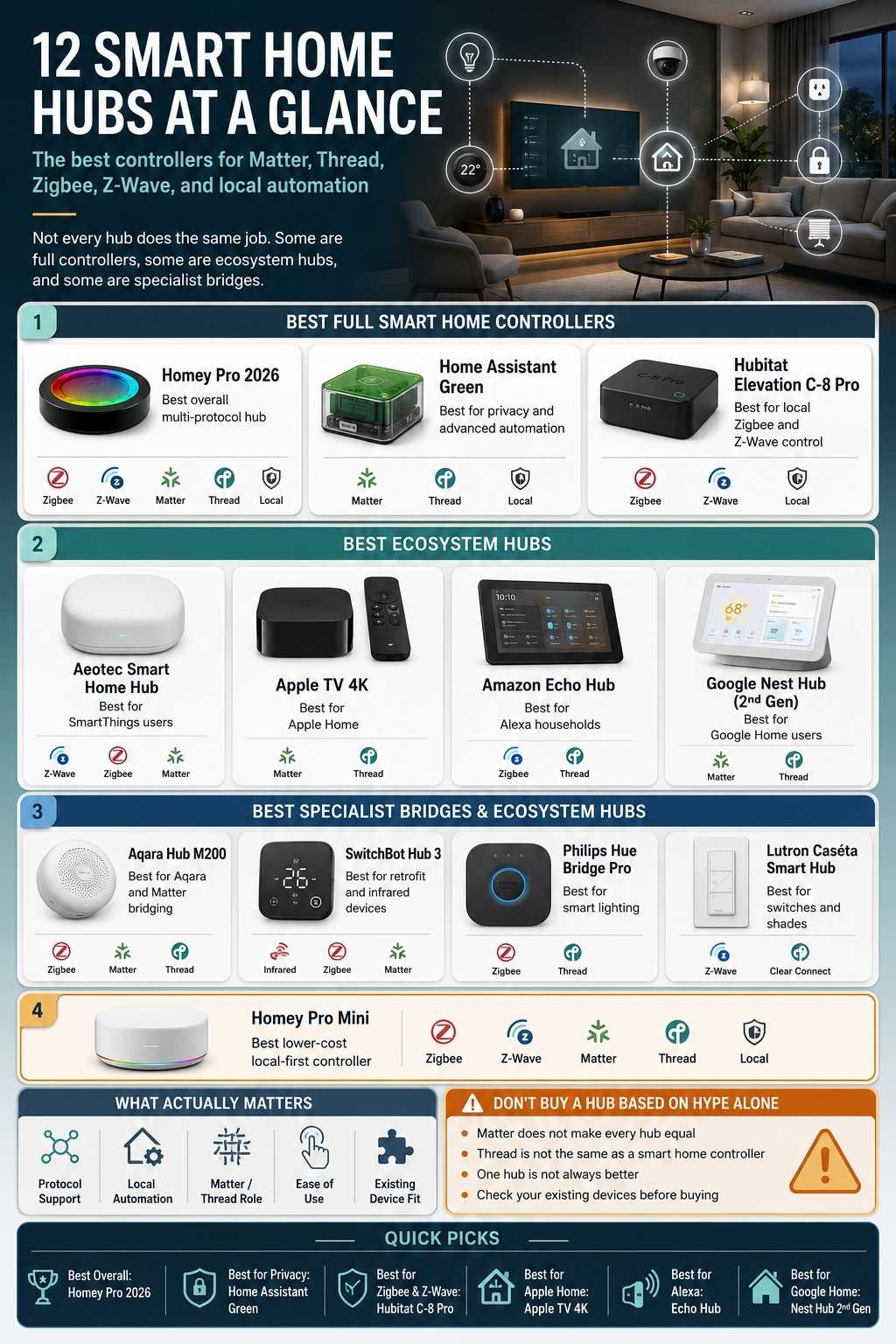
This guide takes a deliberately contrarian approach. I am not pretending that all 12 products are direct competitors or that one device should replace every bridge in the house. Some are full automation controllers. Some are ecosystem hubs. Others are specialist bridges that earn their place by doing one job reliably.
The goal is not to eliminate boxes at any cost. It is to build a smart home that continues working after the novelty wears off.
What Is a Smart Home Hub?
A smart home hub is a device or software platform that connects compatible smart devices, manages their states, and runs scenes or automations. Depending on the product, it may directly support Zigbee, Z-Wave, Matter, Thread, Bluetooth, Wi-Fi, infrared, proprietary radios, or cloud integrations.
That definition is broad because manufacturers use the word hub for several different roles.
A Hubitat Elevation controller runs detailed local automations and directly connects Zigbee and Z-Wave products. An Apple TV can act as an Apple Home hub and Thread border router but does not directly replace a Z-Wave controller. A Philips Hue Bridge manages a specialized Zigbee lighting network and exposes it to other ecosystems.
All three are called hubs. Buying them as though they were interchangeable is where disappointment starts.
12 Best Smart Home Hubs and Controllers
The products below are numbered for navigation. This is not a claim that the number-one product is the right choice for every home. A house with 40 Z-Wave switches has different needs from a new apartment using five Matter-over-Thread sensors.
1. Homey Pro 2026: Best Overall Multi-Protocol Hub
Homey Pro comes closest to the traditional dream of one polished hub handling most of the house.
The 2026 model includes hardware support for Matter, Thread, Zigbee, Z-Wave, Bluetooth LE, 433 MHz, infrared, and Wi-Fi. Its 4 GB of RAM supports more Homey Apps than the earlier model, while Flow and Advanced Flow provide approachable but capable automation building. Homey says it connects products from more than 1,000 brands and has committed to official support for the 2026 and 2023 models until at least June 2031.
That protocol range is genuinely useful. Homey Pro can sit between modern Matter accessories, established Zigbee sensors, Z-Wave switches, infrared appliances, and older 433 MHz products without requiring the user to assemble a stack of USB radios.
Its interface is also easier to hand over to a household than many enthusiast systems. Dashboards, devices, flows, energy information, and historical insights live inside one coherent product.
The catch is the price. At an official US price of $399, it is considerably more expensive than Home Assistant Green, Hubitat, or a smart-speaker-based controller.
Compatibility also depends on the quality of Homey Apps. A radio being built into the hub does not guarantee that every product using that radio exposes every feature correctly.
The best fit: Homey Pro is the best broad recommendation for someone who wants serious automation without turning the smart home into a permanent technical project.
2. Home Assistant Green: Best for Privacy, Ownership, and Advanced Automation
Home Assistant Green is the product I would recommend to someone who wants to own the logic of the home rather than rent convenience from one ecosystem.
It arrives with Home Assistant installed and provides a 1.8 GHz quad-core processor, 4 GB of RAM, 32 GB of eMMC storage, Gigabit Ethernet, and two USB ports. Home Assistant currently lists more than 1,000 built-in integrations.
The platform can combine devices, online services, dashboards, energy data, scripts, helpers, templates, and deeply conditional automations. That flexibility is unmatched in this guide.
The hardware itself is deliberately plain. Green does not include Zigbee, Thread, or Z-Wave radios. Those have to be added through official or third-party adapters.
Home Assistant Connect ZBT-2 supports Zigbee or Thread, but not both simultaneously. Home Assistant explicitly discourages multiprotocol operation because its earlier testing found stability problems. A user wanting direct Zigbee and a Home Assistant-managed Thread network should plan for separate radios or use an existing external Thread border router.
This detail matters because product roundups routinely describe Green plus one adapter as if it covers both networks at the same time. It does not.
Home Assistant is also easier than it used to be, but “plug-and-play” only describes the first boot. Building a reliable home still requires device research, sensible backups, clean entity naming, dashboard design, and restraint around community integrations.
Practical verdict: Home Assistant Green is the best long-term platform for a privacy-conscious or technically curious homeowner. It is not automatically the best controller for someone who does not want to maintain a system.
3. Hubitat Elevation C-8 Pro: Best for Local Zigbee and Z-Wave Automation
Hubitat makes the most sense in a home where Zigbee and Z-Wave are not legacy inconveniences but the backbone of the system.
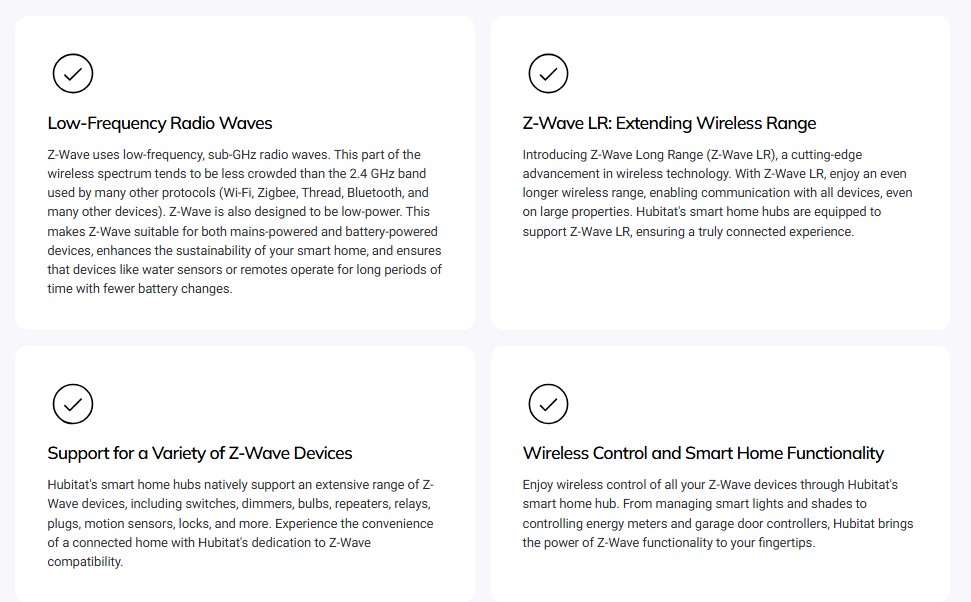
The C-8 Pro includes Zigbee 3.0, Z-Wave 800 Long Range, external antennas for both radios, Matter controller support, Bluetooth, Wi-Fi, Ethernet, and local automation processing. Hubitat says ongoing use does not require a subscription, although optional cloud backup and remote-administration services are available.
Its real strength is automation. Hubitat can handle simple motion-light rules, but it is equally comfortable with restrictions, delays, modes, presence, virtual devices, custom drivers, and more complicated logic.
Because automations run on the hub, supported local rules continue when the internet is unavailable. That is the kind of reliability that matters more after year three than during the first weekend of setup.
The interface is functional rather than glamorous. Homey offers a friendlier visual experience, while Home Assistant provides broader integration and dashboard freedom.
Matter support also needs context. Hubitat can act as a Matter controller, but buyers should not assume every Zigbee or Z-Wave product attached to Hubitat will automatically be exported as a Matter device to other platforms.
Regional Z-Wave frequency is another non-negotiable detail. The US model uses the US frequency, and buyers in other regions need the correct version.
Best use: Hubitat is a better purchase than a trendy Matter-only controller when the house already depends on Zigbee and Z-Wave.
4. Aeotec Smart Home Hub: Best SmartThings Hub for a Mixed-Protocol Home
The original Aeotec Smart Home Hub remains an unusually useful SmartThings controller because it supports both older and newer device networks. Its official product information lists SmartThings, Matter, Z-Wave, Thread, and Zigbee support. That makes it a practical migration hub.
A household can keep existing Z-Wave switches and Zigbee sensors while adding Matter devices and using the relatively approachable SmartThings app for scenes, routines, and dashboards.
SmartThings has moved more supported automation and device handling onto Edge drivers, reducing cloud dependence for compatible routines. The platform still uses cloud services for remote access, accounts, certain third-party integrations, and some app functions. The confusing part is Aeotec’s newer Smart Home Hub 2.
Newer does not automatically mean more compatible. The Hub 2 emphasizes Matter, Thread, Zigbee, Ethernet, Wi-Fi, and faster local processing, but it does not include the Z-Wave radio found in the older Aeotec Smart Home Hub. SmartThings’ own 2025 platform update described the new generation as a Zigbee, Matter, and Thread product.
For a new installation without Z-Wave, that may be fine. For an established Z-Wave home, buying the new model because the number is higher could create a very expensive surprise.
Ideal for: The original Aeotec hub is the more useful SmartThings recommendation for mixed-protocol homes. Check the model, region, and radio list rather than assuming the successor preserves everything.
5. Homey Pro Mini: Best Lower-Cost Local-First Controller
Homey Pro Mini keeps much of Homey’s software experience while trimming hardware and capacity.
It includes Ethernet, Zigbee, Thread, and Matter. The compact controller uses a 1.5 GHz quad-core processor, 1 GB of RAM, and 8 GB of storage and supports roughly 20 Homey Apps. Z-Wave, Bluetooth LE, infrared, and 433 MHz require a separate Homey Bridge.
This creates a clear buying split. For a new home centered on Zigbee, Matter, and Thread, the Mini may provide enough capability at a lower cost than the flagship Homey Pro.
For a home with Z-Wave switches, infrared appliances, or 433 MHz products, the Bridge becomes part of the real purchase price and physical setup.
The software remains the attraction. Homey Flow, Advanced Flow, dashboards, energy monitoring, and broad brand integrations make the Mini more approachable than many similarly capable local controllers.
The 20-app guidance is not necessarily restrictive in a modest home, but it is worth understanding that a Homey App usually represents a brand or service integration rather than one individual device.
Important catch: Homey Pro Mini is a good value only when its built-in radios match the home. Buying it and immediately adding a Bridge narrows the savings.
6. Aqara Hub M200: Best for Aqara Devices, Matter Bridging, and Infrared
The Aqara Hub M200 is a good example of a product that performs several “hub” roles without becoming a completely brand-neutral controller.
It acts as a Matter controller, Thread border router, Thread mesh extender, Aqara Zigbee hub, and Matter bridge for supported Aqara Zigbee products. It connects through dual-band Wi-Fi or Ethernet with Power over Ethernet support and includes a 360-degree infrared blaster. That combination is unusually useful in an Aqara-heavy home.
Aqara sensors, switches, locks, curtains, and other devices can run through the company’s own ecosystem and be exposed to Apple Home, Google Home, Alexa, SmartThings, or Home Assistant through Matter bridging.
The infrared function adds a practical route for controlling an older air conditioner or other IR appliance. Aqara even supports bridging a compatible IR-controlled air conditioner into Matter under specific conditions.
The contrarian warning is that Zigbee is not a promise of universal Zigbee compatibility. The M200 is designed as a hub for Aqara Zigbee devices. Buyers wanting to mix arbitrary Zigbee brands should look toward Home Assistant, Homey, Hubitat, or SmartThings.
Aqara also states that many hub-based automations run locally, although cloud-dependent functions such as some notifications still require internet access.
Smart choice: Buy the M200 because you want the Aqara ecosystem and its bridging features, not because it contains a Zigbee radio.
7. Apple TV 4K: Best Controller for an Apple Home Household
Apple TV 4K is the easiest hub to justify because it also happens to be an excellent media streamer. When added to a room in Apple Home, Apple TV becomes a home hub for remote control, shared access, and automations. Apple requires a home hub to add Matter accessories to the Home app.
Thread support depends on the model. The third-generation Apple TV 4K Wi-Fi + Ethernet version includes Thread networking, while the Wi-Fi-only model does not. Apple’s current store listing explicitly separates the two configurations.
Apple Home is polished, secure, and easy for an iPhone household to understand. It is particularly good for straightforward scenes, presence-based actions, locks, lights, cameras, thermostats, and Siri control.
It is not a replacement for Home Assistant or Hubitat when the automation needs complex variables, long conditional chains, broad historical data, or extensive non-Apple integrations.
The strongest architecture is often Apple Home as the family-facing interface and another controller behind it handling more advanced logic.
That may sound inelegant, but it is usually better than forcing every household member to use an enthusiast dashboard.
Good to know: Apple TV 4K is a very good Apple Home controller and a mediocre reason to abandon a working Zigbee or Z-Wave system.
8. Amazon Echo Hub: Best Alexa Smart Home Control Panel
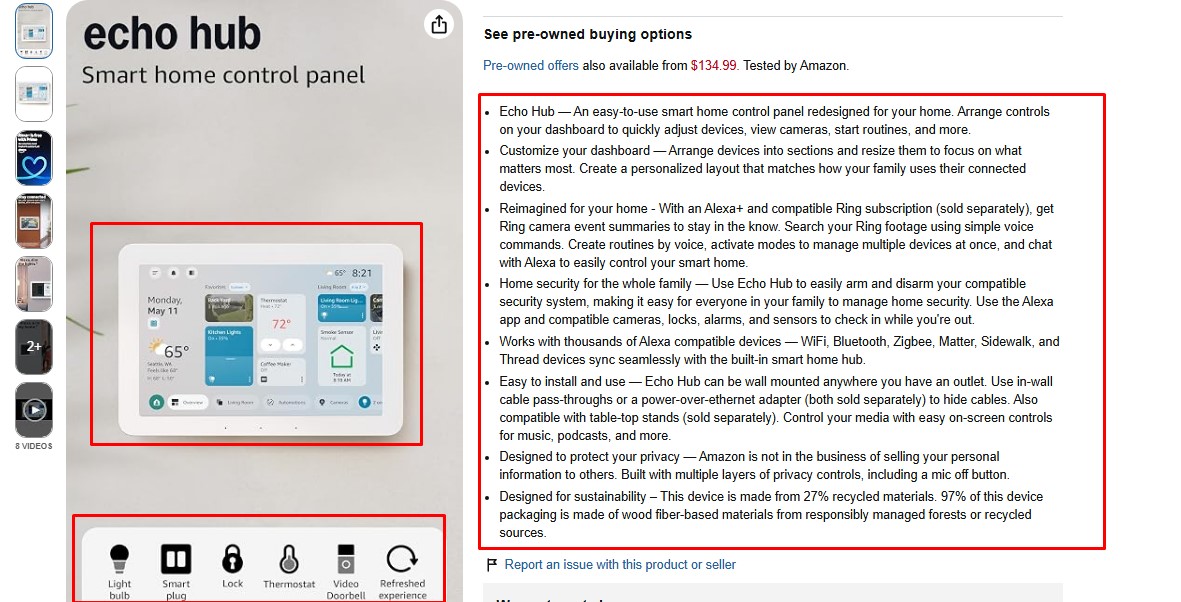
Echo Hub is less interesting as a hidden automation processor than as a shared control surface. The wall-mountable display gives a household quick access to devices, routines, locks, alarms, cameras, and other Alexa functions without asking everyone to find a phone.
Amazon confirms that Echo Hub contains a Thread 1.3 border router. It sits among a growing list of Echo and eero devices that can provide Thread networking for Matter-over-Thread accessories.
Alexa also supports local device connections through technologies including Matter and Zigbee on compatible Echo hardware. The value is accessibility.
A visible dashboard near the entrance or kitchen may improve the smart home more than another invisible automation feature. Guests and family members can see device states and use touch controls instead of memorizing voice commands.
Alexa routines remain easier to create than serious local automation logic. Debugging is limited, complex state management is awkward, and many integrations still depend on manufacturer clouds.
Worth considering: Echo Hub is the best Alexa control panel, not the best automation brain. That distinction should determine whether it belongs at the center of the system or merely on the wall.
9. Google Nest Hub, Second Generation: Best Google Home Display Controller
The second-generation Nest Hub performs a similar household role for Google Home. Google lists it as both a Matter-capable Google Home hub and a Thread border router. It can therefore control Matter devices over Wi-Fi and provide the network connection required by Matter-over-Thread accessories.
The display offers immediate access to lights, cameras, thermostats, media, routines, and other Google Home devices. It is a sensible option for a home already using Android phones, Nest cameras, Google Assistant, and Google Home automations.
The automation model remains simpler than Home Assistant, Homey, or Hubitat. Google Home has improved its automation capabilities, but buyers should not confuse a convenient display with a protocol-rich local controller.
The Nest Hub does not directly add Zigbee or Z-Wave devices. One useful point is that several Google products can now serve the same infrastructure role, including Nest Hub Max, Nest Wifi Pro, Google TV Streamer, and the 2026 Google Home Speaker.
Strongest use: Choose Nest Hub for the Google Home experience and shared interface. Do not buy it expecting enthusiast-level automation.
10. SwitchBot Hub 3: Best for Retrofit Devices and Infrared Appliances
SwitchBot’s strongest products solve problems that conventional smart-home standards tend to ignore. A button pusher can operate a physical switch. A curtain motor can automate existing curtains. A hub can control an infrared air conditioner that was never designed for an app.
Hub 3 connects supported SwitchBot products to other ecosystems through Matter, controls compatible third-party Matter devices, handles infrared appliances, and provides environmental information, programmable buttons, and a physical dial. SwitchBot says more than 30 supported devices can be bridged through the hub.
The physical controls are more important than they first appear. A smart home becomes easier to trust when people can press a labelled scene button or turn a dial rather than open an app and navigate through rooms.
Hub 3 is not a broad replacement for Homey or Home Assistant. Its value rises with the number of SwitchBot devices and infrared appliances already in the home.
Browser reviewers sometimes treat every Matter bridge as a universal controller. Hub 3 is better understood as a capable bridge and control panel for a specific retrofit ecosystem.
My take: It is an excellent problem-solving hub and a weak choice for someone seeking a protocol-neutral foundation.
11. Philips Hue Bridge Pro: Best Smart Lighting Controller
Including a lighting bridge in a list of the best home automation hubs may look old-fashioned. That is exactly why it belongs. The pressure to eliminate specialist bridges often ignores the advantages of a dedicated, mature lighting network.
Hue Bridge Pro supports more than 150 Hue lights and 50 accessories. It adds MotionAware, expanded scene capacity, Hue security integration, and compatibility with Apple Home, Alexa, Google Home, SmartThings, Matter, and other platforms.
The bridge continues to use Zigbee for the Hue network. That keeps bulb and accessory traffic away from Wi-Fi and provides a mesh designed specifically around lighting. A failed internet connection does not need to make a wall switch useless.
Matter support lets Hue products appear in broader ecosystems. It does not turn the Bridge Pro into a general Zigbee coordinator for random third-party sensors and switches.
This is the contrarian point: A specialist bridge is not unnecessary clutter when it makes a critical system more stable. Lighting is one of those critical systems. People notice immediately when it fails.
Real strength: Hue Bridge Pro is worthwhile for a large Hue installation. It should support the central controller, not pretend to replace it.
12. Lutron Caséta Smart Hub: Best for Reliable Switches and Shades
Lutron Caséta is another ecosystem where reliability matters more than protocol purity. The Smart Hub manages Caséta switches, dimmers, fan controls, plug-in devices, compatible shades, schedules, and integrations. Lutron says lighting control continues when Wi-Fi is down and one hub can control up to 74 devices.
Caséta does not win specification comparisons. It uses Lutron’s own wireless technology rather than Zigbee, Z-Wave, or Thread. That means another bridge and another ecosystem.
In return, it offers a mature system built around physical switches and remotes that continue behaving like normal household controls.
That matters more than many smart-home enthusiasts admit. A smart bulb becomes useless when someone cuts power at the wall. A smart switch preserves familiar behavior while adding automation behind it.
Lutron’s hub integrates the lighting system with larger platforms, allowing a Home Assistant, Apple Home, Alexa, Google Home, or other compatible controller to include the lights in broader scenes.
Ideal for: Caséta is not the universal hub. It is often the better foundation for lighting than a universal hub trying to do everything.
Build Around the Home, Not the Protocol Hype
The smart-home market keeps looking for one standard, one hub, or one app that will make every compatibility decision disappear. That is not where the technology is in 2026.
Matter has made it easier to share supported devices across ecosystems. Thread has improved networking for low-power products. Neither removes the need to understand controllers, bridges, radios, local processing, and household usability.
The best smart-home design may contain several hubs. That is not failure. Failure is a house full of smart devices that stops making sense when the internet goes down, a manufacturer closes a service, or the only technical person is away.
Choose the central controller carefully. Keep specialist systems where they add reliability. Give every platform a clear role. A smart home should feel simpler from the room, even when the infrastructure behind it is not.
Frequently Asked Questions on The Best Smart Home Hubs
1. Do I Need a Hub for Matter Devices?
You need a compatible Matter controller. Matter-over-Thread devices also require a Thread border router. These functions may already be built into a smart speaker, display, streaming box, router, or dedicated hub.
2. Is a Thread Border Router the Same as a Smart Home Hub?
No. A Thread border router connects a Thread mesh to the home network. It does not automatically provide advanced scenes, dashboards, or automation logic.
3. Which Smart Home Hubs Work Without the Internet?
Home Assistant, Hubitat, Homey, and specialist systems such as Hue and Lutron can perform substantial local control. Exact functionality varies because remote access, voice assistants, notifications, and third-party services may still require cloud connections.
4. What Is the Best Hub for Zigbee and Z-Wave?
Homey Pro, Hubitat C-8 Pro, and the original Aeotec Smart Home Hub all support both. Home Assistant can support them with suitable separate adapters.
5. Can One Home Use More Than One Hub?
Yes. A central automation controller can coexist with specialist lighting, shade, security, or device bridges. The important step is assigning each platform a clear responsibility.
6. Does Apple TV Work as a Smart Home Hub?
Yes. An Apple TV assigned to a room in Apple Home can act as a home hub. Thread support depends on the model; the third-generation Wi-Fi + Ethernet version includes Thread.
7. Will Matter Replace Zigbee and Z-Wave?
Matter will continue expanding, but it does not make existing Zigbee and Z-Wave devices obsolete. Both protocols remain widely used, especially for sensors, switches, locks, lighting, and established smart homes.