Feeling stuck about where to start with an AI literacy curriculum? You want something clear, age-appropriate, and useful, not a pile of vague ideas about the future.
The good news is that strong K-12 ai literacy does not begin with advanced coding. It begins with short lessons, safe routines, and simple ways to help students notice patterns, question outputs, and understand how artificial intelligence affects daily life. There is real urgency now.
According to CoSN reports that nearly 80% of surveyed K-12 technology leaders already have AI guidelines in place, and Ohio now requires every public district, community school, and STEM school to adopt an AI policy by July 1, 2026. That tells schools across the US the same thing: it is time to move from curiosity to a real plan.
I am going to walk you through that plan by grade band, from K-5 students to high school students, with lesson lengths, trusted resources, and practical ways to teach AI ethics, data, chatbots, and responsible use.
AI Literacy Curriculum for Primary Grades
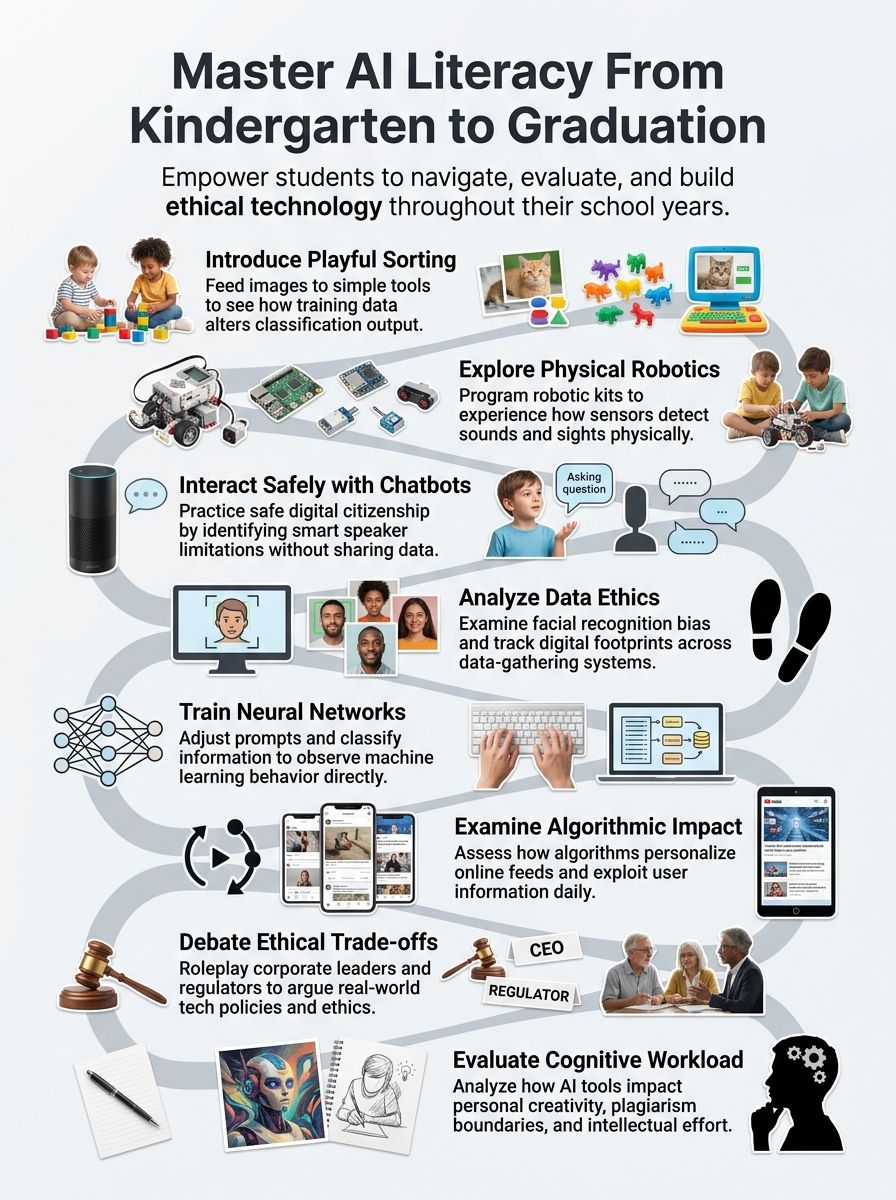
For primary grades, the goal is simple: help children understand how AI works in everyday terms. You want students to notice that machines sort, predict, and respond because people give them examples and rules.
Keep the lessons short, concrete, and playful. Day of AI offers early elementary lessons for ages 5 to 7 and upper elementary lessons for ages 8 to 10, which makes it easier to match activities to attention span and reading level.
Age-appropriate AI concepts and activities
The best primary-grade curriculum focuses on three big ideas first: AI can notice patterns, AI learns from examples, and AI can make unfair mistakes. That is enough to build a strong introduction to AI without burying kids in technical language.
If you want a simple planning frame, borrow from the AI4K12 big ideas and emphasize perception, learning, and societal impact in K-5. Those three ideas turn abstract AI concepts into activities children can see and talk about.
| Concept | Simple classroom move | What students learn |
| AI notices patterns | Sort picture cards into groups like animals, vehicles, or weather | Students see that classification depends on features people choose |
| AI learns from examples | Let students act as the “trainer” for a paper-based or screen-based model | They understand that training data shapes the output |
| AI can be unfair | Show a set of uneven or mislabeled examples and ask what went wrong | They begin to understand bias in plain language |
- Use a dogs-versus-cats or shapes-versus-colors sort before touching any device. That unplugged step helps children understand the job first, then the tool.
- Try a “How We Teach Machines” style lesson where students give examples to a pretend robot. This works especially well with ages 5 to 7 because it builds foundational AI literacy through movement and talk.
- Compare a smart speaker or chatbot to a person. Students quickly see that a machine can sound helpful without actually having feelings or judgment.
- Use a short bias case study with image labels. Ask, “What examples are missing?” so students connect fairness to training data.
- End with an “AI Promise” for safe use, such as checking with an adult, protecting personal information, and being honest about authorship.
Hands-on learning experiences with simple AI tools
Hands-on learning works best in elementary school because children can see cause and effect right away. One strong example is Google’s Teachable Machine, which lets students train a simple model in the browser and watch predictions change as they improve the examples.
That privacy detail matters, too. Google explains that Teachable Machine examples stay on the device unless you choose to save the project, which makes it a practical ai tool for guided classroom demos.
| Tool or resource | Best use in K-5 | Why it helps students |
| Day of AI “AI Literacy in 15 Minutes or Less” | Morning meeting, library, enrichment, or early-finisher time | Gives you a fast, low-prep way to bring AI literacy into the classroom |
| Google Teachable Machine | Teacher-led model training with images, sounds, or poses | Shows supervised learning in a visual, no-code format |
| Robo Wunderkind Explorer Lite | Robotics centers and sensor-based pattern lessons | Helps students connect AI ideas to movement, distance sensing, and real-world inputs |
Robo Wunderkind is useful here because its K-5 materials connect coding, robotics, and AI literacy in one place. Explorer Lite, for example, can build a robot that measures distance to objects, which gives students a concrete way to understand how a machine “senses” the world.
Be careful with generative AI tools in elementary grades. OpenAI says ChatGPT is not meant for children under 13, and FTC COPPA rules are another reason to avoid student sign-ins and personal-data sharing at this age.
- Start with an unplugged sort or prediction game.
- Show one short teacher-led demo with a simple model or chatbot.
- Ask students to explain what the machine used to make its choice.
- Close with a safety rule, an authorship reminder, or a fairness question.
That 20 to 30 minute rhythm is usually enough for primary students. It also makes teaching ai feel realistic for busy teachers who are just beginning.
AI Literacy Curriculum for Middle Grades
Middle grades are where students can move from “AI is a tool” to “AI makes decisions from data, and those decisions deserve scrutiny.” This is the right age to introduce supervised learning, misinformation checks, privacy concerns, and the ethical use of AI.
Students in grades 6 to 8 are also ready for more independent language around algorithms, prompts, and bias. You can still keep lessons hands-on, but now you can ask for explanation, critique, and revision.
Foundational AI skills and ethical considerations
A strong middle school program should teach students to ask better questions before they trust AI output. Who made the system, what data trained it, who could be harmed, and what human check still matters are all fair questions for this age group.
Day of AI makes this easy to pace. Its “Ethical Use of AI Exploration” runs about 45 to 60 minutes, “Truth, Tricks, and AI: Learning to Verify Information” runs about 50 to 60 minutes, and “From Data to Decision: AI, Surveillance, and Human Responsibility” is designed for about 2 hours or periods.
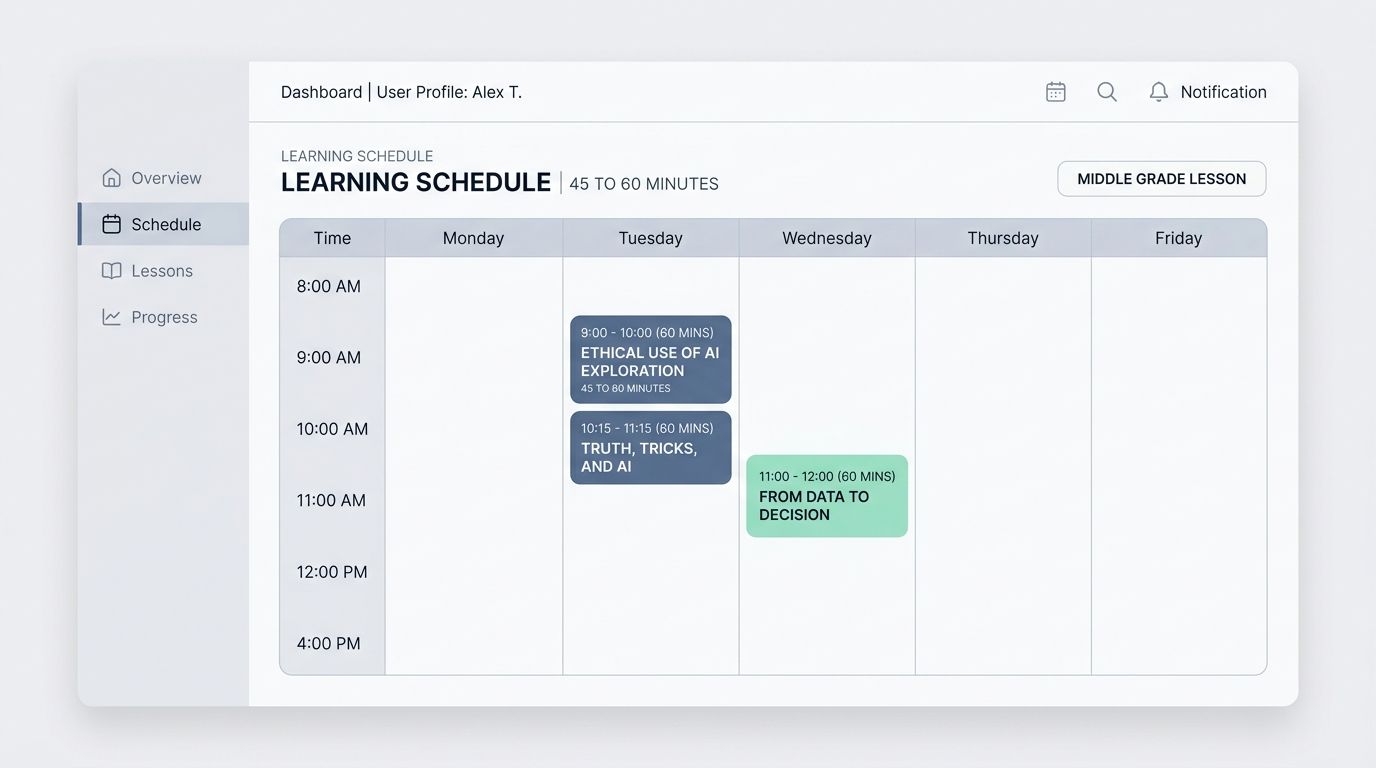
| Middle grade lesson | Approximate time | Best student output |
| Ethical Use of AI Exploration | 45 to 60 minutes | Classroom rules for responsible AI use |
| Truth, Tricks, and AI | 50 to 60 minutes | A verification checklist for AI-generated claims |
| From Data to Decision | 2 hours or periods | A short policy or oversight recommendation |
“Truth, Tricks, and AI” is especially useful because it teaches lateral reading and the Rule of Three. In plain classroom terms, that means students learn not to trust a polished answer until they check it across multiple credible sources.
- Ask students what data an AI system is collecting.
- Ask who benefits if the system is right, and who gets hurt if it is wrong.
- Ask what a human adult should review before the system affects a person.
- Ask whether the output is a fact, a prediction, or just a likely guess.
Those four questions turn ai ethics into a repeatable classroom habit. That is much more useful than a one-time warning about “bad technology.”
Exploring supervised learning and neural networks
This is the grade band where students should start training and testing simple models for themselves. Day of AI lists “AI Foundations for Middle Grades” as a 2 to 3 hour sequence, and one of its most useful lessons has students train and test a model with Google’s Teachable Machine.
That sequence also introduces the five big ideas of AI as perceive, reason and plan, learn, interact, and impact. For middle schoolers, that framework keeps the learning organized and prevents the topic from turning into random tool practice.
- Define AI clearly: Start with examples students already know, such as recommendations, image filters, or ai-powered search.
- Show how data affects output: Use a tool like Google Quick, Draw or a simple labeled dataset so students can see why training data matters.
- Teach algorithms as step-by-step rules: Let students write and debug instructions before you introduce machine learning vocabulary.
- Train a small supervised model: Have students compare strong and weak datasets so they can evaluate why one model performs better.
- Connect to fairness: End by asking how bias entered the system and what design change might reduce it.
The key middle school shift is this: students stop treating AI output as magic and start treating it as something built, tested, and challenged by people.
Neural networks do not need a heavy math treatment at this level. A simple “input, hidden steps, output” explanation, paired with a role-play or diagram, is enough to help students understand how AI learns from patterns.
AI Literacy Curriculum for Secondary Grades
High school students are ready for the full picture. They can study how artificial intelligence works, where it fails, how it changes writing and work, and why human responsibility still matters.
This is also where your ai literacy curriculum should become more cross-curricular. English, social studies, science, business, art, and computer science all have strong entry points.
Advanced AI applications and societal impacts
Day of AI lists “AI Foundations for High School” as a 3 to 4 hour unit. It covers datasets, machine learning types, neural networks, and algorithmic bias, which makes it a solid base before students move into debate, policy, or subject-specific projects.
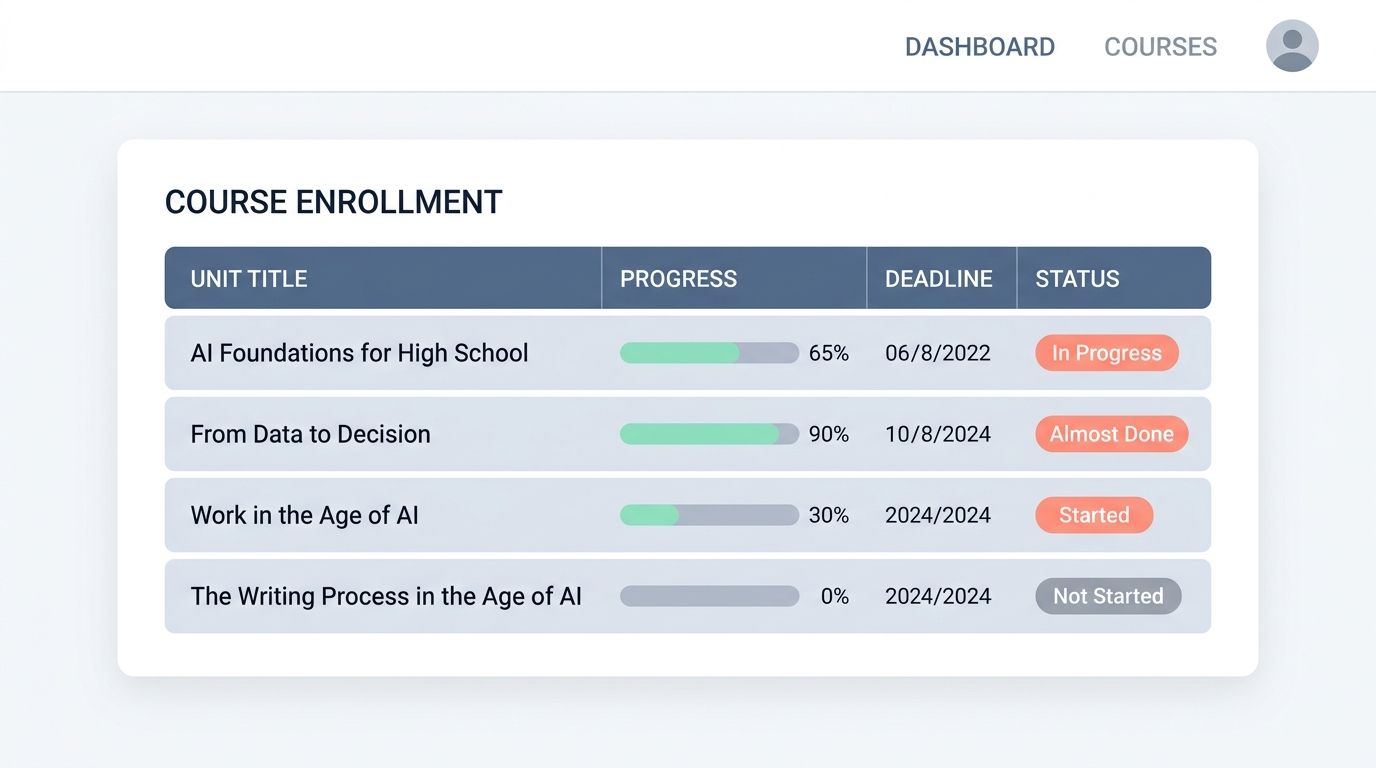
From there, you can choose application units that match your course goals instead of forcing every class into the same path.
| High school unit | Approximate time | What students practice |
| AI Foundations for High School | 3 to 4 hours | Machine learning basics, neural networks, and bias analysis |
| From Data to Decision | 2 hours or periods | Privacy, surveillance, and human oversight |
| Work in the Age of AI | 2 hours or periods | Career analysis, task change, and ethical trade-offs |
| The Writing Process in the Age of AI | 4 to 5 class periods | Authorship, revision, disclosure, and academic integrity |
“The Writing Process in the Age of AI” is especially helpful for secondary ELA because it treats large language models as brainstorming and drafting partners, while keeping human judgment, voice, and revision at the center. That is the right way to teach using generative ai without letting the tool replace the thinking.
- In social studies, use surveillance, elections, and regulation case studies to examine power and accountability.
- In ELA, compare human writing to AI-generated drafts and ask students to defend authorship choices.
- In STEM classes, have students train a model, inspect errors, and explain how data quality changes the output.
- In career and technical courses, analyze how AI changes tasks, workflows, and human responsibility in real jobs.
This approach gives high school students concrete skills and knowledge, not just opinions. They learn to evaluate systems, use AI responsibly, and explain why a human should stay in the loop.
Debates on AI ethics and responsible use
High school debates work best when students are not arguing in the abstract. Give them a role, a case, a time limit, and a rule that every claim needs evidence or a clear example.
For a clean one-class structure, Day of AI’s “Ethical Use of AI Exploration” breaks the lesson into a 10-minute introduction, 10 to 15 minutes on ethical issues, 10 minutes reviewing guidelines, 20 minutes creating rules, and a 10-minute reflection. That pacing keeps the discussion focused and helps students move from opinion to policy.
- Assign roles such as student, teacher, parent, developer, policymaker, or school leader.
- Use one real issue, such as facial recognition, plagiarism, chatbot companionship, or data privacy.
- Require students to separate benefits, risks, and guardrails before they state a final position.
- Finish with a written classroom or school rule, not just a verbal debate.
A strong secondary rule is simple: AI may assist the process, but the student still owns the claim, the evidence, and the final decision.
If you want a deeper chatbot sequence, “The Brain Behind the Bot” runs 4 to 5 hours and helps students understand natural language processing, bias in chatbots, and classroom AI norms. That makes it a smart fit for advisory, digital citizenship, or interdisciplinary teams.
For creative subjects, “Human & Machine: Exploring Poetry, Emotion, and Voice” gives students a rich way to judge originality, emotion, and identity in AI-generated writing. It also pushes them to evaluate what makes a voice feel human.
Final Thoughts
A strong ai literacy curriculum does not start with a flashy platform. It starts with clear grade-band goals, safe routines, and short lessons that help students ask better questions.
For K-5, begin with pattern sorting, storytelling, and teacher-led demos. For middle grades, add model training, lateral reading, and class AI rules. For high school, move into neural networks, authorship, surveillance, work, and debate.
If your school is ready for the next step, pilot one unit, pair it with professional development, and expand from there. In February 2026, ISTE+ASCD and Google announced a three-year effort to make AI literacy training available to six million U.S. educators, which is a good reminder that teacher support matters just as much as student lessons.
Frequently Asked Questions on AI literacy curriculum
1. What is an AI literacy curriculum by grade band?
It is a plan that gives an introduction to AI for each grade, from primary to secondary, so students learn at the right pace. It helps teachers with teaching and learning, and it shows how to introduce AI in ways a Child can grasp.
2. How do we introduce AI in early grades?
Introduce AI with play, simple games, and short stories that show the age of AI, so students need not fear new tech.
3. What do each grade band study, and who builds the work?
Primary grades learn basic ideas, patterns, and fairness. Secondary grades go deeper, they work on building AI, data projects, and hands on tests that let a Child make and learn. Teachers and curriculum teams design lessons, they link teaching and learning to life, and they use technology to enhance lessons.
4. Why teach AI now?
We live in the age of AI, and life and jobs change fast. We must introduce AI so students can shape technology, and not just follow it.