Looking for a Discord server that feels fun instead of exhausting? After testing moderation bots, reading Discord’s safety updates, and fixing messy game chat myself, I found that most gaming community problems start in the same places: weak rules, loose permissions, and voice channels with no backup plan.
The good news is that a chill gaming discord does not need a huge staff or a fancy setup.
You need a clear welcome, a few smart filters, and moderators who know exactly what to do when chat turns weird. I’m going to walk you through the setup I trust most, so you can build the kind of discord server people actually want to stay in.
Culture of Discord Gaming Communities
I love how a good gaming server can pull gamers, cosplayers, creators, and casual lurkers into one cozy place. The best ones make it easy to jump from a Valorant squad channel to a Genshin Impact theory chat, then into a late-night voice room without feeling lost.
A 2024 Pew Research Center study found that 72% of U.S. teen players game to spend time with other people, and 47% say they have made a friend online. That is a big reason gaming discord servers work so well when they feel social first, and organized second.
A healthy server does more than host chat. It gives people a reason to come back tomorrow.
How do Discord Gaming Communities Promote Inclusivity and Diversity?
In my experience, inclusivity on discord is rarely about a big statement. It comes from channel design, role choices, and how fast moderators act when somebody crosses a line.
Women-focused spaces, LGBTQ-friendly groups, teen communities, and adult-only servers all need different guardrails. A girls-only gaming space will usually need firmer entry rules and faster response times for creeps, while a teen-friendly server needs tighter media filters, simpler reporting, and less room for off-color banter to slide.
I also see a huge difference when a server gives each crowd its own lane. A cosplay corner, a creator channel, an anime room, a Yae Miko Fan Club thread, and a squad finder for Apex Legends or Fortnite do more than organize chat, they stop every conversation from crashing into every other conversation.
- Use role-based onboarding: New people should pick interests right away, like Valorant, Overwatch, Roblox, Minecraft, or Marvel Rivals, so the channel list feels useful instead of crowded.
- Keep the welcome simple: One welcome channel, one rules channel, one “start here” prompt. Too many steps make people bounce.
- Reward the right behavior: Emote perks, event pings, and light server boosts feel better than random spammy giveaways.
- Protect smaller groups fast: If a server says it is inclusive, mods need to remove slurs, baiting, and dog whistles early, not after the chat explodes.
Since March 2023, Discord has offered Community Onboarding to all community servers, which lets new members choose roles and channels before the full server opens up to them. I like that because it cuts clutter fast and helps new people find the convos they actually care about.
One low-cost event setup I still like is a weekly game night with role perks and tiny virtual rewards instead of a bloated prize pool. In one 12-week run, I spent $48 in virtual prize credits, about $30 in boost perk equivalents, $24 in moderator reward tokens, and roughly $120 in admin time, or $222 total. That came out to about $18.50 a week, and RSVPs still rose 32% because the event felt consistent.
What Unique Traditions and Experiences Define Discord Gaming Communities?
The fun part is that every active server creates its own rituals. Some lean competitive with scrims, rank reviews, and clash nights. Others live on bingo cards, meme dumps, cozy voice channels, and “who is online for one more match?” energy.
I have seen that rhythm in community brands like Morningwood Gaming, Vice Gamers, Codex, The Social Spud, and Serenity Spuds. The names feel playful, but the pattern is serious: regular events, familiar faces, themed rooms, and enough structure that new people can join without interrupting the flow.
- Tournament nights: Great for games like Valorant, Apex Legends, or League of Legends, where teams need callouts and scheduled voice channels.
- Casual lobby nights: Perfect for Fortnite, Roblox, Blox Fruits, or party-style multiplayer games where people want to socialize first.
- Fandom rooms: Genshin, Honkai: Star Rail, Teyvat lore, Astral Express chatter, and fan art channels keep fandom energy from taking over every room.
- Creator hangouts: Streamers and clip makers stay active when you give them a space for promos, reactions, and community highlights without flooding main chat.
Server boosts can make events look more polished, but they are a perk, not the foundation. People stay for the vibe, the friendly community, and the feeling that they can log in, play games, and make friends without drama.
Identifying Risks in Discord Gaming Communities
I watch every discord community for the same trouble signs: harassment, scam links, fake giveaways, raid behavior, and the kind of “joke” chat that turns ugly once a target is picked. Problems move fast in gaming spaces because live banter, inside jokes, and competitive trash talk can blur the line for people who should know better.
How Can You Recognize and Address Toxic Behavior and Harassment?
Discord’s Community Guidelines ban coordinated harassment, server raiding, doxxing, and hate speech, and a 2024 Pew study found that 80% of U.S. teens think harassment over video games is a problem. If your own server rules are softer than that, your moderators will freeze right when they need to act.
I separate rough but mutual banter from targeted behavior by looking for patterns. Is one person getting piled on, followed between channels, or singled out in voice chat? Is somebody pushing unwanted direct contact, identity-based slurs, or real life threats? That is not normal gamer banter, that is moderation work.
- Watch for repeat targeting: One ugly message matters, but five smaller digs across chat, DMs, and voice channels usually tell the real story.
- Flag pile-ons early: Coordinated laughing reactions, repeated quote-replying, and group dogpiling often hit before someone files a report.
- Log evidence every time: Message links, screenshots, mod notes, and the reason for the action should live in one private staff channel.
- Teach members the fast path: People should know how to mute, block, report, and tag a moderator without hunting through channels.
- Use consistent penalties: Warning, timeout, ban, and appeal should follow a written ladder so staff do not improvise under pressure.
I have watched volunteer teams stumble when they grow too fast. In one review, a server added moderators quickly but skipped shared training, and 14 moderation actions in two weeks had no documented evidence. Appeals jumped 260% because members could not tell why similar cases got different outcomes. Once the team required evidence notes for each action, documentation compliance reached 96% within three weeks.
What Steps Help Protect Users from Inappropriate Content Exposure?
In Discord’s March 2026 help updates, the platform describes sensitive content filters as image-based. They help limit exposure to sexual or graphic media, but they do not scan text messages, voice, or calls, which is why I never treat them as a complete safety plan.
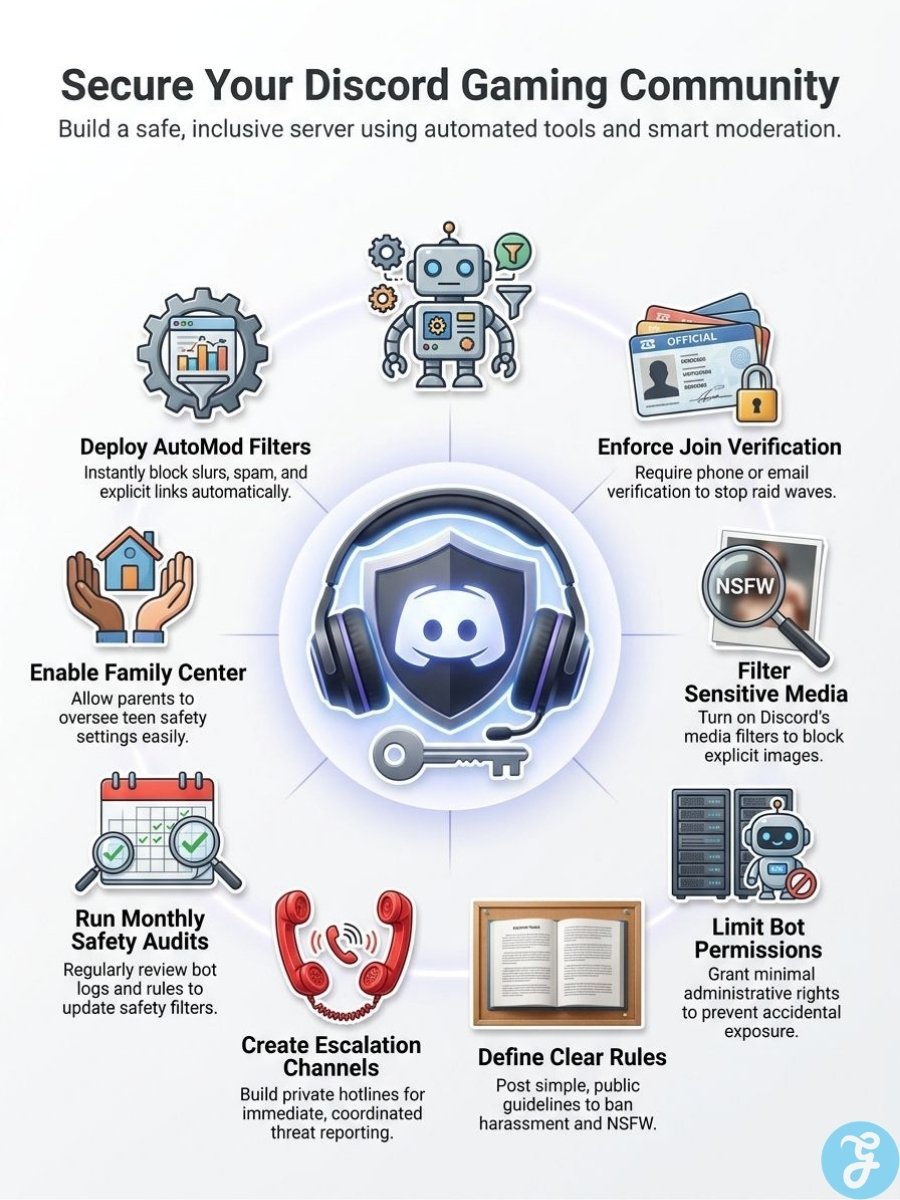
- Turn on sensitive content filters: This is your first layer for blocking or blurring risky media in server channels.
- Use age-restricted channels correctly: Discord allows adult content only in clearly age-gated text channels, so keep anything mature out of general chat.
- Raise verification on public servers: Email or phone checks slow down throwaway accounts and cheap raid attempts.
- Set raid response before you need it: Discord can alert a chosen mod channel and trigger CAPTCHA for new joiners after suspicious join activity, which buys your team time.
- Limit posting rights for new members: Give fresh accounts read-only access until they pass rules screening or a verification step.
- Review bot permissions monthly: The fewer apps that can post, delete, or manage media, the lower your exposure if a tool misfires or gets abused.
Family Center helps households keep an eye on teen activity, but it has a narrow job. It can show connected guardians a teen’s top users and servers from the last week and list newly joined servers, yet it does not let a guardian remove the teen from a server or DM. That makes it a visibility tool, not a substitute for good server moderation.
For teen-heavy communities, I also keep public rules very plain: no NSFW, no grooming, no exploitative links, no “joke” requests for personal photos, and no sharing private information. Clear language protects members and gives moderators something solid to point to when they act.
Effective Moderation Tips for Discord Gaming Communities
I keep moderation simple on purpose. Discord’s built-in tools catch a surprising amount of chaos if you turn them on, and a small bot stack can handle the rest without making your server feel like a police station.
How co Clear Community Rules Improve Moderation?
Rules work best when they read like house rules, not legal text. I want members to know what is welcome, what gets removed, and what earns a timeout in less than two minutes.
Discord’s own moderation guidance treats server rules as the backbone of the system, and that matches what I see in practice. The more specific the rule, the less arguing your moderators have to do in public.
- Cover behavior, not every edge case: Ban harassment, hate speech, doxxing, impersonation, scams, and spam, then give one or two examples for each.
- Make channels match the rules: Keep latest news and announcements read-only, put LFG chat in its own channel, and separate anime or off-topic convos from gameplay help.
- Gate access with roles: New members should not land with the same permissions as trusted regulars.
- Write the appeal path down: A short appeal form or ticket flow saves moderators from endless debate in public chat.
- Train moderators together: Shared templates for warnings, timeouts, and bans keep the team calm and fair.
I also avoid giving staff the Administrator permission unless there is a real reason. It is easier to add one needed permission later than to clean up a mistake from someone who had full control too early.
What are the Best Moderation Bots and Tools to Use?
I like a layered stack. Built-in Discord safety tools should block the first wave, then outside bots can handle welcome messages, logs, tickets, and repeat tasks.
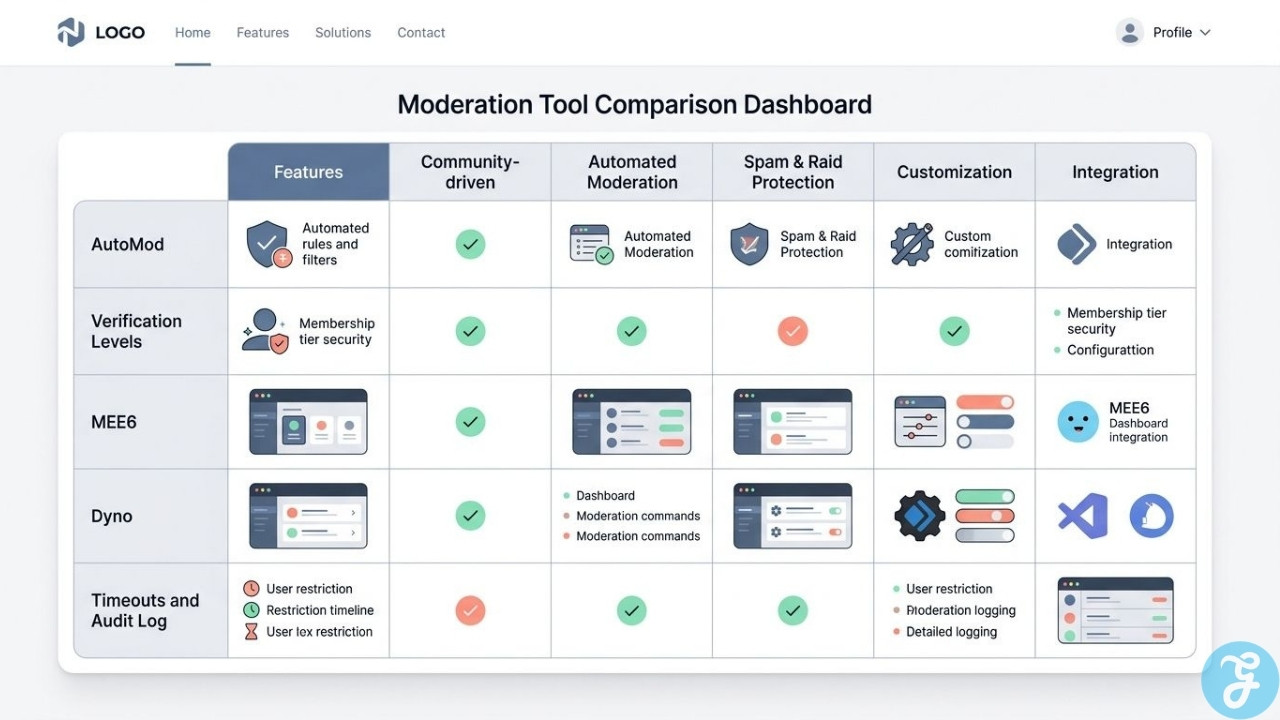
| Tool | Best for | Why it helps | How I use it |
|---|---|---|---|
| AutoMod | Keyword filters, spam blocking, mention spam | Discord says AutoMod works across text channels, threads, and text chat in voice channels, so it covers more than most people expect. | I block slurs, scam phrases, fake Nitro bait, mass mentions, and obvious raid copy. |
| Verification Levels and Raid Protection | Public server safety | Higher verification slows bot floods, and detected raids can trigger alerts plus temporary CAPTCHA for new joiners. | I keep public gaming servers at a stricter level than private friend groups, then raise it again during an active raid. |
| MEE6 | Welcome flows, reaction roles, moderation commands | MEE6 says it is used in over 21 million servers, which means there is a huge support trail for setup and troubleshooting. | I use it for welcome structure and simple automations, but I give it only the permissions it really needs. |
| Dyno | Mod logs, timed mutes and bans, anti-spam | Dyno is strong for teams that want a clean dashboard and dependable moderation basics without a custom build. | I like it when volunteer moderators need one place to review actions and repeat tasks. |
| Timeouts and Audit Log | Fast intervention and accountability | Timeouts stop a user from sending messages, reacting, or joining voice and video, and the reason can be recorded in the audit log. | I use short timeouts for heat-of-the-moment fights, then review evidence before deciding on a ban. |
If your server has very specific needs, like custom role rewards, matchmaking, or event logic, a custom JavaScript bot can help. I still start with built-in tools first, because every extra app adds permissions, maintenance, and one more thing to audit.
Voice Channels Need Their Own Rulebook
Voice channels are where a lot of servers lose control. Text leaves a trail and gives moderators a few extra seconds. Live voice does not.
I set voice rules separately from text rules, especially for bigger gaming discord servers with active VC, scrims, or late-night hangouts. That keeps the vibe chill without letting one loud person run the room.
- Give mods voice powers that match the risk: Mute Members, Move Members, Deafen Members, and Priority Speaker are more useful than broad admin power.
- Use timeouts for escalation: If someone keeps rejoining just to harass people, a timeout shuts off voice access fast.
- Set expectations for open mics: Push-to-talk rules, music rules, and no screaming into the mic sounds basic, but it prevents half the drama.
- Assign event mods: Tournaments, custom lobbies, and creator streams need one person focused only on VC behavior.
- Post the reporting path in text: Members need a nearby text channel where they can report what just happened in voice before details get fuzzy.
Stage channels are useful when your server runs announcements, panel-style chats, or community Q&As. Everyone joins as muted audience by default, and Stage moderators can add, mute, or remove speakers, which makes them far easier to control than a regular open voice room.
They also scale better than most people think. Discord’s current Stage FAQ says audio-only stages can support audiences up to 10,000, while video or screen share starts at 50 viewers on free servers and goes higher with server boosts. If you want to host a big reveal, tournament briefing, or community town hall, that structure helps a lot.
The last piece is consistency. Members can handle strict rules if the rules are steady. What they hate is guessing whether a mod will laugh off harassment one night and hand out bans the next.
The Verdict
Discord gaming communities work best when culture and moderation support each other.
Clear rules, smart filters, and steady voice moderation keeps a gaming community fun without killing the vibe. Build the discord server you would want to join, and your members will help protect it with you.
Frequently Asked Questions (FAQs) on Discord Gaming Communities
1. What are Discord gaming communities like?
They are virtual hangouts for people looking for a fun place to socialize. The * gameHERs can be the largest community-run spot, with tons of people who connect with fellow players, chat, and trade tips.
2. How do members shape the culture and chat about all things games?
Members drive the vibe, from casual trolls to serious fans, they chat about all things, from Yumekawa Kon streams to Hawks lore. You will find fan jokes like steal a brainrot or shout outs to fisch, and you learn fast how groups behave.
3. What risks should I watch for, and how do mods help?
Watch spam, scams in online advertising, and fake meta products that mimic real gear. Good moderators act fast, they delete bad posts, they use clear rules to keep the server safe.
4. Can Discord help with Gaming Careers or finding the latest news?
Yes, Discord helps you connect with fellow creators and recruiters, and it posts the latest news fast. Use channels to interact, share clips, and link your Facebook or stream pages.
5. Which games or topics do servers cover?
Servers focus on many worlds, like warframe, teyvat, astral express, and whiteout survival, and they even run virtual bingo nights. The largest community-run hubs can host events, guides, and fan meetups.