AI voices are officially past the point of being an easy-to-dismiss novelty. In short clips, some of them sound so expressive and clean that your average listener won’t even catch a hint of synthetic processing.
But anyone who actually works with audio knows the reality: a dazzling ten-second marketing demo is a terrible yardstick for a real production environment.
An AI voice can sound brilliant in a brief sample, then completely fall apart inside a corporate training video, a multi-chapter audiobook, or a fast-paced customer support loop. It drops its cadence, pauses in bizarre spots, or bizarrely sounds like a game-show host while delivering serious compliance data. That is exactly why digging into true AI TTS voice quality matters before you attach a synthetic voice to your brand.
Redefining the Quality Standard
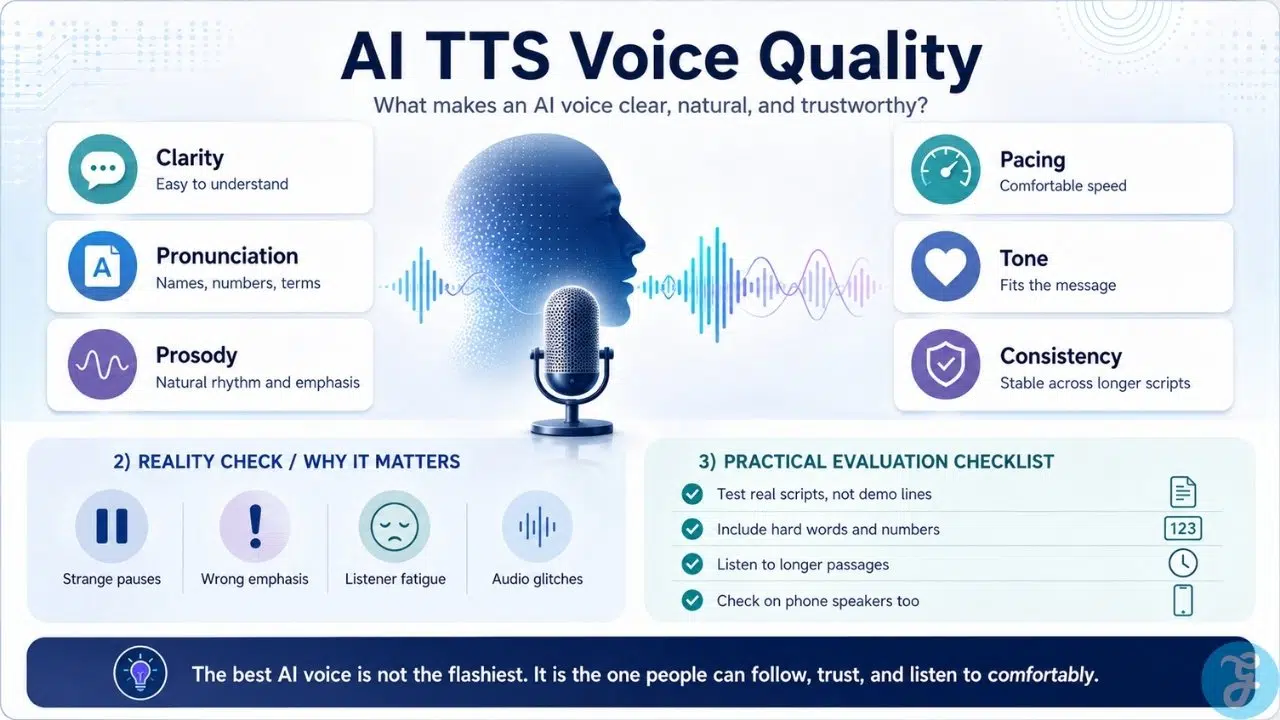
When we look past the initial wow factor, evaluating AI TTS voice quality isn’t about finding the flashiest or most dramatic voice available. It is about text-to-speech that people can actually listen to for more than two minutes without experiencing immediate listener fatigue. If your audience has to expend mental energy just to parse what your narrator or voice agent is saying, your content has already failed.
To understand how a voice will hold up when reading real, unpredictable scripts, you have to look at several core TTS quality factors. True production readiness requires a balance of technical execution and human-like flow.
| Quality Factor | What It Solves | The Real-World Friction |
| Intelligibility | Pure clarity and comprehension | Mishearing critical data like “fifteen” vs “fifty” or “can” vs “can’t” |
| Pronunciation Accuracy | Saying specific words correctly | Stumbling over acronyms, brand names, and complex industry terminology |
| Prosody | The natural melody and rhythm of speech | Avoiding a robotic, metronome-like cadence across long blocks of text |
| Context Awareness | Interpreting the meaning of the script | Making a warning feel serious, or signaling a question with the right pitch rise |
The Illusion of AI Voice Naturalness
When teams shop around for a speech generator, they almost always put AI voice naturalness at the top of their priority list. They want a voice that sounds completely human.
But here is the industry secret: human speech is fundamentally messy. We pause to breathe, we shift our pacing mid-sentence, and we alter our emphasis based on emotional subtext. An AI voice that is engineered to be flawlessly smooth and mathematically perfect often ends up sounding sterile, uncanny, and corporate.
Achieving great AI voice naturalness requires restraint rather than over-acting. A meditation app demands a slow, warm, deeply grounded tone, whereas a breaking news wrap-up requires a sharp, alert, and neutral delivery. The goal is never absolute perfection; it is a matching of the tone to the environment where the audio lives.
Benchmarking the Best AI Voice Models
The underlying technology moves incredibly fast, and the current landscape is split between massive premium cloud systems and lightweight open-weight models. Finding the right fit means looking at how these systems handle complex formatting, numbers, and long-form endurance.
Testing across the industry reveals how the best AI voice models serve entirely different production needs:
-
Fish Audio (S2 Pro): A current favorite for creative, narrative, and dialogue-heavy content. It provides exceptional emotional nuance with granular tone controls, allowing you to trigger specific behaviors like whispering or excited speech.
-
ElevenLabs (v3): The long-standing heavyweight for polished video narration and audiobooks. Its strength lies in highly accurate contextual processing and top-tier voice cloning capabilities, though it comes at a premium cost.
-
Kokoro (82M): The current champion for open-source efficiency. Despite its incredibly small footprint, it generates high-fidelity audio at remarkable speeds, making it a gold standard for developers deploying on modest hardware.
-
LMNT and Cartesia: Purpose-built stacks engineered specifically for conversational AI applications. They trade off some ultra-premium studio sheen in exchange for sub-200ms real-time streaming speeds.
The SSML Paradox: Why Prompting Is Replacing Code
For years, getting a standard text-to-speech engine to behave required wrestling with Speech Synthesis Markup Language (SSML). If a voice mispronounced a word or rushed a transition, developers had to manually inject tedious code blocks, forcing hard-coded breaks like <break time=”500ms”/> or adjusting pitch percentages line by line. It was an audio-editing nightmare disguised as software development.
The newest generative voice architectures are completely upending this workflow. Because modern engines are built on unified, single-pass neural networks rather than mechanical stitching, they handle context natively.
Instead of writing code to fix a broken sentence, creators are shifting to “promptable voice.” High-end models allow you to inject expressive inline tags directly into the script, using plain text markers like [whispers] or [excited] to dynamically steer the delivery. The system infers the correct cadence, breath control, and emotional weight based on the surrounding text. If a model has true baseline quality, you should be managing its behavior through natural phrasing and punctuation, not writing a script to fix its technical shortcomings.
The Multilingual Mirage: Why Regional Accents Break the Stack
It is remarkably easy for a speech engine to look flawless during a standard marketing presentation spoken in a crisp, generic mid-Atlantic American accent. That is the baseline data every model is flooded with during training. The real operational trap happens the exact moment you push that voice into global deployment or localized markets.
A major flaw in general-purpose models is uneven performance across regional accents, code-switching (blending multiple languages in a single sentence), and distinct localized dialects. A voice stack might maintain premium studio fidelity in English, yet sound like an aggressive, unnatural machine translation when switching to Spanish, Hindi, or Arabic.
True localized voice quality requires a model that understands regional stress patterns and phonetic anomalies natively. If you are building customer-facing systems for a global audience, your testing roadmap must include heavy accent-robust benchmarking. If a system cannot handle real-world naming conventions, localized slang, or sudden language shifts smoothly, it will alienate your regional users, no matter how beautiful the English demo sounded.
Your Practical Evaluation Roadmap
If you want to protect your user experience, stop picking a voice based on pre-baked vendor samples. Create a specialized testing document filled with your actual brand names, acronyms, dialogue scripts, and complex numbers.
Generate at least a few minutes of continuous audio to check for volume stability, sudden accent shifts, or audio artifacts like metallic clipping. Finally, make sure to listen to the output on a basic mobile phone speaker, not just high-end studio headphones. If the voice remains highly intelligible and engaging in a noisy room on a tiny speaker, you have found a model that works.