
Pagination looks like a small technical detail until a publisher has thousands of articles buried behind it. A category page shows the newest posts. Page two shows older posts. Page three goes deeper. After a few months, important evergreen articles, author archives, news updates, and topic pages may sit behind dozens of paginated URLs. If that structure is clean, search engines can keep discovering older content. If it is weak, entire sections can become hard to crawl, poorly linked, duplicated, or ignored.
That is why pagination SEO matters for publishers. For blogs, news sites, magazines, ecommerce editorial sections, and large content libraries, pagination is not only a design choice. It is part of the site’s discovery system. It affects how readers browse archives, how crawlers find older URLs, how category pages pass internal signals, and how search engines understand large groups of related content.
Bad pagination does not always break a site overnight. It creates quiet damage. Older posts stop getting discovered. Category pages become thin. Infinite scroll hides crawl paths. Page two, page three, and deeper archive pages use the wrong canonical tags. Tag pages multiply without value. Search engines keep finding duplicate archive URLs while important articles receive fewer internal links.
This guide explains pagination SEO best practices for publishers in a practical way. It covers archive pagination, pagination structure, canonical rules, infinite scroll, load-more buttons, category pages, tag pages, author archives, and common mistakes that can quietly weaken organic visibility.
Good pagination should do two things at the same time: 1. Help readers browse 2. Help search engines discover.
What Is Pagination SEO?
Pagination SEO is the process of making multi-page content collections easy for search engines and users to navigate.
For publishers, pagination usually appears on:
- Blog archive pages
- News category pages
- Tag pages
- Author pages
- Search result pages
- Topic hubs
- Review lists
- Long article directories
- Media galleries
- Comment pages
- Forum-style discussion pages
- Ecommerce editorial collections
The most common example is a category archive.
A publisher may have a URL like:
/technology/
Then deeper pages:
- /technology/page/2/
- /technology/page/3/
- /technology/page/4/
Each page contains a different set of articles from the same category. That structure helps readers move through older content. It also gives search engines a path to find posts that are no longer linked from the homepage.
Pagination becomes an SEO problem when that path is broken, hidden, duplicated, blocked, or canonicalized incorrectly. A strong pagination structure makes the archive clear. A weak one turns the archive into a crawl trap.
Why Pagination Matters More for Publishers
Pagination matters on any large site, but it matters more for publishers because content volume grows constantly. A simple blog may publish two posts a week. A news site may publish dozens every day. Over time, the site builds hundreds or thousands of URLs across categories, tags, authors, and date-based archives. Without clean pagination, older content gets buried.
That creates several problems:
- Search engines may not discover older articles easily
- Important evergreen posts may lose internal link support
- Category pages may become difficult to crawl deeply
- Infinite scroll may hide older URLs from crawlers
- Tag archives may create low-value paginated pages
- Duplicate archive pages may waste crawl resources
- Incorrect canonical tags may confuse page relationships
- Readers may struggle to browse older content
For a publisher, the homepage is temporary. Pagination is one of the systems that keeps older content reachable after it leaves the homepage. That is why paginated content SEO should be part of every publisher’s technical SEO routine.
How Search Engines See Paginated Content
Search engines do not experience pagination exactly like a human reader. A reader sees a button, clicks page two, scrolls, clicks page three, and continues browsing. A crawler needs crawlable links and unique URLs.
If the archive uses proper HTML links, search engines can move through the sequence. If it depends only on JavaScript clicks, hidden API calls, infinite scroll without URLs, or buttons that do not expose crawlable links, discovery becomes weaker.
Search engines need to understand:
- Each paginated page has a unique URL
- Each URL contains different content
- The pages are part of the same archive sequence
- Internal links lead to articles on each page
- Important older articles can still be reached
- Canonical tags do not erase deeper pages
- The structure is not infinitely low-value duplication
This is the core of pagination SEO. A crawler does not need fancy animation. It needs clear paths.
The Basic Pagination Structure Publishers Should Use
A clean pagination structure should have three things:
- A unique URL for each paginated page
- Crawlable links between paginated pages
- A logical relationship between the archive pages and the articles listed on them
For example:
- /seo/
- /seo/page/2/
- /seo/page/3/
This is usually clearer than a structure that relies only on scripts or fragments, such as: /seo/#page2
Fragment URLs are not ideal for archive discovery because they do not represent clean, separate paginated pages in the same reliable way.
A good pagination structure should also avoid producing endless, empty, or nearly empty pages. If a category has only 25 articles, it does not need a pagination system that creates 200 possible page URLs. Every paginated page should have a reason to exist.
Use Crawlable HTML Links
This is one of the most important pagination SEO best practices. Pagination links should use normal HTML anchor links.
A simple crawlable link looks like this: <a href=”/technology/page/2/”>Next</a>
That is better than a button that only triggers JavaScript without a crawlable URL.
For example, this is weaker: <button onclick=”loadMorePosts()”>Load more</button>
A search engine can follow normal links more reliably. Buttons, events, and JavaScript-only actions may work for users but still make discovery harder for crawlers.
For publishers, this affects older posts directly. If page two and deeper pages are not reachable through crawlable links, older articles may receive fewer internal discovery paths.
Use crawlable links for:
- Next page
- Previous page
- Numbered pages
- Deep archive pages
- Category pagination
- Tag pagination
- Author archive pagination
A user can enjoy a smooth interface. But underneath that interface, the crawler still needs real links.
Give Every Paginated Page a Unique URL
Each paginated page should have a separate URL. That helps search engines understand that page two is not the same as page one.
For example:
- /news/
- /news/page/2/
- /news/page/3/
or:
- /news/?page=2
Both can work if the URLs are stable, crawlable, and handled consistently. For publishers, clean path-based URLs are often easier to read, but query parameters are not automatically bad. The important thing is consistency.
Avoid structures that create many duplicate versions of the same archive, such as:
- /news/page/2/
- /news/?page=2
- /news/?p=2
- /news/?sort=latest&page=2
- /news/page/2/?utm_source=social
If multiple versions exist, canonical signals and internal links should clearly point to the preferred version. A messy pagination URL system can create crawl waste. A clean URL system helps search engines understand the archive.
Do Not Canonical Every Paginated Page to Page One
This is one of the most common publisher mistakes. Many sites set every paginated archive page to canonicalize back to page one.
For example:
- /category/page/2/ canonicalizes to /category/
- /category/page/3/ canonicalizes to /category/
- /category/page/4/ canonicalizes to /category/
This is usually wrong for publisher archives. Page two is not a duplicate of page one. It contains a different set of articles. Page three contains another set. These pages are part of the archive structure and help crawlers discover deeper content.
If every paginated page points canonically to page one, you may send the wrong signal: that page two and deeper pages are not important versions. A better default for publisher archive pagination is usually a self-referencing canonical.
For example:
- /category/page/2/ canonicalizes to /category/page/2/
- /category/page/3/ canonicalizes to /category/page/3/
This does not mean every paginated page must rank. It means you are not pretending that deeper pages are duplicates of page one. The article URLs listed on those pages still matter most. Pagination pages are discovery paths. Do not accidentally weaken those paths.
What About rel=next and rel=prev?
Years ago, rel=”next” and rel=”prev” were often used to indicate paginated sequences. Today, Google no longer uses them as an indexing signal for pagination. That does not mean using them is harmful. Other systems or search engines may still understand them. But for Google, they should not be treated as the main pagination SEO solution.
Publishers should focus on what still matters:
- Unique URLs
- Crawlable links
- Clear internal linking
- Correct canonical tags
- Useful archive pages
- Clean sitemaps where appropriate
- No blocked important paths
- No JavaScript-only discovery
Do not rely on rel=”next” and rel=”prev” to fix a broken pagination structure. They are not a substitute for crawlable links.
Should Paginated Pages Be Indexed?
This is where pagination SEO becomes more nuanced. Not every paginated page needs to rank. But not every paginated page should be blocked or noindexed either. For publisher archives, the main value of paginated pages is usually discovery and navigation. They help search engines find article URLs.
Indexing may make sense when:
- The archive page is useful to readers
- The category is important
- The page contains unique article listings
- The page is part of a strong topic area
- Older content is valuable
- The archive has clean internal links
Noindex may make sense when:
- The paginated page is thin
- The archive is of low value
- The tag page is weak
- The page creates duplicate noise
- Internal search result pages are being generated
- Filtered pages create many similar variations
The mistake is applying one rule to everything. Do not automatically noindex every paginated page without checking whether those pages help discovery. Do not automatically index every weak tag archive either. The right decision depends on the archive type.
Pagination SEO for Category Archives
Category archives are usually the most important paginated pages for publishers. A category page represents a main editorial section such as:
- Technology
- Health
- Business
- Travel
- Sports
- Entertainment
- Finance
- Lifestyle
- SEO
- Education
For important categories, pagination should be clean and crawlable.
A strong category archive should have:
- A clear category title
- A short, useful description
- Article listings
- Crawlable pagination links
- Internal links to important guides or topic hubs
- A self-referencing canonical
- Fast mobile performance
- No unnecessary parameters
- No blocked page two or deeper pages
Category pagination should not be treated as throwaway content. It is part of the site’s structure. For a large publisher, category pages can help search engines understand topical authority. But only if they are maintained properly.
Pagination SEO for Tag Archives
Tag pages need more caution. Publishers often create too many tags. A writer adds a tag for a phrase. Another writer uses a similar variation. Over time, the site has hundreds or thousands of thin tag pages.
Examples:
- ai
- artificial-intelligence
- ai-tools
- ai-news
- ai-technology
- future-of-ai
Some may be useful. Many may overlap. Paginated tag archives can become crawl waste if the tags are thin, duplicated, or poorly managed. A tag page may deserve indexable pagination if:
- The tag represents a real topic
- It has many quality articles
- It has search value
- It has a unique description
- It helps users browse related content
- It does not duplicate a category or topic hub
A tag page should probably be noindexed, merged, or removed if:
- It has only one or two posts
- It overlaps with stronger tags
- It has no unique value
- It was created randomly
- It creates several weak, paginated pages
- It competes with a category page
Archive pagination works best when the archive itself is worth keeping. Do not optimize pagination for pages that should not exist.
Pagination SEO for Author Archives
Author pages can be useful for publishers, especially when author expertise matters.
An author archive may show:
- Author bio
- Expertise
- Role
- Social profiles
- Published articles
- Topic areas
- Credentials
- Editorial history
If the author page has real value, pagination can help readers and crawlers access older work. Good author archive pagination should include:
- Clear author identity
- Unique author bio
- Article list
- Crawlable pagination
- Correct canonical tags
- Mobile-friendly layout
- Links to strong articles
- No thin duplicate template problems
Weak author pages are different. If an author page only has a name and one article, it may not deserve indexation. For publishers with many contributors, the author archive strategy should be intentional. Do not create hundreds of thin author pages and then paginate them endlessly.
Pagination SEO for Date Archives
Date archives are often less useful. Many CMS platforms create monthly, yearly, or daily archives automatically.
For example:
/2026/06/
/2026/05/
/2025/12/
These pages may be useful for some news publishers, but they are often thin or redundant for regular blogs. If date archives duplicate category archives, tag archives, and search paths, they may create crawl waste.
Ask:
- Do users actually browse by date?
- Does the date archive offer unique value?
- Does it compete with better archive pages?
- Is it indexed without purpose?
- Does it create many paginated pages?
- Is it needed for news browsing or historical coverage?
For most evergreen blogs, date archives can often be noindexed. For news sites, they may have more value if used carefully.
Infinite Scroll and Pagination SEO
Infinite scroll is popular because it feels smooth. Readers keep scrolling, and more posts load automatically. The problem is that search engines need accessible URLs and links. If infinite scroll is the only way to reach older content, SEO can suffer.
A search-friendly infinite scroll setup should include:
- A paginated URL series behind the experience
- Unique URLs for component pages
- Crawlable links to deeper pages
- URL updates as users scroll, where appropriate
- No reliance on user interaction
- Article links available in HTML
- Testing with rendered HTML tools
For example, a user may see infinite scroll on: /lifestyle/
But crawlers should still be able to access:
- /lifestyle/page/2/
- /lifestyle/page/3/
- /lifestyle/page/4/
This gives readers a modern browsing experience while keeping a crawlable structure for search engines. Infinite scroll is not the enemy. Invisible pagination is the problem.
Load More Buttons and SEO
A “Load More” button can work for users. But it can create the same SEO issue as infinite scroll if it only loads content through JavaScript and does not expose crawlable URLs.
A safer setup is:
- Show a Load More button for users
- Keep crawlable pagination links in the HTML
- Use progressive enhancement
- Maintain unique paginated URLs
- Make article links accessible without requiring a click
For example, the visual interface can show a button, but the page can still include crawlable links to page two and page three. Publishers should test whether Google and other crawlers can find articles beyond the first loaded set. If older posts are not discoverable without clicking a JavaScript button, the setup needs improvement.

Pagination and Internal Linking
Pagination is part of internal linking. Every paginated archive page links to a group of articles. Those article links help crawlers discover deeper content. For publishers, this matters because many older articles stop receiving homepage links quickly. A good pagination structure helps preserve discovery. But pagination alone is not enough.
Important older articles should also be linked through:
- Topic hubs
- Evergreen guides
- Related articles
- Category pages
- Manual editorial links
- Author pages
- Updated content sections
- HTML sitemaps were useful
Do not rely on page 23 of a category archive as the only internal link path to an important article. Pagination helps breadth. Contextual internal links help emphasize importance. Use both.
Pagination and Crawl Budget
Pagination can affect crawl budget on large publisher sites. A clean paginated structure helps crawlers reach useful articles. A messy structure creates waste. Crawl waste can happen when pagination creates:
- Duplicate paginated paths
- Empty pages
- Infinite page URLs
- Parameter combinations
- Sort variations
- Filtered pages
- Thin tag archives
- Internal search result pagination
- Broken paginated URLs
- Redirect chains
- Noindex pages are still heavily linked
For large publishers, the goal is not to block every paginated page. The goal is to avoid letting low-value pagination consume attention that should go to important articles. Practical crawl budget improvements include:
- Reduce duplicate archive paths
- Clean up thin tags
- Fix broken pagination
- Avoid infinite URL traps
- Use consistent canonical URLs
- Do not link heavily to useless paginated pages
- Keep important articles close to strong pages
- Use sitemaps for key canonical URLs
- Monitor crawl stats in Search Console
Pagination should help crawlers move through the site, not trap them.
Pagination and XML Sitemaps
Most publishers should not rely on page pagination in XML sitemaps. A standard XML sitemap should usually include canonical article URLs and important indexable pages.
For example, include:
- Article URLs
- Evergreen guide URLs
- Important pages
- Major category pages
- News URLs in a news sitemap where appropriate
- Image or video URLs where relevant
Do not fill your sitemap with every paginated archive page unless there is a clear reason. Pagination pages should normally be discoverable through internal links. The sitemap should focus on the content you want search engines to prioritize. For most publishers, that means articles and important hubs, not every page of every archive.
Pagination and Duplicate Content
Paginated pages are not automatically duplicate content. Page two of a category archive is different from page one if it lists different articles. But duplicate problems can happen when:
- Multiple paths show the same article lists
- Tag pages duplicate category pages
- Date archives duplicate topic pages
- Parameter URLs repeat the same archive
- Sort options create many similar pages
- Page titles and descriptions are identical across all pages
- Canonical tags conflict
- Internal links point to multiple versions
A clean pagination structure should reduce duplication. Use consistent URLs, clear canonicals, and controlled archive types. Also consider making page titles clearer for paginated pages.
For example: Technology News – Page 2
This helps distinguish paginated pages from the first page. Do not overdo it with keyword stuffing. Just make the structure clear.
Pagination Page Titles and Meta Descriptions
Paginated archive pages should not all have the exact same title and meta description if they are indexable.
A simple structure works:
- Page one: Technology News and Analysis
- Page two: Technology News and Analysis – Page 2
- Page three: Technology News and Analysis – Page 3
For meta descriptions, you do not need to write custom descriptions for every deep archive page. But avoid misleading page-two metadata that describes only the first page.
If your CMS can handle simple pagination labels, that is usually enough. The key is clarity. A paginated page should not pretend to be the main category page if it contains a different set of posts.
Pagination and User Experience
SEO should not ignore readers. A good pagination structure should be easy to use.
Readers should be able to:
- Move to the next page
- Move to the previous page
- Jump to nearby pages
- Return to page one
- Understand where they are
- Browse older content without frustration
- Use pagination on mobile
Avoid tiny pagination links on mobile. Avoid pagination that shifts around after ads load. Avoid hiding the next button below too many widgets. Avoid making users click through endless pages when filters, topic hubs, or better category organization would help.
Good archive pagination should feel simple. If readers hate it, search engines are not the only problem.
Pagination SEO for Long Articles
Most publisher pagination issues happen in archives, but some sites split long articles across multiple pages. This can be risky.
Splitting a long article may increase ad impressions, but it often weakens user experience. Readers may abandon the article before finishing. Search engines may need to process multiple component pages. Internal signals may get split.
For most modern publisher content, one complete article page is usually better for readers.
Consider article pagination only when:
- The content is naturally chapter-based
- Each page has substantial value
- Navigation is clear
- Canonicals are handled correctly
- A view-all version is available if appropriate
- The user experience is not damaged
Do not split articles only to increase pageviews. That is a short-term publishing habit that often feels outdated to readers.
Common Pagination SEO Mistakes
1. Canonicalizing All Paginated Pages to Page One
This is the biggest mistake. Page two and deeper pages usually contain different article links, so they should not automatically canonical to page one.
2. Using JavaScript-Only Pagination
If crawlers cannot follow the pagination links, older content may become harder to discover.
3. Relying Only on Infinite Scroll
Infinite scroll needs crawlable paginated URLs behind it.
4. Creating Too Many Thin Tag Pages
Pagination cannot save weak archives. Clean the tag strategy first.
5. Blocking Useful Paginated Pages in Robots.txt
Blocking pagination may stop crawlers from reaching older articles through those paths.
6. Noindexing Everything Without a Discovery Plan
Noindex can be useful, but older articles still need crawlable paths.
7. Letting Empty Pagination Pages Exist
A page with no posts should not be crawlable and indexable.
8. Using Inconsistent URL Formats
Do not create several URL versions for the same archive page.
9. Ignoring Mobile Pagination
Pagination must be usable on mobile, not only on desktop.
10. Depending on Sitemaps Alone
Sitemaps help discovery, but internal links still matter.
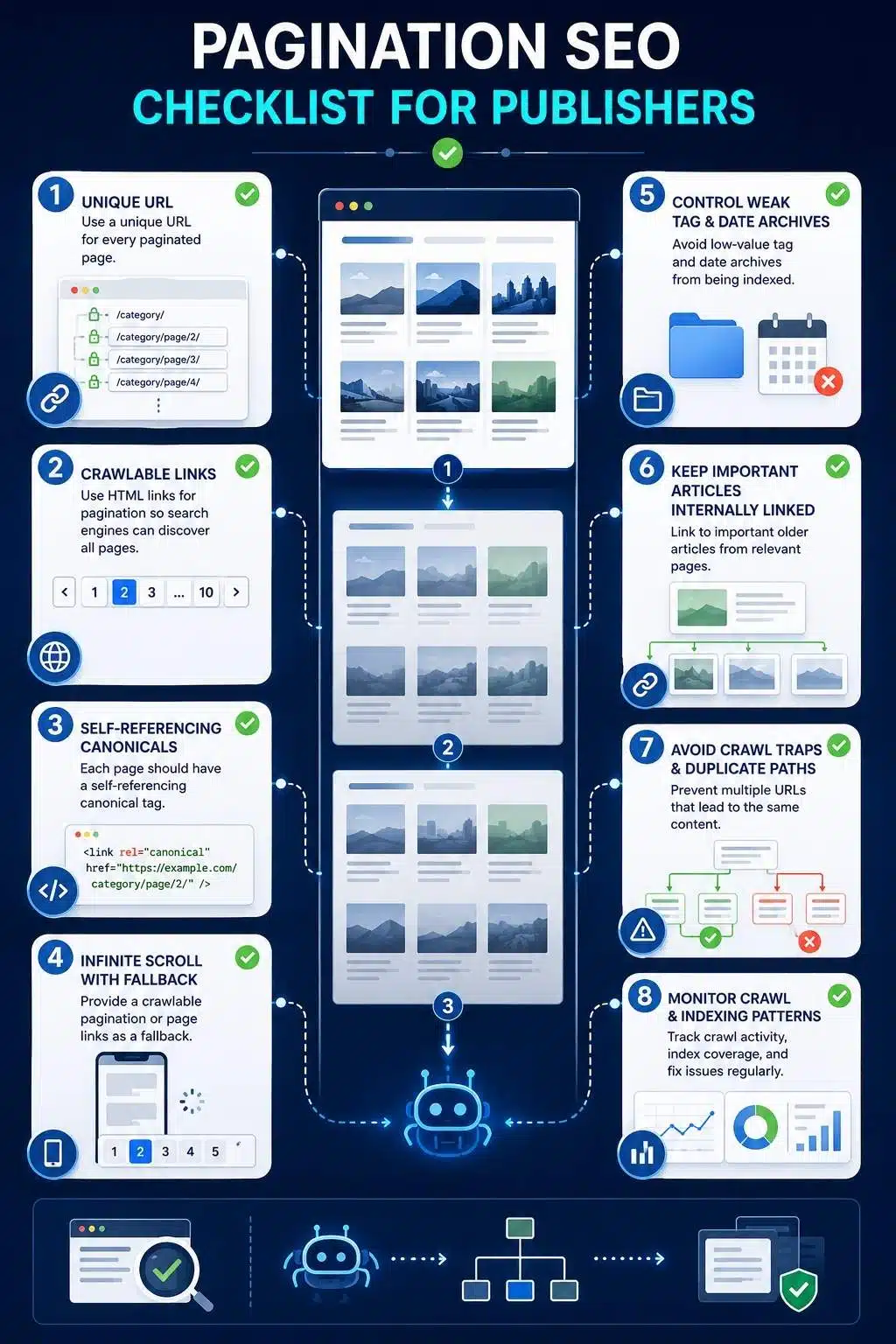
Pagination SEO Checklist for Publishers
Use this checklist during technical audits.
URL Structure
- Each paginated page has a unique URL
- URL format is consistent
- No duplicate pagination paths
- No endless empty page URLs
- No fragment-only pagination
Crawlability
- Pagination links use normal HTML anchors
- Page two and deeper pages are reachable
- Article links are visible in rendered HTML
- Infinite scroll has a crawlable fallback
- Load-more buttons do not hide all deeper links
Canonical Tags
- Page one canonical points to page one
- Page two canonical points to page two
- Page three canonical points to page three
- Canonicals do not point to redirected URLs
- Canonicals are consistent with internal links
Index Control
- Useful category pagination is crawlable
- Weak tag pagination is reviewed
- Internal search pagination is controlled
- Noindex is used carefully
- Robots.txt is not blocking important discovery paths
Archive Quality
- Category pages have value
- Important tags are curated
- Thin tags are merged, improved, or noindexed
- Author pages include useful information
- Date archives are reviewed for value
User Experience
- Pagination works on mobile
- Next and previous links are easy to tap
- Page numbers are understandable
- Ads do not block pagination
- Readers can browse older content easily
Monitoring
- Search Console indexing patterns are checked
- Crawl stats are reviewed for waste
- Important older articles are still discovered
- Paginated pages do not generate large error patterns
- Site crawls confirm archive depth
Frequently Asked Questions About Pagination SEO
1. What Is Pagination SEO?
Pagination SEO is the process of making multi-page content collections crawlable, understandable, and useful for search engines and readers. It is especially important for publisher archives, category pages, tag pages, author pages, and large content libraries.
2. Is Pagination Bad for SEO?
No. Pagination is not bad for SEO when it is implemented properly. It becomes a problem when paginated pages are hidden behind JavaScript, canonicalized incorrectly, blocked, duplicated, or used to create many low-value archive pages.
3. Should Page 2 be canonical to Page 1?
Usually no. Page two of an archive normally contains different article links from page one, so it should not automatically canonical to page one. A self-referencing canonical is usually safer for useful paginated archive pages.
4. Should Paginated Pages Be Indexed?
It depends. Useful category pagination may be indexable. Thin tag pagination, internal search results, and low-value duplicate archives may be better noindexed or controlled. The decision should depend on the archive value and crawl discovery needs.
5. Should Pagination Pages Be in XML Sitemaps?
Usually, publishers should focus XML sitemaps on canonical article URLs and important pages. Pagination pages should generally be discoverable through internal links unless there is a specific reason to include them.
6. How Does Pagination Affect Crawl Budget?
Pagination can help crawl discovery when clean. It can waste crawl budget when it creates duplicate paths, empty pages, thin archives, internal search pagination, or endless parameter combinations.
Good Pagination Keeps Older Content Alive
Pagination is not just a way to organize old posts. For publishers, it is part of the technical system that keeps the content library reachable.
A clean pagination structure helps readers browse older articles. It helps search engines discover deeper content. It prevents useful posts from disappearing after they leave the homepage. It supports categories, author pages, topic archives, and long-running editorial coverage.
Bad pagination does the opposite. It hides content behind buttons. It sends every page back to page one. It creates thin tag archives. It wastes crawl time on duplicate paths. It makes older articles harder to find and harder to value. That is why pagination SEO deserves real attention. The best setup is not complicated.
Use unique URLs. Use crawlable links. Keep canonicals clean. Avoid hiding old content behind JavaScript. Control weak archives. Make pagination work on mobile. Monitor crawl and indexing patterns. Link important older articles from stronger pages, not only deep archive pages.
Pagination should not be a graveyard for old content. It should be a clear path through the archive. That is how publishers protect the long-term value of everything they publish.