


Picking the right database for your web application feels like choosing between a hundred different tools in a toolbox, and you are not even sure what half of them do. You build features, your app grows, and suddenly your database starts to slow down or costs you way too much money. Your team argues about whether you need a relational database or a NoSQL option. Meanwhile, your application sits there waiting for you to make a decision that actually works.
Here is a helpful secret. Companies that pick the best Modern Web Applications Databases early on cut their infrastructure costs by up to 40 percent. They handle three times more traffic without breaking a sweat. That is not magic; it is just smart planning.
I am going to walk you through the top databases that power successful web applications today. You will learn what makes each one tick, where they shine, and where they stumble. We will cover PostgreSQL, MongoDB, MySQL, Redis, and DynamoDB in plain English.
So, grab a cup of coffee, and let’s go through it together. I will show you everything you need to know.
Evaluating Database Options for Web Applications
Picking the right database shapes your entire application’s foundation. You need to think through what matters most for your specific project. Speed, growth capacity, data structure, and security all play major roles in your decision.
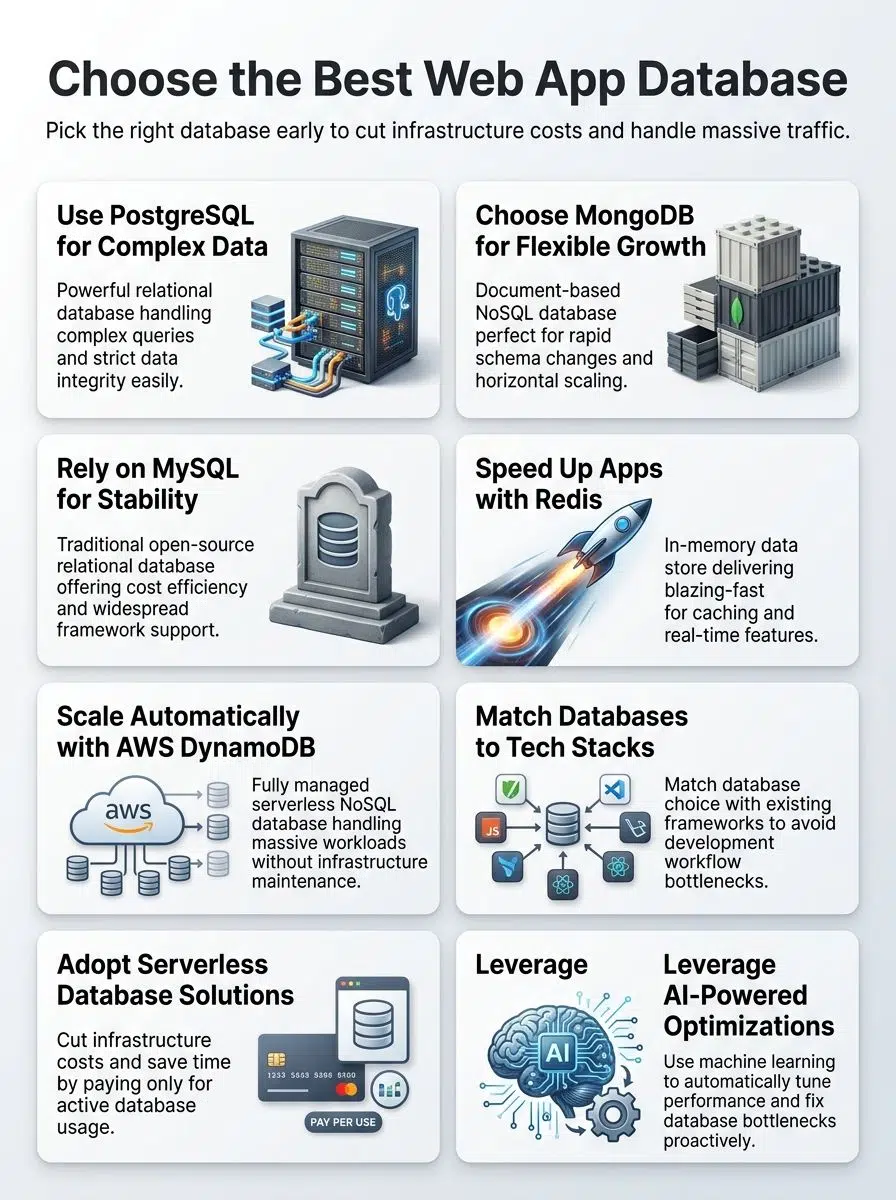
Assess Scalability and Performance
Scalability and performance form the backbone of any web application database. Your application needs to handle more users, more data, and more requests as it grows. A database that works great with 100 users might collapse under the weight of 100,000 users.
You must test how your database performs under heavy loads. Run stress tests to see where it breaks. Measure response times, throughput, and resource usage.
A 2025 industry report from Red9 found that 91 percent of US organizations estimate a single hour of database downtime costs over $300,000. That makes performance optimization a direct business priority, not just an IT task.
Here is how popular databases scale:
- PostgreSQL: Scales vertically by adding more CPU and RAM to a single server.
- MongoDB: Grows horizontally, spreading data across multiple servers.
- MySQL: Performs well for standard workloads but often requires manual sharding for massive datasets.
- Redis: Speeds up data retrieval dramatically as an in-memory caching layer.
- DynamoDB: Scales automatically on AWS without any manual intervention.
Your architecture choices determine whether your application thrives or struggles.
Consider Data Modeling and Structure
Data modeling shapes how your application stores and retrieves information. You need to pick the right structure for your specific needs. Relational databases organize data into tables with rows and columns.
NoSQL databases store data in flexible formats like documents or key-value pairs. Your choice affects how fast queries run and how much data you can handle. SQL databases work great for structured data with clear relationships.
A clear comparison helps make this choice easier:
- DynamoDB: Imposes a strict 400KB size limit per single item.
- MongoDB: Offers a generous 16MB limit for BSON documents.
If your application needs to store large, nested user profiles, MongoDB offers much more breathing room per record. The wrong structure creates bottlenecks later on, making performance optimization painful and expensive.
Your data modeling choice impacts backend development speed and long-term maintenance costs. Relational systems require you to define schemas upfront, which takes planning but prevents messy data.
Check Integration Compatibility with Modern Frameworks
Your data model shapes how your app works, but your database choice shapes how your app talks to the rest of your development stack. Modern frameworks like React, Vue, and Node.js expect databases that play nice with their architecture.
PostgreSQL works great with Node.js applications through libraries like Sequelize and TypeORM. MongoDB pairs seamlessly with JavaScript frameworks since both speak JSON natively.
A common insider tip from senior backend developers involves Object-Relational Mapping tools. While these tools make coding faster, they frequently generate hidden query loops if you do not configure your eager loading properly. This hidden issue secretly drains your database resources.
Integration compatibility matters because mismatched systems slow down your entire project. MySQL integrates well with PHP frameworks like Laravel, while DynamoDB fits perfectly into AWS tech stacks. Test how each database performs with your specific tech stack before committing.
Review Security and Compliance Capabilities
Security matters more than ever in web development. Your database holds sensitive customer data, payment information, and personal details that hackers want to steal.
PostgreSQL, MySQL, and MongoDB all offer encryption at rest and in transit. This protects information as it sits on servers and travels across networks. DynamoDB comes with AWS security features built in, including identity management and access controls.
Compliance requirements vary heavily by industry. If your web application handles US healthcare data, you must follow strict HIPAA rules. Financial institutions adhere to PCI DSS standards.
“The best database does not just store data fast, it proves to auditors that your data is locked down tighter than a bank vault.”
Redis provides data isolation options for sensitive workloads. MongoDB lets you set granular permissions so only approved users can access specific data.
The right databases for modern web applications balance speed with protection, giving you fast querying without sacrificing safety. Check what compliance certifications each database holds before making your choice.
PostgreSQL Overview
PostgreSQL stands as a powerful, open-source relational database that developers worldwide trust for handling complex data storage and performance demands in modern web applications.
Highlight PostgreSQL Features
This open-source relational database system offers amazing features that make it a top choice for web development. According to the 2025 Stack Overflow Developer Survey, PostgreSQL reached 55.6 percent adoption, making it the most used database globally.
PostgreSQL handles complex queries with speed and precision. It supports advanced data types like JSON, arrays, and custom data structures. Developers appreciate its ACID compliance, which guarantees transactions stay reliable and consistent.
The system scales well as your application grows, managing large workloads easily. Full-text search capabilities built right in let you search through massive amounts of data fast. Window functions and Common Table Expressions give developers tools to write cleaner code.
Recently, the pgvector extension transformed PostgreSQL into a premier tool for AI applications. It allows developers to store and query high-dimensional vector embeddings right alongside their standard relational data.
Discuss PostgreSQL Advantages and Challenges
Now that you understand what makes PostgreSQL tick, let us talk about what actually happens when you put it to work. Experienced database administrators know that while it is powerful, it requires active tuning.
A classic insider tip is to aggressively monitor your auto-vacuum settings. If you neglect vacuum maintenance, dead rows pile up, and your performance drops noticeably over time.
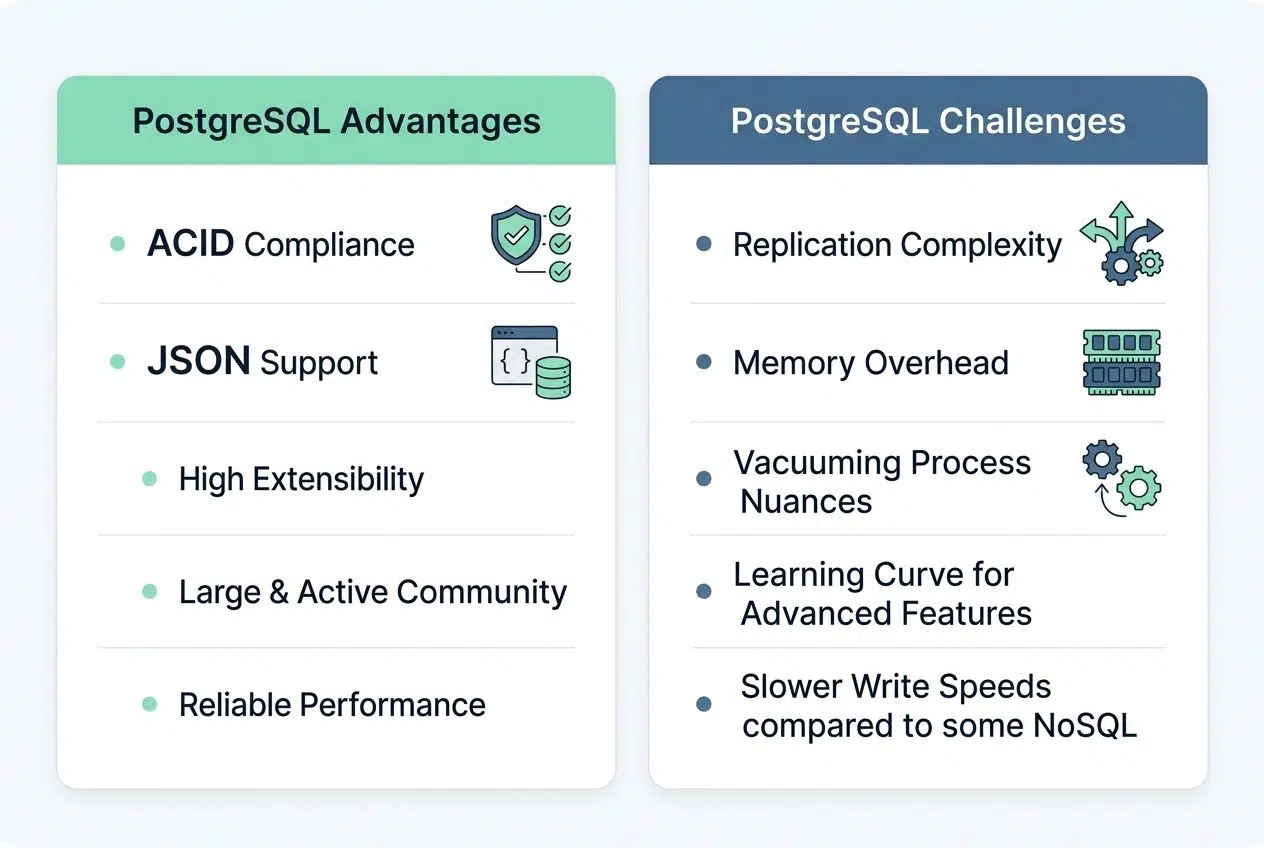
| PostgreSQL Advantages | PostgreSQL Challenges |
|---|---|
| ACID Compliance: Transactions execute reliably. Data integrity stays intact, even during failures. Your application will not wake up to corrupted records. Advanced Data Types: Arrays, JSON, and range types live here natively. You avoid the awkward workarounds other databases demand. Full-Text Search: Built-in capabilities handle complex searches without extra tools. Your queries run faster than bolting on external solutions. Extensibility: Create custom functions, operators, and data types. PostgreSQL bends to your application’s needs, not the reverse. Window Functions: Analytical queries become straightforward. Complex calculations that would punish other databases feel natural here. JSON Support: PostgreSQL treats JSON natively. You query and manipulate it with dedicated operators and functions. Open Source: No licensing fees. The community patches vulnerabilities fast. You control your own destiny. |
Replication Complexity: Setting up read replicas requires more legwork than MySQL. Configuration mistakes happen easily, and recovery takes patience. Memory Overhead: Each connection spawns a separate process. High-traffic applications with thousands of concurrent users face memory pressure quickly. Scaling Horizontally: Sharding demands manual intervention. PostgreSQL does not split data across servers automatically like some cloud databases. Vacuum Operations: Dead rows need periodic cleanup. Neglect maintenance, and performance degrades noticeably over time. Learning Curve: PostgreSQL’s power comes with a price. Advanced features perplex newcomers who expect simpler syntax. Write Performance: Concurrent writes can lock tables. Applications with heavy write loads sometimes find bottlenecks here. Operational Overhead: Monitoring and tuning require dedicated attention. You cannot set it and forget it like managed cloud services. |
MongoDB Essentials
MongoDB stores data in flexible, document-based formats that work great for applications needing rapid changes and growth. Stick around to learn why developers keep picking it.
Detail MongoDB Features
MongoDB stores data in flexible, document-based formats called BSON, which resembles JSON structures. This NoSQL approach lets developers work with data that does not fit rigid table layouts. Documents can hold nested information, arrays, and complex objects all in one place.
Developers love this structure for several reasons:
- You can change data structures without rewriting entire databases.
- The platform scales horizontally across multiple servers.
- It handles big data and real-time workloads effortlessly.
Querying in MongoDB feels natural for developers since it uses JavaScript syntax. The database supports transactions across multiple documents, giving you reliability similar to traditional SQL systems.
Replication keeps your data safe by copying it across several servers automatically. Sharding divides large datasets into smaller chunks spread across different machines, which speeds up data retrieval significantly.
The cloud-hosted version, MongoDB Atlas, has become a massive success. By early 2026, Atlas accounted for 71 percent of the company’s total revenue. It eliminates server management headaches, letting teams focus on building features.
Evaluate MongoDB Pros and Cons
Now that you understand the flexible document structure and horizontal scaling capabilities, let us examine what works well. We also need to look at what presents challenges when you deploy MongoDB in production environments.
A common pitfall is ignoring the strict 16MB limit on a single BSON document. If you infinitely push new items into an array within a single user document, your application will eventually crash when it hits that hard limit.
| MongoDB Advantages | MongoDB Disadvantages |
|---|---|
| Flexible Schema Design You skip rigid table definitions. Documents store data in whatever format makes sense for your application. This flexibility accelerates development cycles significantly. Horizontal Scalability Sharding distributes data across multiple servers automatically. Your application grows without hitting a single server’s limits. Performance stays consistent as your user base expands. Developer Experience JSON-like syntax matches how developers think about data structures. Query language feels natural. Integration with JavaScript frameworks happens seamlessly. Fast Prototyping No schema migrations required before adding new fields. Teams launch features quickly without database redesigns. Iteration cycles compress dramatically. Embedded Data Models Related information nests within documents. Single queries retrieve complete objects. Fewer database round-trips mean faster response times.
|
Memory Consumption MongoDB keeps more data in RAM than traditional databases. Storage requirements balloon for large datasets. Cost calculations shift when infrastructure needs spike. Transaction Limitations Multi-document transactions exist, but single-document transactions perform best. Complex operations spanning multiple documents require careful application logic. Data Duplication Denormalization creates redundancy. Updates across embedded documents become manual processes. Data consistency demands developer discipline. Query Performance Trade-offs Complex joins across collections perform slower than relational databases. Aggregation pipelines add complexity. Index management requires expertise. Operational Overhead Replica set management demands attention. Sharding configuration introduces operational complexity. Monitoring and tuning require specialized knowledge.
|
MySQL for Web Applications
MySQL powers countless web applications with rock-solid reliability, and developers keep coming back to it for good reason. Read on to see why this database still dominates the landscape.
Explain MySQL Features
Developers love MySQL because it works like a reliable workhorse for web applications. This relational database management system stores data in structured tables with rows and columns. It is perfect for organizing information with clear relationships.
SQL queries let you pull exactly what you need from your data storage, whether you are searching for user profiles or transaction records. MySQL handles transactions well, meaning multiple operations either complete fully or roll back together.
For modern deployments, nearly everyone uses the InnoDB storage engine. InnoDB provides crucial features like row-level locking and foreign key constraints that keep your data clean and consistent. Setting up MySQL takes minimal effort compared to other systems, which explains why so many web development projects start with it.
Your backend development team can integrate MySQL into nearly every modern framework, from Node.js to Python to PHP. While historically dominant, MySQL has seen a slight shift recently. In the 2025 Stack Overflow Developer Survey, it actually fell to fourth place in popularity, being overtaken by Redis and PostgreSQL.
Analyze MySQL Benefits and Limitations
MySQL has powered web applications for decades, yet it carries both significant strengths and real drawbacks that shape how teams build today.
| Benefits of MySQL | Limitations of MySQL |
|---|---|
| Widespread Adoption MySQL runs millions of websites globally. Teams find extensive documentation everywhere. Community support spans forums, tutorials, and Stack Overflow answers.
|
Scaling Challenges Vertical scaling works better than horizontal approaches. Sharding requires manual implementation. Large datasets create performance bottlenecks quickly.
|
| Cost Efficiency Open source means zero licensing fees. Installation costs remain minimal. Resource requirements stay relatively low compared to alternatives.
|
ACID Limitations Older storage engines lack full ACID compliance. InnoDB improved this, yet performance trade-offs exist. Complex transactions sometimes fail unexpectedly.
|
| Reliability and Stability MySQL has proven itself for 25+ years. Production crashes remain rare. Data corruption incidents occur infrequently with proper maintenance.
|
Limited JSON Support JSON handling exists, yet it feels secondary. Query performance on JSON fields lags behind native document databases. Complex nested data structures strain the system.
|
| LAMP Stack Integration MySQL pairs seamlessly with PHP, Apache, and Linux. WordPress, Drupal, and Magento depend on it. Hosting providers offer MySQL on nearly every plan.
|
Replication Complexity Master-slave setups require careful configuration. Lag between replicas causes consistency issues. Failover automation demands additional tools and expertise.
|
| Simple Query Language SQL remains intuitive for most developers. Learning curve stays gentle. Standard queries execute predictably across versions.
|
Schema Rigidity Altering tables locks them during modifications. Growing applications struggle with schema changes. Downtime occurs during large table alterations.
|
| Security Features User privilege systems offer granular control. Password authentication works reliably. Regular patches address vulnerabilities promptly.
|
NoSQL Trend Gap Modern applications increasingly favor flexible schemas. Microservices architectures prefer distributed databases. MySQL feels outdated for some specific use cases.
|
| Mature Tooling Ecosystem Backup solutions abound, from mysqldump to Percona. Monitoring tools integrate effortlessly. Management utilities range from command-line to GUI options.
|
Memory Consumption Issues Poorly tuned queries consume excessive RAM. Index management requires constant attention. Memory leaks occasionally plague certain older versions.
|
Redis in Modern Web Development
Redis powers real-time applications by storing data in memory, making it blazingly fast for caching, sessions, and live features. Read on to see how it transforms your web stack.

Describe Redis Features
In-memory data storage powers Redis, making it incredibly fast for real-time applications. This database holds data in RAM rather than on disk, which means your web application gets lightning-quick responses.
To put this speed into perspective, standard Redis cache hit latency is often measured in low microseconds. You will frequently see response times as low as 0.002 milliseconds, which makes disk-based databases look incredibly slow.
Redis supports multiple data types, including strings, lists, sets, hashes, and sorted sets. Caching becomes effortless, and session management runs smoothly without breaking a sweat. Pub/sub messaging capabilities let your application communicate across different parts in real-time.
The database also offers persistence options, so your data survives server restarts if you configure it that way. Expiration keys automatically delete data after a set time, which keeps your storage lean and efficient.
Consider Redis Strengths and Weaknesses
Redis shines when you need blazing-fast data storage and retrieval. This in-memory database delivers performance that leaves traditional databases in the dust. It is perfect for real-time applications, caching layers, and session management.
The trade-offs deserve your attention, primarily around infrastructure expenses:
- Costly RAM Requirements: Redis keeps all data in memory. In US cloud environments like AWS ElastiCache, high-RAM instances get expensive very quickly compared to standard disk storage.
- Limited Query Power: You lose the advanced querying power that relational databases offer, so complex searches become painful.
- Performance Penalties: Data persistence options exist, but they slow down performance compared to pure in-memory operation.
- No True ACID Guarantees: Redis does not provide the transaction support and ACID compliance that SQL databases guarantee.
For teams managing massive datasets, Redis works best as a complementary tool alongside your primary database rather than as a standalone solution.
DynamoDB Capabilities
AWS DynamoDB powers applications that need lightning-fast data access, automatic scaling, and serverless simplicity. Read on to discover why enterprises trust it for mission-critical workloads.
Outline DynamoDB Features
DynamoDB stands out as a fully managed NoSQL database service from AWS that handles massive workloads without missing a beat. This cloud database automatically scales up or down based on your traffic, so you pay only for what you use.
DynamoDB stores data in tables with items and attributes, making it flexible for various data modeling approaches. The service delivers single-digit millisecond performance, which means your web applications respond fast to user requests.
Pricing is highly transparent and usage-based. For example, in the US East region, on-demand pricing runs $1.25 per million write request units and $0.25 per million read request units.
Built-in replication spreads your data across multiple availability zones, protecting against failures. Real-time performance defines DynamoDB’s core strength in modern web development. The database handles transactions across multiple items, ensuring data consistency when operations matter most.
Weigh DynamoDB Advantages and Drawbacks
Amazon DynamoDB shines when you need a cloud database that scales automatically without manual work. Your application grows, and DynamoDB grows with it, handling millions of requests per second with ease. The service manages all the backend infrastructure.
But DynamoDB has real limitations worth considering before you launch:
- Restrictive Query Language: The query format forces developers to think differently about data modeling. Complex queries that take seconds in PostgreSQL become painful exercises here.
- Strict Item Limits: Every single item has a hard maximum size limit of 400KB. If you have larger files, you must store them in Amazon S3 and save the link in DynamoDB.
- Spiking Costs: Your data storage costs spike quickly with large datasets, and you will hit unexpected expenses if you ignore read access patterns.
- Vendor Lock-in: The learning curve is steep, and migrating away from DynamoDB later becomes a massive headache.
Choose this path only when you truly need serverless scalability and can live with its constraints.
Emerging Trends in Databases for Web Applications
Database technology moves fast, and new solutions keep changing how developers store and manage data for web apps.
Serverless database solutions
Serverless databases eliminate the need to manage servers, patches, or infrastructure headaches. You pay only for what you use, making costs predictable and flexible.
Amazon Aurora Serverless and Google Cloud Firestore lead this space, offering auto-scaling that handles traffic spikes. New competitors like Neon provide serverless PostgreSQL, giving developers familiar SQL tools with modern cloud elasticity.
These solutions scale down to zero when idle, so you stop paying instantly. Development teams love serverless options because they focus on code, not operations.
Your application grows without you wrestling with capacity planning or hardware decisions. Cloud databases in the serverless model shine for startups and small teams with limited budgets.
Multi-model databases for flexibility
Multi-model databases let developers work with different data types inside one system. You can store relational data, NoSQL documents, and graph information all together.
This flexibility cuts down the hassle of managing multiple database management systems. Teams save time and money by reducing the number of tools they need to maintain. PostgreSQL, for example, supports JSON data alongside traditional tables, giving developers real options for data modeling.
This approach works great for modern web applications that handle varied workloads and need scalability without constant architecture changes. Choosing a multi-model database means your backend development becomes simpler and faster.
Developers write less code because they do not have to move data between separate systems. Performance stays strong since everything lives in one place, reducing network delays and querying overhead.
AI-powered database optimizations
While multi-model databases give you flexibility, artificial intelligence takes performance to the next level. We are seeing incredible advancements in how databases handle AI-specific workloads.

“The integration of vector search directly into relational databases has completely changed the infrastructure game for AI developers in 2026.”
For example, a 2026 Timescale benchmark showed the pgvectorscale extension for PostgreSQL handling 50 million vectors at 471 queries per second with just 28 milliseconds of latency. This eliminates the need for standalone vector databases.
Machine learning algorithms also learn from your application’s habits and automatically tune indexes. This means your database gets smarter every single day without requiring manual intervention from your team. The system identifies bottlenecks before they slow down your users, adjusts resource allocation on the fly, and predicts future performance issues.
Closing Thoughts
Picking the right database shapes your entire web development journey. PostgreSQL excels for relational data, complex transactions, and AI vector search. MongoDB handles flexible, document-based storage beautifully.
MySQL remains a solid choice for traditional applications. Redis powers real-time performance through blazing-fast caching. DynamoDB scales automatically on AWS cloud platforms. Your project’s specific needs drive the decision, not trends or hype.
Scalability matters for growth. Data modeling determines your architecture’s foundation. Performance optimization keeps users happy. Security and compliance protect your business. Integration with modern frameworks saves development time. Test multiple options before committing to one solution.
Stay curious about emerging technologies. Experiment with new platforms in side projects. The best database for your team is the one that solves your specific problems efficiently. You need it to scale when you need it to. By thoughtfully evaluating The Best Modern Web Applications Databases, your developers will maintain the system confidently for years to come.
Frequently Asked Questions (FAQs) on Best Modern Web Applications Databases
1. What makes a database good for modern web applications?
A solid database handles lots of users, keeps data safe, and works fast. According to AWS, response times under 100 milliseconds are essential for keeping visitors engaged. You want something that scales as your app grows, like picking the right shoes for a long hike.
2. Which types of databases are best for web apps today?
Relational systems like PostgreSQL or SQL Server work well when you need structure and clear rules. If your data changes shape often, document stores such as MongoDB fit better. Many teams mix both to get the best results.
3. How do I choose between cloud-based and on-premise databases?
Cloud options like Amazon RDS let you skip hardware headaches and handle updates automatically. On-premise gives you control, but means more work setting things up yourself. Think of it like renting an apartment versus building your own house.
4. Can these databases help my site load faster?
Yes! The right setup can speed up searches and keep visitors happy by reducing wait times. Indexing helps find info quickly while caching stores answers close at hand, like keeping snacks in your desk drawer instead of running to the kitchen every time.























