Look, if you make digital content today, you probably know the exact pain of “subscription fatigue.” You pay a monthly fee for an AI writer, another for an image generator, a third for a video editor, and a fourth just to get decent voiceovers. Then, you spend half your workday copying and pasting assets between a dozen browser tabs just to finish one marketing campaign. It is wildly expensive and completely exhausting.
That is exactly why the software market is finally shifting. We are seeing a massive, overdue rise in unified AI tools for content creation. These platforms bring text, image, video, audio, and infographic generation into a single, clean workspace. You log in once, pay one bill, and generate everything in one place.
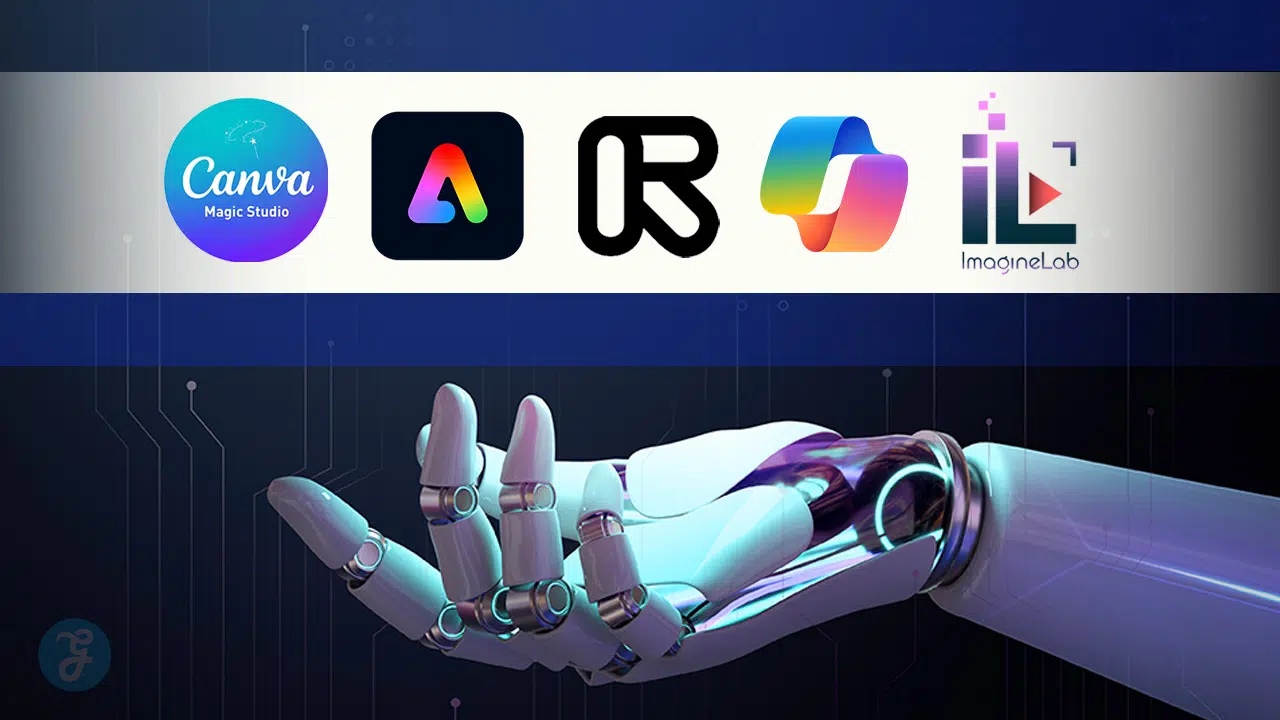
I have tested the biggest platforms on the market to see which ones actually deliver on the “all-in-one” promise without crashing your browser or draining your wallet. Here is the ultimate breakdown of the top 10 platforms that will completely overhaul how you build multimedia content.
1. Canva (Magic Studio)
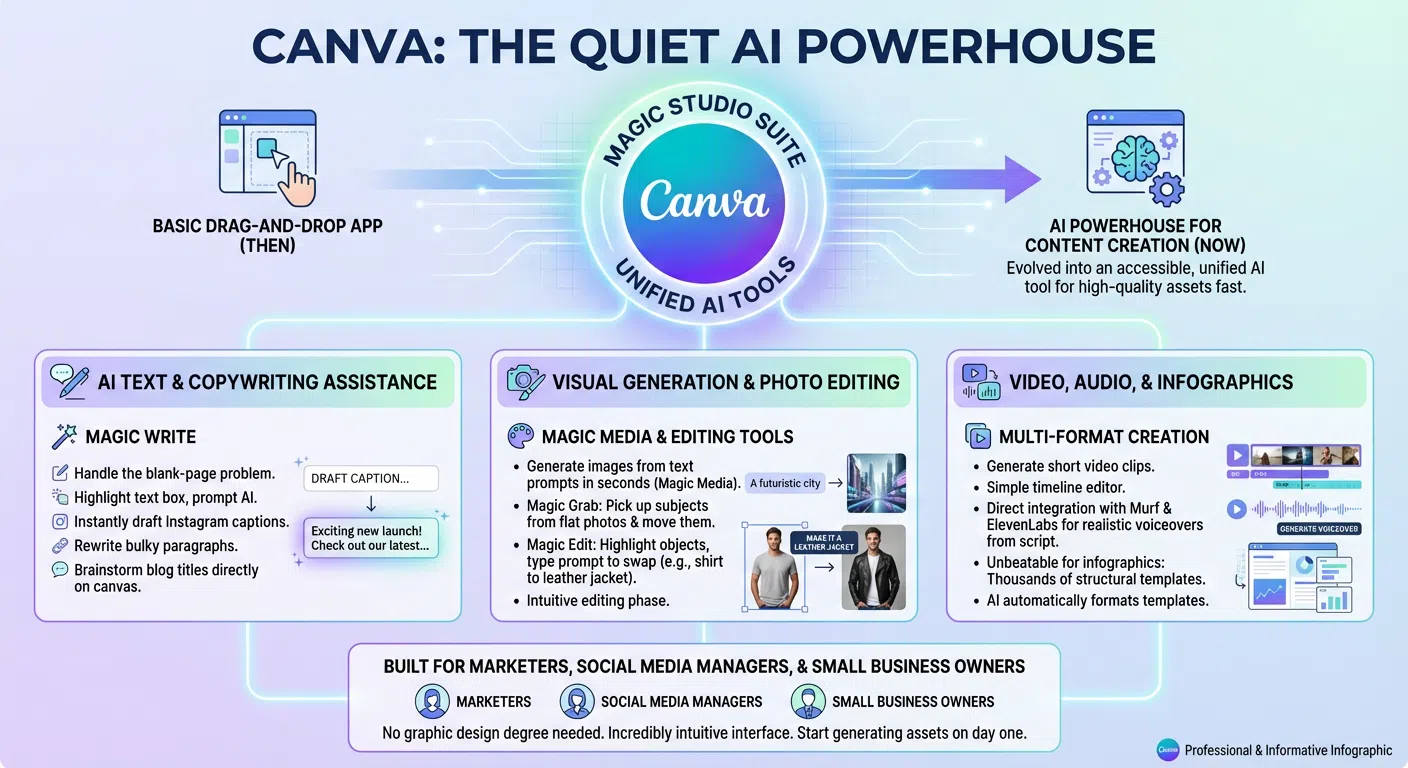
Canva started as a basic drag-and-drop design app, but it has quietly grown into an absolute powerhouse of artificial intelligence. By integrating their Magic Studio suite, they turned a simple canvas into one of the most accessible unified AI tools for content creation available right now. It is built specifically for marketers, social media managers, and small business owners who need high-quality assets fast, without needing a degree in graphic design. The interface remains incredibly intuitive, meaning you can jump right in and start generating assets on day one.
AI Text and Copywriting Assistance
Canva uses a tool called Magic Write to handle the blank-page problem. You can highlight a text box on your design, prompt the AI, and have it instantly draft an Instagram caption, rewrite a bulky paragraph, or brainstorm a list of blog titles directly on the canvas.
Visual Generation and Photo Editing
For visuals, the Magic Media engine generates images from text prompts in seconds. But the real magic happens in the editing phase. Tools like Magic Grab let you pick up a subject from a flat photo and move it around, while Magic Edit lets you highlight a shirt and type “make it a leather jacket” to instantly swap the clothing.
Video, Audio, and Infographics
Canva allows you to generate short video clips and drop them onto a simple timeline editor. For audio, they integrate directly with third-party apps like Murf and ElevenLabs, meaning you can type a script and generate a realistic voiceover without ever leaving the Canva window. When it comes to infographics, Canva is arguably unbeatable, offering thousands of structural templates that the AI can automatically format for you.
|
Feature Area |
Key Details | Best Use Case |
|---|---|---|
| Target Audience | Social media managers, educators, small brands | Fast, high-volume social content |
| Pricing Model | Generous free tier; Canva Pro is highly affordable | Small teams needing shared folders |
| Standout Feature | Magic Switch (resize a design for 5 platforms instantly) | Turning a presentation into a blog |
| Weakness | Advanced timeline video editing is clunky | Long-form cinematic video production |
2. Adobe Express
Adobe Express brings the heavy-hitting power of Adobe’s professional software into a simple, single-pane web browser. It is built entirely around Adobe Firefly, their proprietary AI model trained exclusively on licensed content, which makes it incredibly safe for commercial use. This platform targets brands and creators who want professional-tier results without spending months learning complex software like Premiere Pro or Photoshop. If you already use other Adobe products, this connects perfectly with your existing Creative Cloud libraries.
Safe Commercial Image Generation
Because Firefly powers the image generation, you do not have to worry about copyright strikes or messy legal issues when running ads. The Generative Fill feature is ported directly from Photoshop, letting you insert, remove, or replace objects in your photos with terrifying accuracy just by typing a few words.
Video Production and Social Management
The platform includes a robust drag-and-drop video editor packed with AI-powered quick actions. You can remove backgrounds from video clips instantly or auto-caption your reels. Once your multimedia project is done, Adobe Express has a built-in content scheduler to post your work directly to TikTok, Instagram, or LinkedIn.
Audio and Animation Capabilities
One of the coolest features is “Animate from Audio.” You can record a voiceover directly into your browser—or upload an AI-generated audio file—and the software will automatically lip-sync your audio to an animated character or graphic.
|
Feature Area |
Key Details | Best Use Case |
|---|---|---|
| Target Audience | Brand designers and commercial agencies | Commercial-safe advertising assets |
| Pricing Model | Premium included in Creative Cloud subscriptions | Existing Adobe ecosystem users |
| Standout Feature | Generative Fill and Firefly 3 Image Generation | Flawless object removal and replacement |
| Weakness | Standalone premium subscription can feel pricey | Audio tools rely mostly on Adobe Podcast |
3. Higgsfield AI Video Generator
For those who prioritize social-first video storytelling and cinematic visuals, Higgsfield AI Video Generator has emerged as one of the most captivating AI video platforms available. Unlike many AI resources that stick to templates or simple animated graphics, Higgsfield prioritizes motion, camera movement and making videos look modern and intriguing.
The platform is designed primarily for creators, marketers, ecommerce brands and agencies who create short-forms for platforms such as TikTok, Instagram Reels, YouTube Shorts and paid ads. The interface remains simple and user-friendly, allowing users to begin creating videos in no time with no requirement for expert video editing expertise.
Cinematic AI Video Generation
The brilliance of Higgsfield lies in its film-like style of creating AI videos. This platform creates flatter looking clips, but with the option of adding in some camera moves, transitions, depth and motion effects to make the video look more polished.
Users can type in a basic text description of the desired scene or visual style, and the AI video generator will automatically render it. The platform always generated powerful visuals and required minimal tweaks to prompt.
The motion quality feels especially optimized for social media marketing. Product promos, fashion campaigns, lifestyle videos, creator-style ads and high-energy reels all looked noticeably better compared to many competing AI generators.
Fast Workflow for Short-Form Content
Another reason creators are moving toward Higgsfield AI Video Generator is speed. The workflow is straightforward:
- Enter a prompt
- Choose the visual style
- Generate the video
There are no overwhelming editing panels or complicated timelines slowing things down. Even users with no editing background can create social-ready videos within minutes.
The platform works especially well for brands and agencies that need large volumes of content quickly without sacrificing visual quality.
Feature Area
| Key Details | Best Use Case |
| Target Audience | Creators, marketers, ecommerce brands, agencies |
| Pricing Model | Free plan available with premium upgrades |
| Standout Feature | Cinematic camera movement and AI motion effects |
| Best For | Reels, short-form ads, social media campaigns |
| Weakness | Limited advanced timeline editing and post-production tools |
Visit Link – Ai video Generator
4. Runway (RunwayML)
Runway is famous for pushing the absolute boundaries of AI video generation, but most people do not realize it is a complete creative suite. While the world knows it for cinematic tools like Gen-2 and Gen-3 Alpha, its dashboard actually holds over 30 different “AI Magic Tools.” It is built strictly for filmmakers, VFX artists, and high-end creators who need raw, cinematic quality over cute social media templates. The interface feels more like a professional editing bay than a simple web app.
Industry-Leading Video Generation
Runway’s text-to-video and image-to-video tools are currently industry standard. You can upload a static image, use the “Motion Brush” to highlight a river, and tell the AI to make only the water flow. You then edit these generated clips directly on their web-based timeline.
Complete Multimedia Processing
Beyond video, Runway offers infinite image expansion, allowing you to upload a square photo and have the AI paint the missing background to make it widescreen. It also features an AI text generator specifically tuned for scriptwriting and prompting.
Audio and Subtitle Tools
Runway handles audio exceptionally well. It includes text-to-speech generation for quick voiceovers, automatic subtitle creation, and a suite of clean-audio tools that remove background noise from your uploaded clips in a single click.
|
Feature Area |
Key Details | Best Use Case |
|---|---|---|
| Target Audience | Filmmakers, VFX artists, YouTube creators | High-end cinematic b-roll and VFX |
| Pricing Model | Tiered monthly subscription with a credit system | Short-form cinematic storytelling |
| Standout Feature | Gen-3 Alpha Video and precise camera controls | Directing AI video like a real camera |
| Weakness | Burns through generation credits extremely fast | Not designed for graphic design or print |
5. Microsoft Workspace (Copilot + Designer)
Microsoft took a different approach by bundling its AI tools into a single subscription rather than forcing everything into one canvas. This ecosystem acts as one of the best unified AI tools for content creation if you already spend your day in Office apps. By integrating OpenAI’s top-tier models directly into their ecosystem, Microsoft built a suite where your text app, your image app, and your video app all talk to each other securely. It is the perfect setup for corporate professionals and educators.
AI Text and Image Generation
Microsoft Copilot handles all your text generation. It can summarize long documents, draft blog posts, or write video scripts using your company’s data as context. For visuals, Microsoft Designer leverages DALL-E 3 to generate high-quality images and instantly drops them into structured, well-designed layouts based on your prompts.
Clipchamp Video Hub
Microsoft acquired Clipchamp and aggressively loaded it with AI features. It serves as your primary video hub, offering a very clean timeline editor. You can drop in your AI-generated images, add natural-sounding AI voiceovers from Microsoft’s text-to-speech engine, and generate auto-captions in seconds.
Infographics and Presentations
Design and PowerPoint work hand-in-hand here. You can ask Copilot to generate a massive, structured presentation complete with AI-generated infographic slides, charts, and speaker notes with a single text prompt.
|
Feature Area |
Key Details | Best Use Case |
|---|---|---|
| Target Audience | Office workers, enterprise teams, educators | Corporate presentations and internal videos |
| Pricing Model | Integrated into Microsoft 365 subscriptions | Teams already using Windows and Office |
| Standout Feature | DALL-E 3 Integration within Designer | Instant layout generation from prompts |
| Weakness | Tools are slightly fragmented across different apps | Lacks advanced photo manipulation |
6. ImagineLab.art
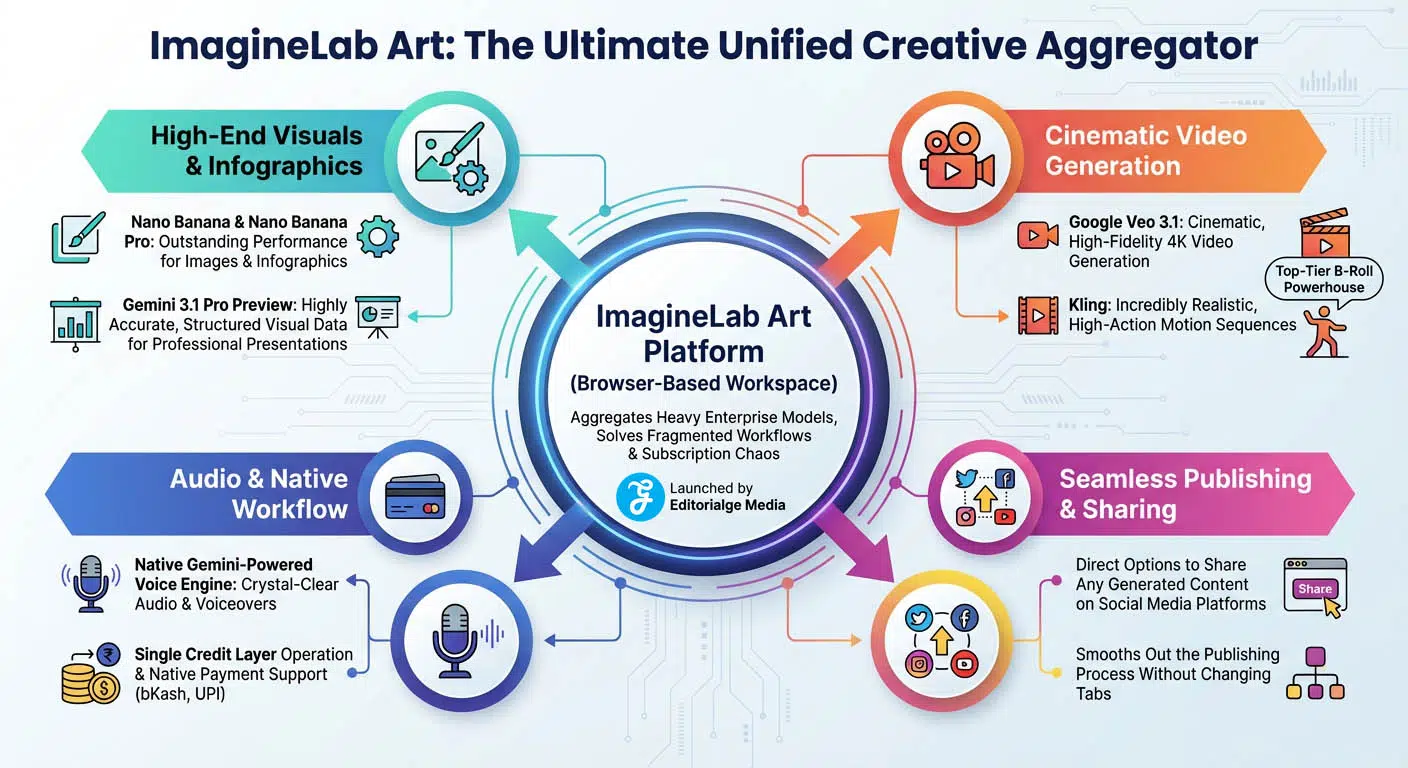
ImagineLab Art is a wildly powerful, newly launched platform built specifically to solve the problem of fragmented workflows and subscriptions chaos. Instead of relying purely on its own proprietary tech, it acts as an aggregator, pulling the heaviest enterprise models—from Google, Black Forest Labs, and others—into one single browser-based workspace. Launched by Editorialge Media, it allows you to create, edit, and export everything without ever changing tabs. Plus, there are direct options to share any kind of generated things on social media platforms directly without hesitation, smoothing out the publishing process.
High-End Visuals and Infographics
For images and graphics, the platform pulls no punches. You get access to models like Nano Banana and Nano Banana Pro for generating images and infographics with outstanding performance. It also offers Gemini 3.1 Pro Preview, which is incredible for generating highly accurate, informative images and structured visual data perfectly suited for professional presentations.
Cinematic Video Generation
ImagineLab.art handles motion brilliantly. The platform features Google’s Veo 3.1 for cinematic, high-fidelity 4K video generation, alongside Kling for producing incredibly realistic, high-action motion sequences. This makes it an absolute powerhouse for creators needing top-tier b-roll.
Audio and Native Workflow
The platform features a native, Gemini-powered voice engine for generating crystal-clear audio and voiceovers. Everything operates on a single credit layer, and they even offer native payment support for local gateways like bKash and UPI, making these premium tools highly accessible.
|
Feature Area |
Key Details | Best Use Case |
|---|---|---|
| Target Audience | Independent creators, agencies, global students | Accessing multiple premium AI models at once |
| Pricing Model | Replaces multiple subscriptions via one credit system | Consolidating heavy API costs into one bill |
| Standout Feature | Veo 3.1 Video, Nano Banana Pro, Gemini 3.1 Pro | Generating hyper-realistic multimedia assets |
| Weakness | UI is still evolving following its recent launch | Might feel overwhelming for casual users |
7. Simplified
Simplified was built from the ground up to be the ultimate app for modern marketing teams. It acts as a direct competitor to Canva but puts a much heavier emphasis on AI writing and end-to-end social media management. It is ideal for teams who need to brainstorm a campaign, design the graphics, edit the promo video, and hit “publish” on Twitter and LinkedIn without ever leaving the website. The workspace is highly collaborative, allowing multiple people to edit the same project simultaneously.
Long-Form AI Writer
Simplified features a deeply robust AI writer that goes far beyond simple captions. It can handle long-form blog posts, Amazon product descriptions, and YouTube video scripts natively within the app, keeping your tone of voice consistent across the board.
Video, Audio, and Graphic Design
You get a full graphic design suite equipped with background removers, magic erasers, and a vast library of infographic templates. The video editor is surprisingly capable, handling timeline cuts, text-to-speech voiceovers with varied accents, and automatic subtitle generation perfectly.
Built-in Publishing
The biggest draw is the social media calendar. Once your AI-generated image or video is done, you drag it onto a calendar inside the app, and Simplified handles the actual posting to your social channels.
|
Feature Area |
Key Details | Best Use Case |
|---|---|---|
| Target Audience | Social media agencies and busy bloggers | End-to-end workflow from design to publish |
| Pricing Model | Generous free tier with scalable team plans | Collaborative remote marketing teams |
| Standout Feature | AI Writer paired with the Publishing Calendar | Managing multiple brand accounts |
| Weakness | Video generation is not as advanced as Runway | The UI can feel cluttered with too many options |
8. Visme
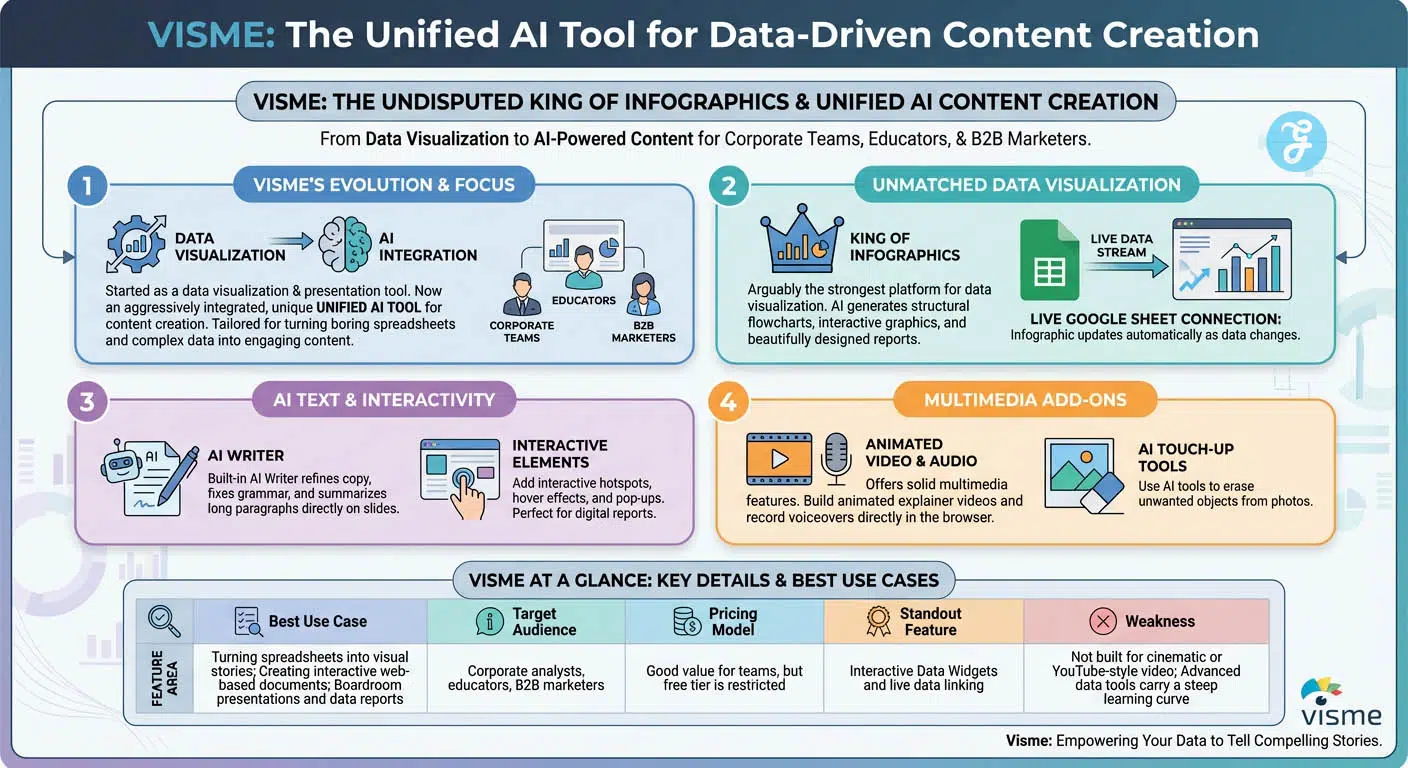
Visme started its life as a data visualization and presentation tool. Recently, it aggressively integrated artificial intelligence to become one of the most unique unified AI tools for content creation available today. If your day job involves turning boring spreadsheets or complex data into engaging content, this is the tool for you. It is tailored heavily for corporate teams, educators, and B2B marketers. No other tool handles charts, graphs, and structured data quite like Visme.
The Undisputed King of Infographics
Visme is arguably the strongest platform on the market for data visualization. Its AI helps generate structural flowcharts, interactive graphics, and beautifully designed reports. You can even connect it live to a Google Sheet, and the infographic will update itself when the data changes.
AI Text and Interactivity
The built-in AI Writer helps refine your copy, fix grammar, and summarize long paragraphs directly on your presentation slides. You can also add interactive hotspots, hover effects, and pop-ups to your designs, making them perfect for digital reports.
Multimedia Add-ons
While heavily focused on data, Visme still offers solid multimedia features. You can build animated explainer videos, use AI touch-up tools to erase unwanted objects from your photos, and record voiceovers directly in the browser to narrate your slides.
|
Feature Area |
Key Details | Best Use Case |
|---|---|---|
| Target Audience | Corporate analysts, educators, B2B marketers | Boardroom presentations and data reports |
| Pricing Model | Good value for teams, but free tier is restricted | Creating interactive web-based documents |
| Standout Feature | Interactive Data Widgets and live data linking | Turning spreadsheets into visual stories |
| Weakness | Not built for cinematic or YouTube-style video | Advanced data tools carry a steep learning curve |
9. Kapwing
Kapwing began as a simple, collaborative meme maker, but its aggressive push into AI has transformed it into a powerhouse workspace. It is built strictly with modern video creators in mind—think YouTubers, TikTokers, and podcast editors. The entire platform runs in the cloud, meaning you do not need an expensive gaming laptop to edit 4K video. It is incredibly fast and responsive and strips away all the intimidating dials found in traditional video software.
Smart, Transcript-Based Video Editing
Kapwing excels at video workflow. It uses a transcript-based editor; the AI transcribes your video, and you edit the footage simply by deleting words in the text document. It also features an incredible “auto-silence removal” tool that cuts out dead air and “umms” in one click.
Subtitles and Translation
It is famous for having some of the most accurate, highly customizable auto-subtitles on the internet. You can translate those subtitles into dozens of languages instantly, making your content globally accessible.
Visuals and Voiceovers
The platform features AI image generation for creating quick b-roll and an AI background removal tool that works on both photos and videos. Its text-to-speech generator is highly realistic and drops right onto your editing timeline, allowing you to narrate faceless videos easily.
|
Feature Area |
Key Details | Best Use Case |
|---|---|---|
| Target Audience | YouTube, TikTok creators, and podcasters | Fast-paced, short-form vertical video |
| Pricing Model | Highly affordable for solo creators | Editing podcasts and talking-head content |
| Standout Feature | Transcript-based editing and auto-subtitles | Cutting rough drafts in record time |
| Weakness | Weak on traditional print or graphic design | Free tier watermarks your exports heavily |
10. Picsart
Picsart transitioned from a wildly popular mobile photo editor into a serious, browser-based AI creation suite. It is fast, aggressively trendy, and perfect for creators who need punchy, highly stylized visuals. It shares a lot of DNA with Adobe Express but often feels a bit more playful and heavily geared toward Gen Z creators and e-commerce brands. The best part is that the mobile app syncs perfectly with the web version, so you can start a project on your phone and finish it on your laptop.
Advanced Photo Manipulation
Picsart offers incredible AI image generation and expansion. The AI replace and remove tools work flawlessly, allowing you to swap out backgrounds on product photos in seconds. It also features a massive library of design templates for quick graphic creation.
Batch Editing and Avatars
For e-commerce, you can batch-edit dozens of product photos at once using AI to uniform the lighting and background. They also offer AI avatar generation, turning selfies into stylized professional or artistic portraits.
Growing Multimedia Capabilities
They recently added an AI video generator and an AI GIF maker to keep up with the demand for motion. You also get a handy AI Writer for generating quick marketing slogans, product descriptions, and social media captions.
|
Feature Area |
Key Details | Best Use Case |
|---|---|---|
| Target Audience | E-commerce brands, Gen Z creators, influencers | Trendy social posts and fast photo edits |
| Pricing Model | Very cheap premium tier compared to rivals | Mobile-first content creation workflows |
| Standout Feature | AI Image Replace and smart background removal | Creating clean product photography catalogs |
| Weakness | Audio and timeline video editing are very basic | The free mobile version is heavily ad-supported |
11. VEED.IO
Similar to Kapwing, VEED started as a browser-based video tool but has aggressively expanded into a full-scale AI content suite. Today, it stands as one of the most effective unified AI tools for content creation if you specialize in talking-head videos, corporate training, or digital courses. It entirely removes the complicated timelines of traditional editing software and makes video creation as straightforward as typing a Word document.
AI Avatars and Voice Cloning
VEED offers incredibly lifelike AI avatars. If you are camera shy, you simply type a script, and a digital human reads it perfectly with natural hand gestures. It also features top-tier voice cloning technology; you record a short sample of your voice, and the AI can narrate future videos sounding exactly like you.
Eye Contact Correction and Dubbing
One of their most mind-blowing features is AI eye contact correction. If you were reading a script off-camera, the AI adjusts your pupils so you appear to be looking directly into the lens. They also offer AI voice dubbing, translating your spoken video into a different language while keeping your original voice tone.
Complete Video Generation
You get an AI script generator to help plan your content, built-in image generation to create custom b-roll on the fly, and handy tools that turn static data into animated video infographics for presentations.
|
Feature Area |
Key Details | Best Use Case |
|---|---|---|
| Target Audience | Course creators, corporate trainers, YouTubers | Talking-head videos and training materials |
| Pricing Model | Premium features require higher subscription tiers | Creating faceless YouTube channels |
| Standout Feature | AI Avatars, Voice Cloning, and Eye Contact Fix | Scaling video production without a camera |
| Weakness | Not useful for static graphic or print design | Heavy files can lag on older web browsers |
Canva vs. Microsoft AI: Which Ecosystem is Right for You?
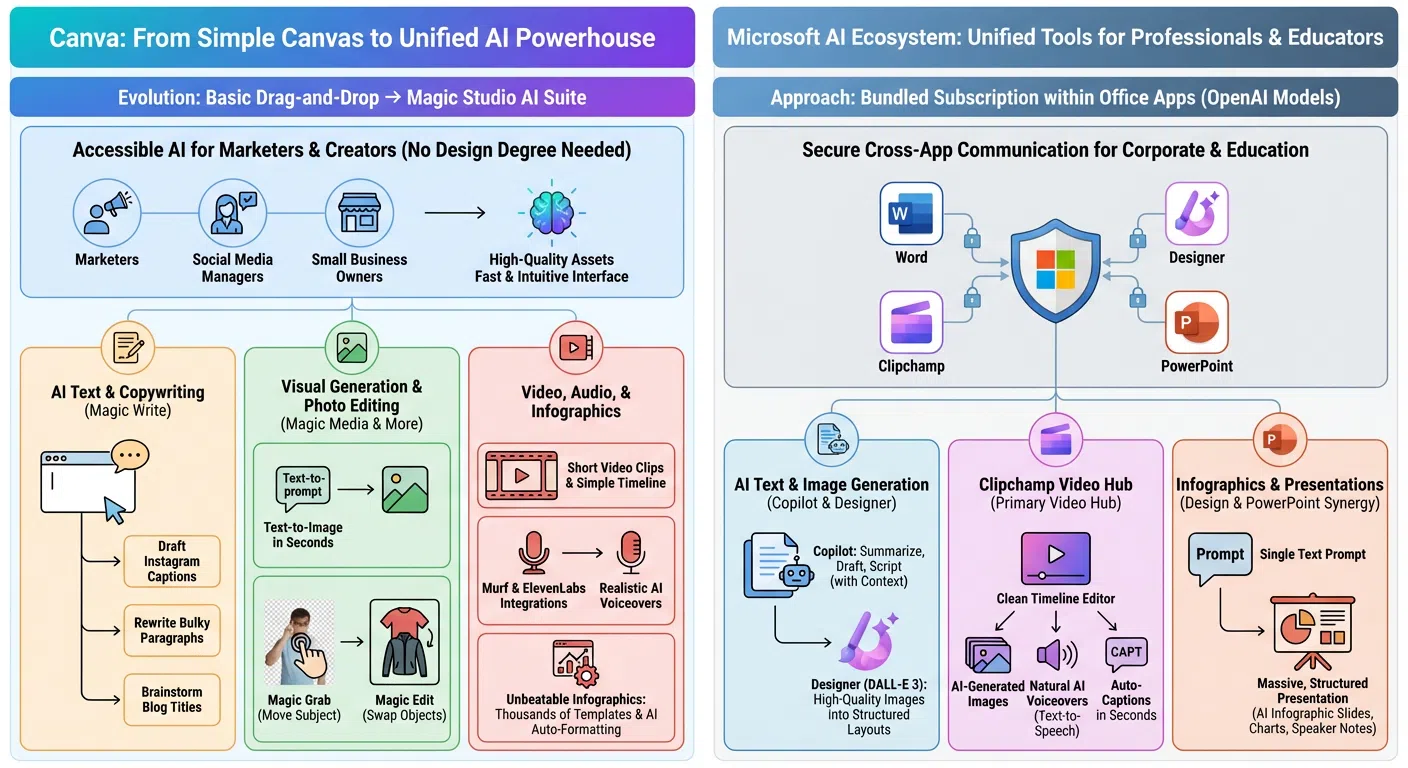
Looking at the infographic, it’s clear that both Canva and Microsoft have built incredibly powerful AI suites, but they take fundamentally different approaches to how you create content. Canva has evolved its simple canvas into an all-in-one AI powerhouse, while Microsoft has woven OpenAI’s models directly into the Office apps people already use.
Here is a breakdown of how they compare across key areas:
1. The Overall Approach and Target Audience
- Canva is built for speed and accessibility. It’s tailored specifically for marketers, social media managers, and small business owners who need high-quality assets fast but don’t have a graphic design degree. Everything happens in one intuitive interface.
- Microsoft is built for the corporate and education sectors. Instead of a single canvas, it offers a bundled subscription where familiar apps (Word, PowerPoint, Clipchamp, Designer) communicate with each other securely. It’s an ecosystem designed for professionals who already spend their day in Office.
2. Text and Image Generation
- Canva relies on its “Magic” tools. **Magic Write** is perfect for quick, punchy copy—like drafting Instagram captions, brainstorming blog titles, or rewriting paragraphs. For visuals, it offers fast text-to-image generation, but its real strength lies in photo editing. Tools like **Magic Grab** let you move subjects around, and **Magic Edit** lets you easily swap out objects in a photo.
- Microsoft leans on **Copilot** and **Designer**. Copilot is positioned as a heavier-lifting text tool, able to summarize documents and draft scripts using your existing context. For visuals, Microsoft Designer utilizes the powerful **DALL-E 3** engine to generate high-quality images and automatically drops them into structured, well-designed layouts.
3. Video and Audio Capabilities
- Canva keeps video editing straightforward with a simple timeline for short clips. For audio, it relies on powerful third-party integrations, partnering with tools like Murf and ElevenLabs to provide realistic AI voiceovers.
- Microsoft takes video a step further by using **Clipchamp** as a dedicated primary video hub. It offers a clean timeline editor but keeps everything in-house, featuring its own natural text-to-speech AI voiceovers and the ability to generate auto-captions in seconds.
4. Infographics and Presentations
- Canva positions itself as “unbeatable” for infographics. It focuses on sheer volume and ease of use, offering thousands of templates that the AI can automatically format for you.
- Microsoft focuses heavily on presentation synergy. By combining Designer and PowerPoint, you can type a single text prompt and the AI will generate a massive, fully structured presentation—complete with infographic slides, charts, and even the speaker notes.
ImagineLab Art vs. Canva: Which AI Platform Fits Your Workflow?
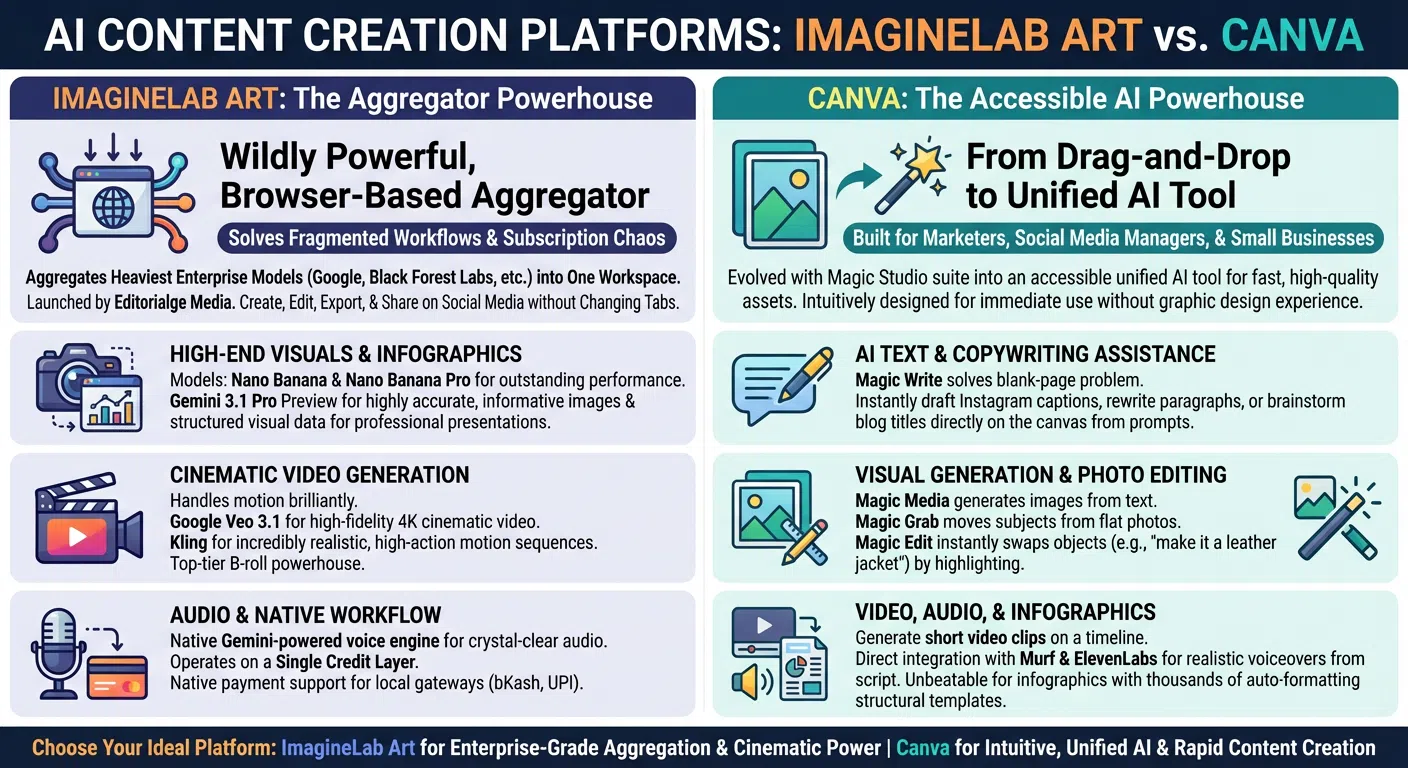
Looking at the infographic, it’s clear that ImagineLab Art and Canva are both powerful AI content creation platforms, but they are built with entirely different philosophies in mind. Canva focuses on making everyday design incredibly easy, while ImagineLab Art focuses on bringing heavy-duty, enterprise-level AI models into one place.
Here is a breakdown of how they compare across key categories:
1. The Core Approach and Target Audience
- Canva is known as “The Accessible AI Powerhouse.” It evolved from a simple drag-and-drop tool into a unified AI workspace built specifically for marketers, social media managers, and small businesses. Its primary goal is speed and intuition—allowing users with zero graphic design experience to generate high-quality assets rapidly.
- ImagineLab Art takes the approach of an “Aggregator Powerhouse.” Instead of building simple tools, it solves the problem of “subscription chaos” and fragmented workflows by pulling the heaviest enterprise AI models (like Google and Black Forest Labs) into a single, browser-based workspace. It allows you to create, edit, export, and share without ever changing tabs.
2. Visual Generation and Photo Editing
- Canva excels at practical photo manipulation. While it has “Magic Media” to generate images from text, its real strength is in its editing tools. Features like “Magic Grab” let you pick up subjects from flat photos, and “Magic Edit” lets you highlight an object and swap it out instantly (like typing “make it a leather jacket”).
- ImagineLab Art focuses on high-end, structured visual generation. It relies on advanced models like Nano Banana and Nano Banana Pro for outstanding visual performance. It also utilizes Gemini 3.1 Pro Preview specifically for generating highly accurate, informative images and structured visual data meant for professional presentations.
3. Video and Audio Capabilities
- Canva keeps video production simple. It allows users to generate short video clips and arrange them on a basic timeline. For audio, Canva relies on direct integrations with third-party apps like Murf and ElevenLabs to generate realistic voiceovers from scripts.
- ImagineLab Art leans heavily into high-end production. It is built for “Cinematic Video Generation,” handling motion brilliantly by using Google Veo 3.1 for high-fidelity 4K cinematic video, and Kling for realistic, high-action sequences (making it a top-tier B-roll tool). Furthermore, instead of using third-party apps for sound, it features a *native* Gemini-powered voice engine for crystal-clear audio.
4. Copywriting, Infographics, and Workflow
- Canva is highly focused on helping with everyday text and layouts. Its “Magic Write” tool solves the blank-page problem by instantly drafting Instagram captions or brainstorming blog titles directly on the canvas. When it comes to infographics, Canva is described as “unbeatable,” offering thousands of structural templates that auto-format.
- ImagineLab Art focuses its workflow on ease of access to premium tools. It operates on a unique “Single Credit Layer,” meaning you don’t have to juggle different currencies or subscriptions for different AI models. It also specifically caters to diverse users with native payment support for local gateways like bKash and UPI.
Final Thoughts
You no longer need to pay for five different software subscriptions just to put out a single YouTube video or launch a digital marketing campaign. The software market has finally caught up to how modern creators actually work, bringing the entire production studio right into your web browser.
Whether you need the heavy data visualization power of Visme, the cinematic video capabilities of Runway, or the premium, all-in-one model aggregation of ImagineLab.art, there is a unified workspace out there built for your exact needs. Finding the best unified AI tools for content creation simply comes down to knowing what format you produce most often. Pick the platform that excels at your primary workflow, cancel your redundant monthly subscriptions, and enjoy a much faster, significantly less stressful creative process.
Frequently Asked Questions (FAQs)
Why are unified AI tools for content workflow useful?
These tools are useful because they reduce the need to switch between many apps. They help teams save time, improve coordination, and keep content more consistent. They also make it easier to plan, create, review, and publish content from one shared system.
Which teams benefit most from unified AI tools for content workflow?
These tools are useful for many types of teams. They work well for content marketers, social media teams, SEO teams, agencies, startups, educators, and in-house marketing departments. They are especially helpful for teams that produce content in different formats on a regular basis.
Can unified AI tools for content workflow help with SEO?
Yes, many of these tools can support SEO work. They can help with topic planning, content briefs, structure, readability, repurposing, and editorial workflow. While they do not replace SEO strategy, they can make it easier to produce organized and helpful content.
Are unified AI tools better than using separate tools?
That depends on your workflow. Unified tools are often better for speed, teamwork, and simplicity because they bring many functions into one place. Separate tools may still be useful for teams with very advanced needs in one area, such as high-end video editing or deep SEO analysis.
Do unified AI tools for content workflow replace human writers and editors?
No, they do not replace people. These tools can speed up tasks and support the workflow, but human review is still needed for fact-checking, editing, creativity, strategy, and brand judgment. The best results usually come from combining AI support with human oversight.
What features should I look for in unified AI tools for content workflow?
Look for features that match your needs. Common features include AI writing, image generation, video tools, audio support, workflow automation, team collaboration, templates, brand controls, and publishing support. A good tool should solve your biggest workflow problem first.
What is the best unified AI tool for content workflow?
There is no single best tool for everyone. Canva is strong for visual content. Narrato is useful for editorial workflow. Jasper is good for brand-led marketing. Descript works well for audio and video. ClickUp and Notion are helpful for planning and collaboration. The best choice depends on your team’s goals and content process.