Are you tired of losing customer details in a sea of messy spreadsheets? For growing companies, keeping track of every conversation can quickly become overwhelming. Without the right system in place, managing customer relationships often turns into a major challenge.
A recent 2025 IBM report found that an effective system can deliver up to a 245% return on investment—an impressive advantage for any business focused on growth.
This guide compares the best CRM tools for growing businesses side by side, highlighting what each solution does best.
What Is CRM Software?

Customer Relationship Management (CRM) software acts like a highly organized digital brain for your company. It helps your team remember every customer name, previous order, and special request.
Instead of digging through old emails, your staff can use this system to track sales leads and set helpful reminders. Everything stays in one clear dashboard.
“In 2026, Forrester reported that 50% of business teams see an immediate boost in productivity simply by switching to a mobile-friendly CRM.”
Modern sales tools often include smart artificial intelligence features. These AI additions can flag VIP clients who need attention or automatically draft follow-up emails for you.
Key Features to Look for in a CRM Tool
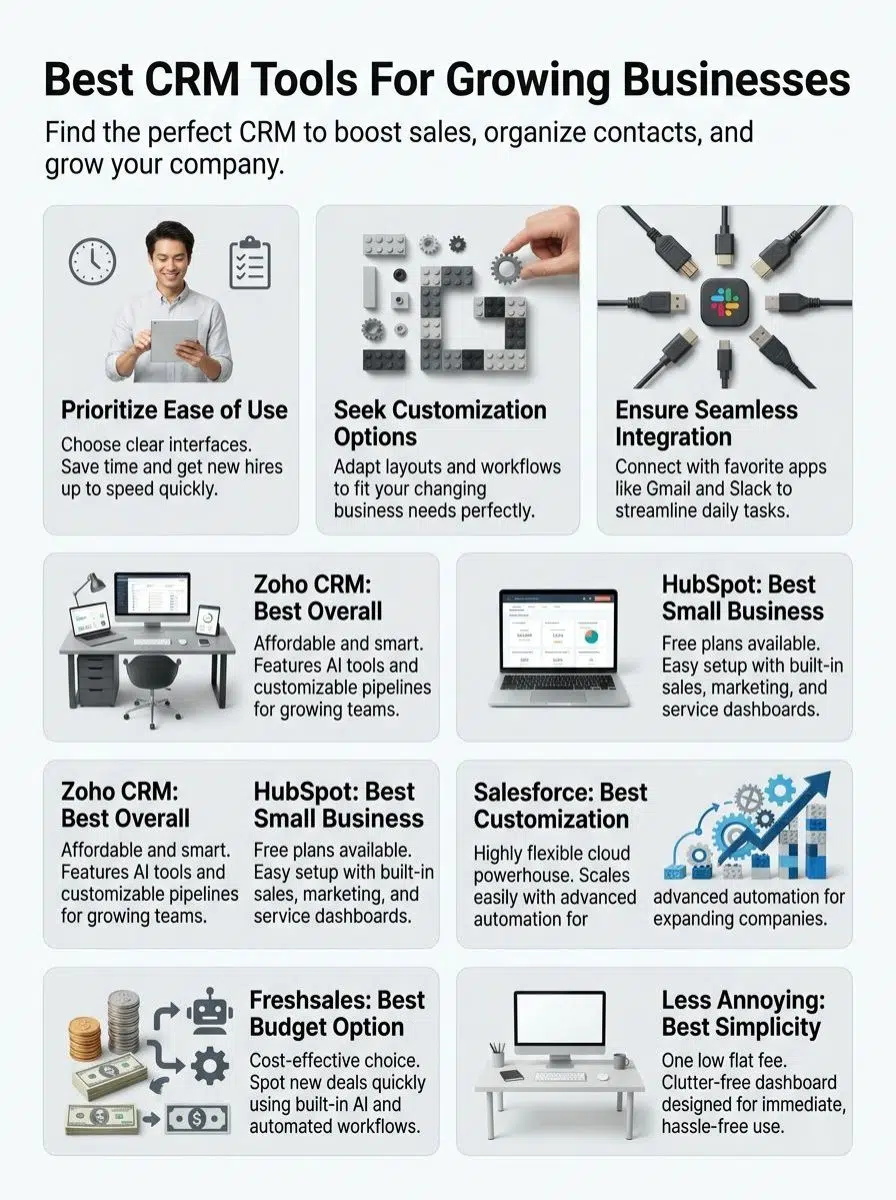
Finding the perfect fit requires knowing which features actually matter for your daily routine. The right tools save precious time and make your workday much easier.
Ease of use
A tool must simplify your day, not complicate it. If your sales representatives spend hours searching for a basic client phone number, the system is failing them.
Busy teams need clean screens and buttons that make sense instantly. To keep things simple, look for these three traits:
- Clean dashboards: Important numbers should be front and center.
- Fast data entry: Adding a new contact should take seconds.
- Mobile access: Your team needs to check details on their phones.
Easy-to-use software directly improves your sales performance metrics. Staff members waste less time fighting the technology and spend more time talking to prospects.
Customization options
Every company works differently, and your software should adapt to your specific habits. Top CRM platforms allow you to adjust page layouts and build reports that match your exact workflow.
For example, the Salesforce Starter Suite costs $25 per user each month and lets you create unique sales stages. If you eventually upgrade to their $100 Pro Suite, you gain the ability to build entirely custom apps.
In 2026, flexible software solutions help small companies stay agile as they hire more staff. You can tweak the system to track whatever data matters most to your bottom line.
Integration capabilities
Your new software needs to shake hands with the tools you already use every day. Leading systems easily connect with popular apps like Gmail, Microsoft Outlook, and Slack.
Connecting your accounts saves you from typing the same information twice. For instance, linking your CRM to QuickBooks Online allows you to view paid invoices directly on a customer profile.
These seamless connections keep your marketing strategies aligned with your actual sales data. A highly connected digital workspace makes running your company far more efficient.
Scalability for business growth
Success can sneak up fast, and your technology must keep pace. A great system handles new clients and extra employees without crashing or slowing down.
Many popular options now offer tiered pricing plans based on your data needs. Zoho CRM, for example, gives standard organizations 10 gigabytes of storage, but enterprise users can buy much more.
A truly scalable system means you will not have to migrate all your data to a new platform in two years.
You want a reliable partner that supports your journey from a tiny startup to a major player.
Best Overall: Zoho CRM
Zoho CRM gives expanding companies powerful tools to handle complex sales tasks. It provides a huge feature set that helps teams stay highly organized and close deals faster.
Features & Description (Zoho CRM)
This software makes client management much easier for growing teams. You can track new leads, automate boring chores, and manage hundreds of contacts without feeling overwhelmed.
In 2026, the Standard plan costs just $14 per user each month. If you upgrade to the Enterprise tier for $40, you gain access to Zia, an AI assistant that predicts which deals will likely close.
The main dashboard displays your activity logs and active deals at a single glance. Small startups can even start with a free version for up to three users.
Pros & Cons (Zoho CRM)
Zoho packs incredible value for companies wanting smart lead management. Here are the main advantages and drawbacks for users this year.
| Pros | Cons |
|---|---|
|
|
Best for Small Businesses: HubSpot CRM
HubSpot CRM is a fantastic choice for owners who have busy days and big goals. If you want a smart, clean workspace that does the heavy lifting, this is a top contender.
Features & Description (HubSpot CRM)
Busy founders love this platform for its incredibly generous free tier. In 2026, the free version still allows you to store up to one million contacts and gives you two free user seats.
You can manage active deals and set up automated reminders without reading a training manual. When you are ready for more power, the Starter plan begins at $15 per user each month.
The platform syncs beautifully with Gmail, allowing you to track exactly when a client opens your message. It is a highly flexible solution that expands easily as your revenue increases.
Pros & Cons (HubSpot CRM)
This platform equips smaller teams with friendly tools and a famous free tier. Check out the strengths and weaknesses below.
| Pros | Cons |
|---|---|
|
|
Best for Advanced Customization: Salesforce Starter Suite
Salesforce Starter Suite gives you massive flexibility to shape the platform to your liking. If you want a system that bends easily to fit unique processes, this stands out.
Features & Description (Salesforce Starter Suite)
This package delivers serious power for teams that want professional-grade tools. For $25 per user each month, you can manage up to ten users with built-in sales and service features.
Your staff can move quickly using the built-in email templates and real-time performance dashboards. It also includes basic Einstein AI features to help you score your best prospects.
Salesforce connects smoothly with thousands of external apps on their AppExchange marketplace. It is a highly trusted brand that supports millions of professionals globally.
Pros & Cons (Salesforce Starter Suite)
This suite packs plenty of muscle, but it definitely has a learning curve. Here is a quick look at what to expect.
| Pros | Cons |
|---|---|
|
|
Best Budget-Friendly Option: Freshsales
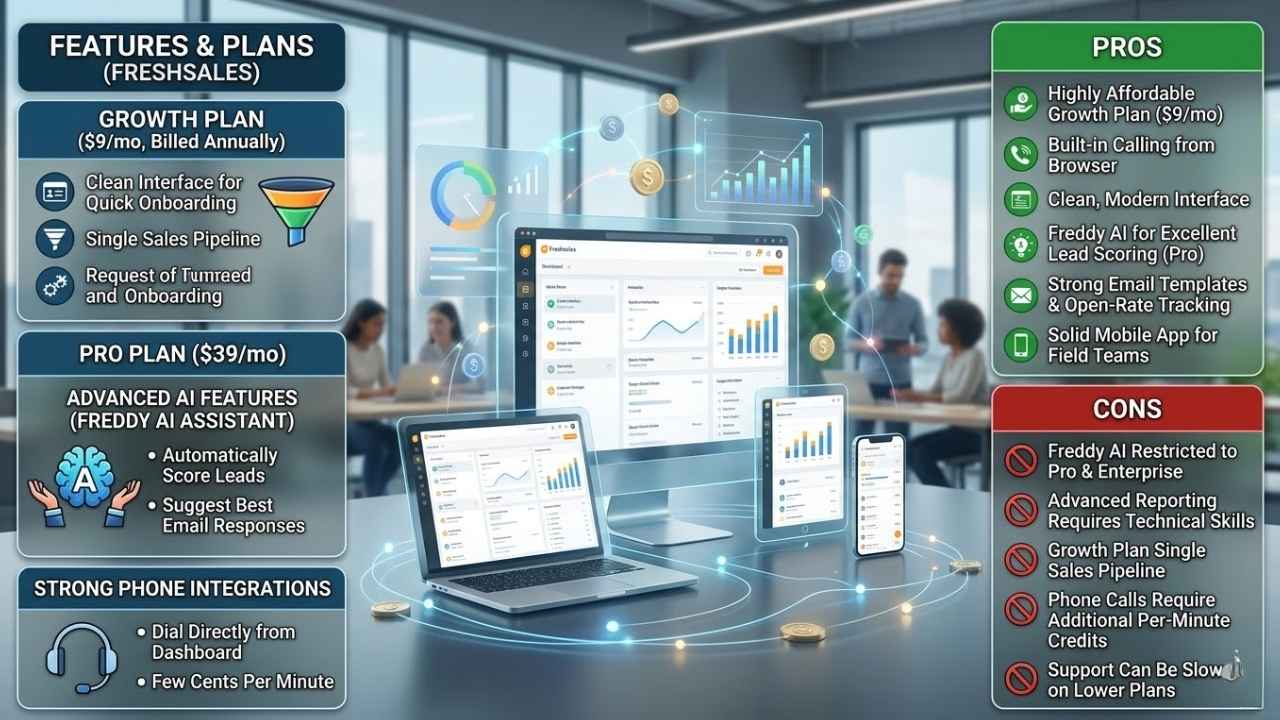
Freshsales delivers highly useful features without draining your monthly budget. Growing teams can access modern tools quickly while keeping expenses low.
Features & Description (Freshsales)
This software offers a very clean interface that helps new users get started immediately. The Growth plan costs just $9 per user each month when billed annually.
If you need advanced AI features, the Pro plan at $39 per month includes the Freddy AI assistant. Freddy can automatically score your leads and suggest the best email responses.
Strong phone integrations allow you to make calls directly from the dashboard for a few cents per minute. It is a highly cost-effective choice for service companies making lots of outbound calls.
Pros & Cons (Freshsales)
Many founders pick this tool for its great pricing and built-in calling features. Here is a breakdown of the good and the bad.
| Pros | Cons |
|---|---|
|
|
Best for Simplicity: Less Annoying CRM
If you want a straightforward tool, this option cuts out all the confusing jargon. It is incredibly easy to learn and perfect for technology beginners.
Features & Description (Less Annoying CRM)
This platform promises a fast setup and crystal-clear navigation screens. True to its name, it avoids confusing menus and hides no secret fees.
The company charges a flat rate of exactly $15 per user each month. Your dashboard shows your calendar, task list, and client notes on one single page.
You can add custom data fields as your client list expands. Many service professionals choose it because it gets out of the way and lets them focus on making calls.
Pros & Cons (Less Annoying CRM)
This platform wins awards for customer support and basic usability. Here is what you need to know before signing up.
| Pros | Cons |
|---|---|
|
|
Final Thoughts
Picking the perfect CRM tool will absolutely shape your future success. We have explored options with great prices, smart artificial intelligence, and easy setups.
Each platform we reviewed brings something valuable to the table for your team. Whether you choose the huge feature list of Zoho or the friendly design of HubSpot, you are making a smart move. The best CRM tools for growing businesses compared here will help you focus on your buyers. Take a look at a few free trials and see which one feels right for you!