
Have you ever searched for your own website on Google and noticed strange or random pages appearing in the results? Sometimes there seem to be far too many pages listed, and many of them offer little or no value to visitors. This situation often leaves website owners wondering why their site appears cluttered in search results.
This problem is commonly known as index bloat—a situation where search engines add a large number of low-value, duplicate, or unnecessary pages from a website into their index.
Understanding the causes of index bloat is the first step toward solving it. The following guide explains what creates this issue and outlines simple, practical steps to fix it and restore a healthier website structure.
Index Bloat: Why You Have Too Many Pages in Search
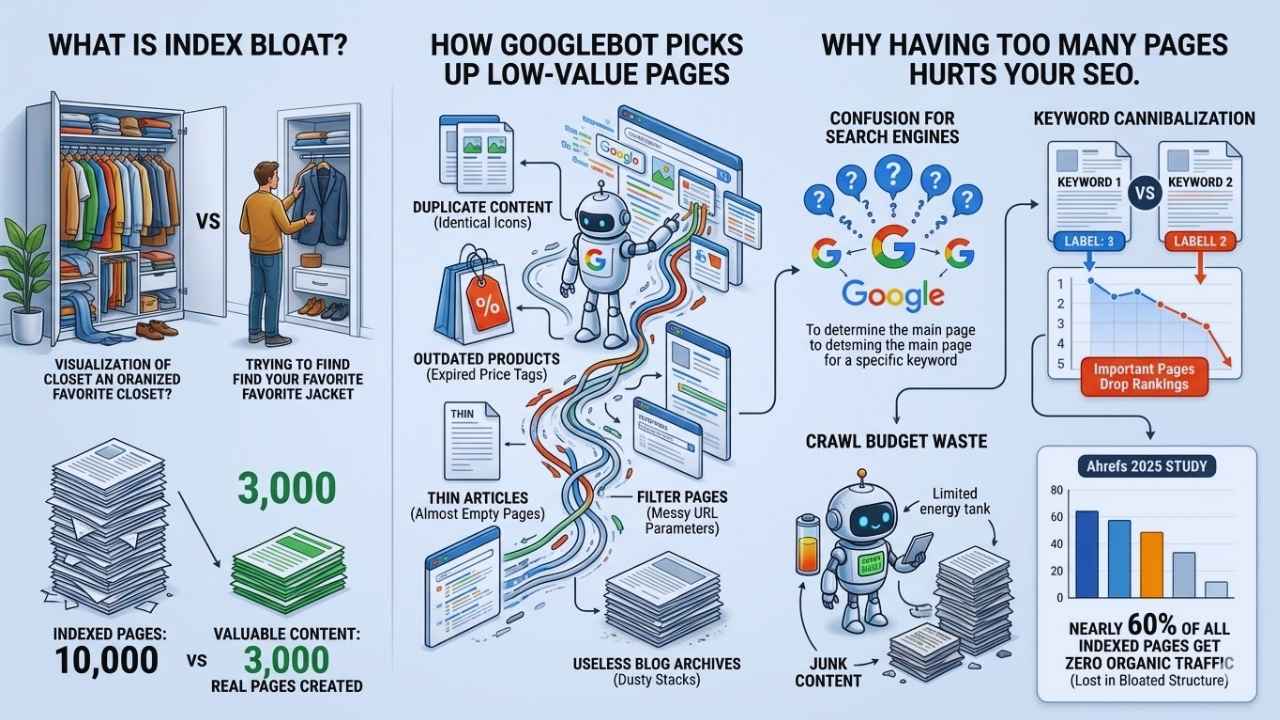
Index bloat means your website has too many pages in Google’s database, and most of them add little to no value. Think of it like stuffing your closet with old clothes you never wear. Soon, you cannot find your favorite jacket at all.
Sites might have 10,000 indexed pages, but the owner may have created only 3,000 real ones. Google sometimes indexes way more than you expect.
This happens when Googlebot picks up duplicate content, outdated products, or thin articles. It also grabs filter pages full of messy parameters or useless blog archives.
Too many low-quality pages confuse search engines. They struggle to figure out which page actually matters for a specific keyword. This confusion leads directly to keyword cannibalization, dropping your important pages down the list.
A recent 2025 industry study by Ahrefs found that nearly 60% of all indexed web pages receive zero organic traffic, often because they are lost in a bloated site structure.
Index bloat wastes your crawl budget. Google bots spend their limited time scanning junk instead of finding the valuable content that actually brings organic traffic and boosts SEO performance.
How Does Index Bloat Occur?
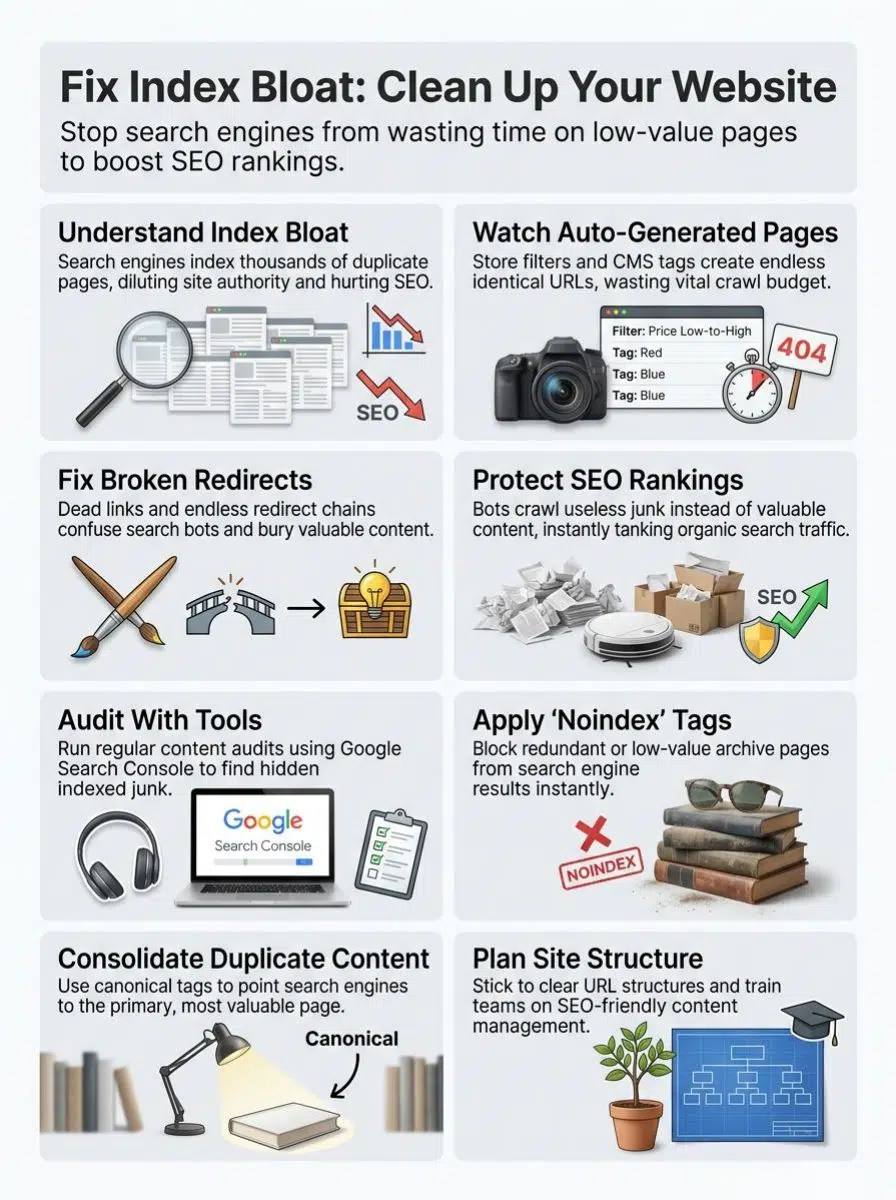
Index bloat sneaks in fast, sometimes right under your nose. It often starts with small changes that slowly spiral out of control. This fills search results with pages you never intended to show up.
Auto-generated pages through CMS platforms
Modern websites rely on systems like WordPress or Shopify to save time. These platforms are incredibly helpful, but they can create thousands of pages very quickly.
For example, a store might sell one shirt in ten different colors. The site software might automatically build ten separate pages for each color. This happens instead of just showing them as clickable options on a single product page.
Many WordPress users do not realize that every new tag they create automatically generates a brand new archive page, creating massive bloat instantly.
This floods Google with low-value or duplicate content. If your site has 3,000 real products but 10,000 indexed pages, you are likely facing an issue with auto-generated URLs.
Each useless page eats up your crawl budget. This forces search engines to work much harder to find your important content.
Overuse of parameters in URLs
URL parameters often sneak into links on eCommerce sites. This generates a mountain of duplicate or near-duplicate pages.
Imagine a shop page with filters for size, color, and price. Each filter can create endless web addresses like /shop?size=small&color=red. Marketing tracking codes like utm source can also accidentally get indexed if they are not managed properly.
This makes search engines work overtime by indexing thousands of low-quality combinations. Google’s crawl capacity stretches thin as it tries to index every slight variation.
Fewer important pages get noticed as a result. That mismatch signals heavy parameter use and leads straight to SEO Search Engine Optimization issues.
Poorly managed redirects and 404 error pages
Redirects gone wild often send users or search engines running in circles. Sometimes they end up stuck in endless redirect chains. These chains waste crawl budget and actively slow down your SEO performance.
Dead links that hit error pages can also pile up surprisingly fast. Here are the most common culprits:
- Endless redirect loops between deleted pages.
- Unresolved 404 error pages from old campaigns.
- Soft 404s returning a success code while showing a broken page.
Google may index these broken pages by mistake. This leads to hundreds of low-quality entries clogging up the search results.
Sites with unmanaged redirects usually see big problems. Valuable pages get buried under a pile of errors.
Faceted navigation lets users filter products easily. However, it can flood your site with similar URLs. Each sort selection creates a brand new web address.
For instance, sorting by “red shoes under $50” generates a unique link. Google might index all these combinations as separate pages. This happens even though they show almost the exact same content.
It leads to massive duplicate content issues. An online store can easily jump from a few hundred real products to thousands of indexed URLs overnight.
Too many filtered versions eat up your crawl efficiency. This slows down indexing for your more useful content.
Thin content and low-value archive pages
Thin content fills pages with very little value for readers. A blog with 500 posts might automatically generate 2,000 tag or date archive pages. Most of those archives just show the same two or three articles over and over again.
Google crawls these low-quality pages and gets completely lost in a maze. Common examples of thin pages include:
- Empty blog category pages.
- Date-based archives with no posts.
- Copied manufacturer product descriptions.
In recent 2025 and 2026 core updates, Google has aggressively targeted these low-quality pages. Their ranking systems actively demote sites filled with unhelpful, repetitive text.
This spreads out your website’s authority too much. It confuses Google on which page actually deserves to rank higher.
The Impact of Index Bloat
Too many pages clog up your site, acting just like a traffic jam during rush hour. This mess can confuse search engines and slow things down. It also leaves your human visitors completely frustrated.
SEO rankings and crawl budget issues
Search engines like Google do not have endless time to look at every page on your site. They operate on a strict crawl budget. This means they pick and choose what to scan on any given day.
Index bloat clogs this whole process with thousands of low-value pages. With 10,000 indexed pages but only 3,000 real ones, bots waste energy on useless spots. They completely miss the pages that actually matter.
This mess leads directly to weaker search engine rankings. Your high-quality content falls off the radar, while outdated pieces eat up all the attention.
User experience and site performance degradation
Slow load times and a confusing site structure leave your visitors feeling frustrated. Too many low-quality pages cause important information to get lost in the shuffle.
Think about opening a physical shop with aisles full of empty boxes. No one would stay long, and absolutely no one would buy anything.
Site performance drops as your servers work overtime just to keep up with unnecessary requests. This clogs things up for both humans and bots alike.
Here is a quick look at how bloat directly impacts your site:
| Impact Area | What Happens Behind the Scenes | The End Result |
|---|---|---|
| Crawl Efficiency | Bots scan duplicate filter pages instead of new blogs. | New content takes weeks to appear in search. |
| Keyword Rankings | Multiple pages compete for the exact same term. | Your main sales page drops off page one. |
| Server Load | Bots constantly request useless parameterized URLs. | Slower page speeds for actual human customers. |
How to Identify Index Bloat
Spotting index bloat early requires a sharp eye. Small issues can hide in plain sight. You must always keep checking behind the curtains.
Conducting regular content audits
Regular content audits help you spot these issues fast. By checking your pages every few months, you can see if Google is indexing more than you actually created.
That gap is your biggest warning sign. It signals that low-quality content is swelling your index.
Audits highlight thin articles, outdated product listings, and weak archive sections. Repeated checks reveal crawl budget issues before they cause permanent damage.
Using Google Search Console and Screaming Frog
Google Search Console is your best friend for spotting exactly what Google has indexed. You will want to check the Page Indexing report specifically.
If your total indexed number is way higher than your actual CMS page count, that is a huge red flag. The tool will flag thin content or useless URLs hiding in the weeds.
Next, you can use Screaming Frog. This software works like a digital bloodhound, sniffing out every corner of your website.
Many SEO professionals recommend connecting Screaming Frog directly to your Google Analytics API. This pro-tip lets you easily spot orphan pages that are indexed but receive zero actual traffic.
- Open your Page Indexing report in GSC.
- Compare the total indexed pages to your CMS page count.
- Look for a sudden spike in the “Indexed, not submitted in sitemap” category.
- Run a Screaming Frog crawl to find exact duplicate URLs.
Strategies to Fix Index Bloat

You can clean up your site and boost its health with a few simple steps. Let us look at how small changes can make a massive difference for your traffic.
Slapping a ‘noindex’ tag on a low-value page gives Google a clear instruction. It tells them, “Hey, please do not add this to your search results.”
Search engines often crawl thousands of unnecessary pages like empty archive sections or login screens. If your website shows 10,000 indexed URLs but you only built 3,000, index bloat is actively hurting you.
If you use WordPress, popular plugins like Yoast SEO or Rank Math make this incredibly easy. You can automatically set whole categories, like tag archives, to ‘noindex’ with one single click.
This trick blocks redundant URLs from the index. It gives more ranking power to the important pages that should actually drive organic traffic.
Canonical tags act like helpful traffic signs for search engines. They point bots to the main, original page out of many copies.
Think about a website with the same product listed under different URLs because of size filters. Google can get confused and index each one separately.
Placing a canonical tag on these duplicates tells Google which version is the primary one. This cuts down your extra indexed pages instantly.
Big online stores often struggle heavily with this. Using canonical tags keeps your crawl budget sharp and focuses your ranking power where it belongs.
Managing URL parameters with modern rules
In the past, Google Search Console offered a specific URL Parameters tool to handle endless page versions like ?sort=price. Google officially retired that tool in early 2022 because their crawlers got much smarter.
However, messy parameters can still cause massive index bloat today. Instead of a specific tool, you now need to rely on strict robots.txt rules and proper canonical tags to fix the issue.
- Update your robots.txt file to block tracking parameters.
- Use canonical tags pointing back to the clean URL.
- Avoid using messy parameters for internal site links.
You can use your robots.txt file to block Google from crawling URLs that contain certain useless tracking parameters. This simple step prevents search engines from wasting time on thin or duplicated listings.
Cleaning up redirect chains and removing dead pages
Redirect chains confuse search engines and slow your site to a crawl. Long chains send bots through a digital maze instead of straight to the real content.
If Page A redirects to Page B, and then to Page C, you need to fix it. Update the link so Page A points directly to Page C. This clears the path for everyone.
Dead pages, like old products or outdated blog posts, add serious fuel to index bloat. Remove them from your sitemap entirely.
Use proper 404 or 410 signals so search crawlers know those pages are gone for good. With fewer dead ends, search bots can focus entirely on the quality pages that matter most.
Preventing Index Bloat
Keep your site healthy by watching what grows and pulling out the weeds early. Smart habits stop trouble before it starts. This will save you major headaches down the line.
Best practices for site structure and content planning
Organize your site with clear categories and logical menus. Make sure each important page is easy to find straight from the homepage.
This helps both crawlers and users zip around without getting lost in a digital maze. Limit low-value pages by avoiding near-identical product listings.
Stick to simple URL structures that tell people exactly what is inside. A clean link like /category/product is always better than a long string of random numbers.
Always plan ahead for growth. Set strict rules now for adding new filters, so you do not end up with thousands of irrelevant archive URLs later.
Regular audits and URL inspections
Spotting bloat early starts with digging through your own analytics regularly. Running a scheduled quarterly audit shines a bright light on hidden ghosts.
It pulls up thin content and ignored archives that eat up your crawl efficiency. URL inspections using Google Search Console work wonders for this too.
- Check the Page Indexing report in GSC monthly.
- Look for unexpected spikes in indexed URLs.
- Review server logs for wasted bot activity.
These checks catch sneaky parameters tacked onto links or forgotten 404 error traps. Quick, routine checks help keep your site structure incredibly healthy.
Educating teams on SEO-friendly content management
Your entire team needs clear rules for content management to avoid creating bloat in the first place. Low-quality pages and messy URL structures will heavily harm your organic traffic.
Proper training helps everyone spot issues before a page ever goes live. I highly recommend creating a simple Standard Operating Procedure for publishing.
Your checklist could simply ask, “Is this page uniquely useful, or is it a duplicate?” Catching trouble spots early saves everyone a headache.
With the right habits in place, your team will build a better site structure. You will boost search engine rankings naturally without even breaking a sweat.
Final Thoughts
When fixing index bloat: why you have too many pages usually comes down to simple mistakes. Index bloat is always best managed with a simple “less is more” approach. We just covered exactly what causes too many pages to pile up in Google’s index. We looked at everything from duplicate content to messy URLs and thin product listings.
Taking steps like adding ‘noindex’ tags and cleaning up those confusing redirects are easy fixes you can start right now. This will save valuable time for both you and the search engines. Imagine your website running faster, ranking higher, and giving your visitors a much better experience without all those pointless pages. Are you ready to clean house? Open up Google Search Console or Screaming Frog today to get started. Every single page on your site should earn its spot! Take control of your URL management now, because your site deserves top performance.