When determining the most effective digital learning environments for young minds, looking beyond the massive tech conglomerates reveals a thriving ecosystem of independent developers. Small and Medium-sized Enterprises (SMEs) based right here in the United States are building some of the most innovative, pedagogically sound, and privacy-conscious preschool platforms available today. These smaller studios often prioritize educational value over aggressive monetization, creating safe digital spaces where children can develop foundational cognitive, social, and academic skills.
How We Selected Our 15 Best SMEs for Early Childhood Educational Apps in USA
Identifying the standout independent developers required a rigorous filtering process to ensure both educational integrity and a secure digital environment. We evaluated dozens of American studios against a strict set of criteria to find the ones truly advancing early childhood education.
-
Geographic Baseline: Headquartered and operating within the United States as an independent studio or dedicated small-scale SME.
-
Curriculum Alignment: Content designed in consultation with early childhood educators, focusing on literacy, numeracy, and emotional intelligence.
-
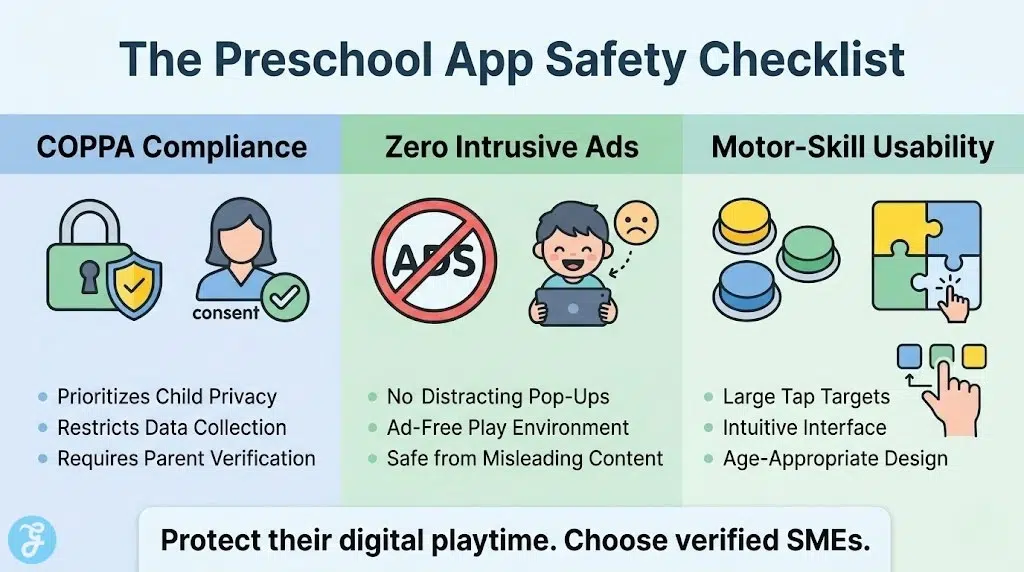
Privacy and Safety: Strict COPPA compliance, zero third-party data selling, and ad-free interfaces.
-
User Experience: Intuitive, frustration-free navigation built specifically for the motor skills of children aged 2 to 6.
Before diving into the individual reviews, it is important to understand the landscape of these specialized studios.
Evaluating the Top 15 Early Childhood Educational Apps in USA
Exploring the offerings from these independent developers showcases a commitment to interactive, meaningful screen time. Here is our curated breakdown of the strictly verified, standout SMEs shaping the future of early learning.
1. Spinlight Studio
Originally founded in Champaign, Illinois, Spinlight Studio built applications that transformed basic toddler activities into digital learning moments. Their titles were celebrated for their simplicity and clear, uncluttered interfaces that prevent overstimulation. Note that the studio’s app catalog was acquired by Codagami in 2015, and the original spinlight.com domain was later purchased by NanoGlobals in 2021, so the legacy apps may no longer be in active development.
Best for:
-
Introducing basic counting, alphabet recognition, and early problem-solving.
Why We Chose It:
-
Highly intuitive navigation that requires zero parental intervention.
-
Focuses on actionable learning loops rather than passive screen watching.
-
Completely free of in-app purchases and external advertising.
Things to consider:
-
The visual style is slightly older and less flashy than newer competitors.
The 2026 Edge:
-
The original app catalog (including AlphaTots, Operation Math, and Swapsies) remains available, though active development under the original studio has ceased.
Building on that philosophy of intuitive play, another studio focuses entirely on rapid engagement for shorter attention spans.
2. THUP Games
This San Francisco-based studio hit the ground running with their beloved monkey-themed educational suite. THUP Games understands that preschool attention spans are short, so their applications rely on rapid, rewarding micro-games. Their focus remains squarely on core preschool competencies like matching, colors, and spatial reasoning.
Best for:
-
Quick, rewarding learning sessions focused on preschool fundamentals.
Why We Chose It:
-
Rapid pacing keeps active toddlers engaged during short play sessions.
-
Consistent, positive audio reinforcement encourages continued exploration.
-
Simple drag-and-drop mechanics tailored perfectly for small fingers.
Things to consider:
-
The repetitive nature of the mini-games may cause older preschoolers to lose interest over time.
The 2026 Edge:
-
Refined audio cues that better support neurodivergent learners during gameplay.
While quick games work well for toddlers, older preschoolers often benefit from a more structured academic approach.
3. Intellijoy
Intellijoy, based in San Jose, California, offers a comprehensive digital academy that covers everything from tracing letters to understanding basic emotional cues. They are one of the most prolific independent publishers in the early childhood space, maintaining a massive library of specialized learning modules. Their approach is highly structured, miIntellijoy, and based in Skokie, Illinois, offers a comprehensive digital academy that covers everything from tracing letters to basic numeracy and reading, mimicking a traditional preschool curriculum.
Best for:
-
Parents looking for a structured, all-in-one digital preschool curriculum.
Why We Chose It:
-
Offers a unified ecosystem where one subscription unlocks all subject areas.
-
Features clear, voice-guided instructions that don’t require reading skills.
-
Provides granular progress tracking across dozens of specific skill sets.
Things to consider:
-
The sheer volume of apps in their library can be overwhelming to navigate initially.
The 2026 Edge:
-
AI-driven difficulty scaling that adjusts in real-time if a child struggles with a specific concept.
A unified Kids Academy app that consolidates their previously separate skill-specific apps into one progressive curriculum.
4. RV AppStudios
Founded by Vivek Dave, RV AppStudios is on a mission to provide high-quality educational content completely free of charge. Their Lucas & Friends franchise covers phonics, math, tracing, and basic literacy fundamentals without hiding anything behind a paywall. The studio funds its free kids’ apps using ad revenue generated from a separate portfolio of casual games aimed at adult audiences, keeping the children’s experience completely ad-free.
Best for:
-
Families seeking premium-tier educational games without subscription fees.
Why We Chose It:
-
Absolutely no ads, hidden fees, or in-app purchases.
-
Covers a wide breadth of subjects, including early coding concepts.
-
Features colorful, friendly mascots that guide the learning experience.
Things to consider:
-
The interface can occasionally feel crowded with too many activity options on a single screen.
The 2026 Edge:
-
Expanded offline functionality ensuring full access to the curriculum without an internet connection.
For the youngest demographic, hyper-stimulation is a concern, leading some developers to strip back the digital noise completely.
5. Night & Day Studios
Famous for their classic farm animal application, this Portland, Oregon studio specializes in cause-and-effect digital toys for toddlers. Night & Day Studios focuses on audio-visual discovery, helping the youngest learners associate sounds, words, and images. Their products are meticulously designed to be soothing rather than hyper-stimulating.
Best for:
-
Toddlers taking their first steps into digital interaction and vocabulary building.
Why We Chose It:
-
Gentle pacing that prevents cognitive overload in very young children.
-
High-quality audio recordings featuring real animal and environmental sounds.
-
Clean, minimalist design aesthetic that focuses attention on the learning object.
Things to consider:
-
The content library is smaller and more specialized than larger edtech platforms.
The 2026 Edge:
-
Implementation of adaptive color palettes that shift based on the time of day to protect circadian rhythms.
Once foundational vocabulary is established, children naturally want to explore the wider world.
6. Peapod Labs
Operating from Chicago, Peapod Labs creates digital encyclopedias tailored for preschool minds. Their “ABC” series allows children to explore wildlife, food, and music through interactive photography and videos. They prioritize real-world imagery over cartoons, providing an authentic window into the world for curious kids.
Best for:
-
Satisfying the curiosity of children fascinated by animals, geography, and real-world objects.
Why We Chose It:
-
Utilizes high-resolution photography and video rather than standard animations.
-
Introduces complex vocabulary in an accessible, visually supported manner.
-
Encourages parent-child co-play and discussion.
Things to consider:
-
Requires more active reading and guidance from parents compared to fully narrated apps.
The 2026 Edge:
-
Integration of localized flora and fauna data based on the user’s geographic region.
Beyond factual exploration, digital spaces also offer profound opportunities for creative expression.
7. Piikea Street
This American independent studio designs digital toys that encourage unstructured play and creativity. Piikea Street’s applications are open-ended, allowing children to manipulate virtual environments without rules or time limits. Their alphabet and math tools feel like physical toys brought to life on a touchscreen.
Best for:
-
Fostering creativity and open-ended exploration alongside basic academics.
Why We Chose It:
-
Beautifully crafted interactive elements that respond uniquely to every touch.
-
Seamlessly blends creative art projects with letter and number recognition.
-
Promotes a stress-free environment with no winning or losing states.
Things to consider:
-
The lack of strict goals might not appeal to children who prefer structured tasks.
The 2026 Edge:
-
New haptic feedback integration that provides physical sensations corresponding to digital actions.
Interactive storytelling represents another critical pillar of early childhood development.
8. FableVision Studios
Located in Boston, Massachusetts, FableVision is a veteran in the educational media space, creating bespoke learning experiences. While they often partner with larger broadcasters, their proprietary early childhood applications are masterclasses in narrative-driven learning. They use storytelling to teach social-emotional skills alongside traditional academics.
Best for:
-
Developing social-emotional intelligence and empathy through interactive storytelling.
Why We Chose It:
-
Exceptional narrative quality penned by experienced children’s authors.
-
Focuses heavily on problem-solving, resilience, and emotional regulation.
-
Features distinct, hand-drawn art styles that stand out from generic digital art.
Things to consider:
-
Their apps are often more akin to interactive books than fast-paced games.
The 2026 Edge:
-
Voice-recognition technology that allows children to practice reading lines alongside characters.
Equally important to standard curriculum is the development of a child’s aesthetic sensibilities.
9. Wee Society
San Francisco’s Wee Society is an independent design studio that creates quirky, visually striking applications for kids. Their goal is to build digital tools that are as enjoyable for design-conscious parents as they are for children. Their applications focus heavily on self-expression, emotional articulation, and visual arts.
Best for:
-
Encouraging visual creativity, design thinking, and emotional expression.
Why We Chose It:
-
Unique, modern design aesthetic that breaks away from traditional primary colors.
-
Innovative mechanics that encourage kids to draw, sing, and record their own voices.
-
Promotes empathy and diversity through its character designs.
Things to consider:
-
The focus is more on art and emotion than strict literacy or numeracy.
The 2026 Edge:
-
AI-assisted art tools that help children turn basic scribbles into complex animations.
Some developers excel by wrapping complex logic into highly approachable packages.
10. Duck Duck Moose
Operating out of San Mateo, California, this pioneering studio is now a wholly-owned subsidiary of the nonprofit Khan Academy, having joined them in 2016. Duck Duck Moose applications are characterized by their whimsical music, physics-based puzzles, and robust math curricula. They manage to make complex concepts like addition and geometry accessible to four-year-olds, and all 21 of their apps were made completely free as part of the Khan Academy transition.
Best for:
-
Introducing early math and physics concepts through highly engaging, musical gameplay.
Why We Chose It:
-
Award-winning curriculum that makes math genuinely fun for toddlers.
-
Incredible use of classical music and custom soundtracks to enhance learning.
-
Completely free and highly accessible to all income brackets.
Things to consider:
-
Some of the older apps in their catalog have not received recent visual updates.
The 2026 Edge:
-
Integration with Khan Academy’s broader Khan Kids ecosystem, expanding the early learning resources available alongside the original Duck Duck Moose catalog.
For parents who want a direct, no-nonsense approach to skill building, specialized developers offer targeted drilling.
11. 22learn
New York’s 22learn creates comprehensive digital workbooks and flashcards transformed into interactive games. Their applications are incredibly straightforward, focusing on core drilling of sight words, tracing, and basic math facts. They are an excellent tool for closing specific educational gaps.
Best for:
-
Direct, focused practice on specific academic skills like sight words and letter tracing.
Why We Chose It:
-
Extremely clear objectives and rewards for completing tasks.
-
Massive library of targeted activities focusing on specific educational gaps.
-
Simple interfaces that minimize distractions during learning sessions.
Things to consider:
-
The rote learning style is highly effective but may feel less like “play” than other options.
The 2026 Edge:
-
Smart-pacing algorithms that prevent fatigue by automatically suggesting breaks during intensive drill sessions.
For vocabulary building using an entirely different approach, puzzle-based systems prove highly effective.
12. 77SPARX Studio
Headquartered in Sunnyvale, California, 77SPARX Studio excels at merging digital puzzle mechanics with vocabulary building. Their flagship applications, such as PUZZINGO and Wonster Words, use spelling and phonics challenges to unlock silly, highly rewarding animations. They focus on making repetitive learning tasks feel like a rewarding game loop.
Best for:
-
Reinforcing spelling, phonics, and vocabulary through interactive puzzle mechanics.
Why We Chose It:
-
Exceptional use of humor and silly animations to reward correct answers.
-
Phonics lessons are seamlessly integrated into the core gameplay loop.
-
Expansive libraries of puzzles that scale in difficulty as the child learns.
Things to consider:
-
The premium content requires in-app purchases beyond the initial free offerings.
The 2026 Edge:
-
Advanced dynamic scaling that identifies words a child struggles with and seamlessly reintroduces them in future puzzles.
Sometimes, the most effective digital environments are the simplest ones.
13. Kevin Bradford LLC
Operating entirely as an independent developer in the USA, Kevin Bradford specializes in highly focused, straightforward preschool and kindergarten learning modules. His applications strip away heavy animations and convoluted menus, offering kids immediate access to matching games, counting exercises, and shape recognition.
Best for:
-
Parents seeking straightforward, lightweight applications without bloated file sizes or menus.
Why We Chose It:
-
Extremely fast load times and clean, distraction-free interfaces.
-
Direct focus on core kindergarten readiness without unnecessary gamification.
-
Highly affordable pricing structures with no hidden microtransactions.
Things to consider:
-
The graphics are highly functional but lack the cinematic polish of larger studio productions.
The 2026 Edge:
-
Ultra-optimized coding that allows the applications to run flawlessly on older, legacy tablet models.
When cognitive development requires a more specialized touch, brain-training methodologies become invaluable.
14. ImagiRation LLC
Based in the Boston area, ImagiRation goes beyond standard curriculum by focusing on cognitive brain training, logic, and speech therapy. Developed in collaboration with neuroscientists, their applications feature adaptive puzzles designed to improve reasoning, visual processing, and articulation in early learners.
Best for:
-
Target cognitive development, logic building, and early speech therapy support.
Why We Chose It:
-
Scientifically backed puzzle structures that actively train spatial reasoning.
-
Dedicated modules for preverbal children and those needing articulation practice.
-
Difficulty naturally adapts based on the child’s processing speed and accuracy.
Things to consider:
-
The focus is heavily educational, which might feel more like a workbook than a toy.
The 2026 Edge:
-
Enhanced progress reports that translate cognitive puzzle data into actionable insights for parents and therapists.
Rounding out our list is a studio that turns digital devices into interactive laboratories.
15. Tinybop
Operating out of Brooklyn, New York, Tinybop builds beautifully illustrated, open-ended digital discovery applications. Rather than focusing strictly on literacy or math, they create digital sandbox environments that let kids explore everything from the human body to the physics of simple machines.
Best for:
-
Introducing complex STEM concepts through intuitive, open-ended exploration.
Why We Chose It:
-
Visually stunning artwork created by distinct, internationally recognized illustrators.
-
Zero written instructions, relying instead on pure curiosity and interactive discovery.
-
Excellent supplementary handbooks provided for parents to guide the digital experience.
Things to consider:
-
Younger toddlers may need parental guidance to fully grasp the concepts being explored.
The 2026 Edge:
-
Seamless integration with physical classroom experiments, allowing teachers to pair app discovery with real-world materials.
An Overview of Early Childhood Educational Apps in USA
To simplify your decision-making process, we have compiled the core details of these top independent developers into a quick-reference format below.
Overview Comparison
Reviewing these core metrics side-by-side provides a clear snapshot of the digital learning landscape.
| SME Developer | Headquarter Location | Core Focus Area | Pricing Model |
| Spinlight Studio | Champaign, IL | Basic Numeracy & Letters | Paid Apps |
| THUP Games | San Francisco, CA | Puzzles & Matching | Paid Apps |
| Intellijoy | San Jose, CA | Comprehensive Curriculum | Subscription |
| RV AppStudios | Phonicss, USA | Math, Tracing | Completely Free |
| Night & Day Studios | Portland, OR | Sensory & Vocabulary | Paid Apps |
| Peapod Labs | Chicago, IL | Encyclopedic Discovery | Paid Apps |
| Piikea Street | USA | Creative Open Play | Paid Apps |
| FableVision Studios | Boston, MA | Social-Emotional Learning | Premium / Custom |
| Wee Society | San Francisco, CA | Art & Emotional Articulation | Paid Apps |
| Duck Duck Moose | San Mateo, CA | Math & Physics | Completely Free |
| 22learn | New York, NY | Sight Words & Tracing | Paid Apps / Bundles |
| 77SPARX Studio | Sunnyvale, CA | Phonics & Puzzles | Freemium |
| Kevin Bradford LLC | USA | Direct Skill Drilling | Paid Apps |
| ImagiRation LLC | Boston, MA | Cognitive & Speech Therapy | Subscription / Paid |
| Tinybop | Brooklyn, NY | STEM & Discovery | Paid Apps / Bundles |
Evaluating these choices naturally brings us to our primary recommendations for standard use cases.
Our Top 3 Picks and Why?
Narrowing down the field, three developers stand out for their exceptional contribution to early learning. ImagiRation LLC takes a vital spot for its scientifically rigorous approach to cognitive development and speech therapy. RV AppStudios remains a top recommendation for providing premium, ad-free educational content entirely for free. Finally, Tinybop provides the most visually stunning, curiosity-driven environments for introducing complex STEM subjects to young minds.
How to Choose the Right Early Childhood Educational Apps in USA by Yourself?
Selecting the right digital tools for your child requires matching the software to their specific developmental stage and your family’s screen-time philosophy. Reviewing these key factors will ensure a positive learning environment.
-
Identify the Goal: Determine if you need a comprehensive curriculum, a targeted skill builder (like math or phonics), or open-ended creative play.
-
Check the Monetization: Avoid applications with intrusive ads or micro-transactions that a child could easily click. Opt for upfront purchases or transparent subscriptions.
-
Review the Pacing: Ensure the application allows the child to learn at their own speed without stressful timers or aggressive failure states.
-
Assess Parent Controls: Look for robust parent dashboards that allow you to track progress, set time limits, and adjust difficulty.
Applying this framework directly to your specific needs allows you to match the right developer to your child using the metrics below.
Decision Matrix
Matching your specific priorities with the right developer ensures a successful digital learning environment.
| Choose This SME… | If You Prioritize… |
| ImagiRation LLC or 22learn | Highly structured logic, speech therapy, and focused academic drilling. |
| RV AppStudios or Duck Duck Moose | High-quality education without subscription fees or ads. |
| Wee Society or Tinybop | Creative expression, STEM discovery, and open-ended exploration. |
| Intellijoy | A comprehensive, all-in-one digital preschool curriculum. |
Before making your final download, it is crucial to run through a rapid safety and usability check.
The Final Checklist
Running through this quick verification process guarantees you are downloading safe, effective software.
-
Verify the developer is COPPA compliant and handles data securely.
-
Ensure there are no third-party advertisements within the gameplay.
-
Test the interface to confirm the buttons are sized for toddler motor skills.
-
Check if the application functions offline for travel or restricted environments.
-
Confirm the educational content is developed alongside teaching professionals.
Securing the Digital Foundation for Early Learners
Choosing applications from independent American developers ensures your child engages with software built with pedagogical intent rather than corporate data harvesting. These fifteen SMEs demonstrate that screen time, when carefully curated and thoughtfully designed, functions as a powerful catalyst for early cognitive development and school readiness.
Frequently Asked Questions (FAQs) About Early Childhood Educational Apps in USA
Parents often have similar concerns when integrating new digital tools into their daily routines. Here are answers to the most common inquiries regarding preschool software.
1. Are subscription-based apps better than one-time purchase apps for toddlers?
Subscription apps typically offer a constantly updating library of content and adaptive learning algorithms, which is great for long-term use. One-time purchases are often more specialized and cost-effective, making them ideal for targeting a specific skill without recurring fees.
2. How much screen time is appropriate for preschoolers using these apps?
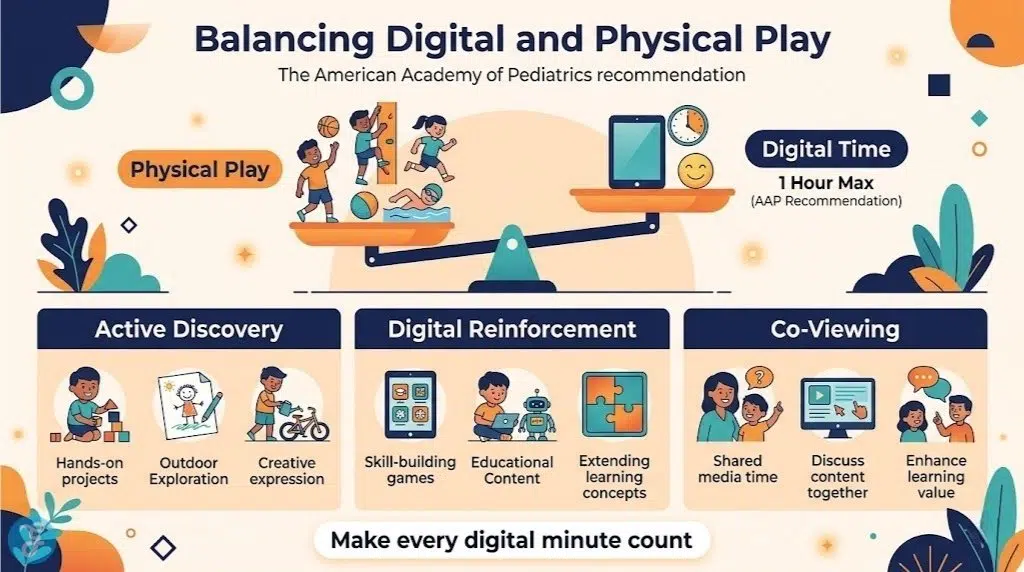
Historically, the American Academy of Pediatrics recommended limiting screen time to one hour per day of high-quality programming for children aged 2 to 5. In 2026, the AAP updated these guidelines to move away from strict time-based limits toward a more individualized approach that prioritizes content quality, context, and conversation. Co-viewing or co-playing with children remains highly recommended to help them understand and apply what they are seeing.
3. Do these independent apps sell my child’s data?
The reputable SMEs listed here strictly adhere to COPPA (Children’s Online Privacy Protection Act) regulations. They do not track personal identifying information or sell usage data to third-party advertisers.
4. Can these apps replace traditional preschool?
No digital application can entirely replace the social interaction, physical play, and hands-on guidance provided by a traditional preschool environment. These apps are designed to be supplemental tools that reinforce concepts learned in the real world.
5. Will I need an internet connection for my child to play these games?
While initial downloads and subscription verifications require the internet, many independent developers design their core games to be fully playable offline. Always check the developer’s notes, as streaming-heavy apps will require a persistent connection.