
In a move that could redefine how artificial intelligence functions on mobile devices, Google has quietly launched a new Android app called AI Edge Gallery.
This app allows users to run advanced AI models directly on their smartphones—completely offline. Without needing an internet connection, users can now generate AI-written text, analyze documents, create images, and more. It’s a bold step toward making AI both private and portable.
A New Chapter in AI: On-Device Intelligence Without the Cloud
Until now, most AI apps—especially those using large language models or image generators—required a stable internet connection. This was because the heavy computation needed for AI tasks typically occurred on cloud servers. But Google’s new app challenges that paradigm by shifting the processing entirely to your device.
AI Edge Gallery lets Android users download and run pre-trained AI models on their phones, ensuring that data stays on the device instead of being sent to the cloud. That translates to two major user benefits:
- Stronger data privacy, since user inputs never leave the device.
- Faster performance, because users no longer need to wait for responses from a remote server.
Meet Gemma 3 1B: A Compact Yet Powerful AI Engine
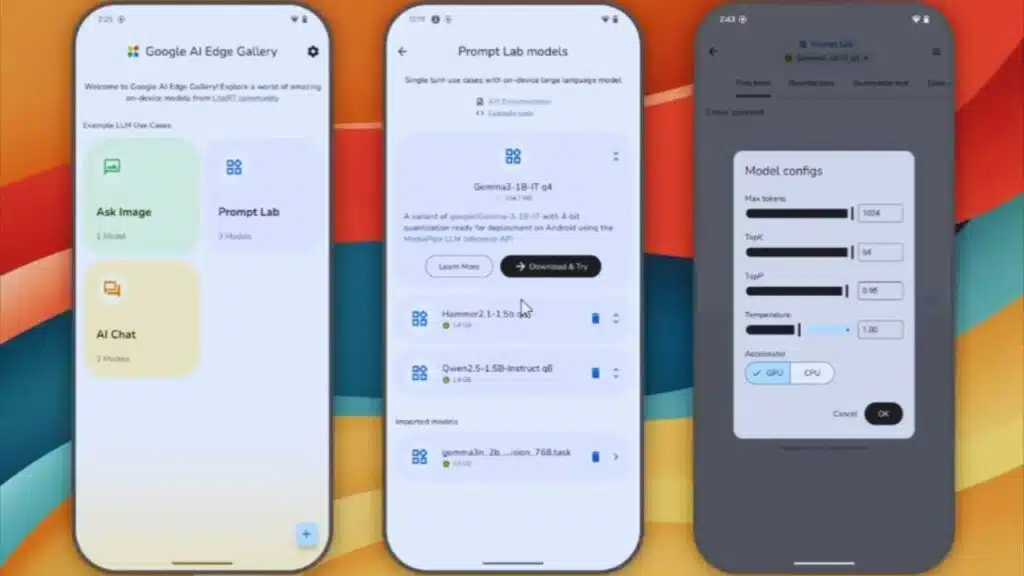
At the core of this offline AI experience is Google’s Gemma 3 1B model. Though relatively compact—just 529MB in size—Gemma is highly optimized. It can process an impressive 2,585 tokens per second, enabling rapid natural language processing and text generation.
Despite its small footprint, Gemma 3 1B is capable of performing many complex AI functions typically seen in larger models. It supports:
- Smart replies and messaging enhancements
- Document summarization and analysis
- Code writing and technical explanations
- Creative content generation (stories, blog posts, etc.)
This model’s efficiency makes it ideal for mid-range devices, yet powerful enough to mimic cloud-based tools like ChatGPT or Gemini in certain tasks—all while being locally run.
Powered by Hugging Face and Google AI Edge Technologies
One of the most exciting parts of this app is its integration with Hugging Face, a leading platform for open-source AI models. AI Edge Gallery allows users to browse and import models from Hugging Face directly into the app. That means developers and enthusiasts have access to a rich repository of vetted and community-approved AI tools.
Additionally, the app is built using Google’s AI Edge framework, which includes:
- TensorFlow Lite: A lightweight, mobile-optimized version of TensorFlow designed for edge computing.
- MediaPipe: A framework that helps optimize media and vision-based machine learning models for real-time applications.
Together, these technologies enable the app to function smoothly across a variety of devices, including mid-range Android smartphones, although performance may vary depending on the phone’s processing capabilities and memory availability.
Intuitive Features for Everyday Use
While the underlying technology is advanced, Google has ensured that the user interface remains friendly and accessible—even for those unfamiliar with AI development. The AI Edge Gallery offers several built-in tools that make AI usage easy and fun:
1. AI Chat
A conversational AI interface that allows users to ask questions, get real-time answers, and hold multi-turn dialogues with the model.
2. Ask Image
A unique feature where users can upload an image and ask the AI questions about it. For example, you can upload a photo of a dish and ask, “What ingredients are in this meal?”
3. Prompt Lab
An experimental zone where users can test one-shot prompts and tweak model responses using sliders and presets. This is especially useful for developers or educators who want to experiment with prompt engineering.
The combination of these tools offers a well-rounded, hands-on AI experience, completely untethered from the internet.
Open Source and Free for Developers
What’s perhaps most impressive is that Google is releasing AI Edge Gallery as open-source software under the Apache 2.0 license. This not only encourages developers to contribute but also allows commercial use without licensing fees.
According to Google’s official GitHub repository (source), developers can:
- Modify the app
- Add their own models
- Deploy the tech within their apps or services
This move positions Google as an advocate for transparent and community-driven AI development, providing an alternative to proprietary, closed platforms like Apple’s Core ML or Meta’s LLaMA.
Still in Alpha, But a Promising Start
Though currently labeled as an “experimental Alpha release”, the app is fully functional and available to the public. Google has indicated that more features and improvements will roll out in future updates, especially as user feedback helps shape the next versions.
Importantly, the company confirmed that an iOS version is in the works, which will eventually allow iPhone and iPad users to experience the same benefits. However, timelines for the iOS release remain undisclosed.
A Strategic Launch Amid AI Industry Scrutiny
This launch also comes amid increased scrutiny of Google’s larger AI ambitions. Just days before this app release, the U.S. Department of Justice opened a civil antitrust investigation into Google’s partnership with AI startup Character.AI, reportedly over concerns the collaboration could sidestep federal merger regulations.
While that investigation unfolds, the launch of AI Edge Gallery may help shift the narrative. Instead of centralized control, the app promotes decentralized, personal AI, giving users full ownership of their interactions.
The Future of Personal AI: Always-On, Always Private
By allowing users to run high-performing AI on their own phones without an internet connection, Google is addressing several modern challenges:
- Privacy: No data leaves the device, ensuring sensitive input is never exposed to servers.
- Accessibility: Users in areas with poor internet can still use advanced AI tools.
- Customization: With open-source capabilities, developers can tailor the app for specific use cases—from education to healthcare and beyond.
Whether you’re a developer, educator, student, or just an everyday user curious about AI, the AI Edge Gallery represents a turning point in how we engage with smart technologies. It signals a shift from cloud dependency to personal empowerment—where your phone becomes your very own AI hub.
Google’s AI Edge Gallery is more than just an app—it’s a glimpse into the future of offline, privacy-first, and open-source AI. As development continues, it could very well become a cornerstone in Google’s strategy to decentralize AI and make it available for everyone, everywhere—no Wi-Fi required.
The Information is Collected from India Today and The Economic Times.