


Migrating from shared hosting to a Virtual Private Server [VPS] significantly boosts your website’s performance, security, and overall control, providing a dedicated and customizable hosting environment tailored precisely to your needs. However, the migration process itself can be intimidating, particularly due to potential challenges such as data loss, extended downtime, and technical incompatibilities.
To navigate these challenges effectively, proper guidance and the selection of reliable migration tools are critical. The right tools not only streamline the process but also ensure minimal downtime, secure data handling, and an uninterrupted user experience throughout the transition.
This comprehensive guide explores in detail 7 powerful, user-friendly, and highly efficient tools designed specifically to help you migrate from shared hosting to VPS smoothly.
Whether you are just starting out or already an experienced webmaster, this guide equips you with the insights and practical steps needed for a seamless migration.
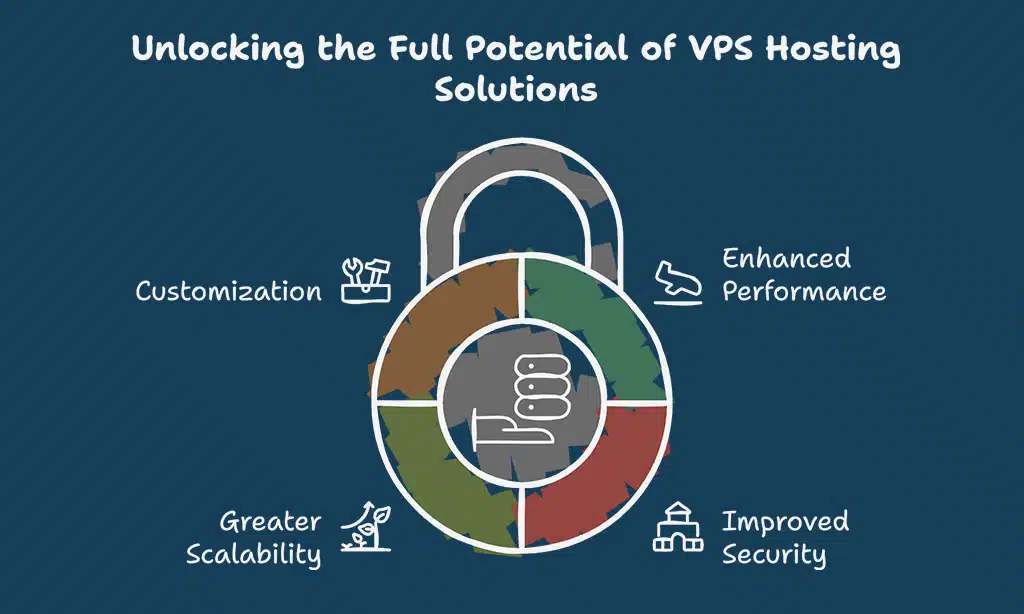
Shared hosting suits small-scale projects but often falls short as your website traffic grows. Consider migrating to VPS hosting for:
- Enhanced Performance: Dedicated resources result in faster load speeds and improved user experience.
- Improved Security: Isolated environment reduces vulnerabilities, ensuring greater data protection.
- Greater Scalability: Easily upgrade resources as your website expands.
- Customization: Enjoy full control over your server configuration and software installations.
Key Factors to Consider Before Migration
Before using any of these 7 tools to help you migrate from shared hosting to VPS, ensure you:
- Backup Data Completely: Prevent data loss by securing backups.
- Minimize Downtime: Schedule migrations during off-peak hours.
- Check Compatibility: Confirm your software and plugins will function on your new VPS.
- Manage DNS Effectively: Prepare for DNS propagation delays with temporary URLs.
Transitioning from shared hosting to a VPS can greatly enhance your website’s capabilities, but selecting the right tool for the migration is crucial.
Below, we explore seven of the most effective and user-friendly migration tools available, each offering distinct features to cater to different user needs, skill levels, and website complexities.
This comprehensive overview will help you determine the best tool to ensure your migration process is smooth, secure, and efficient.
1. cPanel & WHM Transfer Tool
The cPanel & WHM Transfer Tool significantly simplifies the migration process for websites currently hosted on cPanel-based shared hosting, offering a streamlined, user-friendly interface that even beginners can navigate with ease. This tool efficiently automates the transfer of your website files, databases, email accounts, and configurations, drastically reducing the manual effort required.
Additionally, it minimizes downtime by performing most tasks behind the scenes, ensuring your website remains accessible throughout most of the migration. Ideal for administrators seeking a hassle-free solution, this tool is specifically optimized for seamless cPanel-to-cPanel migrations.
| Features | Details |
| Interface | User-friendly |
| Downtime | Minimal |
| Automation | Fully automated transfers |
| Platform Limitation | Only cPanel-to-cPanel migrations |
Practical Insights
- Ensure your licenses for both servers are valid.
- Confirm version compatibility to prevent data corruption.
2. Duplicator WordPress Plugin
Duplicator is one of the easiest tools to help you migrate WordPress sites to VPS, offering robust backup and cloning functionalities that simplify the entire migration process. This powerful yet user-friendly plugin enables seamless website transfers by creating a complete backup of your files, database, themes, plugins, and content, which can then be moved and reassembled effortlessly on your new VPS.
Duplicator ensures data integrity and significantly reduces downtime, making it particularly valuable for beginners or non-technical users. Additionally, the plugin offers a premium version equipped with enhanced features, such as scheduled backups, multisite migrations, and direct cloud storage integrations, further catering to websites of varying sizes and complexities.
| Key Advantages | Details |
| User Interface | Simple and intuitive |
| Migration Method | One-click site duplication |
| Compatibility | Specifically designed for WordPress |
| Downtime | Nearly zero downtime |
Practical Insights
- Always perform a preliminary test migration on a staging environment.
- Large sites should use the premium version for improved support.
3. Plesk Migrator Tool
The Plesk Migrator Tool excels in facilitating migrations between Plesk-managed hosting platforms, offering a comprehensive and robust solution for users transitioning their websites and applications. It effectively manages the transfer of various data types, including websites, databases, emails, and server settings, minimizing manual work and potential errors.
By providing an intermediate-level user interface, the tool balances complexity and flexibility, making it particularly valuable for users familiar with hosting technologies but looking for ease of use.
The Plesk Migrator Tool also supports multiple hosting providers, ensuring compatibility across diverse platforms, and includes helpful built-in validation checks to identify potential migration issues before they occur, significantly enhancing migration reliability and success rates.
| Features | Details |
| Versatility | Compatible with numerous hosting providers |
| Complexity Level | Intermediate |
| Migration Quality | Comprehensive data migration |
Practical Insights
- Familiarize yourself with the Plesk interface to streamline the migration.
- Validate compatibility of your applications with newer Plesk versions.
4. SSH & rsync
Combining SSH [Secure Shell] and rsync provides unparalleled control, speed, security, and flexibility, making it a highly powerful choice for technical users and experienced administrators. SSH ensures secure, encrypted communication between servers, while rsync efficiently synchronizes files and directories, reducing data transfer time by transmitting only the changes rather than complete files.
This combination is ideal for large-scale migrations involving significant data, complex directory structures, or scenarios requiring frequent incremental backups. Although it demands familiarity with command-line operations, mastering SSH and rsync significantly streamlines complex migrations, minimizes downtime, and ensures data integrity throughout the transfer process.
| Features | Details |
| Speed | Rapid data transfer |
| Security | Encrypted transfers |
| User Level | Advanced |
| Flexibility | Extensive control |
Quick Commands Reference:
- Synchronize directories: rsync -avz source destination
- Securely access server: ssh user@host
Practical Insights
- Master command-line basics before initiating migration.
- Use incremental backups with rsync for large databases.
5. Cloudways Migrator Plugin
Cloudways offers a beginner-friendly migration plugin tailored specifically for migrating to Cloudways VPS hosting, making it exceptionally easy even for users with minimal technical knowledge. This specialized plugin automates most of the migration process, efficiently transferring your entire website—including files, databases, themes, and plugins—with virtually no downtime.
Additionally, it features built-in compatibility checks and staging environments, enabling users to preview and test their sites extensively before fully completing the migration. Highly recommended for small to medium-sized businesses and blogs transitioning from shared hosting, the Cloudways Migrator ensures a smooth, stress-free migration experience.
| Features | Details |
| Usability | Highly intuitive |
| Downtime | Virtually zero |
| Cost | Completely free |
| Specialization | Optimized for Cloudways platform |
Practical Insights
- Ideal for small to medium-sized WordPress websites.
- Offers built-in staging for safer migration.
6. UpdraftPlus
UpdraftPlus is a comprehensive and versatile backup and migration tool widely trusted by beginners and experienced website administrators alike. Its intuitive interface makes it easy for users of all skill levels to create and manage complete backups, schedule regular automated backups, and seamlessly restore websites with minimal downtime.
UpdraftPlus supports integration with various cloud storage providers, including Google Drive, Dropbox, Amazon S3, and others, allowing secure and accessible storage of backup files.
The premium version further enhances functionality with advanced features such as incremental backups, multisite support, migration tools, and premium support, ensuring reliable performance for websites ranging from small blogs to large e-commerce platforms.
| Features | Details |
| Backup Options | Scheduled and manual backups |
| Cloud Integration | Google Drive, Dropbox, AWS |
| Accessibility | Easy restoration options |
| Cost Structure | Free version available, premium options offer enhanced features |
Practical Insights
- Schedule frequent backups for high-traffic websites.
- Utilize incremental backups for efficiency.
7. Bluehost VPS Migration Tool
Bluehost’s migration tool effectively streamlines the transition for Bluehost shared hosting customers upgrading to a Bluehost VPS environment. Specifically designed for simplicity and ease of use, this tool provides a seamless and intuitive migration process that automatically handles the transfer of all website data, including databases, emails, configurations, and content.
Users benefit from its automated features, which significantly reduce the technical complexities and manual tasks typically associated with migrations. Additionally, Bluehost’s migration tool minimizes downtime by intelligently scheduling data transfers, ensuring your website remains accessible to visitors throughout most of the migration process.
Backed by Bluehost’s dedicated customer support, it provides guidance at each step, making it an ideal choice for users seeking a straightforward, reliable, and hassle-free migration experience.
| Features | Details |
| Ease of Use | Extremely user-friendly |
| Migration Automation | Fully automated processes |
| Downtime | Minimal interruptions |
| Compatibility | Optimized specifically for Bluehost hosting environments |
Practical Insights
- Perfect for Bluehost users who want hassle-free migration.
- Provides step-by-step guidance and customer support throughout the migration process.
Common Challenges and Solutions During Migration
Potential migration hurdles include common issues such as unexpected downtime, data integrity risks, compatibility problems, and DNS propagation delays, which can affect user access and overall website performance.
Additionally, inadequate planning or insufficient testing before migration can result in disrupted services and technical complications. To overcome these challenges effectively, meticulous preparation, comprehensive backups, detailed compatibility checks, and the strategic selection of migration tools are essential for ensuring a smooth and successful transition.
- DNS Propagation Delays: Typically 24-48 hours. Use temporary URLs to manage this.
- Data Loss Risks: Ensure comprehensive backups are conducted before migration.
- Compatibility Issues: Verify all software and plugins before starting migration.
- Downtime: Schedule migrations strategically during low-activity periods.
Takeaways
Choosing effective tools to help you migrate from shared hosting to VPS ensures an efficient, secure, and smooth transition. Each of the discussed tools addresses specific scenarios and user needs, helping you select the right solution tailored to your requirements. Leverage the detailed insights and practical tips provided here to confidently transition your website to a more robust, scalable hosting environment, thereby enhancing user experience and supporting continued growth.
Remember to carefully assess your site’s unique needs, perform thorough backups, and conduct multiple tests to guarantee a successful migration. Regularly monitor your new VPS environment post-migration, optimize server settings for peak performance, and remain proactive in addressing potential issues.
Ultimately, the right migration strategy will position your website for sustained reliability and long-term online success.





















