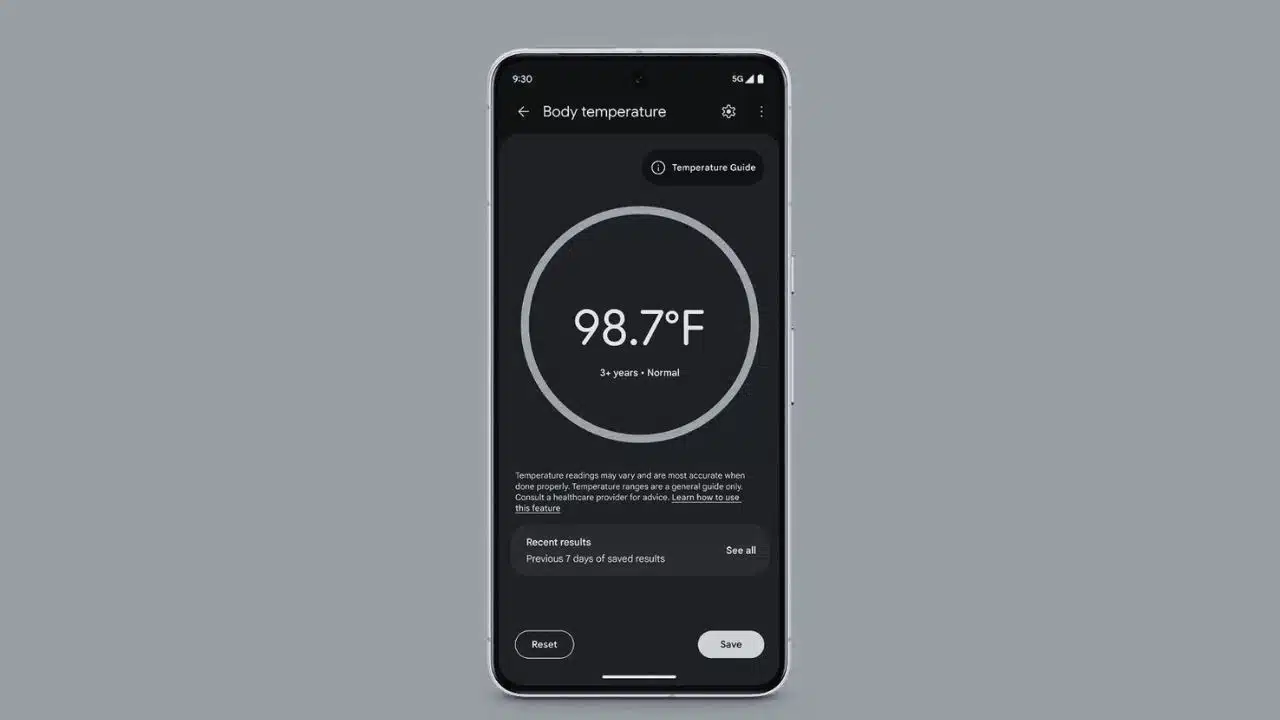
At the beginning of this year, Google made headlines by adding body temperature measurement capabilities to its Pixel Thermometer app, initially available in the United States. This feature allowed users to leverage the advanced sensors in their Pixel devices to measure and track their body temperature. Now, Google is expanding this capability to include users in Europe, bringing this health-focused feature to a wider audience. This expansion represents a significant step in Google’s ongoing efforts to integrate more health and wellness features into its ecosystem, particularly in regions where such functionality has been highly anticipated.
Enhanced Functionality with Body Temperature Monitoring
The body temperature feature in the Pixel Thermometer app is designed to be user-friendly and efficient. Once the feature becomes available, users will notice that the app’s home screen now includes both “Object temperature” and “Body temperature” options. This addition is particularly valuable for those who want to monitor their health more closely, especially in the context of rising awareness about the importance of regular health checks.
Setting up the body temperature measurement is a seamless process. Users can connect their Fitbit account during the setup, allowing them to log and track their temperature readings over time. This integration with Fitbit adds another layer of utility, as it enables users to keep all their health data in one place, making it easier to monitor trends and share information with healthcare providers if necessary.
The temperature measurement process itself is guided by voice prompts within the app. This guidance is crucial for ensuring accurate readings, as the placement of the device is key to obtaining a reliable measurement. Users are instructed to hold their Pixel phone very close to their forehead, and then slowly move it to either their left or right temple. This process is quick, taking only about four seconds, making it convenient for daily use or for quick checks when feeling unwell.
Customizable Age-Specific Temperature Guide
One of the standout features of the Pixel Thermometer app is its customizable temperature guide. During the setup process, users are prompted to select an age range that best suits the person whose temperature is being measured. The available age categories include 0-3 months, 3-36 months, and 3+ years. This is particularly useful for parents or caregivers who might be monitoring the temperature of infants or young children, as the app adjusts its guidance based on the selected age range to provide more accurate and contextually relevant instructions.
For users who prefer a faster process and do not need the age-specific guidance, this feature can be disabled in the app’s settings. This flexibility ensures that the app can cater to a wide range of user needs, from quick self-checks to more detailed monitoring for different age groups.
Saving and Managing Temperature Data
After completing a temperature measurement, users are given the option to save their reading. These saved readings are stored in the “Recent results” section of the app, where they are kept for seven days. This short-term storage is beneficial for tracking changes in temperature over a period of time, which can be particularly useful for identifying patterns or monitoring recovery from illness.
Additionally, users have the option to save their temperature data directly to their Fitbit account. This integration between the Pixel Thermometer app and the Fitbit platform is a significant advantage for those who use Fitbit devices to monitor other health metrics such as heart rate, sleep patterns, and physical activity. The Fitbit app even features a floating action button (FAB) that provides a direct shortcut to the Pixel Thermometer, streamlining the process of taking and recording temperature readings.
User Interface and Compatibility Updates
While the Pixel Thermometer app has introduced these new features, it maintains the same user interface (UI) as last year. This consistency ensures that returning users do not have to learn a new system, while new users can benefit from the intuitive design that Google has implemented.
However, it’s important to note that the live camera preview feature—added to the Object temperature function on the Pixel 9 Pro series—does not carry over to the body temperature measurement. This omission is likely due to the nature of self-measurement, where the live camera preview might not be necessary or practical. Instead, the app focuses on providing a clear and straightforward user experience that emphasizes accuracy and ease of use.
For those using the Pixel 8 Pro, it’s worth mentioning that this feature is not available, despite the device’s advanced hardware. However, the app does include several new features, such as a seven-day history for temperature measurements and a “Routine measurements” option. This allows users to track the temperature of various objects, including food, liquids, and cooking surfaces, making the Pixel Thermometer a versatile tool for everyday use.
European Expansion and Supported Languages
Google’s expansion of the Pixel Thermometer’s body temperature feature to Europe is a major development, especially considering the growing demand for accessible health monitoring tools. According to a recent update in Fitbit’s support documentation, the body temperature feature will soon be available in the following European countries:
- Austria
- Belgium
- Czechia
- Denmark
- Estonia
- Finland
- France
- Germany
- Hungary
- Ireland
- Italy
- Netherlands
- Latvia
- Lithuania
- Norway
- Poland
- Portugal
- Romania
- Slovakia
- Slovenia
- Spain
- Sweden
- Switzerland
- United Kingdom
In addition to expanding to these countries, the app also supports a wide range of languages to accommodate users from different regions. Supported languages include Czech, Danish, Dutch, English, Estonian, Finnish, French, German, Hungarian, Italian, Japanese, Latvian, Lithuanian, Norwegian, Polish, Portuguese, Romanian, Slovak, Slovenian, Spanish, and Swedish. This broad language support ensures that users across Europe can access the app in their native language, making it more user-friendly and accessible.
Availability and Device Requirements
While the expansion of the Pixel Thermometer’s body temperature feature to Europe is a welcome development, it’s important to note that the feature is not yet live on all European devices. Google is gradually rolling out the update, and as of the latest reports, it has not been activated on many devices in the region.
To use the body temperature feature, users must have one of the supported devices, which include the Pixel 8 Pro, Pixel 9 Pro, and Pixel 9 Pro XL. Additionally, users need to have an active SIM or eSIM issued by a carrier based in one of the supported countries. This requirement ensures that the app functions correctly and that the temperature readings are accurate based on the region-specific settings.
A Significant Step for Health Monitoring
The expansion of the Pixel Thermometer app’s body temperature feature to Europe marks a significant step forward in personal health monitoring technology. By integrating this feature with the broader Fitbit ecosystem, Google is providing users with a powerful tool for tracking their health and wellness in a convenient and accessible way. As this feature becomes available across more devices and regions, it will likely play an important role in how individuals monitor their health on a daily basis.