Truecaller Added Live Caller ID Feature for iPhone Users

Truecaller Launch Live Caller ID

Listen to the Podcast:

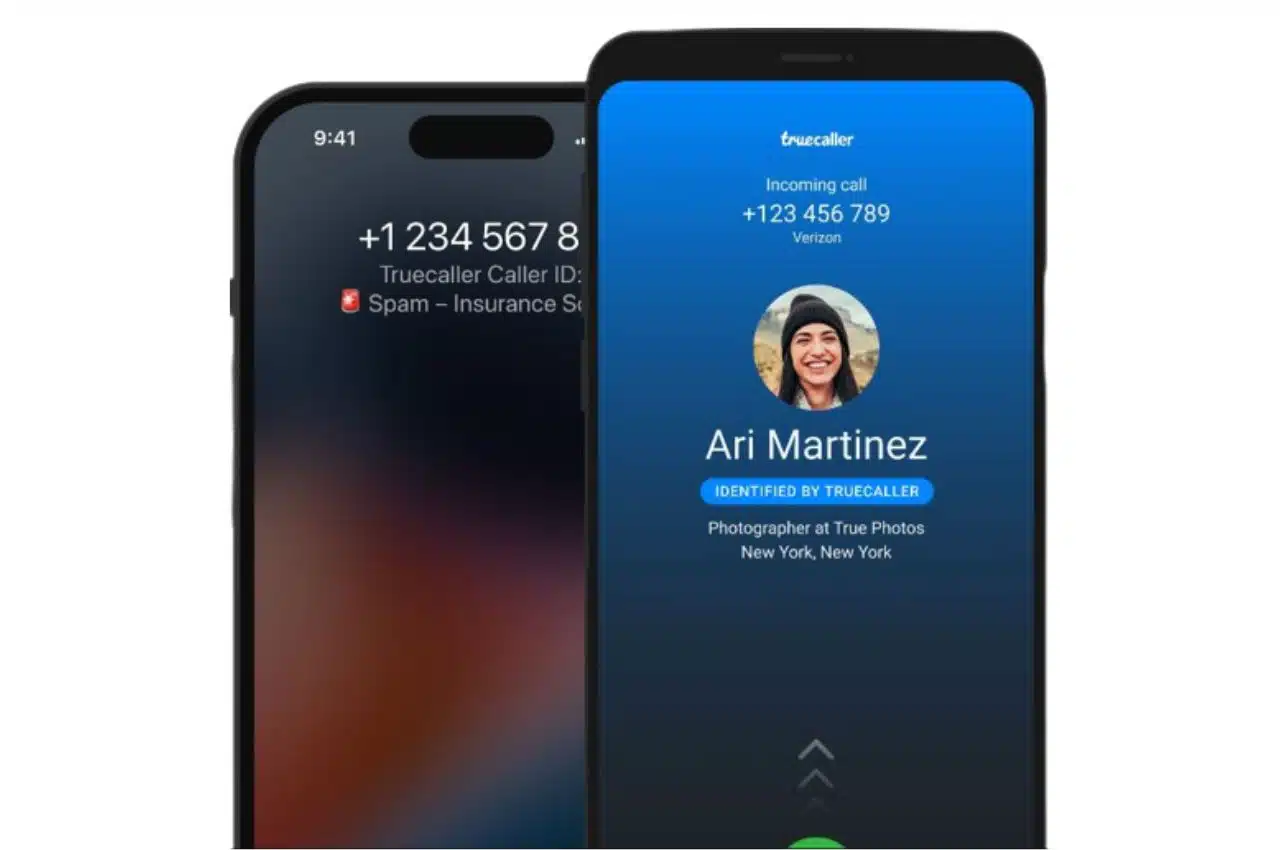
Truecaller has introduced a new Live Caller ID feature for iPhone users that expedites the process of discovering caller information. By integrating Apple’s virtual assistant, the platform enables users to quickly find the required information. However, not everyone has access to this capability due to certain restrictions.

Voice commands now allow iPhone users to activate Truecaller and seek information about unknown callers. By saying “Hey Siri, Search Truecaller” during an incoming call, the app retrieves the number and displays pertinent information at the top of the calling screen. However, this new feature is exclusive to Truecaller premium subscribers and is only available on iOS 16 or later devices. To access the latest update, users must purchase a Premium subscription.

Truecaller for iPhone’s most recent update uses Siri Shortcuts and App Intents to generate search results seamlessly. This update seeks to offer iPhone users a new level of convenience by removing the need for manual number searches and widget copy-pasting. The company emphasized that Live Caller ID with Siri searches the entire Truecaller database, yielding the same level of accuracy as Truecaller on Android.

To activate the Live Caller ID feature on Truecaller for iPhone, users must first navigate to the app’s Premium tab and select ‘Add to Siri.’ This feature allows the shortcut to be added to the device with a single touch. When first using the feature, the user will be prompted to grant Truecaller access. It is recommended to choose ‘Always allow’ to prevent future prompts. Once the Siri shortcut has been configured, users can activate the feature by simply stating “Hey Siri, search Truecaller” to obtain immediate caller information.

In addition to the Live Caller ID feature, the latest update to Truecaller enables users to view and remark on numbers that have been marked as spam. Users can now view feedback from other users regarding a fraudster, as well as report their own experiences with unknown callers. In addition, the update includes a redesigned SMS filtering function that automatically sorts incoming messages into categories such as Finance, Orders, Reminders, Coupons, Offers, and Junk. This feature is currently available in India, South Africa, and Nigeria on iOS 16 and later. Truecaller has stated that these features will shortly be made available in additional countries.


Subscribe to Our Newsletter

Related Articles

Top Trending

Top 10 Video Games You Must Play Before You Die
10 Surprising Facts About Ireland's EV Adoption Rate
10 Surprising Facts About How Ireland's EV Adoption Rate Is Finally Accelerating Toward European Norms
Remote Onboarding Strategy
Best Practices For Onboarding New Employees Remotely: What's The Right Approach?
Best Anime Stories Come From Japan
12 Anime Series That Prove the Best Anime Stories Come From Japan
Countries That Shut Down the Most Nuclear Power
Top 10 Countries That Shut Down the Most Nuclear Power

Fintech & Finance

TSX investing guide for Canadians
7 Critical Facts About TSX Investing Guide for Canadians
Consumer Data Right Australia
12 Essential Facts About How Australia's Consumer Data Right Is Transforming Open Banking
best canadian travel credit cards 2026
8 Best Canadian Credit Cards for Travel Rewards Compared in 2026
How to Use a Balance Transfer to Pay Off Debt Faster
Pay Off Debt Faster with a Smart Balance Transfer
Best High-Yield Savings Accounts Now
Best High-Yield Savings Accounts Of 2026

Sustainability & Living

Solar Panels Increase Home Resale Value
How Solar Panels Affect Your Home's Resale Value
Solar vs Coal
How Solar Energy Is Becoming Cheaper Than Coal
UK Blockchain Food Traceability Startups
12 UK Blockchain Solutions Ensuring Complete Farm-to-Fork Traceability
EV Adoption in Australia
13 Critical Facts About EV Adoption in Australia
Non-Toxic Home Finishes UK
10 UK Startups Revolutionizing Home Renovations with Non-Toxic Finishes

GAMING

Top 10 Video Games You Must Play Before You Die
How Cloud Gaming Is Changing Mobile Experiences
The Rise of Hyper-Casual Games What's Driving Downloads
Hyper-Casual Games Growth: Key Drivers Behind Massive Downloads
M&A in Gaming
Top 10 SMEs Specializing in M&A in Gaming in USA
Top 10 SMEs Specializing in Game Engines
Top 10 SMEs Specializing in Game Engines in the United States of America

Business & Marketing

Remote Onboarding Strategy
Best Practices For Onboarding New Employees Remotely: What's The Right Approach?
remote workplace culture impact
How Remote Work Has Permanently Changed Workplace Culture
ROI Of Employee Well-being
The Link Between Employee Wellbeing And Company Performance
Investing in Nordic stock exchanges
10 Practical Tips for Investing in Nordic Stock Exchanges
Best High-Yield Savings Accounts Now
Best High-Yield Savings Accounts Of 2026

Technology & AI

LLM Cost Optimization
The 120x Problem: Why Most Founders Are Overpaying for LLMs in 2026
GDPR compliant web design
15 Practical Tips for GDPR-Compliant Web Design
How to Build a Scalable App Architecture from Day One
Scalable App Architecture Strategies for Modern Startups
Why Most SaaS Startups Have a Strategy Gap and the Tools Closing It
Why Most SaaS Startups Have a Strategy Gap — and the Tools Closing It
Aya vs Google Translate
Aya vs Google Translate in 2026: Which AI Actually Understands Your Language

Fitness & Wellness

Codependency Recovery Stages
What Codependency Really Means And How To Break Free: Escape the Cycle!
understanding Attachment Styles
Understanding Attachment Styles And How They Affect Relationships!
Digital Fitness Apps in Germany
Digital Fitness Apps in Germany: 15 Startups Turning Phones Into Personal Trainers 
modern therapy misconceptions
Why Therapy Is Still Misunderstood And How To Find The Right Help
Physical Symptoms of Grieving: How It Works
Physical Symptoms of Grieving: How It Works And Why There's No Shortcut Through It