Dyslexia support often comes after a learner has already spent years feeling slow, careless, or behind. That delay is the real problem. A useful tool cannot replace good teaching, a proper assessment, or patient support, but it can remove barriers that make reading, writing, spelling, and studying harder than they need to be.
The United Kingdom was chosen after comparing three strong countries: the United Kingdom, the United States, and Australia. The United States has a large assistive technology market, and Australia has active innovation in dyslexia screening and neurodiversity tools. The UK, however, has the clearest concentration of specialist SMEs working directly in Dyslexia Support Tools, literacy intervention, accessible reading, spelling help, typing support, and study accessibility.
Our Selection Criteria
This list was not built around the loudest brands or the broadest edtech claims. A company had to show a direct link to dyslexia support or to a practical barrier many dyslexic learners face.
Here is how the country choice was narrowed down.
| Rank | Country | Why It Made The Top 3 | Final Decision |
|---|---|---|---|
| 1 | United Kingdom | Strong mix of specialist dyslexia software, literacy tools, reading access products, and assistive technology SMEs | Selected |
| 2 | United States | Large education and accessibility market with major reading and learning platforms | Not selected because several leading options are large providers, nonprofits, or less cleanly SME-focused |
| 3 | Australia | Strong activity in screening, school support, and neurodiversity-focused technology | Not selected because fewer specialist SMEs fit a complete top-10 list for this exact topic |
After selecting the United Kingdom, each company was checked against practical filters.
| Selection Filter | What We Looked For |
| Country fit | UK-based SME, specialist provider, or privately held assistive edtech company |
| Product relevance | Clear support for dyslexia, literacy, reading access, spelling, writing, typing, or study support |
| Public verification | Official website, company record, support page, product page, trusted directory, or public contact route |
| Real use case | Tools used by schools, tutors, parents, universities, workplaces, or independent learners |
| Specialist value | Products that address a specific barrier rather than vague learning improvement |
| Buyer clarity | Clear product explanation, website, contact route, or procurement path |
Some companies were excluded because they were too broad, too large, no longer clearly independent, or not directly focused on dyslexia-related support. That makes the list tighter and more useful for readers who actually need to compare options.
Top 10 Dyslexia Support Tools SMEs In The United Kingdom
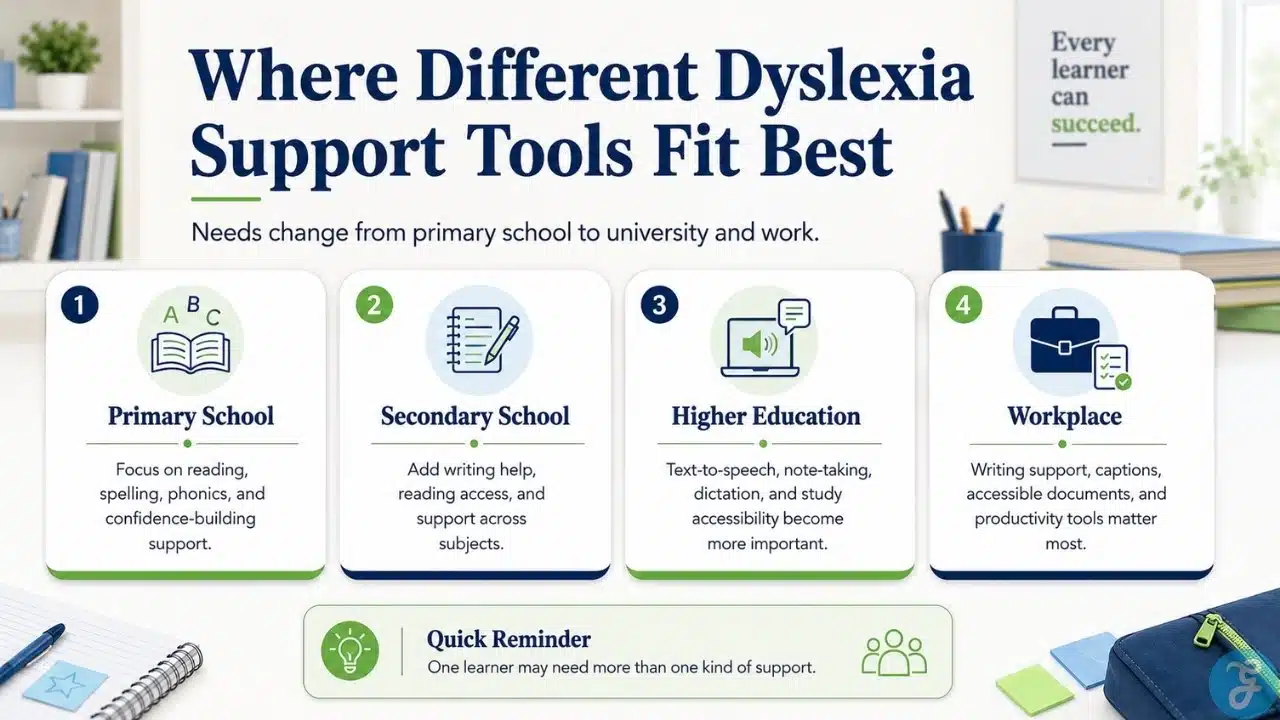
Dyslexia support is not one product category. A seven-year-old learning phonics, a teenager writing essays, a university student taking lecture notes, and an adult preparing workplace documents may need very different tools. The UK market is strong because it covers many of those needs without forcing every learner into the same solution.
1. Nessy Learning
Headquarters: Bristol, United Kingdom
Website: www.nessy.com
Email: info@nessy.co.uk
Nessy Learning is one of the UK’s best-known names in dyslexia-focused education software. Its tools support reading, spelling, writing, typing, early literacy, and dyslexia screening through structured, multisensory activities. The platform is especially useful for younger learners because it makes repeated practice feel less like a punishment. That matters because many dyslexic children need repetition, but they also need to protect their confidence.
Best for:
- Primary-age learners needing reading and spelling support
- Parents, tutors, and schools looking for child-friendly dyslexia tools
Why We Chose It:
- Strong focus on dyslexia and literacy from the start
- Covers reading, spelling, typing, and screening
- Easy for parents and teachers to understand
- Good fit for learners who need confidence-building as well as practice
Things to consider:
- Some older learners may find the style too young
- Adults should choose the right program path instead of leaving children to use it without direction
2. IDL
Headquarters: Lancaster, United Kingdom
Website: www.idlsgroup.com
Email: hello@idlsgroup.com
IDL is built for structured support rather than casual practice. Its literacy platform is closely associated with dyslexia intervention because it uses a multisensory approach to reading and spelling. The company also offers numeracy, wellbeing, and screening tools, which makes it useful for schools working with mixed learning needs. IDL is a sensible choice for support teams that want consistency across learners, not just another app for occasional use.
Best for:
- School-based literacy intervention
- Learners with dyslexia, dyscalculia, or wider additional needs
Why We Chose It:
- Practical fit for SEND teams and intervention staff
- Supports literacy, numeracy, screening, and wellbeing
- Designed for repeated school use
- Clear UK presence and contact route
Things to consider:
- It needs a planned intervention routine
- Buying the platform alone will not fix weak support planning
3. Scanning Pens
Headquarters: Wiltshire, United Kingdom
Website: www.scanningpens.co.uk
Email: ukinfo@scanningpens.com
Scanning Pens makes portable reading pens that scan printed text and read it aloud. This is not a literacy intervention program, and it should not be treated as one. Its value is access. For a learner who understands the subject but struggles to decode printed text quickly, a reading pen can make textbooks, worksheets, exam materials, and workplace documents less dependent on adult help.
Best for:
- Independent access to printed text
- Learners who understand better when text is read aloud
Why We Chose It:
- Strong practical use for dyslexia and reading difficulties
- Works away from a computer or tablet setup
- Useful in schools, colleges, libraries, exams, and workplaces
- Helps learners rely less on someone else reading for them
Things to consider:
- It does not teach reading skills by itself
- Exam use should be checked against current access arrangement rules
4. Crick Software
Headquarters: Northampton, United Kingdom
Website: www.cricksoft.com
Email: info@cricksoft.com
Crick Software develops inclusive reading and writing tools used in many school settings. Products such as Clicker and DocsPlus help learners plan, write, listen back to text, build sentences, and organize ideas. That is valuable for dyslexic learners who may have strong ideas but struggle to get them onto the page clearly. Crick’s tools fit well inside normal classroom work, which makes them useful beyond one-to-one support sessions.
Best for:
- Classroom writing support
- Learners who need help with sentence building, spelling, planning, and text review
Why We Chose It:
- Long-running UK specialist in inclusive education software
- Useful for targeted support and whole-class inclusion
- Strong fit for writing barriers linked to dyslexia
- Helps teachers support literacy across subjects
Things to consider:
- It is broader than dyslexia-only software
- Teachers should introduce features gradually so learners are not overloaded
5. Dolphin Computer Access
Headquarters: Worcester, United Kingdom
Website: www.yourdolphin.com
Email: support@yourdolphin.com
Dolphin Computer Access develops assistive technology that helps people access digital text and information more independently. Its EasyReader product is relevant for dyslexic learners and others with print-access needs because it supports accessible digital reading. This is especially useful for older learners who need to handle longer texts, digital books, or study materials. Dolphin is strongest when the problem is access to reading material rather than early reading instruction.
Best for:
- Accessible digital reading
- Learners with dyslexia, visual impairment, or print-access needs
Why We Chose It:
- Strong UK background in assistive technology
- Useful in schools, universities, libraries, and adult learning
- Supports independent access to reading materials
- Relevant beyond childhood literacy support
Things to consider:
- It is not a phonics or spelling intervention program
- Buyers should match the tool to access needs, not general literacy goals
6. Touch-Type Read And Spell
Headquarters: Chislehurst, Kent, United Kingdom
Website: www.readandspell.com
Email: support@readandspell.com
Touch-Type Read and Spell, often shortened to TTRS, teaches typing through a literacy-based method. For many dyslexic learners, typing is not just a technical skill. It can reduce the strain of handwriting, spelling uncertainty, and slow written output. TTRS is useful because it connects keyboard fluency with reading and spelling practice, making it relevant for children, teenagers, university students, and adults.
Best for:
- Dyslexia-friendly typing practice
- Learners who need support with spelling, reading, and written fluency
Why We Chose It:
- Connects typing skills with literacy development
- Suitable across a wide age range
- Helpful for learners who find handwriting tiring or slow
- Clear support contact and long-running product presence
Things to consider:
- Progress depends on regular use
- Younger learners may need adult help to stay consistent
7. Wordshark
Headquarters: United Kingdom
Website: www.wordshark.co.uk
Email: sales@wordshark.co.uk
Wordshark provides reading, spelling, phonics, grammar, and vocabulary practice through short games and activities. That approach can help learners who need repetition but quickly disengage from worksheets. It is not a complete replacement for structured teaching, but it can make practice less draining. Wordshark is strongest when an adult knows the learning target and uses the activities to reinforce it.
Best for:
- Short reading and spelling practice
- Schools, tutors, and families supporting dyslexic learners
Why We Chose It:
- Good fit for dyslexia and SEN literacy practice
- Makes repeated practice more manageable
- Covers several literacy subskills
- Public sales contact available
Things to consider:
- Some older learners may not like the game-based style
- It should be used with a clear learning aim, not as generic screen time
8. Spellzone
Headquarters: York, United Kingdom
Website: www.spellzone.com
Email: Not publicly listed
Spellzone is an online spelling platform for schools, students, adults, and independent learners. It offers diagnostic tests, word lists, spelling games, activities, and progress tracking. For dyslexic learners, spelling support needs to be structured and patient. Spellzone is most useful when the main barrier is spelling accuracy rather than broader reading access or writing organization.
Best for:
- Online spelling practice
- Schools and learners needing structured spelling support
Why We Chose It:
- UK-based specialist spelling platform
- Useful for dyslexic learners and English learners
- Includes diagnostics, activities, and progress tracking
- Works for school and home use
Things to consider:
- It is not a full dyslexia intervention suite
- Learners may need guidance choosing the right level and word lists
9. Claro Software
Headquarters: London, United Kingdom
Website: www.clarosoftware.com
Email: support@everway.com
Claro Software is associated with assistive reading and writing tools such as ClaroRead. These tools can support text-to-speech, writing, spell checking, word prediction, screen tinting, and study workflows. ClaroRead is especially relevant for older students who need help handling digital text and producing written work. It is not limited to dyslexia, but dyslexic learners are clearly among the users who may benefit from its access and writing support features.
Best for:
- Reading and writing support across study and work
- Older students who need text-to-speech and writing assistance
Why We Chose It:
- Long-standing UK assistive technology product family
- Strong relevance to dyslexia and print-related barriers
- Useful in higher education and workplace settings
- Combines several access features in one toolset
Things to consider:
- Current licensing and support routes should be checked before purchase
- Younger learners may not need the full feature set
10. CareScribe
Headquarters: Bristol, United Kingdom
Website: www.carescribe.io
Email: hello@carescribe.io
CareScribe builds assistive technology for disabled and neurodivergent people in education and work. Its products include Caption.Ed and TalkType, which support captioning, transcription, note-taking, and dictation. CareScribe is not a dyslexia-only company, but it belongs here because dyslexia support often extends beyond reading and spelling. For university students and professionals, lecture capture, meeting notes, dictation, and written output can be the real daily pressure points.
Best for:
- Higher education and workplace accessibility
- Learners who need captions, dictation, transcription, or note-taking help
Why We Chose It:
- UK-based assistive technology SME
- Strong relevance for neurodivergent learners
- Practical support for lectures, meetings, study, and work
- Useful beyond school-age literacy support
Things to consider:
- It is not a reading intervention product
- Best suited for older learners, university students, and professionals
An Overview Of United Kingdom SMEs Specializing in Dyslexia Support Tools
The strongest UK providers do not all solve the same problem. That is useful because dyslexia can affect reading fluency, spelling, handwriting, typing, working memory, organization, processing, confidence, and access to text.
The comparison below is meant to help readers match a tool to the barrier.
Overview Comparison Table
| Company | Best Fit | Main Tool Type | Strongest Use Case |
| Nessy Learning | Primary learners, parents, tutors, schools | Literacy, spelling, typing, screening | Child-friendly dyslexia and literacy support |
| IDL | Schools and intervention teams | Literacy, numeracy, wellbeing, screening | Structured school-based intervention |
| Scanning Pens | Students, exams, libraries, workplaces | Reading pen hardware | Independent access to printed text |
| Crick Software | Primary and secondary schools | Reading and writing software | Classroom writing support |
| Dolphin Computer Access | Schools, universities, libraries, adults | Accessible reading software | Digital reading access |
| Touch-Type Read And Spell | Children, teens, adults | Typing and literacy program | Typing, spelling, and reading confidence |
| Wordshark | Schools, tutors, families | Literacy games and activities | Repeated reading and spelling practice |
| Spellzone | Schools and independent learners | Online spelling platform | Structured spelling improvement |
| Claro Software | Older students, universities, workplaces | Reading and writing assistive software | Text-to-speech and writing support |
| CareScribe | University students and professionals | Captioning, dictation, note-taking | Study and workplace accessibility |
A primary school may find Nessy or IDL more useful for early support. A university student dealing with lectures and long reading lists may need CareScribe, Dolphin, or ClaroRead instead. A learner who can understand the material but cannot decode printed text quickly may get more immediate value from Scanning Pens.
Our Top 3 Picks And Why?
- Nessy Learning
Nessy is the strongest all-round choice for younger learners. It is dyslexia-focused, easy to understand, and useful for reading, spelling, typing, and confidence-building. - IDL
IDL is the strongest school intervention option. It fits schools that need planned support across learners rather than a single-purpose app for occasional practice. - Scanning Pens
Scanning Pens is the strongest access-focused option. It does not teach every literacy skill, but it can help learners read printed material more independently during real school, exam, or work situations.
These three lead for different reasons. Nessy supports early literacy, IDL supports structured intervention, and Scanning Pens supports immediate access.
Why Are Dyslexia Support Tools Booming In The United Kingdom?
Demand is rising because schools, universities, parents, and workplaces are becoming more aware of what dyslexia actually affects. It is not only about reading slowly. It can affect spelling, written output, note-taking, working memory, processing speed, and confidence.
There is also a practical reason. Many education systems still rely heavily on text, timed tasks, written answers, and independent reading. Learners who struggle with those formats need more than encouragement. They need tools that reduce friction while they continue building skills.
What’s Special About Them?
The best UK SMEs in this category tend to be specific. They are not all selling the same broad learning platform. Some focus on literacy intervention. Some focus on reading access. Others focus on typing, spelling, captions, dictation, or study support.
That variety helps because dyslexia support needs to change with age and context.
- A young child may need structured phonics and spelling support
- A secondary student may need writing and reading tools across subjects
- A university student may need note-taking, text-to-speech, and lecture support
- An adult professional may need dictation, spelling support, or accessible documents
Good tools reduce shame as well as workload. That should not be treated as a soft benefit. A learner who feels embarrassed every time they read aloud or submit writing may start avoiding tasks before anyone notices the pattern.
The Better Choice Starts With The Barrier
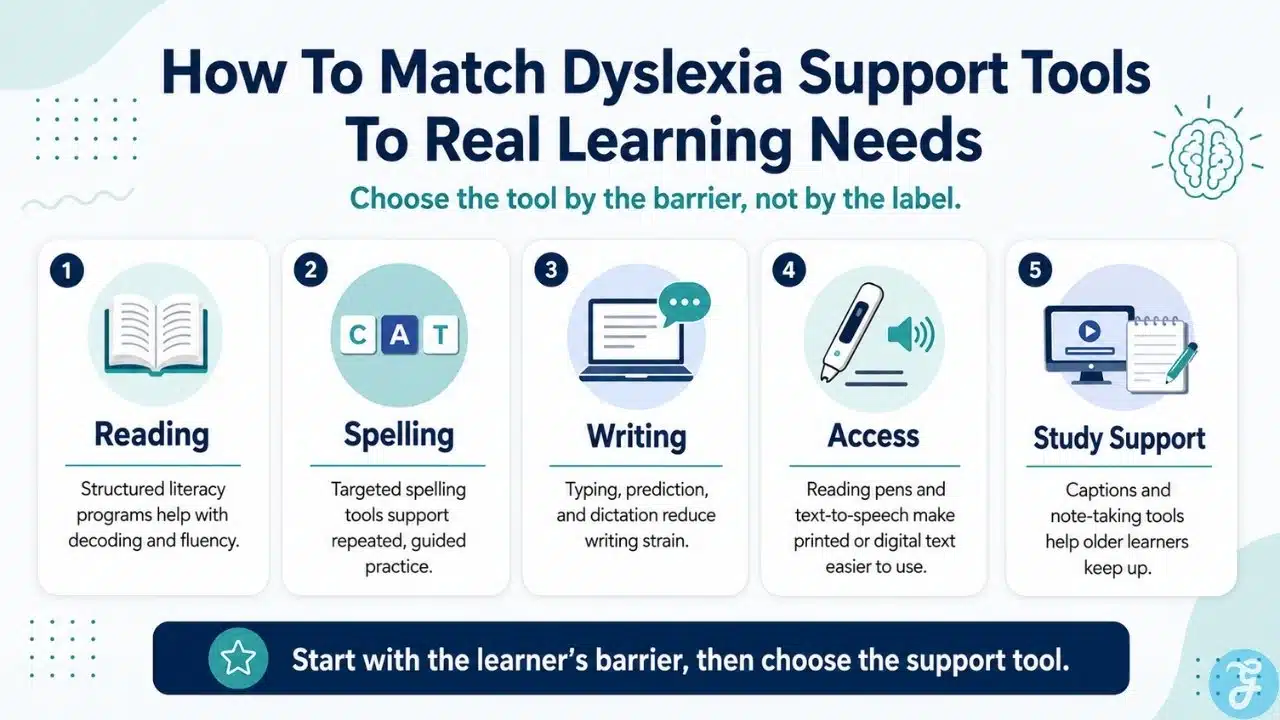
The future of Dyslexia Support Tools in the United Kingdom looks promising, but the best results will not come from buying the most popular platform. They will come from better matching. A spelling tool will not solve a note-taking problem. A reading pen will not replace structured literacy teaching. A captioning tool will not help much if the learner’s main barrier is decoding basic words.
Schools and families should ask a simple question before choosing any tool: what is the learner struggling to do right now?
That answer should guide the choice. If the problem is early reading, look at structured literacy tools. If the problem is printed text access, consider reading pens or text-to-speech. If the problem is written output, typing, dictation, or writing support may matter more. If the learner is older and struggling with lectures, meetings, or long study materials, note-taking and captioning tools may be more useful than another spelling game.
The UK has a strong specialist market, and that is encouraging. The next step is using these tools with more judgment. Dyslexic learners do not need technology that makes schools look modern. They need support that helps them read, write, study, and work with less friction and more independence.
Frequently Asked Questions (FAQs) About Dyslexia Support Tools In The United Kingdom
What Are Dyslexia Support Tools?
Dyslexia support tools help learners with reading, spelling, writing, typing, note-taking, or access to printed and digital text. They can include literacy programs, reading pens, spelling platforms, text-to-speech tools, dictation software, and captioning apps.
Why Was The United Kingdom Selected For This List?
The United Kingdom was selected because it has a strong concentration of specialist dyslexia and assistive technology SMEs. The market includes companies focused on literacy intervention, reading access, writing support, spelling, typing, and study accessibility.
Are Dyslexia Support Tools Only For Children?
No. Some tools are designed for young learners, while others support teenagers, university students, adults, and professionals. Dyslexia-related barriers can continue into higher education and work, especially around reading load, written output, note-taking, and processing speed.
Can These Tools Diagnose Dyslexia?
Most tools cannot replace a formal diagnostic assessment. Some products may offer screening or indicators, but diagnosis should come from a qualified professional using appropriate assessment methods.
How Should Schools Choose The Right Tool?
Schools should begin with the learner’s specific barrier. A learner may need reading intervention, spelling practice, text-to-speech, typing support, captions, dictation, or note-taking help. The right tool is the one that fits that barrier, not the one with the longest feature list.