
Static Site Generators vs. Dynamic CMS is no longer a simple “pick one and move on” decision. In 2026, most teams choose based on outcomes, not hype. They want fast pages, stable SEO, smooth publishing, and fewer security issues. Some get that from a static-first approach. Others need the editorial control and built-in features of a dynamic CMS. Many land in the middle with a headless or hybrid setup.
The good news is that either model can work well. The trade-off is where the complexity lives. Static stacks push complexity into build tools and integrations. Dynamic stacks push complexity into servers, databases, and ongoing maintenance. This guide breaks down performance, SEO, security, workflow, cost, and scaling in plain language.
Static Sites, Dynamic CMS, And Hybrid Models
A static site generator (SSG) builds pages ahead of time. It creates HTML during a build process, then deploys those files to a CDN or static host. When visitors arrive, they get pre-built pages. That is why static sites often feel fast and stable under heavy traffic.
A dynamic CMS generates pages when a visitor requests them. It usually pulls content from a database, applies templates, runs modules or plugins, and serves HTML. This model is flexible and editor-friendly, but it has more moving parts at runtime.
Headless and hybrid models mix both ideas. A headless CMS stores content and delivers it through an API. Your front end can still be static, partly static, or server-rendered. In 2026, hybrids are common because they balance speed with publishing convenience.
| Term | What It Means | Typical Strength |
|---|---|---|
| Static Site Generator (SSG) | Builds HTML before visits | Speed, CDN scaling |
| Dynamic CMS | Renders pages on request | Editorial workflows, features |
| Headless CMS | Content backend via API | Flexibility, omnichannel delivery |
| Hybrid | Mix of static and dynamic rendering | Balanced performance and UX |
The 2026 Decision Framework: 10 Criteria That Actually Matter
To keep this verdict unbiased, compare outcomes instead of opinions. The same stack can be great or messy depending on execution. Use a scorecard that stays practical across industries.
Key criteria to compare:
-
Performance and Core Web Vitals
-
Security risk and update burden
-
Editorial workflow and publishing speed
-
Feature flexibility (dynamic needs)
-
Scalability and reliability
-
Total cost of ownership (TCO)
-
Integrations (martech, CRM, analytics)
-
Governance and compliance
-
Maintainability over 12 to 24 months
| Criterion | What To Measure | Red Flag Sign |
|---|---|---|
| Performance | LCP, INP, CLS, caching health | Fast in tests but slow for users |
| SEO | Index coverage, crawl stats | Key pages not indexed |
| Security | Update cadence, access control | Plugin sprawl, old components |
| Workflow | Drafts, approvals, preview | Editors need dev help for basics |
Performance In 2026: Speed, Core Web Vitals, And Real Users
Static-first delivery often wins on baseline speed because it removes runtime work. There is no database query for every visit. There is no template work under load. A CDN can serve cached HTML near users.
That does not mean dynamic CMS sites must be slow. With good hosting, caching, image optimization, and careful plugin control, a dynamic site can be fast. The issue is consistency. Dynamic stacks tend to drift into slower states over time as features stack up.
Modern hybrid rendering reduces the gap. Many frameworks support partial static generation or incremental rebuilds so you can update pages without rebuilding everything. This helps large sites publish changes quickly while still delivering fast pages.
Static Site Generators vs. Dynamic CMS performance decisions usually come down to one question: are most pages identical for every user, or do they change per user, per session, or per inventory state?
SEO In 2026: Ranking, Rendering, And Content Velocity
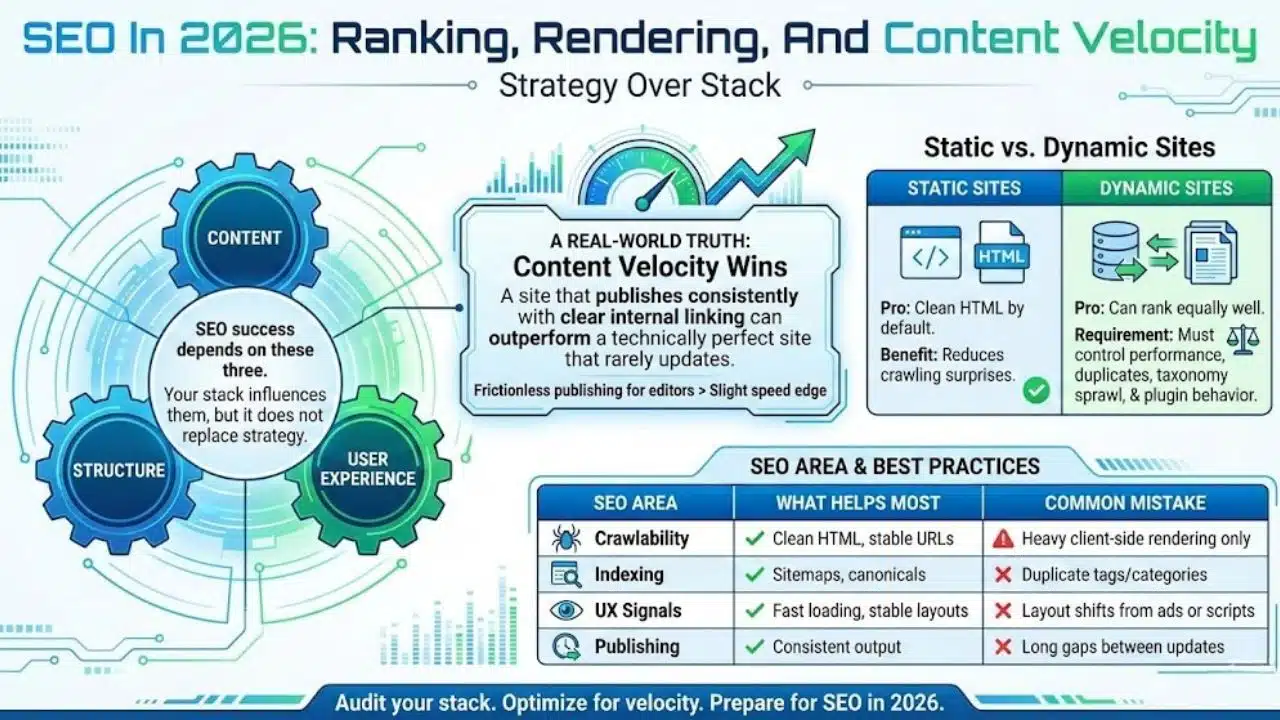
SEO success depends on content, structure, and user experience. Your stack influences all three, but it does not replace strategy.
Static sites often produce clean HTML by default. That can reduce crawling surprises. Dynamic sites can rank just as well, but teams must control performance, duplicates, taxonomy sprawl, and plugin behavior.
A real-world truth: content velocity often beats tiny technical advantages. A site that publishes consistently with clear internal linking can outperform a technically perfect site that rarely updates.
Static Site Generators vs. Dynamic CMS SEO decisions should also account for your team. If your editors need frictionless publishing, a CMS workflow might produce more wins than a slight speed edge.
| SEO Area | What Helps Most | Common Mistake |
|---|---|---|
| Crawlability | Clean HTML, stable URLs | Heavy client-side rendering only |
| Indexing | Sitemaps, canonicals | Duplicate tags/categories |
| UX signals | Fast loading, stable layouts | Layout shifts from ads or scripts |
| Publishing | Consistent output | Long gaps between updates |
Security In 2026: Attack Surface, Updates, And Operational Reality
Security is mostly routine. Who updates what. How often. How many entry points exist. How quickly you detect issues.
Static delivery often reduces public attack surface because there is no live database or admin panel on the public site. Dynamic CMS setups have more public-facing parts: logins, admin routes, plugins, databases, and server configs.
Static stacks still have risks. Those risks often shift to the build and dependency chain. If you use many packages and automation tools, you must protect your CI/CD secrets and review dependencies.
Static Site Generators vs. Dynamic CMS security decisions should be made with your organization’s discipline in mind. If you can enforce updates, audits, and access control, dynamic can be safe. If you struggle with patching and governance, static reduces risk exposure.
| Security Area | SSG Risk | Dynamic CMS Risk | What To Do |
|---|---|---|---|
| Public entry points | Fewer | More | Reduce exposure, add WAF |
| Updates | Dependencies, build tools | Core + plugins + server | Patch schedule and audits |
| Admin access | Often separate | Often built-in | MFA and least privilege |
| Supply chain | Higher importance | Medium | Lockfiles and scanning |
Editing And Workflow: Who Publishes Faster With Fewer Bottlenecks
This is where many decisions become obvious. Speed is not only page speed. It is also team speed.
Dynamic CMS platforms are built for content teams. Drafts, scheduling, revisions, approvals, and media libraries are standard. For large editorial teams, this alone can justify a dynamic CMS even if performance requires more work.
Static workflows have improved. Many teams pair an SSG with a headless CMS so editors get a friendly interface while developers keep tight control over performance.
Ask this question early: how often do you publish, and who presses publish?
| Workflow Need | Best Fit | Why |
|---|---|---|
| Many authors and approvals | Dynamic CMS | Built-in roles and drafts |
| Marketing pages with speed goals | Headless + SSG | Fast delivery with editor UI |
| Documentation and changelogs | SSG | Predictable content and structure |
| Shared ownership | Hybrid | Editors publish, devs guide UX |
Features And Flexibility: What Breaks First As You Scale
Static sites work best when content is predictable. The tension rises when you need accounts, personalization, comments, real-time pricing, or complex search.
Dynamic CMS systems handle many features natively or via ecosystems. That can speed delivery, but it can also increase technical debt if plugins pile up.
Hybrid setups often make sense because they keep content pages fast while isolating truly dynamic features in apps or services.
| Feature Type | SSG Approach | Dynamic CMS Approach | Practical Fit |
|---|---|---|---|
| Blog/marketing | Pre-built pages | Templates on request | SSG or hybrid |
| Membership | External auth + app | Built-in or plugins | Hybrid |
| E-commerce | APIs + static product pages | Plugins/platform tools | Depends on scale |
| Personalization | Edge/client logic | Server logic | Hybrid for most teams |
Cost In 2026: Total Cost Of Ownership Beats Cheap Hosting
Hosting is only one part of cost. The bigger costs are time, maintenance, and risk.
Static hosting can be low cost, but build pipelines and preview systems may require developer time. Add a headless CMS, and the subscription becomes part of your TCO.
Dynamic CMS hosting varies widely. Maintenance often costs more than hosting: updates, security, caching, backups, and performance work add up.
| Cost Driver | SSG | Dynamic CMS | Hybrid |
|---|---|---|---|
| Hosting | Often low | Low to high | Medium |
| Maintenance | Lower runtime, higher pipeline | Higher ongoing upkeep | Medium |
| Tooling | CI/CD, previews, optional CMS | Plugins, security tools | Both |
| Risk cost | Build chain | Plugin/server exposure | Shared responsibility |
Developer Experience And Maintainability Over 12–24 Months
The best system is the one your team can maintain without constant firefighting.
Static stacks can feel clean because runtime is simple. Many issues get solved at build time. Dynamic CMS stacks can be faster to ship early due to mature ecosystems, but they require governance to avoid plugin chaos and performance drift.
Set rules that protect you:
-
Approved plugins only
-
Scheduled update windows
-
Performance budgets
-
Content model guidelines
-
Clear ownership and support
| Topic | What Works | What Fails |
|---|---|---|
| Plugin governance | Allowlist | Install-first culture |
| Updates | Monthly cadence | Delaying updates for months |
| Performance budgets | Automated checks | Guess-based decisions |
| Content model | Defined types | Uncontrolled templates |
Scalability And Reliability: Spikes, Global Traffic, And Uptime
Static delivery scales naturally because CDNs are designed for it. Dynamic CMS sites can scale too, but they need the right architecture. Hybrid models reduce pressure by caching most pages while keeping dynamic parts separate.
| Scenario | SSG Outcome | Dynamic CMS Outcome | Hybrid Outcome |
|---|---|---|---|
| Viral post | Usually stable | Risk without caching | Usually stable |
| Launch spike | Stable if pre-built | Needs load planning | Strong with caching |
| Global readers | CDN edge delivery | Needs CDN tuning | Strong |
| Frequent updates | Build time matters | Instant publish | Fast with partial rebuilds |
Static Site Generators vs. Dynamic CMS: A Simple 2026 Decision Guide
If you want a fast decision, use these signals.
Choose static-first if:
-
Most pages are public and similar for all visitors
-
Speed is a top KPI
-
Your team is comfortable with structured content workflows
-
You want fewer public runtime entry points
Choose dynamic CMS if:
-
You publish frequently with multiple contributors
-
You need drafts, approvals, revisions, and scheduling
-
You rely on rich built-in features
-
You can commit to updates and governance
Choose hybrid if:
-
You want fast content pages and strong editing
-
You also need accounts, commerce, or personalization
-
You want to reduce performance drift long term
| Decision Signal | Best Fit | Why |
|---|---|---|
| High editorial volume | Dynamic CMS | Workflow wins |
| Performance as KPI | SSG or hybrid | Better baseline speed |
| Complex dynamic needs | Dynamic or hybrid | Runtime flexibility |
| Mixed priorities | Hybrid | Balanced architecture |
Migration Paths: Switch Without Losing SEO Or Control

Most ranking losses happen because of broken redirects and changed intent, not because the stack changed.
CMS to static tips:
-
Keep the same URL structure where possible
-
Plan 301 redirects for every changed URL
-
Preserve metadata and canonical rules
-
Validate sitemap and index coverage
-
Rebuild previews for editors
Static to CMS tips:
-
Protect slugs and taxonomy
-
Define content types before import
-
Audit media handling
-
Plan caching early
| Migration Task | Why It Matters | Quick Check |
|---|---|---|
| URL mapping | Protects rankings | Redirect sheet complete |
| Metadata parity | Protects CTR | Titles/descriptions match |
| Sitemap validation | Improves discovery | Submitted and tested |
| Speed baseline | Avoids regressions | CWV tracked and compared |
Final Thoughts: The 2026 Verdict
There is no single winner for every site. The best choice depends on your publishing workflow, feature needs, and maintenance discipline.
If you want speed and stability with fewer runtime parts, static-first is a strong fit. If you need heavy editorial workflows and built-in features, dynamic CMS remains the practical choice. If you want both performance and easy editing, hybrid is often the most realistic answer in 2026.
Static Site Generators vs. Dynamic CMS is best treated as a spectrum. Choose the mix that removes your biggest bottleneck and keeps your team moving.