
A SaaS launch day checklist is not just a nice project management document. It is the difference between launching with control and spending your first public day apologizing in support tickets. Most SaaS teams do not fail on launch day because they forgot to write a LinkedIn post. They fail because billing was not fully tested. The onboarding flow had one silent blocker. The welcome email landed in spam. The analytics events were missing.
The help docs were unfinished. The support team did not know what questions were coming. The founder was busy refreshing Product Hunt while new users were quietly getting stuck. That is the painful part of launching SaaS product campaigns. The public launch is exciting, but the real work happens behind the scenes.
A good launch day plan does not make the product perfect. No SaaS product launches perfectly. But it does help your team catch obvious mistakes, reduce panic, assign ownership, monitor the right signals, and turn attention into actual activation.
This guide walks through a practical SaaS launch checklist built for founders, marketers, product managers, and growth teams who want launch day to feel like a controlled release, not a public stress test.
For the broader strategy behind acquisition, onboarding, retention, and long-term SaaS momentum, read my complete SaaS Growth Marketing Guide.
Why SaaS Launch Day Needs a Real Checklist
A SaaS launch is different from launching a normal website, course, ebook, or agency service. With SaaS, people do not just read your page and leave. They sign up, verify email, enter payment details, create workspaces, invite teammates, connect tools, trigger automated emails, hit usage limits, open dashboards, and expect the product to work immediately.
That means launch day touches many moving parts:
- Product
- Engineering
- Billing
- Security
- Analytics
- Onboarding
- Marketing
- Sales
- Support
- Documentation
- Legal
- Customer success
- Founder communications
If one part breaks, the user experience can fall apart. A broken pricing page hurts conversion. A confusing onboarding step hurts activation. A failed webhook can block paid access. A missing support process can make early users feel ignored. A weak analytics setup can leave you guessing what happened.
That is why a SaaS launch day checklist should not only ask, “Did we publish the announcement?”
It should ask:
- Can new users sign up without help?
- Can paid users access what they paid for?
- Can the team see what users are doing?
- Can support respond quickly?
- Can engineering fix issues fast?
- Can marketing explain the product clearly?
- Can leadership decide whether to push harder, pause, or roll back?
A strong launch is not just loud. It is operationally ready.
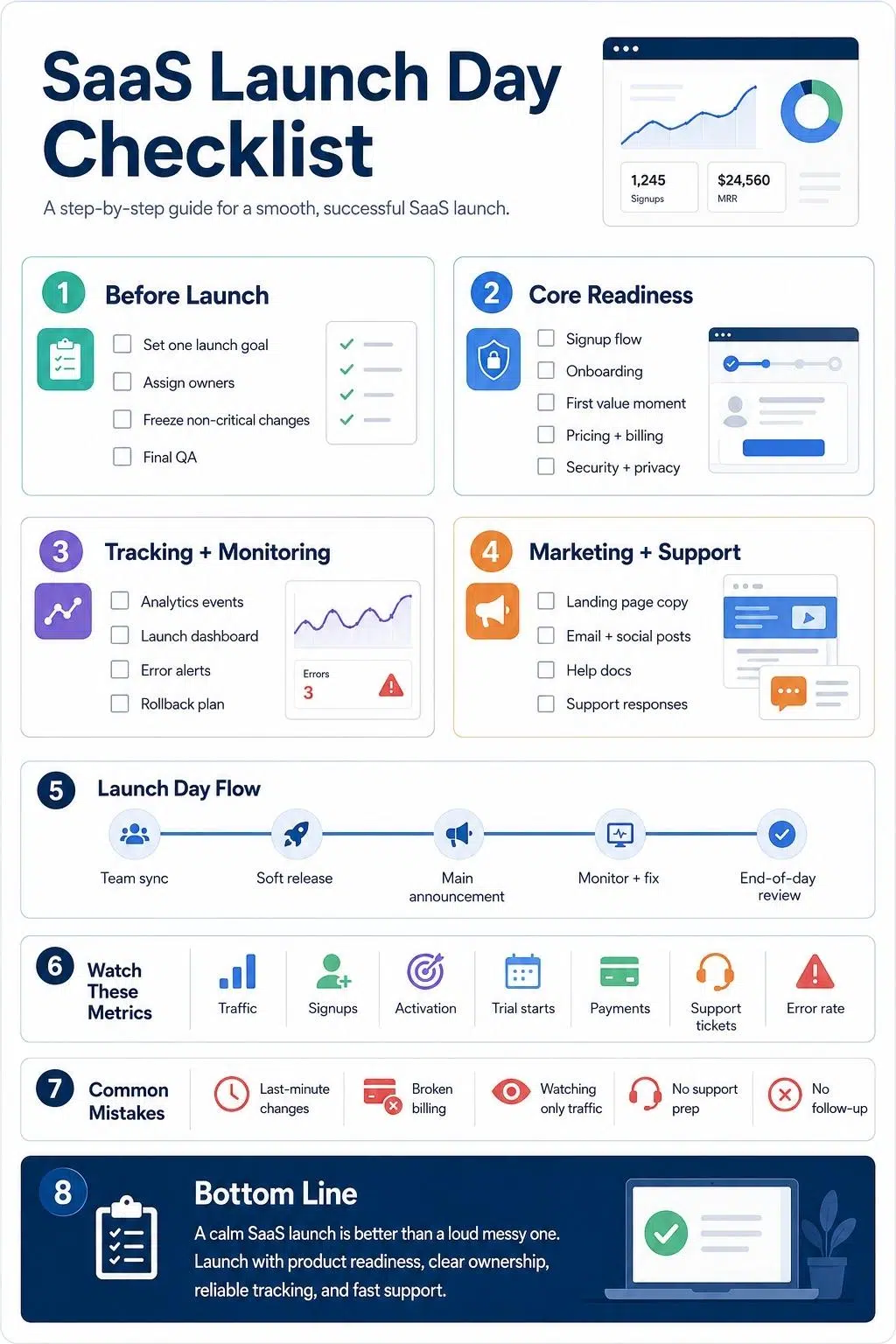
What Should Be Ready Before SaaS Launch Day?
Before launch day, your SaaS product should be usable, measurable, supportable, and explainable. That does not mean every feature must be finished. It means the core promise must work.
If your product says it helps marketing teams plan campaigns, users should be able to create an account, set up their workspace, create a campaign, invite a teammate if needed, and reach the first meaningful result without guessing.
If your product says it automates reporting, users should be able to connect data, generate a report, understand the output, and know what to do next. If your product says it replaces a manual workflow, the launch experience should prove that quickly.
Before launching, make sure these basics are ready:
- Core user flow works from signup to first value
- Pricing and plan limits are clear
- Billing and trial logic are tested
- Help docs answer obvious questions
- Analytics tracks the full user journey
- Support ownership is assigned
- Product monitoring is active
- Backup and rollback plans exist
- Launch messaging matches the actual product
- Team members know their roles
Launch day is not the time to discover that nobody owns failed payments, broken invite links, or angry replies from early users.
The Complete SaaS Launch Day Checklist
Use this checklist as a working launch day plan. You can adapt it for a new SaaS product, a major feature release, a public beta, a Product Hunt launch, or a relaunch after repositioning.
1. Confirm the Launch Goal Before Anything Goes Live
A messy launch often starts with a vague goal. “Get attention” is not a launch goal. “Make noise” is not a launch goal either.
Your launch goal should help the team make decisions. For example:
- Get 500 qualified signups in the first week
- Convert 50 beta users into active free trial users
- Book 20 demos from ideal customer profiles
- Drive 100 workspace creations
- Validate a new positioning angle
- Test pricing response from early adopters
- Move waitlist users into the product
- Generate feedback from a specific user segment
Your goal affects everything else. If your goal is signups, you need a strong landing page conversion and a smooth account creation. If your goal is demos, your sales handoff and calendar flow matter more. If your goal is activation, onboarding, and lifecycle emails become critical.
Do not let every team member define success differently. Write one primary launch goal and two or three supporting metrics. Keep them visible all day.
2. Assign a Launch Owner and Clear Team Roles
Launch day should have one clear owner. This person does not need to do everything. In fact, they should not. Their job is to coordinate decisions, monitor progress, and keep the team focused when things get noisy.
Assign roles before launch day:
| Role | Responsibility |
| Launch owner | Coordinates the full launch day plan |
| Product owner | Watches onboarding, product usage, and user feedback |
| Engineering lead | Handles bugs, uptime, performance, and rollback decisions |
| Marketing lead | Manages announcements, social posts, email, and launch channels |
| Support lead | Owns tickets, live chat, help docs, and user questions |
| Analytics owner | Monitors traffic, signups, activation, and tracking issues |
| Sales or founder lead | Handles demo requests, high-intent leads, and investor/customer replies |
This prevents the classic launch-day problem where everyone is busy, but nobody is responsible.
3. Freeze Non-Essential Product Changes
Do not keep changing the product until the last minute. Launch day is already full of moving parts. Last-minute edits can create fresh bugs, break tracking, confuse support, or change screenshots after marketing assets are ready. Create a launch freeze window.
For many SaaS teams, this means:
- No non-critical feature changes 24–48 hours before launch
- Only approved bug fixes are allowed
- Clear sign-off from product and engineering
- Final QA on signup, onboarding, billing, and core workflows
- Backup plan if a critical bug appears
This is especially important when launching SaaS product updates with billing, permissions, integrations, AI features, or team collaboration.
A simple rule helps:
If the change does not protect launch quality, improve activation, or fix a blocker, it waits.
4. Test the Full Signup Flow Like a Real User
Your signup flow is one of the most fragile parts of launch day. Do not test it only as an admin. Do not test it only on the same laptop your team uses every day. Test it like a real user who has never seen the product.
Check:
- Landing page CTA
- Signup form
- Email verification
- Password reset
- Social login, if available
- Workspace creation
- Team invite flow
- First onboarding step
- Trial start
- Plan selection
- Welcome email
- First in-app message
- Mobile and tablet behavior
- Browser compatibility
- Error messages
Use fresh accounts. Use different email providers. Test both happy paths and failure paths.
For example, what happens if someone enters the wrong password? What happens if the invite link expires? What happens if a user signs up but does not verify their email? What happens if a teammate accepts an invite before creating an account?
These are small details until launch day traffic exposes them.
5. Make Sure Users Can Reach the First Value Moment
The first value moment is the point where a user understands, “Okay, this can help me.” For SaaS, this matters more than total signups. A user who signs up but never reaches value is not a win. That is just traffic passing through your product. Before launch day, define your first value moment.
Examples:
| SaaS Type | First Value Moment |
| Project management SaaS | User creates the first project and assigns a task |
| Reporting SaaS | User connects data and generates the first report |
| Email marketing SaaS | User creates and sends or schedules the first campaign |
| CRM SaaS | User imports contacts and logs the first deal or interaction |
| AI writing SaaS | User generates useful draft output |
| Analytics SaaS | User sees meaningful dashboard data |
| HR SaaS | User creates a job post or employee record |
Once you define it, remove friction around it.
Ask:
- Can users reach this moment quickly?
- Are there too many setup steps?
- Are you asking for unnecessary information too early?
- Is the empty state helpful?
- Do users know what to do next?
- Is there a sample project, template, or guided path?
Launch day should not send users into a blank dashboard with no direction.
6. Check Pricing, Plans, Trials, and Billing
Billing mistakes are painful because they affect trust immediately. Before launch day, test your pricing and payment flow carefully.
Check:
- Pricing page accuracy
- Monthly and annual plan logic
- Free trial length
- Trial-to-paid transition
- Coupon codes
- Founder discounts
- Tax settings
- Invoices and receipts
- Upgrade and downgrade paths
- Plan limits
- Failed payment behavior
- Cancellation flow
- Refund policy
- Customer portal
- Webhook handling
- Access after payment
- Access after payment failure
Use real test cases. Do not only confirm that “Stripe is connected” or “payment works.” SaaS billing has many edge cases.
For example:
- Does a user get access immediately after payment?
- Does access update correctly after plan upgrade?
- Does the app handle failed payments clearly?
- Does the user receive the correct receipt?
- Does the invoice include the right company details?
- Does a canceled user lose access at the right time?
- Does a trial user receive the correct messaging before conversion?
Billing is not just a finance task. It is part of the product experience.
7. Review Security, Privacy, and Access Controls
Security is easy to push aside when everyone is focused on launch buzz. That is a mistake. A SaaS product usually handles user accounts, business data, payment information, files, integrations, or internal workflows. Even if you are an early-stage user, you need to trust yourself.
Before launch day, review:
- Authentication
- Password reset
- Email verification
- Role-based permissions
- Admin and user access levels
- Data visibility between accounts
- API keys and secrets
- File upload behavior
- Integration permissions
- Payment data handling
- Privacy policy
- Terms of service
- Cookie notice, where needed
- Data deletion process
- Backup process
- Error logs that may expose sensitive data
For team-based SaaS, permission testing is especially important. Can a member see admin-only billing? Can one workspace see another workspace’s data? Can removed users still access shared links? Can invited users access the wrong account?
These are not “later” problems. They are launch-day trust problems.
8. Set Up Product Analytics Before the Launch
You cannot improve what you cannot see. Launch day analytics should show more than traffic. They should show whether the launch is creating meaningful product usage.
Track events such as:
- Landing page visits
- CTA clicks
- Signup starts
- Signup completions
- Email verifications
- Workspace creations
- Onboarding completions
- First key action
- Feature usage
- Team invites
- Trial starts
- Plan upgrades
- Payment completions
- Cancellations
- Help doc views
- Support requests
Also, create a simple launch dashboard.
Include:
- Traffic by channel
- Signup conversion rate
- Activation rate
- Time to first value
- Drop-off points
- Paid conversion or trial starts
- Support ticket volume
- Error rates
- Uptime and performance
Do not wait until the day after launch to discover that tracking was broken. Analytics should be tested before the first campaign goes live.
9. Prepare Monitoring, Alerts, and Rollback Plans
Launch day needs a technical safety net. Even a small launch can create unexpected pressure on your app, database, email system, payment flow, or third-party integrations.
Before launch, confirm:
- Uptime monitoring
- Error tracking
- Server performance monitoring
- Database monitoring
- Payment webhook monitoring
- Email delivery monitoring
- API limits
- Queue processing
- Backup status
- Incident alerts
- On-call owner
- Escalation path
- Rollback process
The team should know what counts as a launch-blocking issue.
For example:
- Signup is broken
- Payments are failing
- Users cannot access paid features
- The app is down
- A major data visibility issue appears
- Critical onboarding step fails
- Email verification is not working
- Core feature returns errors
Write the rollback decision before launch day. In the middle of pressure, teams often debate too long. A predefined rollback plan saves time.
10. Finalize Your Landing Page and Website Copy
Your landing page should not sound like an internal roadmap. It should explain the product in plain language.
Before launch, review:
- Headline
- Subheadline
- Primary CTA
- Product screenshots
- Feature sections
- Use cases
- Social proof, if available
- Pricing link
- FAQ section
- Comparison or alternative pages, if relevant
- Terms and privacy links
- Mobile layout
- Page speed
- Form behavior
- Demo booking flow
Ask one hard question: Would a cold visitor understand what this product does within a few seconds?
Many SaaS launches lose users because the product is explained in founder language, not customer language.
Avoid vague launch copy like:
“Reimagining productivity for modern teams.”
Use clearer copy:
“Plan, assign, and track client projects in one workspace built for small agencies.”
Specific beats clever on launch day.
11. Prepare Your Launch Messaging
A good launch message explains the problem, the product, the audience, and the reason to care. Prepare different versions for different channels.
You may need:
- Homepage announcement
- Email to waitlist
- Email to beta testers
- Product Hunt copy
- LinkedIn founder post
- Company LinkedIn post
- X/Twitter thread
- Community post
- Press or media pitch
- Partner announcement
- Customer announcement
- In-app message
- Sales follow-up
- Demo invitation
Keep the core message consistent, but do not copy-paste the same post everywhere. A waitlist email can be direct. A founder post can be more personal. A community post should be more conversational. A sales email should be more benefit-focused.
Before launch day, create a simple message map:
| Audience | Message Focus |
| Waitlist users | Access is open, and here is what to try first |
| Beta testers | Thank you, what changed, and how to continue |
| Prospects | The problem is solved, and why now |
| Existing customers | What is new and how does it help |
| Partners | Why this matters to their audience |
| Community members | What you built, who it helps, and what feedback you want |
Launch messaging should not only announce. It should guide action.
12. Prepare Help Docs and Support Responses
Support should not be treated as cleanup after marketing. For SaaS launch day, support is part of conversion and retention.
Prepare help content for:
- Getting started
- Account setup
- Pricing and billing
- Free trial questions
- Team invitations
- Integrations
- Data import
- Password reset
- Plan upgrades
- Cancellations
- Known limitations
- Troubleshooting
- Contacting support
Also, prepare support macros or saved replies. Common launch questions may include:
- Is there a free trial?
- How do I invite my team?
- Can I cancel anytime?
- Does this integrate with my current tools?
- Where is my receipt?
- Why did my import fail?
- Can I switch plans later?
- Is my data secure?
- Do you offer a discount?
- How do I delete my account?
The faster you answer early users, the more confidence they feel. But do not hide behind canned replies. Launch users often give the most useful feedback you will get.
13. Create a Launch Day Support Room
If your team is remote, create one dedicated launch channel. This could be in Slack, Discord, Teams, or any internal chat tool. Use it only for launch issues.
Set simple rules:
- Report issues clearly
- Include screenshots or links when possible
- Tag the owner
- Separate bugs from user questions
- Mark the severity level
- Confirm when fixed
- Share user feedback patterns
- Avoid random celebration spam during critical windows
You can have another channel for wins and screenshots. Keep the operational channel clean.
A good issue format:
Issue: Signup confirmation email delayed
User impact: New users may not verify accounts
Severity: High
Owner: Engineering
Status: Investigating
Next update: 15 minutes
This keeps everyone calm and aligned.
14. Schedule the Launch in Waves
Not every SaaS launch should go public to everyone at once. A launch wave reduces risk.
Example launch day plan:
| Time | Action |
| Morning | Final QA, monitoring check, team sync |
| First wave | Invite beta users and waitlist segment |
| Second wave | Send main email announcement |
| Third wave | Publish social posts and community posts |
| Fourth wave | Push Product Hunt, partner, or public campaign |
| End of day | Review metrics, bugs, feedback, and next steps |
A wave-based launch helps you catch issues before the biggest audience arrives. If the first wave reveals a billing bug, you can pause before sending the full announcement. This is not being timid. It is being professional.
15. Check Email Deliverability and Automation
Email is often overlooked until users complain.
Before launch, test:
- Welcome email
- Verification email
- Password reset email
- Trial start email
- Payment receipt
- Failed payment email
- Team invite email
- Onboarding sequence
- Product education emails
- Demo booking confirmation
- Support reply email
Check whether emails land in the inbox or spam. Review subject lines, sender name, formatting, links, and mobile readability. Also confirm that the right users receive the right sequence.
A paid user should not receive a “complete your trial setup” email if they already upgraded. A user who fails payment should not receive a “welcome to paid plan” email. Bad lifecycle emails make the product feel messy.
16. Review Onboarding Emails and In-App Guidance
Onboarding should not dump everything on the user at once. Launch users need a clear path.
Before launch, review:
- First login experience
- Empty states
- Tooltips
- Checklists
- Sample data
- Templates
- Product tours
- Onboarding emails
- Help links
- Upgrade prompts
- Team invite prompts
- Success messages
Your goal is not to show every feature. Your goal is to help the user reach one meaningful result. That is what creates momentum.
17. Prepare Sales and Demo Follow-Up
If your SaaS has a sales-assisted motion, launch day can generate leads that need quick human follow-up.
Prepare:
- Demo booking page
- Calendar availability
- Sales email templates
- CRM pipeline stages
- Lead scoring rules
- Qualification questions
- Follow-up timing
- Founder reply templates
- Customer proof points
- Objection responses
- Pricing explanation
For B2B SaaS, some high-intent visitors may not sign up immediately. They may want a demo, security details, procurement information, or a conversation with the founder. Do not lose them because the launch team only watched signup numbers.
18. Prepare Social Proof and Trust Elements
Early SaaS products often lack strong case studies. That is normal. But you can still build trust.
Use what is honest and available:
- Beta user quotes
- Founder credibility
- Product screenshots
- Use-case examples
- Security notes
- Integration details
- Clear pricing
- Transparent roadmap notes
- Customer logos, only with permission
- Community feedback
- Early usage milestones, if meaningful
Do not fake trust. Do not invent testimonials. Do not overstate adoption. A transparent early product is better than a polished page full of claims nobody believes.
19. Create a Launch Day Content Checklist
Your content should be ready before launch morning.
Check:
- Blog announcement
- Landing page copy
- Founder post
- Company social post
- Email announcement
- Product screenshots
- Short demo video
- GIFs or product clips
- FAQ section
- Changelog
- Help docs
- Press kit, if needed
- Community post
- Product Hunt assets, if relevant
Also check image sizes, link previews, grammar, CTA links, and mobile formatting. Small errors are normal. Broken links are not.
20. Test Every CTA and Tracking Link
Before launch, click every important link. Do not assume they work.
Test:
- Homepage CTA
- Pricing CTA
- Signup button
- Demo button
- Email links
- Social profile links
- Product Hunt link
- Community post links
- UTM links
- Help doc links
- Privacy and terms links
- App login link
- Password reset link
- Referral links
- Partner links
Also, confirm that UTM parameters are clean and consistent. Messy tracking makes post-launch analysis harder. For example, use consistent source and medium naming:
- LinkedIn / social
- newsletter/email
- producthunt / launch
- partnername / referral
- founderprofile / social
Launch day is not only about traffic. It is about learning which channels brought the right users.
21. Prepare a Known Issues List
A known issues list keeps support, product, and leadership honest. Not every issue needs to block the launch. But the team should know what is incomplete.
Create a simple list:
| Issue | User Impact | Workaround | Owner | Launch Risk |
| CSV import is slow for large files | Some users may wait longer | Use smaller file batches | Engineering | Medium |
| Mobile dashboard not fully optimized | Mobile users may have limited experience | Recommend a desktop for setup | Product | Low |
| Slack integration in beta | Some advanced workflows unavailable | Manual export available | Engineering | Medium |
This helps support answering confidently. It also prevents surprise when users notice what your team already knew.
22. Decide What Will Pause the Launch
You need a pause list. This is different from a known issues list. A pause list defines problems serious enough to stop or delay promotion.
Examples:
- App is unavailable
- Signup flow is broken
- Payment flow is broken
- Users cannot access paid features
- Sensitive data is exposed
- Password reset is broken
- Email verification is failing widely
- Core feature fails for most users
- Analytics is completely unavailable
- Support cannot handle the volume
When these happen, the launch owner should not need a long debate. Pause promotion. Fix the issue. Communicate clearly if needed. Resume only when the team agrees.

23. Monitor the Right Launch Day Metrics
Launch day dashboards can become addictive. It is tempting to stare at page views, likes, upvotes, and impressions. Those numbers are useful, but they do not tell the full SaaS story. Monitor three levels of metrics.
Awareness Metrics
- Website visits
- Social impressions
- Email open rate
- Click-through rate
- Community engagement
- Product Hunt visits or upvotes, if relevant
Conversion Metrics
- Signup rate
- Demo bookings
- Trial starts
- Payment completions
- Waitlist-to-signup conversion
- Pricing page conversion
Product Metrics
- Activation rate
- Onboarding completion
- First key action
- Time to first value
- Feature usage
- Team invites
- Support tickets
- Error rates
- User feedback themes
The best launch day plan watches all three. A launch can look successful on social and still fail inside the product. The opposite can also happen: modest traffic but strong activation from the right users.
24. Capture User Feedback While It Is Fresh
Launch day feedback is raw, but valuable. Create easy ways for users to share it:
- In-app feedback button
- Short survey
- Support chat
- Founder email reply
- Community thread
- Feedback form
- Follow-up call invitation
Ask focused questions:
- What made you sign up today?
- What were you hoping this product would help with?
- Where did you get stuck?
- What confused you?
- What did you expect to happen next?
- Did you reach the result you wanted?
- What would make this useful enough to keep using?
- What nearly stopped you from continuing?
Do not ask too many questions at once. One or two sharp questions beat a long survey nobody completes.
25. Respond Publicly With Care
On launch day, people may comment publicly on LinkedIn, X, Reddit, Product Hunt, communities, and newsletters. Reply like a human. Thank people. Answer clearly. Do not get defensive. Do not oversell. Do not argue with every critic. Good replies can build trust. Weak replies can make the product look immature.
If someone reports a bug publicly, say something like:
“Thanks for flagging this. We’re checking it now and will update once it’s fixed.”
If someone asks who the product is for, answer directly. If someone compares you to a competitor, explain the practical difference without attacking the other tool. Public launch communication is part of brand building.
26. Keep a Live Launch Log
A launch log helps you review what actually happened.
Track:
- Time of each announcement
- Traffic spikes
- Signup spikes
- Bugs discovered
- Fixes shipped
- Support volume
- User feedback themes
- Team decisions
- Paused campaigns
- Channel performance
- Unexpected issues
- Strong user quotes
- Follow-up opportunities
This does not need to be fancy. A shared doc is enough. The launch log becomes useful the next day, next week, and during your next launch. Without it, everyone remembers launch day differently.
27. End the Day With a Real Debrief
Do not finish launch day with only celebration or exhaustion. Hold a short debrief.
Ask:
- What worked?
- What broke?
- What surprised us?
- Which channel brought the best users?
- Where did users drop off?
- What feedback is repeated?
- What must be fixed within 24 hours?
- What can wait?
- What should we communicate tomorrow?
- What should we change before the next launch wave?
The first 24–72 hours after launch are often more important than launch day itself. That is when you fix leaks, follow up with high-intent users, improve onboarding, and decide where to push next.
SaaS Launch Day Timeline Example
Here is a simple launch day timeline you can adapt.
| Time | Task |
| 8:00 AM | Team sync, role confirmation, dashboard check |
| 8:30 AM | Final signup, billing, onboarding, and support test |
| 9:00 AM | First wave: beta users or waitlist segment |
| 10:00 AM | Review bugs, support questions, and activation data |
| 11:00 AM | Main website and email launch |
| 12:00 PM | Founder and company social posts |
| 1:00 PM | Community posts and partner messages |
| 2:00 PM | Demo lead follow-up and support review |
| 3:00 PM | Product metrics check and issue prioritization |
| 5:00 PM | Second communication push if systems are stable |
| 6:00 PM | Team debrief and next-day action plan |
The exact schedule depends on your timezone, audience, and launch channels.
The main point is to avoid dropping every announcement at the same time before you know the product is stable.
Simple SaaS Launch Checklist by Team
Use this section if you want a quick team-based view.
Product Checklist
- Core workflow tested
- First value moment defined
- Onboarding reviewed
- Empty states improved
- Known issues documented
- User feedback form ready
- Feature limits explained
- Product screenshots updated
Engineering Checklist
- Deployment ready
- Monitoring active
- Error tracking active
- Rollback plan documented
- Backups confirmed
- Payment webhooks tested
- Email system tested
- Performance checked
- Critical bugs fixed
Marketing Checklist
- Landing page ready
- Launch message approved
- Email campaign scheduled
- Social posts prepared
- UTM links tested
- Blog post ready
- Product visuals ready
- Community posts tailored
- CTA links checked
Support Checklist
- Help docs ready
- Saved replies prepared
- Support inbox assigned
- Live chat coverage planned
- Known issues shared
- Escalation path clear
- Billing questions documented
- Bug reporting format ready
Sales Checklist
- Demo page ready
- Calendar availability checked
- Lead routing set up
- CRM stages ready
- Follow-up templates written
- Pricing objections prepared
- High-intent lead alerts active
Analytics Checklist
- Dashboard ready
- Signup events tested
- Activation events tested
- Trial events tested
- Payment events tested
- Channel tracking ready
- Error and support metrics visible
What to Do After Launch Day
A SaaS launch does not end when the announcement goes live.
After launch day, focus on learning and improving.
Within 24 Hours
- Fix critical bugs
- Reply to high-intent users
- Review signup and activation data
- Check billing issues
- Update help docs
- Send personal replies to strong leads
- Capture testimonials or useful feedback
- Decide whether to continue, pause, or adjust campaigns
Within 7 Days
- Analyze channel quality
- Improve onboarding drop-off points
- Follow up with inactive signups
- Segment users by behavior
- Run user interviews
- Review support themes
- Publish a launch update, if useful
- Adjust pricing or messaging only if evidence supports it
Within 30 Days
- Review retention
- Measure trial-to-paid conversion
- Identify best-fit customer segments
- Improve lifecycle emails
- Build stronger case studies
- Plan the next launch wave
- Update positioning based on real usage
- Turn early users into advocates
The best SaaS teams treat launch as the start of learning, not the end of building.
Common SaaS Launch Day Mistakes
Avoid these if you want a calmer launch.
1. Launching Before the Core Workflow Works
A beautiful landing page cannot save a broken product flow. If users cannot reach value, the launch will leak attention.
2. Ignoring Billing Edge Cases
Payment failures, trial transitions, coupon logic, invoices, and access control need testing. Billing confusion hurts trust fast.
3. Watching Only Traffic
Traffic does not prove product readiness. Watch activation, onboarding completion, and first key action.
4. Sending Everyone at Once
A wave-based launch gives you room to catch problems before full exposure.
5. Leaving Support Unprepared
Early users often ask basic but urgent questions. Slow replies can turn excitement into doubt.
6. Making Last-Minute Product Changes
Rushed changes create fresh risk. Freeze non-essential updates before launch.
7. Forgetting Post-Launch Follow-Up
The users who signed up on launch day need guidance. Without follow-up, many will never return.
A Calm Launch Is Better Than a Loud Mess
A SaaS launch day checklist will not remove every surprise. It is not supposed to. Its job is to make sure the important things are owned, tested, monitored, and ready before new users arrive.
The real win is not getting a temporary spike. The real win is turning launch attention into activated users, useful feedback, qualified leads, early customers, and a stronger product.
Launch day should feel exciting. But it should not feel blind. When your product, billing, onboarding, analytics, support, and messaging are aligned, you give your SaaS product a better chance to earn trust from the first click.
That is what a good launch day plan does. It turns public attention into controlled momentum.
Frequently Asked Questions About SaaS Launch Day Checklist
1. What is a SaaS launch day checklist?
A SaaS launch day checklist is a practical list of product, billing, analytics, marketing, support, security, and post-launch tasks that must be ready before a SaaS product goes live. It helps teams avoid confusion, assign ownership, and monitor the launch properly.
2. What should be included in a SaaS launch checklist?
A SaaS launch checklist should include signup testing, onboarding, billing, pricing, payment webhooks, analytics events, monitoring, support docs, launch messaging, email automation, security checks, team roles, rollback plans, and post-launch follow-up.
3. How do you create a launch day plan for a SaaS product?
Start by defining the launch goal, assigning a launch owner, freezing non-essential changes, testing the full user journey, preparing marketing assets, setting up analytics, organizing support, and scheduling the launch in waves. A good launch day plan should tell the team what happens before, during, and after launch.
4. When should you start preparing for a SaaS launch?
You should start preparing several weeks before launch, especially if billing, onboarding, integrations, support docs, and analytics need work. The final launch day checklist should be reviewed at least a few days before going live so the team has time to fix blockers.
5. What is the biggest mistake when launching SaaS product campaigns?
The biggest mistake is focusing only on promotion while ignoring product readiness. A SaaS launch can get traffic and still fail if users cannot sign up, understand the product, reach the first value moment, pay correctly, or get help when they are stuck.
6. What should you track on SaaS launch day?
Track traffic, signup rate, activation rate, onboarding completion, time to first value, trial starts, paid conversions, support tickets, error rates, payment issues, and feedback themes. These metrics show whether launch attention is turning into real product usage.