


Have you ever clicked a link on a website and waited… and waited? It feels like the page is thinking about loading, but nothing happens for a few agonizing seconds. Most visitors won’t stick around for that. They tap their feet, get annoyed, and leave before your logo even appears.
That frustration is completely understandable. But here’s the key point: the problem often isn’t an internet connection or a heavy image. It’s likely a hidden technical issue called a redirect chain.
A single extra “hop” in a link can delay a site by hundreds of milliseconds. When those delays stack up, the result is a sluggish website that drives visitors away and confuses search engines.
Redirect chains and the way they silently damage site performance can be clearly understood. More importantly, simple, practical steps can be followed to identify and fix them—so a website runs faster and performs at its best.
What Are Redirect Chains?
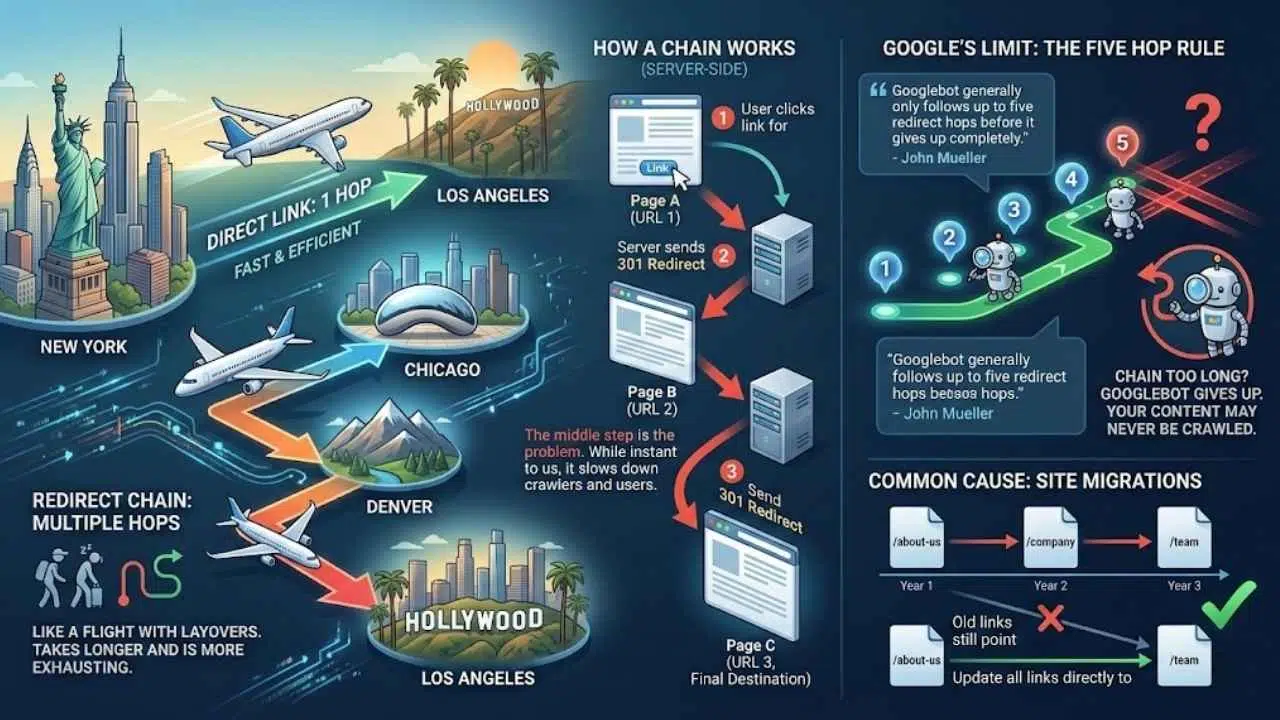
Think of a redirect chain like a flight from New York to Los Angeles. A direct flight gets you there in six hours. But a redirect chain is like flying from New York to Chicago, then to Denver, and finally to LA. You get to the same place, but it takes twice as long and is way more exhausting.
In technical terms, this happens when a link sends you through two or more URLs before you land on the final page.
The “Five Hop” Rule
A standard redirect is simple: Page A sends you to Page B. A chain looks like this:
- Step 1: You click a link for Page A.
- Step 2: The server sends you to Page B.
- Step 3: Page B immediately sends you to Page C (the final destination).
That middle step is the problem. While it seems instant to us, Google’s John Mueller has noted that Googlebot generally only follows up to five redirect hops before it gives up completely. If your chain is too long, Google might never see your content at all.
These chains often pop up during site migrations. You might move a page from /about-us to /company. A year later, you move it again to /team. If you don’t update the original link, you have created a chain that slows down every single visitor.
Why Redirect Chains Are Bad for SEO
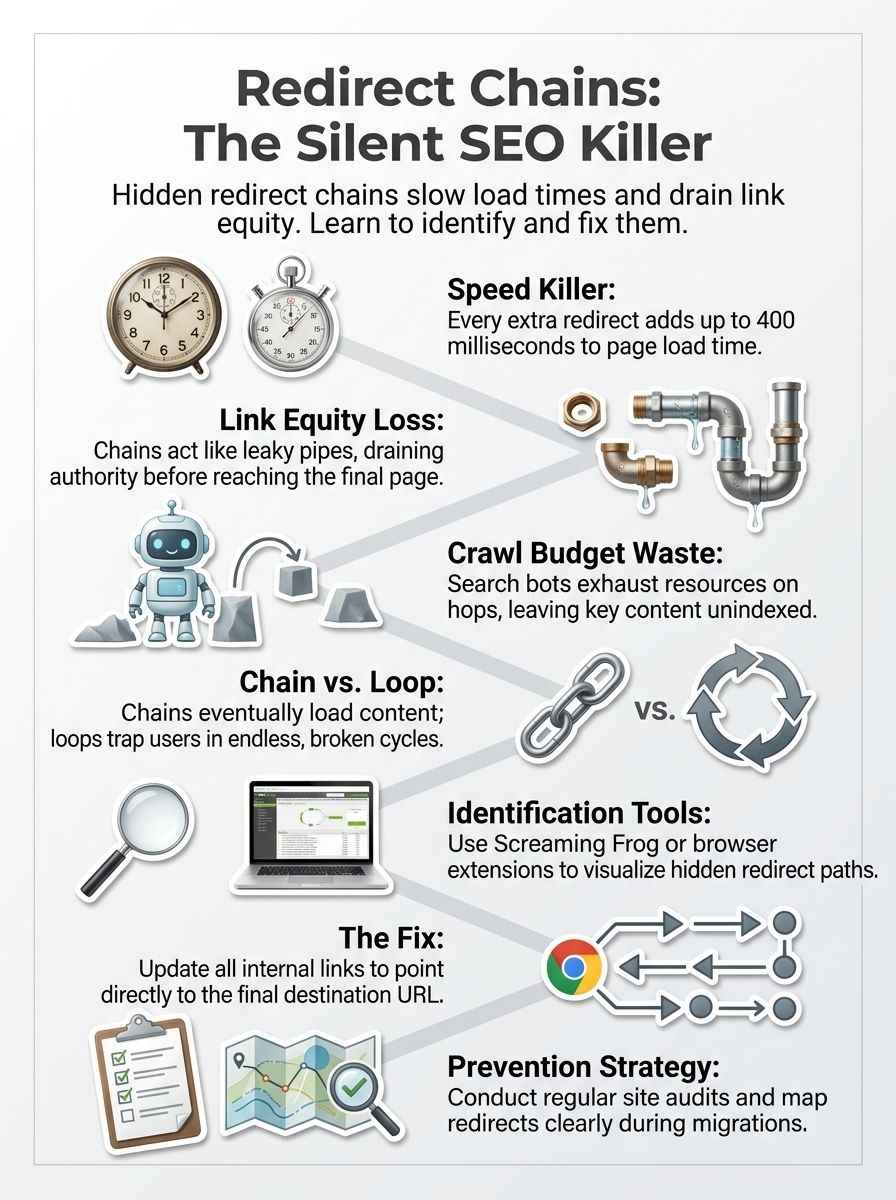
You might think a split-second delay doesn’t matter. But in the world of SEO, speed is everything. Redirect chains hurt your site in three very specific ways that directly impact your bottom line.
1. They Destroy Site Speed
Let’s look at the numbers. Data from web performance studies shows that a single redirect often adds 100 to 200 milliseconds to your page load time. That is the time it takes for the server to receive the request and send the new location back to your browser.
If you have a chain of three redirects, you are looking at a delay of up to 600 milliseconds before the page even starts to load content. A 2024 HubSpot report highlighted that conversion rates drop by nearly 4.42% for every second of load time delay. Speed isn’t just a technical metric; it is a revenue metric.
2. They Dilute “Link Juice”
Imagine your website’s authority is water flowing through a pipe. Every time you redirect a page, that pipe gets a little longer and develops a small leak. Search engines pass “link equity” (or authority) from one page to another through links.
“Think of a redirect chain as a leaky pipe. The more joints and extensions you add, the less water makes it to the garden. By the time the authority reaches your final page, it has lost much of its power to boost your rankings.”
While Google has gotten better at handling 301 redirects, forcing their bots to jump through hoops is risky. You want 100% of that authority hitting your live page, not getting lost in a maze of old URLs.
3. They Waste Your Crawl Budget
Search engines like Google have a “crawl capacity limit” for your site. This is the maximum number of pages their bots will visit in a given time. If they spend their time following a chain of four links just to find one page, they have less time to discover your new blog posts or products.
If you have thousands of redirect chains, you are essentially asking Google to run a marathon just to index your site. Eventually, the bot gets tired and leaves, meaning your new content stays invisible.
Redirect Chains vs Redirect Loops
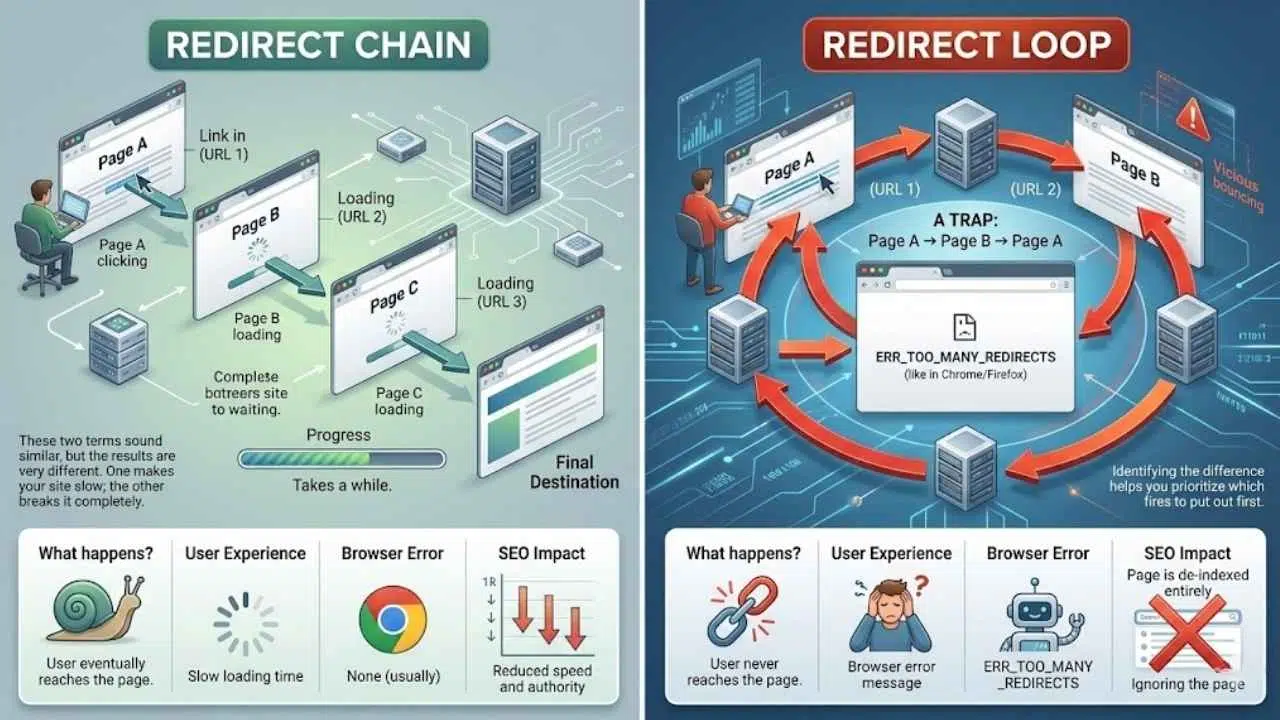
These two terms sound similar, but the results are very different. One makes your site slow; the other breaks it completely.
| Feature | Redirect Chain | Redirect Loop |
|---|---|---|
| What happens? | User eventually reaches the page. | User never reaches the page. |
| User Experience | Slow loading time. | Browser error message. |
| Browser Error | None (usually). | ERR_TOO_MANY_REDIRECTS |
| SEO Impact | Reduced speed and authority. | Page is de-indexed entirely. |
A redirect loop is a trap. Page A sends you to Page B, and Page B sends you right back to Page A. The browser bounces back and forth until it gives up and shows the dreaded “Too Many Redirects” error.
Search engines treat loops as broken pages. They will immediately stop trying to crawl them and drop them from the index. Identifying the difference helps you prioritize which fires to put out first.
How to Identify Redirect Chains on Your Website
Finding these invisible speed bumps is easier than you might think. You don’t need to be a developer to spot them; you just need the right tools.
Using Browser Extensions
For a quick check of a single page, Always use a free Chrome extension called Redirect Path by Ayima. It is a lifesaver for spotting issues on the fly.
Once you install it, you just browse your site as usual. If you land on a page that had a redirect chain, the icon changes to show you exactly how many hops it took to get there. It will list every status code (like 301 or 302) so you can see exactly where the chain began.
Manual Redirect Checking
You can also do a simple manual test. Type an old URL into your browser—maybe one you changed last year—and watch the address bar carefully. If you see it flicker and change multiple times before the page loads, you have likely found a chain.
Clicking links from other websites is another great way to test this. If a partner site links to your old “About” page, click it and see if it takes a direct path or a scenic route to the new location.
Professional Scanning Tools
If you have a large site with hundreds of pages, checking one by one isn’t an option. For a full audit, the industry standard is Screaming Frog SEO Spider. It acts like a search engine bot and crawls every link on your site.
Here is the exact path to find the report you need in Screaming Frog:
- Run a full crawl of your website.
- Go to the top menu and select Reports.
- Choose Redirects.
- Select Redirect Chains.
This will generate a spreadsheet showing you every single chain, the source URL, and the final destination. It is the most efficient way to see the full picture of your technical SEO health.
How to Fix Redirect Chains
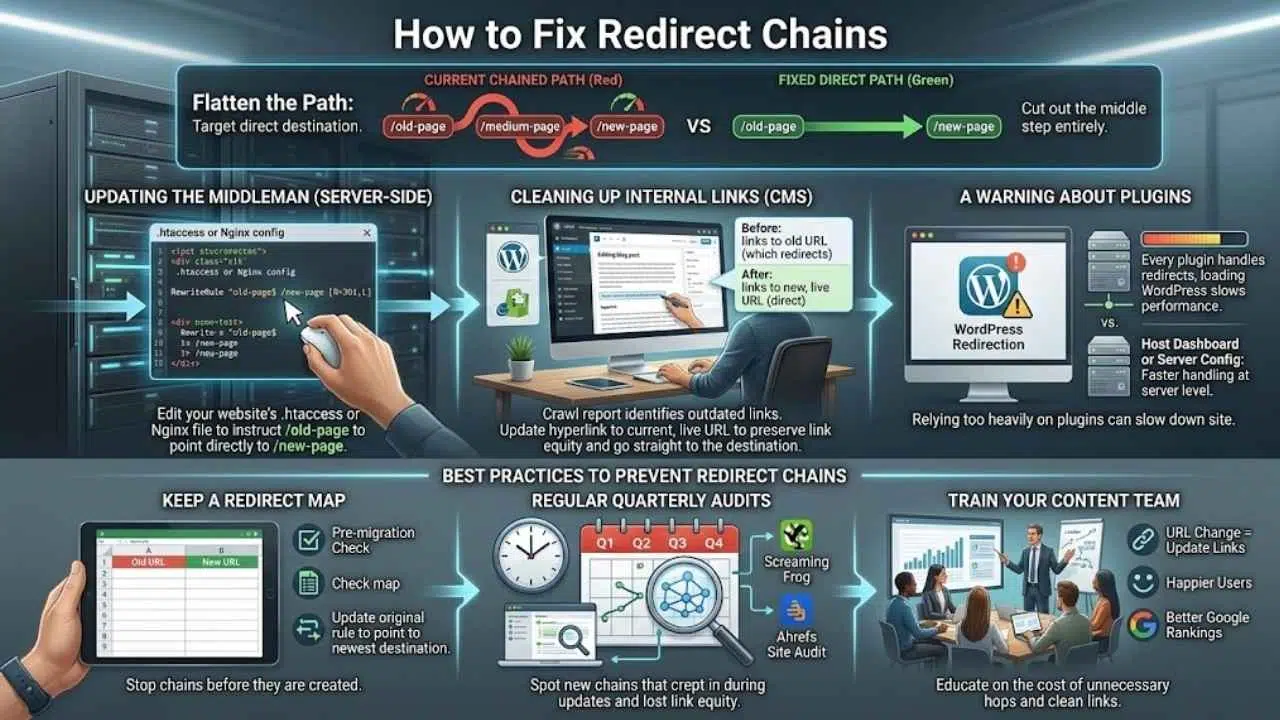
Once you have your list of chains, fixing them is straightforward. The goal is to flatten the path so that every link points directly to the final destination.
Updating the “Middleman”
The most common fix involves editing your website’s .htaccess file (if you are on an Apache server) or your Nginx config file. These files control how your server handles traffic.
Let’s say you have a chain like this:
/old-page → /medium-page → /new-page
To fix it, you need to find the rule for /old-page. Right now, it is telling the server to go to /medium-page. You simply change that instruction so it points directly to /new-page. Now, you have cut out the middle step entirely.
Cleaning Up Internal Links
Sometimes the problem isn’t on the server; it is in your own content. You might have a blog post from 2022 that links to an old product page. Even if your server handles the redirect well, that link is still outdated.
Use your crawl report to find these internal links. Go into your CMS (like WordPress or Shopify) and update the hyperlink to the current, live URL. This is the best way to preserve link equity because the user goes straight to the right place without any redirection at all.
A Warning About Plugins
If you use WordPress, you might be tempted to use a plugin to manage these redirects. While tools like the Redirection plugin are user-friendly, relying on them too heavily can slow down your site.
Every time a plugin handles a redirect, your server has to load WordPress to process it. For the best performance, handling redirects at the server level (like on your host’s dashboard) is always faster than using a plugin.
Best Practices to Prevent Redirect Chains
Fixing chains is good, but preventing them is better. With a few simple habits, you can keep your site clean and fast permanently.
Keep a “Redirect Map”
Whenever you plan a site migration or a URL change, start a simple spreadsheet. I call this a “Redirect Map.” It should have two columns: “Old URL” and “New URL.”
Before you launch any changes, check this map. If you are about to redirect a URL that is already in the “New URL” column, stop. You are about to create a chain. Instead, update the original rule to point to the newest destination.
Regular Quarterly Audits
Don’t wait for your traffic to drop to look for problems. Schedule a quick technical audit once every quarter. Run a tool like Screaming Frog or Ahrefs Site Audit to scan for new chains that might have crept in during recent updates.
Regular checks help you spot lost link equity before it hurts your rankings. It is much easier to fix five redirects today than five hundred a year from now.
Train Your Content Team
Make sure everyone who touches your website understands the cost of a redirect. If your marketing team changes a URL for a campaign, they need to know that they must update all links pointing to that page.
A little bit of education goes a long way. When your team knows that clean links equal better Google rankings and happier users, they will be much more careful about creating unnecessary hops.
Final Thoughts
Redirect chains are one of those silent problems that can slowly drain the life out of your website. They frustrate your visitors with slow load times and confuse search engines, wasting the crawl budget you need for your best content.
The good news is that they are entirely fixable. By using tools like Ayima or Screaming Frog, you can uncover these hidden delays and flatten your links into direct paths. It is a small technical task that pays off with faster speeds and better rankings. So, why not run a quick check on your site today? You might be surprised at how much speed you can recover just by tightening up a few loose links.






















