

How To Conduct A SaaS Audit: Cutting Bloat In Q1 2026 is less about simply “finding tools” and more about proving which subscriptions truly deserve budget, access, and long-term trust. A SaaS audit is one of the fastest ways to turn scattered software spend and hidden security risk into a clear, actionable plan that teams can execute with confidence.
It does not require a massive program to begin.
What matters most is building a defensible inventory, gathering usage evidence that supports real decisions, and establishing a repeatable cadence that prevents bloat from returning over time.
What Is a SaaS Audit?

A SaaS audit is a structured software audit of your cloud subscriptions, licenses, and user access. The goal is simple: confirm what you own, who uses it, what it costs, and what risk it introduces.
A good audit blends subscription analysis (contracts, renewals, and spend) with operational checks (provisioning, deprovisioning, and adoption) and a compliance review (access controls, data handling, and audit trails).
If you want a practical framework, map your findings to the NIST Cybersecurity Framework 2.0 functions. It adds “Govern” to the familiar flow of Identify, Protect, Detect, Respond, and Recover, which is a strong reminder that SaaS risk is also a leadership and policy issue, not just a technical one.
What “done” looks like (audit outputs you can reuse)
- Application inventory: app name, business owner, cost center, renewal date, and users.
- License position: purchased seats vs. assigned seats vs. active seats, plus premium add-ons.
- Access posture: SSO coverage, MFA status, admin roles, and orphaned accounts.
- Data posture: what data flows into the app, retention needs, and backup expectations.
- Decision log: keep, downgrade, consolidate, or retire, with next steps and dates.
Why Conduct a SaaS Audit in Q1 2026?
Q1 is the best time to cut bloat because budgets reset, teams revisit priorities, and you can set a clean baseline before renewals and new projects pile up.
It is also a moment when vendors are pushing AI features into “standard” plans. Gartner’s October 2025 forecast for 2026 IT spending explicitly points out that these embedded GenAI capabilities are becoming ubiquitous and that they cost more, which is exactly the kind of quiet price pressure an audit can surface early.
- Stop waste before it compounds: Zylo has reported license utilization around 60%, meaning a large share of provisioned seats are not producing value.
- Control renewal chaos: Zylo has also reported an average of 234 renewals per year, which is why Q1 planning pays off.
- Reduce audit scramble later: you build a standing evidence trail instead of rushing when legal, finance, or customers ask.
Address rising SaaS costs
Costs rise in two ways: obvious subscription price increases, and hidden expansion through add-ons, AI credits, storage, premium support, or “must-have” tiers.
Zylo’s 2025 SaaS Management Index reported average SaaS spend of $4,830 per employee, which is why small savings moves can turn into meaningful budget recovery across a year.
Actions that pay off in the same quarter
- Separate “assigned” from “active”: make your baseline metric active use, not just login history.
- Normalize renewals: put renewal date, notice window, and opt-out date into one calendar owned by finance and IT.
- Create a premium gate: require justification for AI add-ons, admin seats, and advanced tiers so they do not spread by default.
- Run a rightsizing sprint: pick 3 to 5 biggest vendors and clean licenses before you negotiate.
Ensure compliance with 2026 regulations
A SaaS audit is also a compliance management exercise because your highest-risk issues usually live in identity, access, and data handling.
For U.S. public companies, the SEC cybersecurity disclosure rules require a Form 8-K disclosure for material cybersecurity incidents within four business days after determining an incident is material. A tight SaaS audit supports that expectation because you can prove ownership, access pathways, and control operation without guesswork.
If you operate in healthcare, the HIPAA Security Rule requires a risk analysis as part of the security management process. Your SaaS stack is part of that risk surface, especially where ePHI can be uploaded or exported.
Audit records prove what controls exist, and that they run consistently, when regulators, customers, or internal leaders ask.
A simple compliance scope you can execute
- Identity controls: SSO coverage, MFA enforcement, admin role review, and joiner-mover-leaver workflows.
- Vendor evidence: SOC 2 report availability (Type I or Type II), security contacts, and incident notification terms.
- Data controls: encryption expectations, backup ownership, and retention rules by data type.
- Proof: screenshots, exported reports, and change logs stored in one audit folder.
Optimize operational efficiency
SaaS bloat is rarely “one big mistake.” It is a hundred small purchases and access grants that never get cleaned up.
In 1Password’s 2025 report, 52% of employees said they downloaded apps without IT approval. The same report notes that a meaningful share of apps are still outside SSO coverage, which is where both waste and risk tend to hide.
Operational fixes that reduce both spend and risk
- Make access time-bound: for premium tools, grant access for a fixed period, then require renewal.
- Automate offboarding: remove licenses and access at role exit, not “end of week.”
- Assign clear ownership: every app needs an accountable business owner and a technical owner.
- Standardize intake: one request path for new tools, with security and finance checks built in.
How To Conduct A SaaS Audit: Cutting Bloat In Q1 2026 (Key Steps)
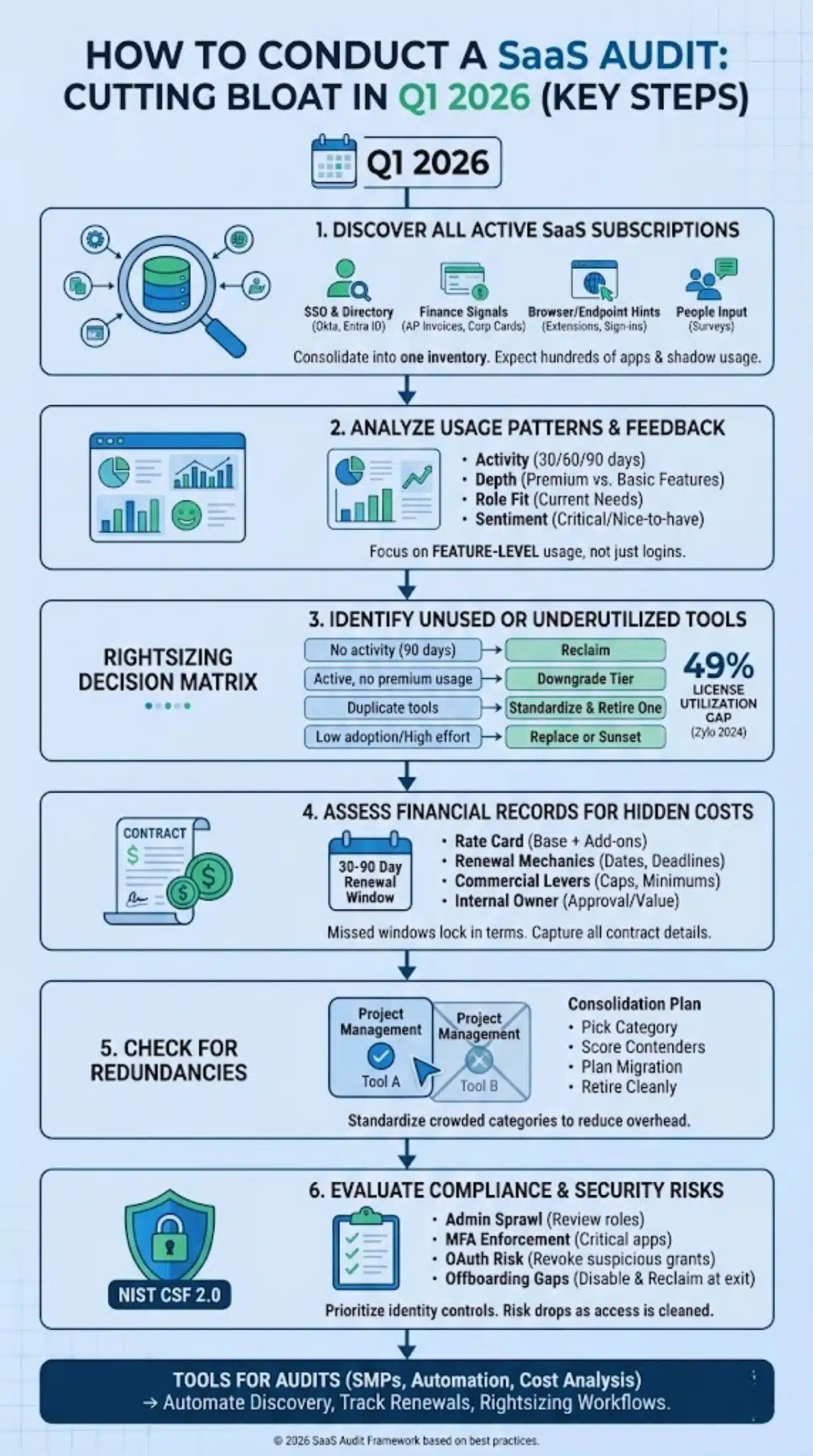
If you want a clean, repeatable SaaS audit, run it like a project: scope, inventory, usage validation, cost validation, risk validation, then decisions and follow-through.
Discover all active SaaS subscriptions
Start with discovery because you cannot optimize what you cannot see. Pull from identity systems, finance systems, and user behavior, then reconcile into one inventory.
Fast discovery checklist (what to pull in week one)
- SSO and directory: Okta or Microsoft Entra ID app assignments, SAML apps, OAuth grants, and admin roles.
- Finance signals: corporate cards, AP invoices, expense tools, and cloud marketplaces.
- Browser and endpoint hints: extensions, installed apps, and sign-in events that point to shadow usage.
- People input: a short survey asking “what tools do you pay for, and what tools do you use?”
Zylo has reported the average organization manages hundreds of apps, which is why you should expect duplicates and “department-only” tools to appear quickly once you combine these sources.
Analyze usage patterns and employee feedback
Usage analysis fails when teams rely on one weak metric like “last login.” You want enough evidence to downgrade or reclaim without breaking real workflows.
One practical approach promoted by SaaS management teams is “feature-level usage,” meaning you check whether a user actually used the paid features that justify the tier, not just whether they visited the product.
Usage questions that lead to clear actions
- Activity: who was active in the last 30, 60, and 90 days?
- Depth: did they use premium features, or only basic ones?
- Role fit: do they still need access based on their current role?
- Sentiment: do teams say the tool is critical, “nice to have,” or avoided?
Identify unused or underutilized tools
This is where cost optimization becomes real. Look for licenses with no meaningful activity, duplicate tools in the same category, and premium tiers used by default.
Zylo’s 2024 SaaS Management Index reported that companies were only using about 49% of provisioned licenses. That kind of gap is why license reclamation usually produces quick wins.
A right-sizing decision matrix
| Signal | What it usually means | Action |
|---|---|---|
| No activity in 90 days | Seat is idle or the user moved roles | Notify user and manager, then reclaim |
| Active, but no premium feature usage | Tier is too high | Downgrade tier, keep account |
| Two tools with the same job, split adoption | Redundancy and training overhead | Pick a standard, migrate, retire one tool |
| Low adoption plus high admin effort | Tool is costly to maintain | Replace or sunset |
Once you know what exists and who uses it, validate spend. Hidden costs tend to come from add-ons, storage, premium support, implementation fees, and auto-renewal timing that reduces your negotiation window.
Many enterprise SaaS agreements set non-renewal notice windows in the 30 to 90 day range. If you miss the window, you lose leverage and you often lock in another term.
What to capture for every contract (minimum viable financial review)
- Current rate card: base subscription, add-ons, usage fees, and true-up language.
- Renewal mechanics: renewal date, notice deadline, and required cancellation method.
- Commercial levers: seat minimums, overage pricing, and price increase caps.
- Internal owner: who approves spend and who confirms usage value.
Check for redundancies in the SaaS stack
Redundancy is not always bad, sometimes you need purposeful overlap for security or segmentation. The problem is accidental overlap that grows because no one owns the category.
Zylo’s 2024 SaaS Management Index highlighted how common duplication can be across categories like project management and collaboration. Treat that as a prompt to pick standards in your most crowded categories.
A practical consolidation plan
- Pick a category: project management, file storage, e-signature, training, or collaboration.
- Score contenders: adoption, cost per active user, security posture, and integration fit.
- Plan migration: export data, set cutover dates, and train teams on the standard tool.
- Retire cleanly: revoke access, confirm data retention, and cancel before the notice deadline.
Evaluate compliance and security risks
Security and compliance management should not be a separate workstream that starts after “cost is done.” The fastest savings often come from cleaning up access, and that is also where risk drops.
Use NIST CSF 2.0 as your checklist backbone, then focus on identity controls first. In 1Password’s reporting, many teams still have meaningful gaps in SSO coverage, which is where shadow usage and unmanaged access can persist.
Security checks that belong in every SaaS audit
- Admin sprawl: reduce the number of admins, and review admin grants monthly.
- MFA enforcement: require MFA for critical apps, then confirm it is actually enabled.
- OAuth risk: review third-party app connections and revoke suspicious grants.
- Offboarding gaps: confirm accounts are disabled and licenses reclaimed at exit.
Tools and Technologies for SaaS Audits
You can run an audit with spreadsheets, but you will not keep it healthy that way. The right tools automate discovery, keep renewals visible, and reduce manual license management.
SaaS Management Platforms (SMPs)
SMPs centralize app inventory, access intelligence, and workflows so you can run subscription analysis and compliance review from one place.
As of 2026, BetterCloud markets 90+ integrations and 1000+ actions out-of-the-box, which can matter if your team needs automation at scale, not just reporting.
Quick comparison (how teams typically use these platforms)
| Platform type | Best for | What to validate during a demo |
|---|---|---|
| Automation-heavy SMP | Fast onboarding, offboarding, and policy workflows | Depth of actions, error handling, and audit trails |
| Spend and renewal management | Negotiation prep, renewal calendars, cost centers | Contract fields, notice deadlines, and forecasting accuracy |
| Access governance focused | Access reviews, entitlement cleanup, least privilege | Review workflows, completion rates, and evidence export |
Automation tools for license tracking
License tracking gets easier when it is attached to lifecycle events. That means HR-driven joiner-mover-leaver changes, plus scheduled rightsizing checks for inactivity.
One common workflow used by SaaS automation teams is to notify the user after a period of inactivity, then reclaim the license if the user and manager do not confirm need. This “friendly off-ramp” reduces friction and avoids breaking real work.
A policy you can implement in a week
- Exit rule: deprovision access the same day HR marks separation.
- Inactivity rule: review at 30 days, warn at 60, reclaim at 90 for premium seats.
- Exception rule: require manager approval to keep premium access without usage evidence.
Cost analysis software
Cost analysis software ties usage to spend so you can make decisions in dollars, not opinions. It also makes budgeting strategies more realistic because you can forecast renewals and model the impact of rightsizing before you negotiate.
Procurement platforms like Vendr position renewal dashboards and negotiation support as their core value, which can help if your team lacks time to chase vendors and deadlines.
Best Practices for Cutting SaaS Bloat
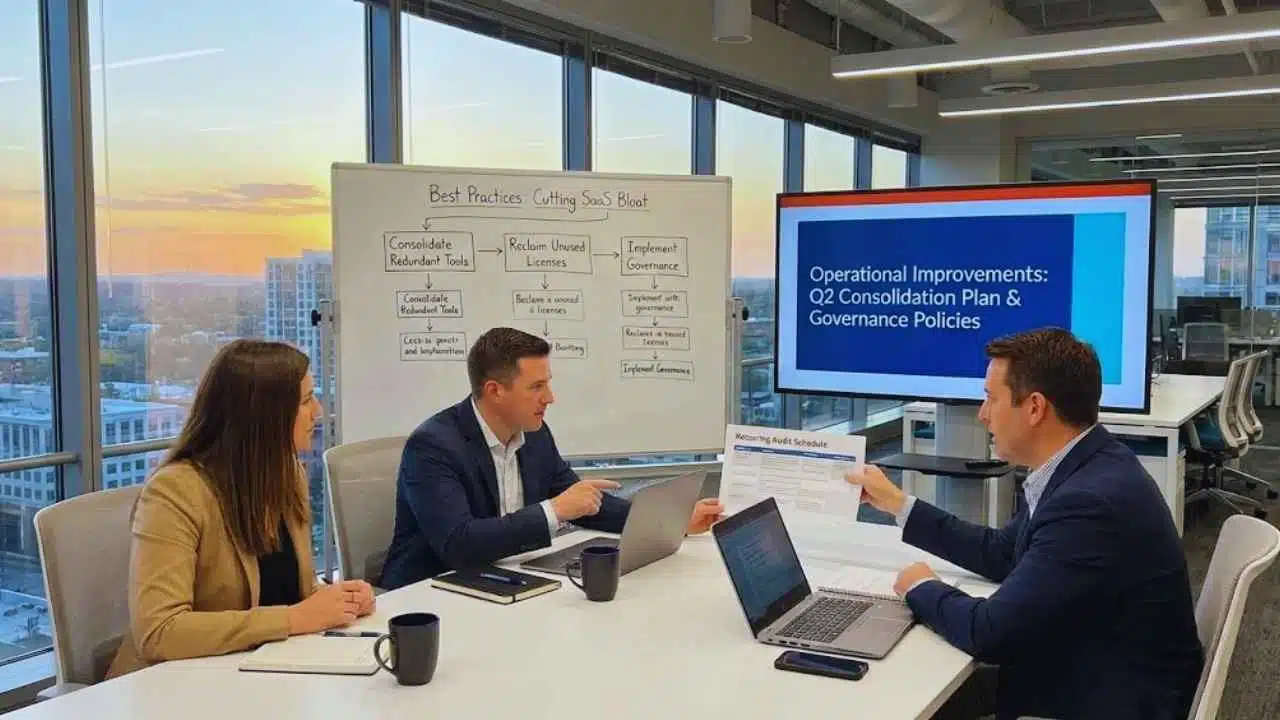
When you finish the audit, do not stop at findings. Turn them into operational improvements that make bloat harder to reintroduce.
Consolidate redundant tools
Consolidation works best when you pick a standard per category and commit to it. BetterCloud has reported a slowing consolidation rate, dropping from 14% to 5% year over year, which suggests many teams still struggle to finish the last mile of tool retirement.
Consolidation rules that reduce conflict
- Pick decision criteria early: security baseline, adoption, cost per active user, and integration fit.
- Do not migrate everything: migrate only active data and defined retention needs.
- Set a retirement date: keep a short overlap window, then cut over.
- Close the loop: cancel contracts before the notice deadline and remove access.
Reclaim unused licenses
License reclamation is the fastest cost optimization lever because you can act without waiting for a renewal date.
A pro-tip I use in audits is to separate “inactive” from “seasonal.” If a role spikes once per quarter, capture that pattern and create a time-bound access plan instead of paying year-round premium seats.
Negotiate better pricing and contract terms
Negotiation is easier when you bring clean data: active users, tier usage, and what you will actually keep. If your baseline is messy, vendors anchor the conversation on your current seat count.
Start renewal work early enough to keep leverage. In many enterprise contracts, 60 days is a safer internal target than 30 days because it leaves time for security review, stakeholder alignment, and finance approval.
Implement governance policies for software acquisition
Governance fails when it lives in a PDF and not in workflow. Put rules into the same tools people already use for requests, approvals, and onboarding.
Tools like Torii emphasize keeping an audit trail, storing vendor documents like DPAs, and preparing for SOC 2 evidence needs. That mindset is useful even if you do not run formal attestations, because it keeps SaaS decisions traceable.
Creating a Recurring Audit Schedule
Your first audit is a cleanup. Your recurring schedule is resource management.
For SOC 2 programs, accounting firms note that Type II examinations often run over a 3 to 12 month period and many organizations pursue annual examinations. Even if you are not pursuing SOC 2, that cadence is a good cue to keep evidence fresh.
A simple schedule most teams can sustain
| Cadence | What you review | Output |
|---|---|---|
| Monthly (30 minutes) | New apps, new renewals, high-risk access changes | Updated inventory and a short action list |
| Quarterly | License rightsizing, redundancy scan, admin review | Reclaimed seats, consolidation candidates, renewal plan |
| Biannual or annual | Deep compliance review, vendor evidence refresh, tabletop exercise | Evidence pack and prioritized security roadmap |
Final Thoughts
Run a tight SaaS audit in Q1 2026 to cut bloat and save money. You will find unused subscriptions, hidden costs, and access risks that quietly drain budgets. Use subscription analysis and cost optimization to free budget, and use compliance management to reduce legal risk.
How To Conduct A SaaS Audit: Cutting Bloat In Q1 2026 works best as a quarterly habit, so your SaaS management stays lean and your software audit outcomes keep compounding.


























