Are you trying to jazz up your Discord messages but find yourself stuck with plain, unremarkable text? Perhaps you’ve seen others craft those neat little lines of small text and wonder how they do it.
You’re not alone! Many Discord users are eager to personalize their chat experience but aren’t quite sure where to start.
Discord is more than just a platform for gamers; it’s a rich community hub where the way you say something can be as impactful as what you say. That’s why understanding its text formatting capabilities can take your chatting from mundane to impressive, almost like wielding a secret power! Our guide is geared towards unlocking that potential by showing you how to make Discord small text that stands out in your Discord conversations.
You’ll discover simple methods, tips for advanced formatting, and even ways to combine styles for greater impact. Ready for your words to pack a mini-punch? Keep reading; we’ve got all the tiny details covered!
Understanding Discord’s Text Formatting Engine
Discord’s text-formatting engine is simple but mighty. It lets you play with your words and change how they look, just like in a fancy writing program. And the secret sauce? It’s all done with Markdown, a lightweight markup language.
This means that when you type certain symbols, Discord knows to make your words stand out—maybe by making them bold, italicized, or even putting a line through them.
The cool part is that it’s really easy to use. If you want small text, for instance, you add some special characters before and after what you want to shrink down. You don’t need any fancy software skills; it’s as straightforward as adding an asterisk for bold text or an underscore for italics.
With Markdown in Discord, you get to spice up your chats without breaking a sweat!
Discord Small Text: Methods to Make It
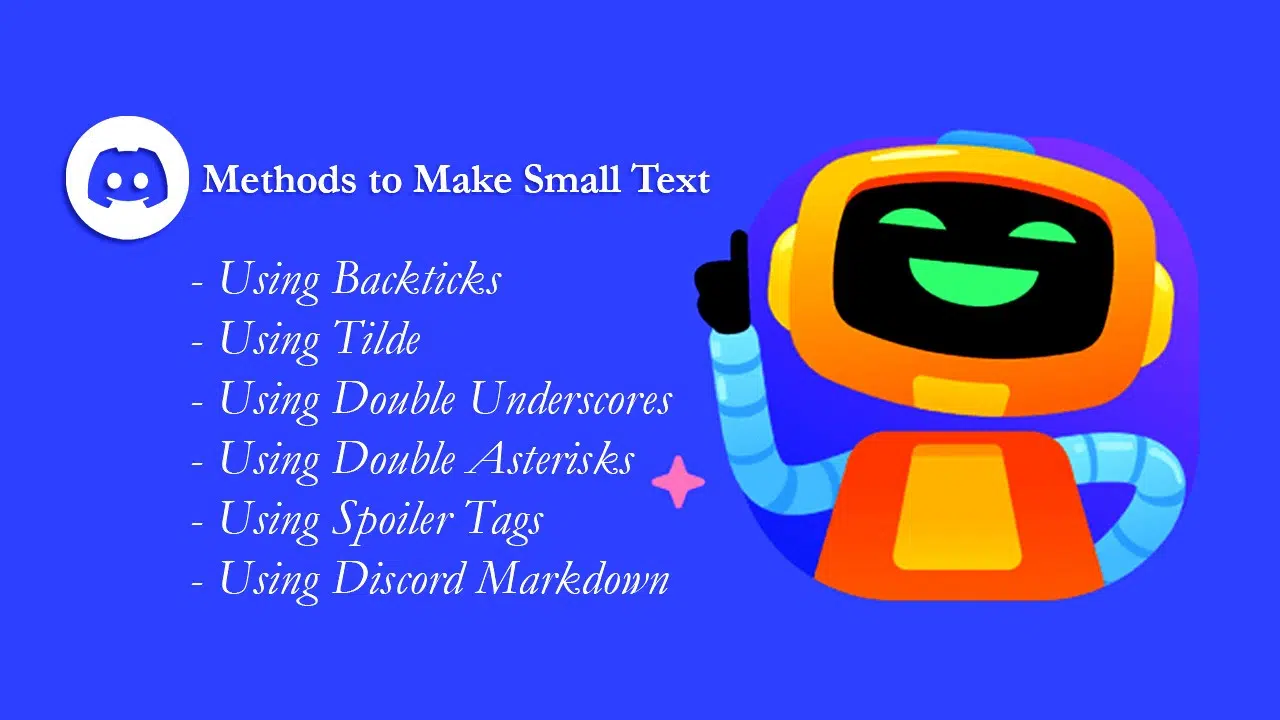
To make Discord small text, there are several methods you can use, including backticks, tildes, double underscores, double asterisks, spoiler tags, and Discord Markdown. Each method offers a unique way to format your text to suit your needs.
Using Backticks
Backticks are small marks used in Discord to create tinier text. You find them on your keyboard, right under the escape key. To make some words look small, you put one backtick before and after the words.
It’s like saying, “Hey, these words need to be tiny!” This trick is great for when you want to make just a few words stand out without taking up too much space.
Imagine you’re writing a message and have this one word that should really be smaller than all the rest. You don’t need anything fancy; just those little backticks will do the job perfectly! It keeps things simple and easy for everyone reading your message.
Remember not to use them for long sentences, though; they work best with short bits of text like names or special terms.
Have fun with it and see how it changes your text! With these handy backticks, your messages can have their own special mini-words that catch people’s eye.
Using Tilde
Making small text in Discord is easy with tildes. The tilde (~) is a little wavy line on your keyboard that helps change how your writing looks. You use it around the words you want to make small.
Just put two tildes before and after what you want to shrink, like this: \~\~tiny text\~\~. When you do that, Discord makes those words smaller than all the other ones in your message.
This trick is great if you want to say something without taking up much space or if you need to add a side note. It’s cool because it lets users play with size for different effects in their chats.
And guess what? You can even mix it with other styles! Imagine combining tiny words with bold or italics; that would really make parts of your message stand out!
Using Double Underscores
If you want your words in Discord to look smaller, double underscores are your friends. Just put two of them before and after your message, like this: __yourmessage__. It’s simple! Remember, if you use too many tiny texts, it might make chatting hard.
Your friends could have a tough time reading what you’ve written if their screen is different or their eyes don’t catch small details easily. Keep things clear, and use this trick just enough to add some fun or emphasis without making anyone squint too much!
Using Double Asterisks
Double asterisks are a handy tool in Discord to make text small and emphasize certain words or phrases. By enclosing the desired text within double asterisks (*), you can instantly transform it into smaller, bolder content that stands out in a conversation.
This feature not only adds visual impact to your message but also helps draw attention to specific points effectively, making your communication more engaging and dynamic.
Furthermore, with just a simple keystroke combination of two asterisks before and after the chosen text, you can enhance the expressiveness of your messages on Discord. Whether it’s for emphasizing crucial details or adding a touch of creativity to your conversations, using double asterisks is an easy yet powerful way to elevate your interactions within the platform.
Using Spoiler Tags
Spoiler tags are a neat way to conceal surprising or confidential content in your Discord messages. By enclosing your text within vertical bars (‘||’), you can create suspense and intrigue, enhancing the impact of your message.
This feature is handy when discussing plot twists, sensitive information, or surprise party plans.
Add an element of mystery to your conversations by utilizing spoiler tags. Enveloping text in these special enclosures heightens engagement and excitement as readers uncover the hidden content with a simple click.
Using Discord Markdown
Discord Markdown is a simple way to format text in Discord. It’s like using bold, italics, or underlining in a word processor. With Markdown, you can make your text stand out. You just need to use special characters to add formatting, such as *asterisks for italics*, **double asterisks for bold**, and __double underscores for underline__.
There are other cool options, too! So let’s dive into the various methods of using Discord Markdown to customize your text.
To make small text on Discord, you can utilize different syntaxes like Bash, JSON, CSS, YAML, ARM, CS, fix, Diff and more. These diverse options offer users flexibility when customizing their texts within the platform.
Advanced Discord Text Formatting
Once you’ve mastered the basics, it’s time to explore advanced Discord text formatting options that will take your messaging game to the next level. From bold and italicized text to underlines and strikethroughs, there are plenty of ways to make your messages stand out in Discord.
Keep reading to discover how these advanced formatting techniques can enhance your communication on the platform.
Bold Text
To make text bold in Discord, you can use double asterisks around the words or phrases you want to emphasize. This is an easy and quick way to grab attention and highlight important information in your messages.
By wrapping the desired text with two pairs of asterisks, you can instantly change its appearance to bold.
Additionally, combining different formatting techniques, such as bold and italics, allows for more creative and unique effects in your Discord messages. You can experiment with various combinations to enhance the visual appeal of your texts while effectively conveying your intended emphasis.
Italicized Text
Making italicized text in Discord can be done using different combinations of symbols and characters. The process is simple and involves using specific syntax to modify the text appearance.
By incorporating various methods, including asterisks and underscores, you can easily add emphasis to your messages or make important points stand out in a conversation on Discord.
There are multiple ways to achieve italicized text within Discord. Each method offers flexibility for users accustomed to distinct styles of formatting their messages. Whether it’s through backticks, tildes, double underscores, double asterisks, spoiler tags, or Discord Markdown usage, each approach allows for effortlessly creating italicized content tailored to your preferences.
Strikethrough
To create strikethrough text in Discord, simply place double tildes (~) before and after the text you want to strike through. This formatting can be useful for indicating changes or revisions within a message or to show that a particular statement is no longer valid or relevant.
By using this simple method of enclosing text with tildes, you can effectively convey crossed-out information within your Discord messages. Now let’s explore other advanced text formatting options available in Discord.
Underline
Before delving into the details of underlining text on Discord, it’s important to understand that using double underscores can come in handy for creating small text. Additionally, users have the flexibility to combine different formatting techniques and styles to produce unique effects with underlines in Discord.
Combined text formatting in Discord
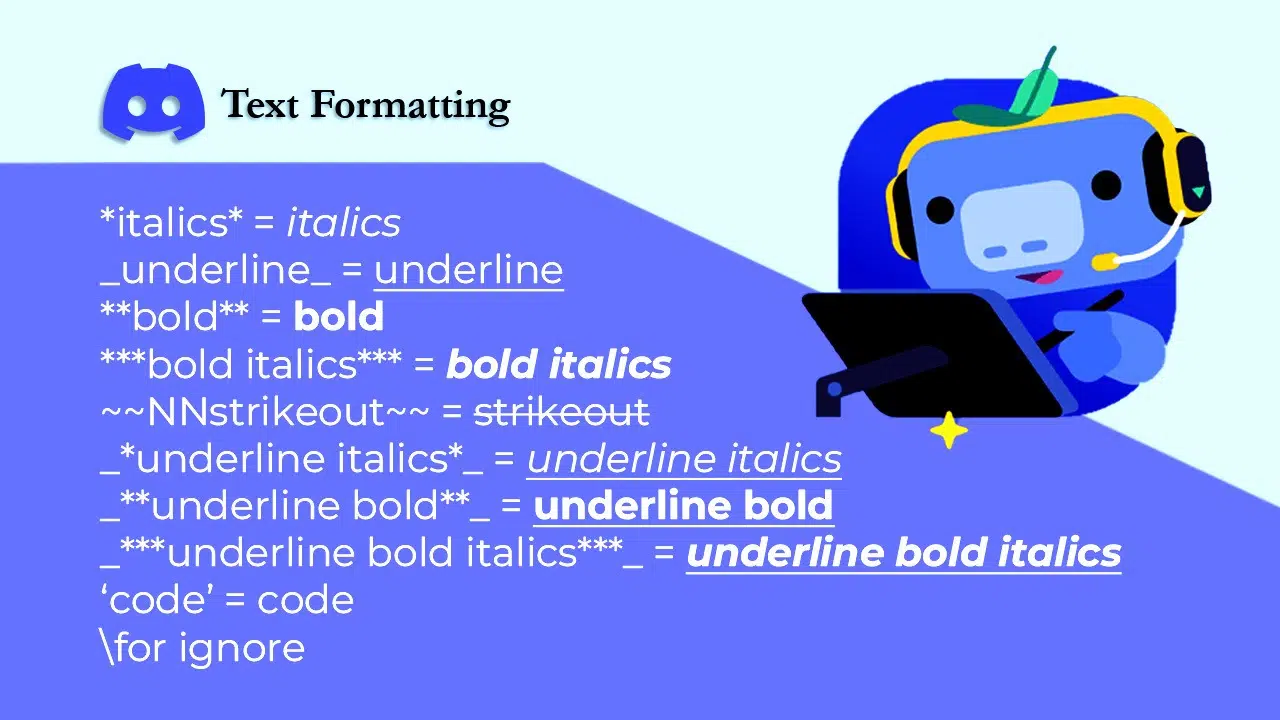
Do you want to emphasize your message in Discord? Learn how to combine text formatting options like bold and italics, bold and strikethrough, or even all formatting options together for maximum impact.
Master the art of combining different text formats in Discord to make your messages stand out.
Bold + Italics
To make text bold and italicized in Discord, you can simply combine the two formatting options. By wrapping your text with double asterisks and double underscores at the same time, you achieve this unique combination.
For example, typing **_Hello!_** will result in Hello! being displayed as bold and italicized.
This feature allows users to add emphasis and style to their messages, making them stand out in group chats or individual conversations. Whether it’s for adding a touch of flair or drawing attention to important information, combining bold and italics can enhance the overall visual appeal of your text in Discord.
Bold + Strikethrough
You can combine the bold and strikethrough effects in Discord by using a combination of symbols before and after your text. This formatting creates a strong visual impact, allowing you to convey emphasis along with a sense of deletion or correction.
Utilizing this unique styling can help your message stand out and effectively communicate your intended tone or message.
To make use of the bold plus strikethrough effect in Discord, simply enclose your text with two pairs of double tildes, followed immediately by double asterisks on each side: ~~**Your Text Here**~~.
Bold + Underline
To make text both bold and underlined in Discord, you can use a combination of double asterisks and double underscores. By placing two asterisks before and after the text, along with two underscores before and after, you can achieve this unique formatting effect.
This combination adds an extra layer of emphasis to your message, ensuring that it stands out prominently within the chat. Moderation is key when utilizing these formatting methods to maintain clear communication without overwhelming or distracting other users.
Bold + Italics + Strikethrough + Underline
Combining formatting techniques in Discord can create unique and eye-catching effects. You can make your text bold, italicized, strikethrough, and underlined all at once to stand out in chats or messages.
Spice up the way you convey your thoughts by using this combination of text styles in Discord. Dare to be different with your text! Try it out for yourself, and impress others with your creatively formatted messages.
By adding multiple formatting styles together, you can emphasize key points or add a touch of flair to your words. Stand out from the crowd and express yourself uniquely through boldness, italics, strike-throughs, and underlines combined! So, what are you waiting for? Give it a try today!
Unique Discord Text Formats
[Video Credit: @GetToiT]
Unlock your creativity with unique text formats on Discord, such as spoiler text, highlighted text, quote text, and even boxed text. These options allow you to add flair and personality to your messages, making them stand out in the bustling world of instant messaging.
Spoiler Text
Discord allows you to add an element of surprise to your messages using spoiler tags. This feature can help hide sensitive or spoiler-related content, giving your conversations an intriguing twist and protecting others from unwanted reveals.
Whether it’s sharing exciting news without spoiling the surprise or discussing plot twists without giving away too much, spoiler tags have got you covered.
By incorporating this feature into your Discord interactions, you can ensure that everyone gets to experience content at their own pace, creating a sense of excitement and anticipation in every conversation.
Highlighted Text
In Discord, highlighted text can be a great way to make your messages stand out. By using simple syntax, you can create eye-catching boxes around your text, making it easier for others to notice and read.
This feature is particularly useful when you want to emphasize important information or draw attention to specific details within your conversations. Whether it’s for organizing discussions or highlighting key points in a message, the highlighted text option offers an effective way to bring focus to your content.
Additionally, by utilizing this unique formatting style, you have the opportunity to add visual appeal and structure to your communication. The ability to highlight text in Discord further enhances the overall user experience by allowing individuals to present their ideas in a clear and visually appealing manner.
Quoted Text
In Discord, you can make your text stand out by using the Quote Text feature. This allows you to emphasize specific messages or create a different visual impact within the conversation.
By using the greater than symbol (>) at the start of a line of text, you can easily turn it into quoted text. Quoting someone’s message or creating indented blocks of text for better organization and readability is made simple with this feature.
Don’t underestimate the power of quote text in Discord conversations. It helps in highlighting important information, providing context, and maintaining a structured flow of communication.
Boxed Text
Discord allows you to create boxed text by using a specific syntax. You can achieve this effect by placing two vertical bars (||) at the beginning and end of the text you want to box.
This feature is useful for emphasizing certain messages or making them stand out from other content in your Discord chat.
To create boxed text in Discord, simply enclose the desired message within double vertical bars like this: This is a boxed text example. Once sent, the enclosed message will appear within a highlighted box, drawing attention to it in the chat window.
Invisible Text
In Discord, you can create invisible text by using the backtick symbol three times (”’) before and after your message. This will make your text completely invisible but still sendable.
It’s a handy way to hide messages in plain sight.
You can also use spoiler tags to “mask” your text, making it appear blurred until someone hovers over it with their cursor. This feature is particularly useful when sharing spoilers or sensitive information while maintaining an element of surprise for readers. Additionally, you can also read about how to play music in Discord.
Other Unique Discord Features
Explore additional unique features of Discord, including non-embedded URLs, color text options, and other formatting options that can enhance your communication experience on the platform.
Non-Embedded URLs
When sharing a link in Discord, it doesn’t always embed as a preview. In some cases, the link appears as regular text instead of displaying an image or video from the website you’re linking to.
This is known as a non-embedded URL. It’s important to understand how to share these links effectively so that other users can easily access them without clicking through.
To share a non-embedded URL on Discord, simply paste the full web address (URL) into your chat message. When sent, it will appear as regular text and won’t be displayed with a preview image or video like embedded links would.
Discord Color Text
Discord does not permit directly changing the default text color. However, there are workarounds, like using scripts to turn text into a code block with different colors. If you want to use different fonts on Discord, you can find a Discord font generator online to help with that.
By using the highlight.js script, it is possible to transform text into a code block with alternative colors when needed on Discord. By finding and using a Discord font generator that is online, different fonts are usable.
Read also: What makes your Discord server stand out?
Frequently Asked Questions (FAQs)
Now learn some common queries on the topic Discord small text.
How do you write plain text in Discord?
Discord allows you to write plain text using code blocks, which prevent any formatting. To employ code blocks, enclose your text with backticks (`) on both sides. This action changes the font and provides a darker background, making your text stand out from other messages.
Does Discord have text?
Discord supports three communication methods for interacting with your friends: voice, video, and text.
What is the sans font in Discord?
The Sans font used in Discord is gg sans, which is applied across various platforms such as the Discord mobile and desktop apps, as well as the website and blog. This choice allows Discord the flexibility to tailor the font for ongoing customization.
Takeaway
In conclusion, making Discord small text offers a variety of creative possibilities. By using different symbols and formatting techniques, users can personalize their messages to stand out.
The combination of various formatting styles allows for unique effects that cater to individual preferences. Additionally, the platform’s features, like spoiler tags and Highlight.js, enhance the overall user experience.
Considering the practicality and impact of these strategies, it’s evident that they can significantly improve communication on Discord. Now, the readers are equipped with valuable insights to create visually appealing messages in Discord effortlessly!