

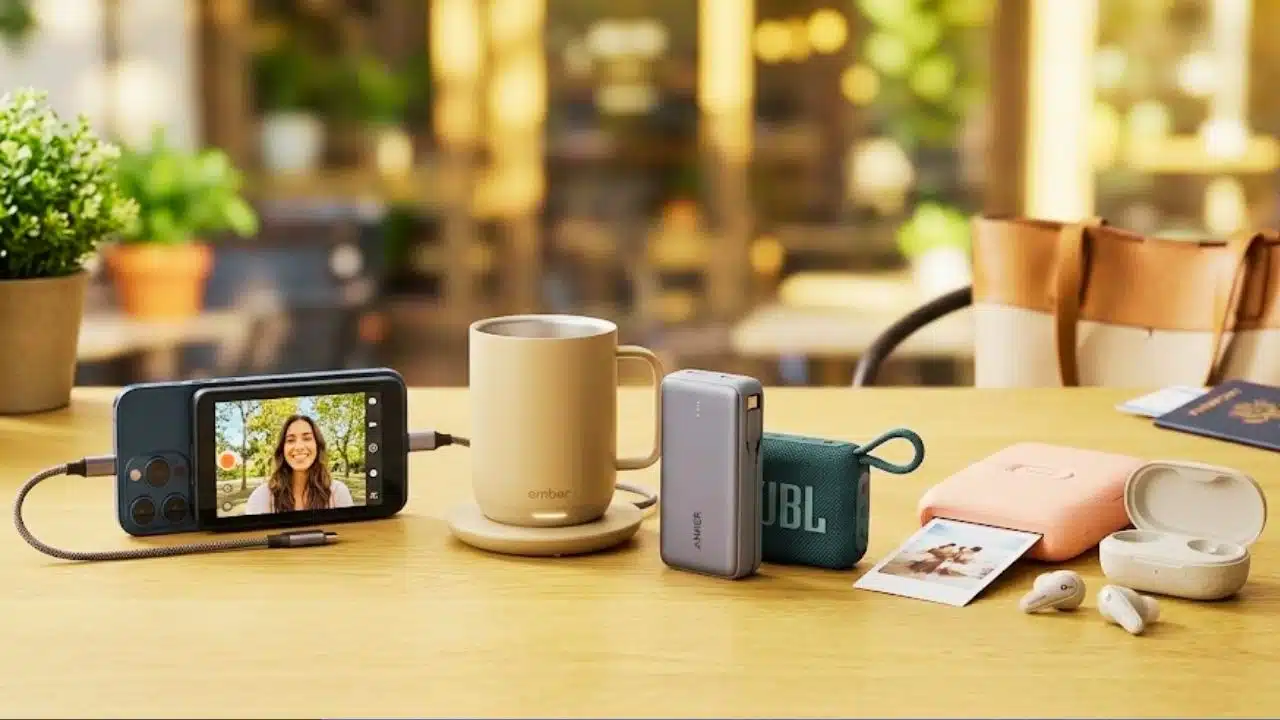
The best tech gifts under $100 tend to feel genuinely considerate because they reduce small everyday hassles. Some options improve photos and video without requiring a new phone. Others smooth out commutes, workouts, coffee breaks, and weekend travel with compact audio, power, and smart comfort accessories.
Below are the best tech gifts for women under $100, ranked for real-world value, with key features, pros, and cons.
Comparison Table
| Gift | Typical use case | Standout convenience | Charging required | Best for |
| Insta360 Snap Selfie Screen | Rear-camera selfies and vlogs with a phone | Real-time preview, magnetic, one-handed design, plug-and-play | No charging required | Better phone content without switching to a new device |
| Ember Mug 2 | Keeping drinks at the right temperature | Temperature control for coffee and tea | Yes | Desk setups and long work sessions |
| Anker Portable Power Bank | Travel and daily phone charging | Fast, reliable backup power | Yes | Commuters and travelers who run low mid-day |
| JBL Go 4 Portable Speaker | Music on the go | Small speaker that travels easily | Yes | Picnics, showers, small rooms, and casual listening |
| Fujifilm Instax Mini Link 3 | Phone photo printing | Instant-style prints from a phone | Yes | Scrapbooks, events, and creative gifts |
| SoundCore P42i earbuds | Calls and everyday listening | Compact earbuds for pockets and bags | Yes | Gym, commuting, and video calls |
1. Insta360 Snap Selfie Screen
Best For: Women who shoot selfies, vlogs, GRWMs, travel diaries, and social clips on a phone and want an easier way to frame shots while using the phone’s stronger rear camera with a real-time preview.
Insta360’s Snap Selfie Screen is a magnetic screen accessory that attaches to the back of a smartphone, enabling rear-camera shooting with a clear, live view for framing. It is built around a low-friction routine: plug-and-play operation, no charging required, and minimal setup, which suits fast everyday filming.
Because it is an add-on display rather than a standalone camera, it does not record footage by itself. Instead, it mirrors what the phone’s rear camera sees in real time so framing, focus, and composition remain consistent with a what-you-see-is-what-you-get approach. The wired USB-C connection helps keep latency low at around 30ms, which is relevant for talking-to-camera segments, walking vlogs, and quick handheld clips.
Two versions support different gifting preferences: Snap Selfie Screen: $79.99 / £72.99 and Snap Selfie Screen with Light: $89.99 / £82.99. The lighted version is co-developed with AMIRO and adds adjustable color and brightness for a more refined look in bedrooms, restaurants, or low-light travel scenes.
Features
- 3.5-inch high-resolution touchscreen that mirrors the phone’s rear camera in real time
- Lets you shoot with the phone’s better rear camera instead of the lower-res front camera
- Ultra-wide 0.5x rear-camera selfies and vlogs with live preview
- Wired USB-C connection, ~30ms latency, no pairing and no charging required
- One-tap mirroring flips the preview for a natural selfie orientation
- Powerful magnetic attachment for quick, secure mount and dismount
- Ultra-thin, pocketable design
- Includes a 2-in-1 protective cover
- Works with native camera apps and third-party camera/editing apps
- Snap Selfie Screen: $79.99 / £72.99
- Snap Selfie Screen with Light: $89.99 / £82.99, co-developed with AMIRO, with adjustable color and brightness (3 colors, 5 brightness levels)
- Compatible with iPhone 15 and later (excluding iPhone Air, 17 Air, 17e, and 16e) and a range of USB-C Android/HarmonyOS flagships supporting DisplayPort Alt Mode and reverse charging
- Works with optional Insta360 Ring Remote and Mini Remote (Bluetooth, minimum firmware required)
Pros
- Makes rear-camera selfies and vlogs much easier to compose thanks to the real-time preview
- Plug-and-play design with no charging required fits quick, everyday filming habits
- Magnetic, one-handed attachment makes it simple to mount, remove, and pack for nights out or travel
- Supports native and third-party camera apps, allowing it to blend into existing shooting and editing routines
Cons
- Requires a compatible phone setup, including USB-C support for DisplayPort Alt Mode and reverse charging on supported Android/HarmonyOS devices
2. Ember Mug 2
The Ember Mug 2 is a comfort-forward tech gift that makes sense for coffee and tea drinkers who dislike lukewarm drinks and repeated reheating. It tends to fit best into desk routines, study sessions, and work-from-home days where a drink may sit between sips.
Features
- Temperature-control mug designed to keep drinks warm
- Built for desk and home use
- App-connected experience on compatible devices
- Charging base for maintaining temperature
Pros
- Adds a premium feel to daily routines
- Helps cut down on wasted coffee or tea and constant microwave trips
- Strong gift appeal for home office and long-work-session setups
Cons
- More of a stay-at-the-desk device than a travel-friendly gadget
- Another item that needs charging and basic care
3. Anker Portable Power Bank
A portable power bank remains one of the most reliable under-$100 tech gifts because it addresses a predictable problem in a straightforward way. It becomes especially valuable on travel days, concert nights, long commutes, and conference schedules where navigation, photos, video, and messaging can drain a phone quickly.
Features
- Portable backup battery for phones and other small devices
- Designed for travel and everyday carry
- Typically supports charging via USB for broad compatibility
- Simple, dependable accessory category with lots of capacity and size options
Pros
- High day-to-day usefulness for commuting, errands, and travel
- Works across many devices rather than locking into a single ecosystem
- Generally easy to gift without needing to match personal style preferences
Cons
- Adds one more device that must be charged ahead of time
- Capacity and fast-charging support vary by model, so selecting the right version matters
4. JBL Go 4 Portable Speaker
The JBL Go 4 lands in a practical zone for a small speaker gift: compact, casual, and easy to bring along. It often gets used around the house, in the kitchen, while getting ready, during short trips, or in small hangouts without requiring a full speaker system.
Features
- Compact portable speaker format
- Built for quick, casual listening sessions
- Designed to travel easily in a bag
- Simple controls for play and volume
Pros
- Straightforward to use and easy to carry
- Well-suited to small rooms and background music
- Lifestyle-friendly gift that can feel social and fun
Cons
- Small speakers typically trade deep bass for portability
- Needs charging like any portable speaker
5. Fujifilm Instax Mini Link 3
A portable photo printer is a creative, memory-oriented tech gift that turns camera-roll moments into physical keepsakes. The Instax Mini Link 3 is especially well-matched to parties, trips, scrapbooking, and gifting printed photos alongside cards or small notes.
Features
- Smartphone photo printing in Instax-style format
- Designed for events, crafts, and memory keeping
- Compact device meant to be brought to gatherings
- Works as a bridge between digital photos and physical keepsakes
Pros
- Highly giftable for creative hobbies and social occasions
- Encourages sharing and printing photos rather than leaving them in a camera roll
- Great for journaling, scrapbooks, and travel albums
Cons
- Printing supplies add ongoing cost
- Print styling is part of the charm, but it is not the same as full-size photo lab prints
6. SoundCore P42i earbuds
Wireless earbuds are a practical gift choice when the goal is everyday usefulness. They can handle commuting, workouts, podcasts, and calls, and their small charging case makes them easy to keep in a purse, jacket pocket, or work bag.
Features
- True wireless earbud form factor
- Pocketable charging case
- Designed for calls, music, and casual listening
- Convenient for travel and daily errands
Pros
- Useful across many scenarios, from calls to gym sessions
- Small, packable, and easy to carry daily
- Often a meaningful upgrade over built-in phone speakers
Cons
- Fit is personal, so comfort can vary by ear shape
- Battery health depends on charging habits over time
Choosing The Right Tech Gift Under $100
When selecting the best tech gifts for women under $100, consider:
- Daily Frequency: The strongest gift is the one that realistically gets used weekly. Phone accessories, audio, and power typically score well for repeat value.
- Portability: Pocketable and purse-friendly tech tends to get more real-world use than bulky gadgets.
- Setup Friction: Gifts that start quickly often become favorites. For content creation, a plug-and-play accessory can matter more than advanced specs.
- Lifestyle Fit: Coffee lovers benefit from temperature control, travelers benefit from backup power, and social planners benefit from speakers or photo printing.
- Ongoing Costs: Some gifts carry replenishment or accessory costs, like photo paper or extra charging gear, which can affect long-term value.
Frequently Asked Questions
What Are The Most Useful Tech Gifts For Women Under $100?
The most useful tech gifts under $100 are usually the ones that remove friction from everyday routines. Portable power banks and earbuds support commuting and travel. Small speakers improve casual listening at home or on short trips. For women who shoot phone content, a screen accessory like the Insta360 Snap Selfie Screen can be a high-impact pick because it enables rear-camera selfies and vlogs with a real-time preview, plus a magnetic, one-handed design and a plug-and-play setup with no charging required.
The Best Under-$100 Tech Gifts Should Feel Like A Simple Upgrade
The best tech gifts for women under $100 are the ones that feel practical, easy to adopt, and aligned with real routines. Some focus on power, audio, or comfort. For women who frequently film on a phone, the Insta360 Snap Selfie Screen stands out because it improves selfie and vlog framing without requiring a new phone or a separate camera system. With a 3.5-inch high-resolution touchscreen that mirrors the phone’s rear camera in real time, a wired USB-C connection with about 30ms latency, and a no-pairing, no charging required workflow, it is a compact gift that can noticeably improve on-the-go content with minimal effort.























